Listen to this Post
Introduction:
The modern professional landscape is saturated with AI tools—new platforms emerge weekly, each promising to revolutionise productivity. Yet, according to AI educator and Mindstream co-founder Adam Biddlecombe, most professionals and teams are failing not because they lack tools, but because they lack a coherent system. The difference between busy work and compounding results lies not in the number of AI subscriptions, but in the strategic layering of capabilities into a seamless, sequenced workflow. This article deconstructs Biddlecombe’s framework for building an AI stack that actually delivers, moving beyond random tool adoption to a professional-grade system where each layer amplifies the next.
Learning Objectives:
- Understand the hierarchical “AI Stack” framework and why building from the foundation up is critical for success.
- Master the 9-stage workflow sequence that transforms AI from a collection of isolated tools into a cohesive force multiplier.
- Acquire practical, platform-agnostic commands and configurations to implement AI-driven automation, research, and execution across Linux, Windows, and cloud environments.
You Should Know:
- The AI Stack: Building from the Bottom Up
Most people treat AI tools like a buffet—sampling whatever looks interesting without understanding where it fits. Biddlecombe argues that every AI tool has a specific job, and those jobs sit in distinct layers. Skipping a layer breaks the entire stack. The professionals getting real results build from the bottom up.
Here is the layer-by-layer breakdown:
- Foundation (Core LLMs): ChatGPT, Claude, Gemini. Pick one or two and master them. Most teams spread themselves too thin here.
- Storage: Google Drive, Notion, Dropbox, Airtable. AI works with what it can access—messy storage equals messy outputs.
- Data: NotebookLM, Power BI Copilot, Tableau AI, ThoughtSpot. Turn raw data into actionable decisions.
- Research: Perplexity, Consensus, Elicit. Stop spending 90 minutes Googling; find sourced answers in under 10 minutes.
- Development: Cursor, GitHub Copilot, Claude Code, Bolt, Lovable. Developers build 3x faster, or you become the builder yourself.
- Productivity: Notion AI, ClickUp AI, Fireflies AI, Otter AI. Meetings, workflows, and draining tasks get handled at this layer.
- Creation: Canva, Descript, ElevenLabs, Jasper. Content at scale that used to require a full team.
- Revenue: HubSpot AI, Apollo, Salesforce Einstein, Shopify Magic. “Honestly, most people should have started here,” Biddlecombe notes.
- Agents: n8n, Make, Zapier Agents, Gumloop, Lindy. Automation running 24/7—but only once your foundation is solid.
Step‑by‑step guide to auditing and building your AI stack:
- Audit Current Tools: List every AI tool you or your team currently use. Categorise them into the layers above.
- Identify Gaps and Redundancies: Are you using three different LLMs poorly (Foundation layer) but have no Research layer tools? Consolidate.
- Master the Foundation: Spend one week deeply learning one primary LLM (e.g., ChatGPT or Claude). Learn prompt structures, custom instructions, and memory features.
- Clean Your Storage: Organise your cloud storage and knowledge bases (Notion, Drive). AI retrieval is only as good as the data it can access.
- Introduce a Research Tool: Replace general web searches with Perplexity or Elicit for work-related queries to save time and improve source quality.
- Implement a Productivity AI: Integrate Fireflies.ai or Otter.ai for automated meeting transcription and summarisation to reclaim hours weekly.
- Connect with Automation: Use Zapier, Make, or n8n to connect your tools, creating workflows that run automatically.
Linux/Windows Command for Stack Integration (using `curl` and jq):
To connect different layers programmatically, you can use API calls. For example, sending a research finding from Perplexity (via its API) into a Notion database using `curl` on Linux/WSL or Windows (with curl installed):
 Linux/macOS/WSL
curl -X POST "https://api.notion.com/v1/pages" \
-H "Authorization: Bearer YOUR_NOTION_API_KEY" \
-H "Content-Type: application/json" \
-H "Notion-Version: 2022-06-28" \
-d '{
"parent": { "database_id": "YOUR_DATABASE_ID" },
"properties": {
"": { "title": [{ "text": { "content": "Research Finding: AI Stack Optimization" } }] },
"Summary": { "rich_text": [{ "text": { "content": "Key insight from Perplexity research on AI tool layering." } }] }
}
}'
(Windows PowerShell equivalent using `Invoke-RestMethod` is available for native Windows environments.)
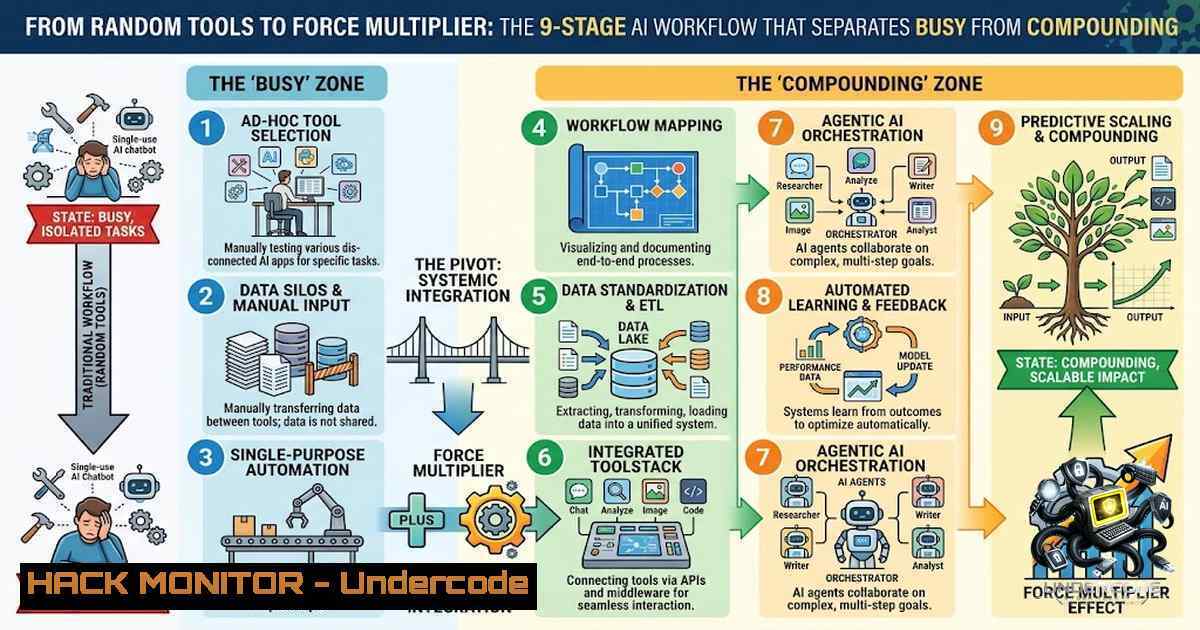
2. The 9-Stage Workflow: Sequencing for Compounding Returns
Having the right tools is insufficient; the order in which you use them determines your output quality. Biddlecombe identifies a critical sequencing problem: “We had the tools before we had the system”. His 9-stage workflow provides the missing order of operations:
- Capture: Get thoughts out of your head and into a system (ChatGPT, Notion AI, Obsidian). Stored, not scattered.
- Research: Don’t Google it. Use Perplexity or deep research tools for market and competitor analysis in a fraction of the time.
- Think: This is where most people rush. Use Claude or ChatGPT as a thinking partner before opening a blank document. Brainstorm, stress-test, and decide.
- Create: Writing, design, video. Each has its own layer; one tool won’t do all three well. Stack them correctly.
- Communicate: AI drafts, meeting notes, follow-ups. Founders reclaim 4-5 hours a week just here.
- Automate: Zapier, Make, n8n. The connective tissue between tools. Stop doing manually what a workflow can handle at midnight.
- Execute: Deploy agents—research agent, content agent, operations agent. “It’s not future tech. It’s this quarter”.
8. Learn: Analyse what worked and what didn’t.
9. Improve: Iterate on the entire process.
The formula at the bottom of this sequence is critical: Knowledge × AI × Automation × Execution = Win-Win. This is multiplication, not addition. Get the order wrong and you’re just adding complexity; get it right and things compound.
Step‑by‑step guide to implementing the 9-stage workflow:
- Stage 1 (Capture): Set up a central “inbox” (e.g., a dedicated Notion database or Obsidian folder) and commit to capturing every idea, task, and note there immediately. Use voice-to-text or AI transcription for speed.
- Stage 2 (Research): Before any project, spend 15 minutes using Perplexity or Consensus to gather sourced information. Save findings directly into your Capture system.
- Stage 3 (Think): Open a ChatGPT or Claude conversation. Prompt it to act as a “thinking partner.” Paste your research and ask it to identify gaps, challenge assumptions, and suggest frameworks.
- Stage 4 (Create): Based on the thinking session, use the appropriate creation tool. For writing, use Jasper or the native LLM. For design, use Canva or Descript for video.
- Stage 5 (Communicate): Use AI to draft the email, presentation, or meeting summary. Refine with a human touch.
- Stage 6 (Automate): Identify repetitive tasks between stages (e.g., saving email attachments to Drive, sending daily summaries). Build a Zapier or n8n workflow for one such task this week.
- Stage 7 (Execute): Deploy a simple agent. For example, use a Zapier agent to monitor a specific RSS feed and automatically summarise new articles into a Notion database.
- Stage 8 (Learn) & 9 (Improve): Weekly review. Ask: “Where did I get stuck? Which stage took the longest?” Adjust your prompts, tools, or sequence accordingly.
-
Practical AI Integration: Google AI Studio for Research and Analysis
Biddlecombe highlights Google AI Studio as a powerful, accessible tool for multimodal analysis, bridging the gap between a simple chatbot and Google’s full cloud ML platform (Vertex AI). It’s excellent at coding, reasoning, creative writing, and multimodal capabilities.
Step‑by‑step guide to using Google AI Studio for video and document analysis:
1. Access: Navigate to `aistudio.google.com`.
- Select Model: Choose a Gemini model with multimodal capabilities.
3. Upload Input:
- For Video Analysis: Add your video file or YouTube link. Be mindful of token limits; for longer videos, consider using shorter clips or a paid plan.
- For Document Analysis: Upload PDFs, Word documents, or images.
- Craft Your Be specific. Instead of “summarise this,” try “Extract the top 5 key ideas from this video and generate 3 quiz questions to test understanding”.
- Analyse Output: Review the generated summary, key ideas, or analysis.
- Iterate: Ask follow-up questions to dive deeper into specific sections.
Pros and Cons to Consider:
| Pros | Cons |
| : | : |
| Object/event detection and summarisation, saving manual labour | May misinterpret or hallucinate visual content in complex scenes |
| Integrates with Google’s AI ecosystem and APIs | Free/low-tier usage may restrict video length or resolution |
| Scales with cloud resources for growing volumes | Data privacy risks if proprietary content is processed publicly |
| Offers real-time monitoring and model updates | High computational cost for large volumes or high-resolution video |
| | Can struggle with edge cases (occlusions, low lighting, unusual angles) |
Linux Command for Automated Video Processing (Conceptual):
While Google AI Studio is a web-based IDE, you can integrate its capabilities into automated pipelines via its API. A conceptual `curl` command to trigger an analysis:
curl -X POST "https://generativelanguage.googleapis.com/v1beta/models/gemini-pro-vision:generateContent?key=YOUR_API_KEY" \
-H "Content-Type: application/json" \
-d '{
"contents": [{
"parts": [
{"text": "Describe the main objects in this image and their spatial arrangement."},
{"inline_data": {"mime_type": "image/jpeg", "data": "BASE64_ENCODED_IMAGE"}}
]
}]
}'
- Cloud and API Security Hardening for AI Workflows
As you connect multiple AI tools via APIs and automation platforms like Zapier or n8n, your security posture must evolve. Exposed API keys or misconfigured cloud storage can lead to data breaches.
Step‑by‑step guide to hardening your AI-integrated environment:
1. API Key Management:
- Never hardcode API keys in scripts or code repositories. Use environment variables (Linux:
export NOTION_API_KEY="your_key"; Windows:setx NOTION_API_KEY "your_key"). - Rotate keys regularly and apply the principle of least privilege—each key should only have access to the specific resources it needs.
2. Cloud Storage Security:
- Review sharing settings on Google Drive, Dropbox, and Notion databases. Ensure that AI tools only have access to explicitly shared folders or workspaces, not entire drives.
- Enable Multi-Factor Authentication (MFA) on all cloud accounts.
3. Automation Platform Security:
- When using Zapier, Make, or n8n, audit the permissions each “connection” (e.g., to Gmail, Slack) has. Revoke any that are unnecessary.
- For sensitive data, consider self-hosting n8n on your own infrastructure (using Docker) to maintain control over data flow.
4. Data Privacy in AI Processing:
- Avoid uploading proprietary or Personally Identifiable Information (PII) to public AI models (like the free tier of ChatGPT or Google AI Studio) unless you are certain of the data handling policies.
- For enterprise-grade processing, use private instances or API tiers with data non-retention agreements (e.g., ChatGPT Enterprise, Azure OpenAI).
5. Monitor and Log:
- Implement logging for API calls. In Linux, use `journalctl` or write logs to a file. In Windows, use Event Viewer or write to a log file using PowerShell.
- Regularly review logs for unusual access patterns or errors that could indicate a security incident.
- The Human Element: Prompt Engineering and Critical Thinking
Biddlecombe and his community consistently emphasise a crucial point: AI is only as useful as the prompts you give it. The “Think” stage of the workflow is where human intelligence adds value, using AI as a partner, not a replacement.
Step‑by‑step guide to crafting effective prompts:
- Be Specific and Contextual: Instead of “Write a marketing email,” try “Write a marketing email to CTOs of mid-sized SaaS companies, highlighting how our new AI feature reduces cloud costs by 20%. Use a professional but conversational tone.”
- Define the Output Format: Specify the format you want. “Provide the response as a bulleted list,” “Generate a table comparing these three options,” or “Write a one-paragraph executive summary.”
- Provide Examples (Few-Shot Prompting): Give the AI an example of the desired output. “Here is an example of a good summary: [bash]. Now summarise this new text in the same style.”
- Iterate and Refine: Treat the first output as a draft. Ask follow-up questions: “Can you make this more concise?” “Can you expand on point 3?” “Can you rewrite this for a non-technical audience?”.
- Fact-Check Everything: AI can hallucinate. Always verify critical facts, statistics, and citations from the primary source.
What Undercode Say:
- Key Takeaway 1: The core failure in AI adoption is not a lack of tools but a lack of a systematic framework. Building an AI stack from the foundation up—starting with core LLMs and storage—is non-1egotiable for achieving compounding results. Isolated tools create isolated results; connected layers create a force multiplier.
- Key Takeaway 2: Sequencing is everything. The “Capture → Research → Think → Create → Communicate → Automate → Execute → Learn → Improve” workflow provides a proven order of operations that prevents teams from creating before thinking or automating random tasks instead of the right ones. This sequence turns AI from a productivity hobby into a strategic asset.
Analysis: Biddlecombe’s framework is a direct response to the fragmentation and “shiny object syndrome” plaguing the AI industry. His emphasis on the “Think” stage is particularly insightful—it acknowledges that AI’s true power lies in augmenting human cognition, not just automating rote tasks. The framework is also notably platform-agnostic, focusing on roles (research, creation, automation) rather than specific brands, making it resilient to the rapid churn of AI tools. The warning against skipping layers (e.g., automating without a solid data foundation) provides a crucial checklist for CTOs and team leads. However, the framework’s success still hinges on individual discipline and the willingness to invest time in mastering foundational tools—a barrier that Biddlecombe acknowledges but perhaps underestimates. The formula Knowledge × AI × Automation × Execution elegantly captures the multiplicative potential, but it also implies that a zero in any variable (e.g., no execution) results in zero overall output, a stark reality check for those expecting AI to be a magic bullet.
Prediction:
- +1: Over the next 18 months, organisations that adopt layered AI stacks and sequenced workflows will see a 3x to 5x increase in output per employee, widening the gap between AI-mature and AI-1aive companies. This will drive a new wave of “AI Workflow Consultant” roles.
- +1: The “Think” stage will become a recognised and formalised business function, with dedicated “AI Thinking Partners” (using LLMs) becoming as common as project managers for strategic planning sessions.
- -1: The proliferation of connected AI tools and automation agents will create a massive new attack surface. Organisations that fail to implement robust API key management and data privacy protocols will face significant data breaches, potentially erasing any productivity gains.
- -1: The “random tool” approach will persist among SMEs and individuals, leading to a growing “AI productivity paradox” where increased spending on AI tools does not correlate with increased output, causing disillusionment and a potential slowdown in AI adoption in the mid-term.
▶️ Related Video (78% Match):
🎯Let’s Practice For Free:
🎓 Live Courses & Certifications:
Join Undercode Academy for Verified Certifications
🚀 Request a Custom Project:
Secure, high-velocity infrastructure and disruptive technological engineering. Contact our engineering team for high-tier development and proprietary systems:
[email protected]
💎 Smart Architecture | 🛡️ Secure by Design | ⭐ Trusted by Thousands
IT/Security Reporter URL:
Reported By: Adam Biddlecombe – Hackers Feeds
Extra Hub: Undercode MoN
Basic Verification: Pass ✅


