Listen to this Post
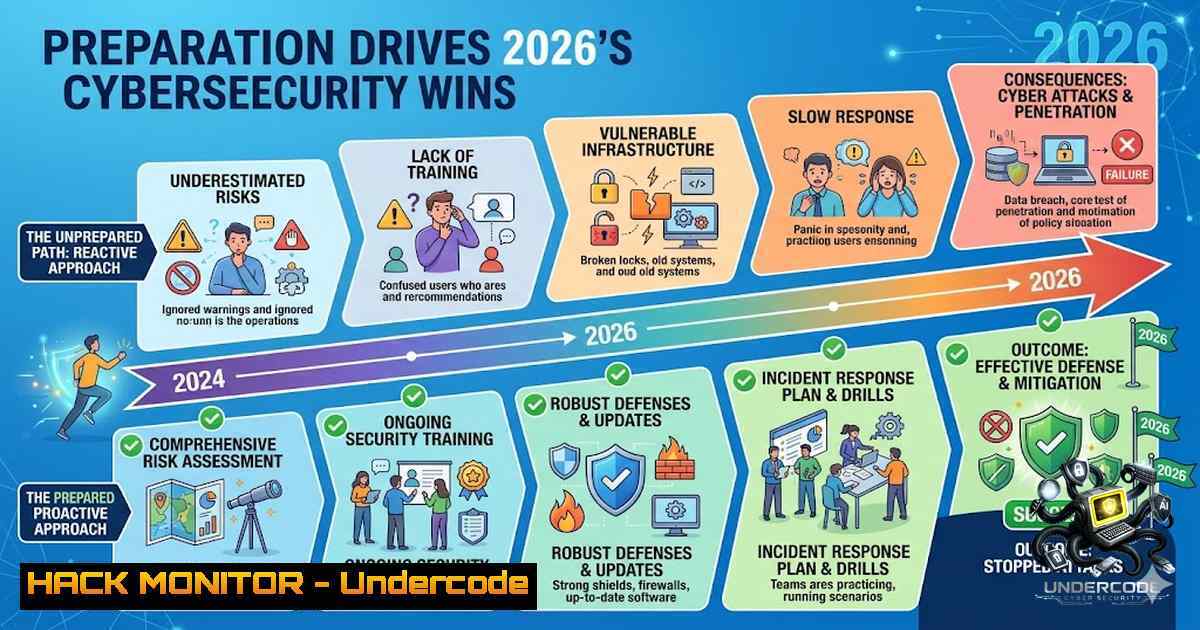
Introduction:
In cybersecurity, success is not an accident—it is the product of intentional planning, continuous learning, and deploying the right tools at the right time. As agentic AI reshapes the threat landscape and APIs become the operational backbone of digital business, organizations that prepare strategically will dominate, while those that react will be breached. This article transforms the philosophy of strategic preparation into a practical, hands-on cybersecurity roadmap for 2026—complete with verified commands, configuration guides, and tool recommendations across Linux, Windows, cloud, and AI security domains.
Learning Objectives:
- Master system hardening techniques across Linux and Windows environments using CIS benchmarks and real-world commands
- Understand the expanding API attack surface and implement OWASP-aligned mitigation strategies
- Deploy AI-powered security tools and guardrails for autonomous threat detection and response
- Build a continuous learning and certification roadmap aligned with 2026 industry demands
- Linux Server Hardening: The Foundation of Defensible Infrastructure
Strategic preparation begins with the operating system. A hardened Linux server reduces attack surface and prevents common privilege escalation vectors. This step-by-step guide focuses on practical commands every security professional should know.
Step 1: System Updates and Patch Management
Outdated software is the number one entry point for attackers. Run these commands to update your package list and apply security patches:
sudo apt-get update && sudo apt-get upgrade -y
For automated security patches, install and configure unattended-upgrades:
sudo apt-get install unattended-upgrades
Edit `/etc/apt/apt.conf.d/50unattended-upgrades` and uncomment the security line to receive only critical patches automatically.
Step 2: Remove Unnecessary Packages and Services
Every unused package is a potential vulnerability. Remove orphaned packages:
sudo apt-get autoremove --purge
Install deborphan to detect unused libraries:
sudo apt-get install deborphan
deborphan | xargs sudo apt-get purge -y
Then audit running services and disable those not required:
sudo systemctl list-units --type=service --state=running
sudo systemctl disable [unnecessary-service]
Step 3: Harden SSH Access
SSH is the primary administrative gateway—secure it aggressively:
sudo nano /etc/ssh/sshd_config
Set the following directives:
PermitRootLogin no
PasswordAuthentication no
PubkeyAuthentication yes
AllowUsers [your-username]
MaxAuthTries 3
Restart SSH and install fail2ban to block brute-force attempts:
sudo systemctl restart sshd
sudo apt-get install fail2ban
sudo systemctl enable fail2ban
Step 4: Configure Firewall with UFW
Enable and configure Uncomplicated Firewall (UFW):
sudo ufw default deny incoming
sudo ufw default allow outgoing
sudo ufw allow ssh
sudo ufw enable
sudo ufw status verbose
Step 5: Detect Weak Passwords with John the Ripper
Run a password audit to identify easily guessable credentials:
sudo apt-get install john
sudo unshadow /etc/passwd /etc/shadow > /tmp/audit.txt
sudo john /tmp/audit.txt
Review the output and force password changes for any compromised accounts.
2. Windows Server Hardening: Defending the Enterprise Backbone
Windows environments remain prime targets. Hardening Windows Server requires a combination of Group Policy, PowerShell, and registry configurations.
Step 1: Enforce Automatic Updates
Open PowerShell as Administrator and run:
Set-ItemProperty -Path "HKLM:\SOFTWARE\Policies\Microsoft\Windows\WindowsUpdate\AU" -1ame "NoAutoUpdate" -Value 0
Set-ItemProperty -Path "HKLM:\SOFTWARE\Policies\Microsoft\Windows\WindowsUpdate\AU" -1ame "AUOptions" -Value 4
Step 2: Configure Windows Defender Firewall
Block unnecessary inbound connections and create role-based rules:
New-1etFirewallRule -DisplayName "Block All Inbound" -Direction Inbound -Action Block
Navigate to Control Panel > System and Security > Windows Defender Firewall > Advanced Settings to create specific inbound/outbound rules for your environment.
Step 3: Enable Core Isolation and Kernel Protection
Open Windows Security > Device Security > Core Isolation Details and toggle Kernel-mode Hardware-enforced Stack Protection ON. Restart the device.
Step 4: Harden Local Security Policies via PowerShell
Apply CIS benchmark-inspired settings:
 Enforce password complexity
secedit /export /cfg C:\secpol.inf
 Edit the file to set PasswordComplexity = 1
secedit /configure /db C:\Windows\security\local.sdb /cfg C:\secpol.inf /areas SECURITYPOLICY
Step 5: Disable Unnecessary Services
sc config [service-1ame] start= disabled
net stop [service-1ame]
Common services to disable include Telnet, TFTP, and Simple TCP/IP Services if not required.
- API Security: Securing the Connective Tissue of Modern Applications
APIs now carry approximately 83% of internet traffic, making them a primary attack vector. With agentic AI multiplying the number of APIs in use, proactive API security is no longer optional.
Step 1: Active API Inventory and Discovery
Maintain a complete, synchronized inventory of all API endpoints using OpenAPI/Swagger documentation. Enable API Discovery tools to identify shadow APIs and automatically export specifications.
Step 2: Implement Modern Authentication (OAuth 2.0 / OIDC)
Use Authorization Code flow for user-facing APIs and Client Credentials for service-to-service communication. For JWTs, enforce:
– Strong signatures: RS256 or ES256 (asymmetric)
– Short access token lifetimes (minutes, not hours)
– Mandatory validation of `aud` (audience) and `iss` (issuer) claims
Step 3: Prevent BOLA (Broken Object Level Authorization) Attacks
BOLA remains the leading cause of API breaches. Never trust only the ID sent in the URL—always filter database queries by the resource owner:
 Pseudo-code example
def get_resource(resource_id, user_token):
user = authenticate(token)
resource = db.query("SELECT  FROM resources WHERE id = ? AND owner_id = ?", resource_id, user.id)
if not resource:
raise PermissionDenied()
return resource
Step 4: Enforce TLS 1.2/1.3 and HSTS
Configure mandatory TLS 1.2 (minimum) or TLS 1.3 on 100% of traffic. Implement HSTS (Strict-Transport-Security) to prevent downgrade attacks. Use mTLS for critical service-to-service communications.
Step 5: Validate Payloads Against Schema
Deploy a Web Application Firewall (WAF) and validate all incoming payloads against a strict JSON/XML schema to prevent injection attacks.
- Cloud Security Hardening: Zero Trust and Continuous Monitoring
Cloud misconfigurations (29%) and weak credentials (47%) account for nearly 76% of compromises. Strategic preparation in the cloud requires a Zero Trust mindset.
Step 1: Enable Multi-Factor Authentication (MFA)
Enforce MFA for all administrative and privileged user accounts. Use Conditional Access policies to require MFA based on risk signals.
Step 2: Implement Least Privilege Access
Structure Role-Based Access Control (RBAC) around your management hierarchy. Eliminate standing privilege with Privileged Identity Management (PIM) and Just-In-Time (JIT) access. Avoid assigning permissions directly to users where possible.
Step 3: Restrict Open Services and Ports
Block public access to private resources. Restrict open ports and protocols to only those explicitly required for business operations.
Step 4: Encrypt Data Across All Layers
Implement encryption at rest, in transit, and in use. Use customer-managed keys (CMK) for sensitive workloads.
Step 5: Continuous Monitoring and Automation
Deploy cloud-1ative security tools (AWS Security Hub, Azure Security Center, Google Security Command Center) and automate remediation where possible. Triage by “breach paths,” not alert volume.
5. AI-Powered Security Tools: Autonomous Defense at Scale
2026 marks the year AI agents become integral to both offensive and defensive security operations. Strategic preparation means integrating AI-powered tools into your security stack.
Deploying AI Security Guardrails
AI guardrails are essential for securing LLM-powered security applications. Key guardrail platforms include Future AGI Protect (multi-modal, per-tenant policy isolation), Lakera Guard (prompt-injection detection), and NVIDIA NeMo Guardrails (open-source policy-as-code). These guardrails prevent prompt injection, jailbreak attempts, and data leakage while providing audit trails for compliance.
Leveraging Autonomous Security Scanning with MCP
The Model Context Protocol (MCP) enables AI agents to perform security scanning autonomously. The Security Scanner MCP Suite includes servers for Nmap (port scanning), Nuclei (vulnerability scanning with 4,000+ templates), Trivy (container CVE scanning), SQLMap (SQL injection testing), and Gitleaks (secret detection).
Installation quick start:
 Install Nmap
curl -sL https://github.com/opsec-infosec/nmap-static-binaries/releases/download/v2/nmap-x86_64.tar.gz | tar xz
sudo cp x86_64/nmap /usr/local/bin/

Install Nuclei
go install github.com/projectdiscovery/nuclei/v3/cmd/nuclei@latest
nuclei -update-templates

Install Trivy
curl -sfL https://raw.githubusercontent.com/aquasecurity/trivy/main/contrib/install.sh | sh

Install SQLMap
git clone --depth 1 https://github.com/sqlmapproject/sqlmap.git /opt/sqlmap

Install Gitleaks
go install github.com/gitleaks/gitleaks/v8@latest
Configure your MCP client (Claude Desktop, Cursor, etc.) to enable autonomous scanning.
AI-Powered Red Teaming
CyberStrike, the first open-source AI agent for offensive security, ships with 13+ specialized agents and 7,300+ actionable security skills, including 2,000+ MITRE ATT&CK atomic tests and 1,500+ CIS Benchmarks controls. Deploy it to automate penetration testing from your terminal.
6. Building Your 2026 Cybersecurity Learning Roadmap
Strategic preparation requires continuous skill development. The 2026 cybersecurity landscape demands expertise in AI security, cloud hardening, and API defense.
Recommended Certifications for 2026:
- CompTIA CySA+ (2026 version): Updated for modern SOC workflows and threat detection
- CompTIA SecAI+: New certification focused specifically on AI security
- EC-Council CCT (Certified Cybersecurity Technician): Performance-based exam with live cyber range activities
- ISC2 Certified in Cybersecurity: Free training and exam through the One Million Certified program
6-Month Learning Roadmap:
- Month 1-2: Networking foundations (TCP/IP, OSI model) and operating system basics
- Month 3-4: Security concepts, threat detection, and tools (Wireshark, Nmap, Burp Suite, Metasploit)
- Month 5-6: AI security, cloud hardening, and hands-on labs
What Undercode Say:
- Preparation is the strategy, not just a step. In cybersecurity, reactive defense is losing defense. The organizations that invest in proactive hardening, continuous monitoring, and AI-powered automation will dominate the threat landscape in 2026 and beyond. Weak credentials and misconfigurations remain the primary breach vectors—fix the basics first.
-
The API explosion demands immediate action. With agentic AI multiplying APIs and 83% of internet traffic flowing through them, API security can no longer be an afterthought. Implement BOLA prevention, enforce OAuth2/OIDC, and maintain active API inventories before attackers exploit your shadow APIs.
The convergence of AI, cloud, and APIs is creating unprecedented attack surfaces, but also unprecedented defensive capabilities. The security teams that prepare strategically—by hardening systems, embracing AI-powered tools, and continuously upskilling—will turn preparation into victory. Those who wait will become case studies.
Prediction:
- +1 AI-powered autonomous security agents will reduce mean time to detection (MTTD) by 60% in enterprise environments by late 2026, as MCP-based scanning and agentic SOC tools become mainstream.
- +1 The cybersecurity certification landscape will fully embrace AI security, with SecAI+ and similar credentials becoming mandatory for SOC roles within 18 months.
- -1 API attacks will increase by over 50% in 2026 as agentic AI deployments multiply the number of APIs, and organizations that fail to implement BOLA prevention will experience major breaches.
- -1 Organizations relying solely on cloud provider security without implementing their own hardening will continue to suffer from misconfiguration-related breaches, which already account for 29% of compromises.
- +1 Open-source AI security tools like CyberStrike and MCP security suites will democratize penetration testing, enabling smaller security teams to perform enterprise-grade red teaming at minimal cost.
▶️ Related Video (84% Match):
🎯Let’s Practice For Free:
🎓 Live Courses & Certifications:
Join Undercode Academy for Verified Certifications
🚀 Request a Custom Project:
Secure, high-velocity infrastructure and disruptive technological engineering. Contact our engineering team for high-tier development and proprietary systems:
[email protected]
💎 Smart Architecture | 🛡️ Secure by Design | ⭐ Trusted by Thousands
IT/Security Reporter URL:
Reported By: %F0%9D%90%8F%F0%9D%90%AB%F0%9D%90%9E%F0%9D%90%A9%F0%9D%90%9A%F0%9D%90%AB%F0%9D%90%9A%F0%9D%90%AD%F0%9D%90%A2%F0%9D%90%A8%F0%9D%90%A7 %F0%9D%90%88%F0%9D%90%AC%F0%9D%90%A7%F0%9D%90%AD – Hackers Feeds
Extra Hub: Undercode MoN
Basic Verification: Pass ✅


