Listen to this Post
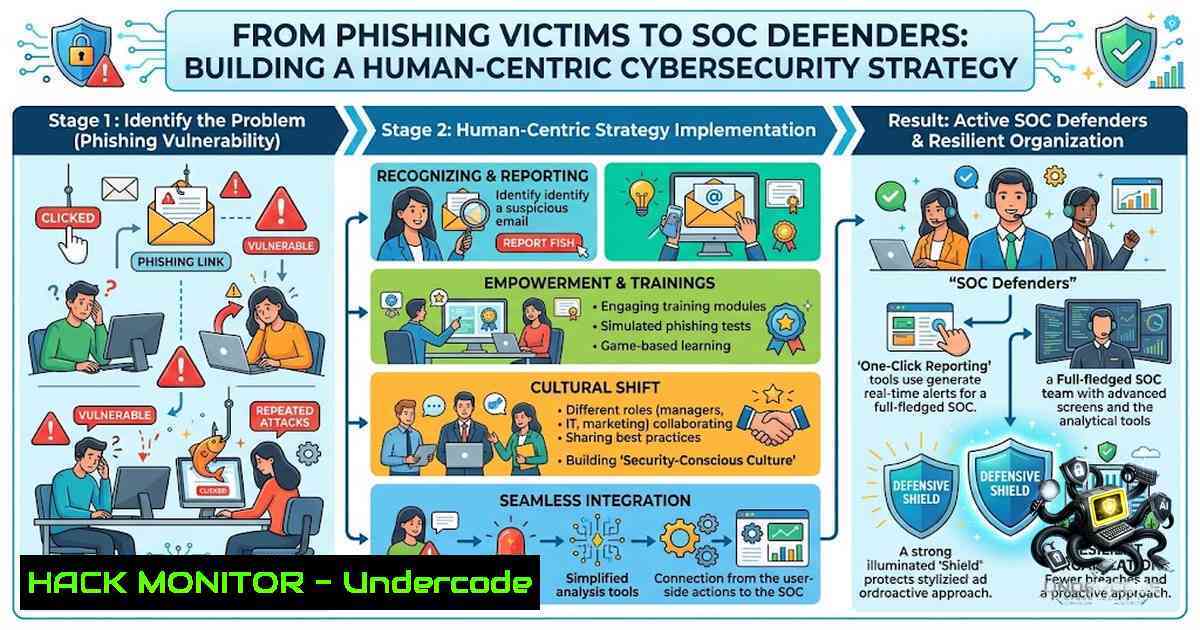
Introduction:
The cybersecurity industry has long been captivated by the allure of sophisticated malware, zero-day exploits, and complex cryptographic attacks. However, the stark reality, as highlighted by a recent Verizon Data Breach Investigations Report, is that the human element is involved in approximately 62% of confirmed data breaches. This figure has remained consistently above 60% for years, underscoring a critical truth: the most vulnerable component of any security infrastructure is not the firewall or the server, but the person behind the keyboard. As aspiring cybersecurity professionals and SOC analysts discover, many attacks don’t start with complex code but with a simple phishing email, a weak password, or a careless click. This article provides a comprehensive technical guide for building a robust defense strategy, exploring everything from the anatomy of a phishing attack to the deployment of open-source SIEM solutions, transforming the “human factor” from a liability into the ultimate firewall.
Learning Objectives:
- Objective 1: Master the technical art of phishing email analysis, including header forensics, hash calculation, and string extraction to identify and neutralize threats.
- Objective 2: Learn to leverage PowerShell for analyzing Windows Security Event Logs to detect brute-force attacks, lateral movement, and other malicious activities.
- Objective 3: Gain hands-on experience with open-source SIEM deployment (Wazuh) and social engineering toolkits (SEToolkit) to simulate attacks and build effective detection rules.
You Should Know:
- Dissecting the Phishing Bait: A Technical Analysis Workflow
When a suspicious email is reported, the clock starts ticking. A SOC analyst’s first task is to extract and analyze the technical artifacts without executing any potentially malicious content. All analysis should be performed in an isolated virtual machine.
Step 1: File Hashing
Before interacting with an attachment, calculate its hash. This allows for a quick reputation check against services like VirusTotal.
– Linux:
md5sum suspicious_attachment.exe
sha256sum suspicious_attachment.exe
– Windows (PowerShell):
Get-FileHash -Algorithm MD5 .\suspicious_attachment.exe
Get-FileHash -Algorithm SHA256 .\suspicious_attachment.exe
The SHA-256 hash is preferred for its collision resistance.
Step 2: File Identification
Never trust a file extension. Attackers often disguise executables as PDFs or documents. Use the `file` command to determine the true type by analyzing the magic bytes.
file suspicious_attachment.pdf
If the output shows “PE32 executable” for a file named .pdf, it is a clear red flag.
Step 3: String Extraction
Extract human-readable strings from the binary to uncover embedded URLs, IP addresses, or command-and-control (C2) server addresses.
strings suspicious_attachment.exe | grep -i "http"
strings suspicious_attachment.exe | grep -E '[0-9]{1,3}.[0-9]{1,3}.[0-9]{1,3}.[0-9]{1,3}'
The first command filters for URLs, while the second uses a regex pattern to find IPv4 addresses. Always save the full output for a thorough review (strings suspicious_attachment.exe > strings_output.txt).
Step 4: Email Header Analysis
Email headers contain the routing information that can reveal spoofing attempts. Tools like MXToolbox’s Email Header Analyzer can parse this data, helping to verify SPF, DKIM, and DMARC records.
 View raw headers of an email file
cat email.eml

Extract just the headers using Python
python3 -c "import email; msg = email.message_from_file(open('email.eml')); print('\n'.join([f'{k}: {v}' for k, v in msg.items()]))"
This Python one-liner parses the email and prints only the header fields, making it easier to spot anomalies.
- Detecting the Digital Footprints: Windows Event Log Analysis with PowerShell
When an attacker gains a foothold, they leave traces in Windows Event Logs. PowerShell is the primary tool for a SOC analyst to query and analyze these logs, searching for signs of compromise.
Step 1: Identify Key Event IDs
Security logs are categorized by Event IDs. Memorizing these is crucial for a Tier 1 analyst:
– 4624: Successful logon
– 4625: Failed logon
– 4672: Special privileges assigned to new logon
– 4720: User account created
Step 2: Investigate Failed Logon Attempts (Brute-Force)
To investigate a potential brute-force attack, query for failed logon events (Event ID 4625) within a specific timeframe.
Get-WinEvent -LogName Security -MaxEvents 100 | Where-Object { $<em>.Id -eq 4625 }
To find the source IP addresses of these failures, you can extend the command to parse the XML data.
Get-WinEvent -LogName Security -MaxEvents 100 | Where-Object { $</em>.Id -eq 4625 } | ForEach-Object {
$xml = [bash]$<em>.ToXml()
$ip = $xml.Event.EventData.Data | Where-Object { $</em>.Name -eq "IpAddress" } | Select-Object -ExpandProperty 'text'
$user = $xml.Event.EventData.Data | Where-Object { $<em>.Name -eq "TargetUserName" } | Select-Object -ExpandProperty 'text'
[bash]@{Time = $</em>.TimeCreated; User = $user; SourceIP = $ip}
}
This script extracts the timestamp, targeted username, and source IP address from each failed logon event, providing a clear picture of the attack pattern.
Step 3: Correlate with Successful Logons
A successful logon (Event ID 4624) immediately following a series of failures from the same IP is a strong indicator of a successful brute-force attack. Look for the Logon Type to understand the context:
– Type 2: Interactive (local login)
– Type 3: Network (e.g., SMB, RPC)
– Type 10: RemoteInteractive (RDP)
Get-WinEvent -LogName Security -MaxEvents 50 | Where-Object { $<em>.Id -eq 4624 } | ForEach-Object {
$xml = [bash]$</em>.ToXml()
$logonType = $xml.Event.EventData.Data | Where-Object { $<em>.Name -eq "LogonType" } | Select-Object -ExpandProperty 'text'
$user = $xml.Event.EventData.Data | Where-Object { $</em>.Name -eq "TargetUserName" } | Select-Object -ExpandProperty 'text'
[bash]@{Time = $_.TimeCreated; User = $user; LogonType = $logonType}
}
- Building the Fortress: Deploying an Open-Source SIEM (Wazuh)
A Security Information and Event Management (SIEM) system is the nerve center of a SOC. Wazuh is a powerful, open-source SIEM solution based on the Elastic Stack, perfect for home labs and enterprise environments. It provides agent-based log collection, threat detection, and file integrity monitoring.
Step 1: Wazuh Server Installation (Ubuntu/Debian)
The installation process is streamlined with an automated script.
curl -s https://packages.wazuh.com/key/GPG-KEY-WAZUH | apt-key add -
echo "deb https://packages.wazuh.com/4.x/apt/ stable main" | tee /etc/apt/sources.list.d/wazuh.list
apt-get update
apt-get install wazuh-manager
systemctl start wazuh-manager
systemctl enable wazuh-manager
This installs the Wazuh manager, which will collect and analyze data from endpoints.
Step 2: Installing the Wazuh Indexer and Dashboard
For a complete SIEM experience, you need the Elastic Stack components for data storage and visualization.
 Install Wazuh Indexer
apt-get install wazuh-indexer
 Install Wazuh Dashboard
apt-get install wazuh-dashboard
After installation, configure the dashboard to connect to the indexer by editing `/etc/wazuh-dashboard/opensearch_dashboards.yml` and setting the `opensearch.hosts` parameter.
Step 3: Deploying Wazuh Agents on Endpoints
To monitor a system, install a Wazuh agent. On a Linux endpoint:
curl -s https://packages.wazuh.com/4.x/wazuh-install.sh | bash
WAZUH_MANAGER="<WAZUH_SERVER_IP>" apt-get install wazuh-agent
systemctl start wazuh-agent
Replace `
- Thinking Like the Adversary: Social Engineering Toolkit (SEToolkit)
To defend against social engineering, you must understand the attacker’s playbook. The Social-Engineer Toolkit (SEToolkit) is a premier open-source framework for simulating these attacks. It is pre-installed in Kali Linux.
Step 1: Launching SEToolkit
sudo setoolkit
This command launches the interactive menu-driven tool.
Step 2: Website Attack Vectors (Credential Harvesting)
One of the most common attacks is credential harvesting via website cloning.
1. From the main menu, select “1) Social-Engineering Attacks” .
2. Select “2) Website Attack Vectors” .
3. Select “3) Credential Harvester Attack Method” .
4. Select “2) Site Cloner” .
- Enter the IP address of your machine (the listener).
- Enter the URL of the site you wish to clone (e.g., `https://login.microsoftonline.com`).
SEToolkit will clone the login page and set up a listener. Any credentials entered by a user in a test environment will be captured, demonstrating the effectiveness of the attack.
5. Proactive Defense: Conducting a Phishing Simulation
A proactive security team conducts controlled phishing simulations to educate employees and measure risk. Tools like Phalanx Check or GoPhish allow security teams to launch safe, internal campaigns.
Step 1: Installation (GoPhish Example)
GoPhish is a popular open-source phishing framework.
- Linux: Download the latest release from the GoPhish GitHub repository.
- Run: `./gophish` from the terminal. The admin interface will be available at `https://127.0.0.1:3333`.
Step 2: Configuration
- Sending Profile: Configure your SMTP server settings for sending emails.
- Email Template: Create a realistic but harmless email template using the HTML editor. Include variables like `{{.FirstName}}` for personalization.
- Landing Page: Clone a legitimate login page, similar to the SEToolkit method, but ensure it has a clear educational banner.
- Users & Groups: Import a target list (e.g., a CSV file) of internal employees to receive the simulation.
- Launch Campaign: Schedule and launch the campaign. The dashboard will provide real-time metrics on who opened the email and submitted credentials.
What Undercode Say:
- Key Takeaway 1: Cybersecurity is fundamentally a human problem. Technology is essential, but 62% of breaches originate from human error, making security awareness training a critical business requirement, not an optional HR activity.
- Key Takeaway 2: The best defense is a multi-layered strategy that combines technical controls (SIEM, EDR) with continuous education. A SOC analyst’s job is to bridge the gap between technology and human behavior, investigating the “why” behind an alert as much as the “how.”
Analysis:
The narrative that cybersecurity is solely a technological battleground is a dangerous misconception. The statistics are clear and consistent: the “human firewall” is the most frequently breached perimeter. This isn’t about blaming users; it’s about understanding that our brains are wired for convenience, not security. A well-crafted phishing email that mimics a trusted source is often more effective than a complex zero-day exploit. Therefore, a modern security strategy must invert its priorities. While investing in next-generation firewalls and AI-driven detection is necessary, it should be paralleled by an equally robust investment in security culture. This means moving beyond annual compliance training to immersive, hands-on simulations that build instinctual suspicion. For the aspiring SOC analyst, mastering log analysis and SIEM configuration is crucial, but their ultimate value lies in their ability to translate technical findings into human-centric recommendations, effectively becoming the bridge between the machine and the person.
Prediction:
- -1 The “human element” will continue to be the primary attack vector for the foreseeable future, as the 2026 DBIR shows its involvement remains persistently above 60%. As AI makes phishing emails more convincing, the problem is likely to worsen, not improve.
- +1 The demand for “Security Awareness” professionals will skyrocket, transforming the role from a checkbox function to a strategic, data-driven discipline focused on behavior analytics and personalized training.
- +1 The integration of AI-driven security awareness platforms that simulate sophisticated phishing attempts in real-time will become a standard feature of enterprise security stacks, making organizations more resilient by default.
▶️ Related Video (86% Match):
🎯Let’s Practice For Free:
🎓 Live Courses & Certifications:
Join Undercode Academy for Verified Certifications
🚀 Request a Custom Project:
Secure, high-velocity infrastructure and disruptive technological engineering. Contact our engineering team for high-tier development and proprietary systems:
[email protected]
💎 Smart Architecture | 🛡️ Secure by Design | ⭐ Trusted by Thousands
IT/Security Reporter URL:
Reported By: Apiafi Idawari – Hackers Feeds
Extra Hub: Undercode MoN
Basic Verification: Pass ✅


