
Listen to this Post
Introduction:
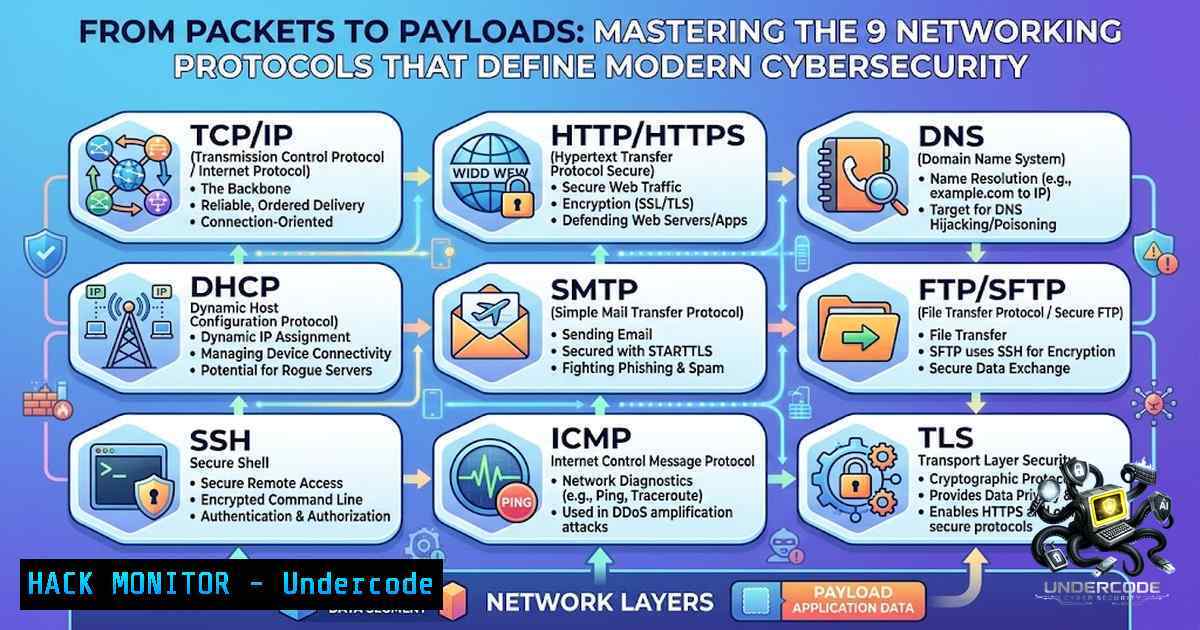
Networking protocols are the invisible backbone of every digital interaction—from sending an email to spinning up a cloud instance. For security professionals, understanding these protocols isn’t just about knowing what they do; it’s about recognizing how they can be attacked, misconfigured, or exploited. This article breaks down nine essential protocols, providing actionable commands and hardening techniques to fortify your infrastructure against the most common network-based threats.
Learning Objectives:
- Understand the function, port assignments, and security implications of core networking protocols including FTP, SSH, SMTP, DNS, HTTP/HTTPS, TCP/UDP, ARP/RARP, and PPP.
- Execute practical Linux and Windows commands to audit, troubleshoot, and secure network services.
- Apply hardening techniques such as firewall configuration, SSH key authentication, and DNSSEC to mitigate real-world vulnerabilities.
You Should Know:
- File Transfer & Remote Access Protocols (FTP, SSH)
The File Transfer Protocol (FTP) on port 21 has been a staple for moving files between systems, but it transmits credentials and data in cleartext, making it a prime target for eavesdropping attacks. Modern security practices mandate replacing FTP with SFTP (which runs over SSH) or FTPS. Secure Shell (SSH) on port 22 provides encrypted remote access and is the gold standard for Linux/Unix administration.
Step-by-Step Guide: Hardening SSH on Linux
- Backup Configuration: Before making changes, back up the SSH daemon configuration.
sudo cp /etc/ssh/sshd_config /etc/ssh/sshd_config.bak
- Disable Root Login and Password Authentication: Edit `/etc/ssh/sshd_config` and set the following directives to enforce key-based authentication and prevent brute-force attacks against root.
PermitRootLogin no
PasswordAuthentication no
PubkeyAuthentication yes
- Change Default Port (Optional but Recommended): Move SSH to a non-standard port to reduce automated scanning noise.
Port 2222
- Restart SSH Service and Test: Always maintain a second active session before restarting to avoid locking yourself out.
sudo systemctl restart sshd
- Implement Fail2Ban: Install and configure Fail2Ban to monitor authentication logs and automatically ban IPs with repeated failures.
sudo apt install fail2ban -y
sudo systemctl enable fail2ban --1ow
Windows Equivalent: On Windows, use the OpenSSH Server feature. Configuration is found in %ProgramData%\ssh\sshd_config. Use PowerShell to manage firewall rules:
New-1etFirewallRule -DisplayName "SSH Custom Port" -Direction Inbound -Protocol TCP -LocalPort 2222 -Action Allow
2. Email Communication Protocols (SMTP, POP3)
Simple Mail Transfer Protocol (SMTP) on port 25 is used for sending and relaying emails between servers, while Post Office Protocol v3 (POP3) on port 110 retrieves emails from a server to a client. Both are inherently insecure without encryption layers like STARTTLS. Attackers can intercept sensitive information or use open relays for spamming. Always enforce TLS encryption and restrict relay access to authorized hosts.
Step-by-Step Guide: Securing SMTP with TLS (Postfix Example)
- Obtain a Certificate: Use Let’s Encrypt to generate a valid SSL/TLS certificate for your mail server.
2. Configure Postfix: Edit `/etc/postfix/main.cf` to enable TLS.
smtpd_tls_security_level = may
smtpd_tls_cert_file = /etc/letsencrypt/live/yourdomain/fullchain.pem
smtpd_tls_key_file = /etc/letsencrypt/live/yourdomain/privkey.pem
3. Restrict Relay: Prevent your server from being used as an open relay.
smtpd_relay_restrictions = permit_mynetworks, permit_sasl_authenticated, defer_unauth_destination
4. Reload Postfix:
sudo systemctl reload postfix
3. Domain Resolution & Web Traffic (DNS, HTTP/HTTPS)
The Domain Name System (DNS) on port 53 translates human-readable domains to IP addresses, but it was designed without security, making it vulnerable to spoofing and cache poisoning. Hypertext Transfer Protocol (HTTP) on port 80 transmits data in plain text, while HTTPS on port 443 adds a layer of encryption via TLS/SSL. Migrating to HTTPS is non-1egotiable for data integrity and confidentiality.
Step-by-Step Guide: Implementing DNSSEC
DNSSEC adds cryptographic signatures to DNS records to prevent tampering.
1. Enable DNSSEC with your DNS Provider: Most major providers (Cloudflare, AWS Route 53) offer one-click DNSSEC enablement.
2. Generate a DS Record: Your DNS provider will generate a Delegation Signer (DS) record containing a hash of your zone-signing key.
3. Add DS Record at Your Registrar: Log into your domain registrar’s console and add the DS record to establish a trust chain from the root zone.
4. Verify: Use an online tool or the `dig` command to check if DNSSEC is validating correctly.
dig +dnssec yourdomain.com
- Data Transmission & Address Resolution (TCP, UDP, ARP, RARP)
Transmission Control Protocol (TCP) provides reliable, connection-oriented communication (think of a phone call), while User Datagram Protocol (UDP) offers faster, connectionless transmission (like a postcard). Address Resolution Protocol (ARP) maps IP addresses to MAC addresses within a local network, and Reverse ARP (RARP) does the opposite. ARP spoofing is a common man-in-the-middle attack where an attacker associates their MAC address with a legitimate IP.
Step-by-Step Guide: Detecting ARP Spoofing
- Monitor ARP Cache: Regularly check the ARP table for inconsistencies. On Linux:
arp -a
On Windows:
arp -a
2. Use Packet Analysis: Deploy Wireshark or `tcpdump` to capture ARP traffic and look for multiple IPs mapping to the same MAC address.
sudo tcpdump -i eth0 arp
3. Implement Static ARP Entries (for critical hosts): On Linux, add a static entry to prevent dynamic updates.
sudo arp -s 192.168.1.1 00:11:22:33:44:55
Note: Static ARP is not scalable for large networks; consider using Dynamic ARP Inspection (DAI) on managed switches.
5. Point-to-Point Communication (PPP)
Point-to-Point Protocol (PPP) is a data link layer protocol used to establish a direct connection between two nodes, often in dial-up or VPN scenarios. While less common today, it’s still used in some WAN technologies. Security relies on authentication protocols like PAP (insecure, sends password in cleartext) or CHAP (more secure, uses a three-way handshake).
Step-by-Step Guide: Configuring PPP with CHAP
- Edit
/etc/ppp/chap-secrets: Add credentials for the client and server.client server secret IP addresses user1 "securepassword"
- Configure the PPP Options File (
/etc/ppp/options): Ensure CHAP is required.auth require-chap
3. Restart the PPP Service:
sudo systemctl restart pppd
6. Network Auditing & Troubleshooting Commands
Proficiency with command-line tools is essential for diagnosing network issues and identifying security misconfigurations.
Linux Commands:
ss -tulnp: Lists all listening TCP and UDP ports with process information.ip addr: Shows IP addresses and network interfaces.ping -c 4 8.8.8.8: Tests basic connectivity.traceroute google.com: Traces the path packets take to a destination.dig example.com: Performs DNS lookups with detailed output.
Windows Commands (Command Prompt/PowerShell):
netstat -an: Displays all active connections and listening ports.netstat -s: Shows per-protocol statistics (TCP, UDP, ICMP, IP).ipconfig /all: Displays detailed IP configuration for all interfaces.tracert google.com: Traces route to a destination.nslookup example.com: Queries DNS records.
7. Firewall Configuration for Protocol Security
Restricting access to services is a fundamental security control. Configure firewalls to allow only necessary traffic.
Linux (UFW):
 Allow SSH (if on custom port 2222)
sudo ufw allow 2222/tcp
 Allow HTTPS
sudo ufw allow 443/tcp
 Enable firewall
sudo ufw enable
Windows (PowerShell):
 Block all inbound traffic by default, then allow specific ports
Set-1etFirewallProfile -Profile Domain,Public,Private -DefaultInboundAction Block
New-1etFirewallRule -DisplayName "Allow HTTPS" -Direction Inbound -Protocol TCP -LocalPort 443 -Action Allow
What Undercode Say:
- Security is layered: No single protocol or tool is a silver bullet. Combining SSH key authentication, firewall rules, and intrusion detection creates a robust defense-in-depth posture.
- Visibility is key: You cannot protect what you cannot see. Regular use of
netstat,ss, and packet capture tools is non-1egotiable for identifying unauthorized services and anomalous traffic patterns.
Analysis:
The fundamentals outlined in this article are the building blocks of any cybersecurity career. However, the threat landscape is evolving rapidly. Attackers are increasingly exploiting application-layer protocols (HTTP/2, DNS over HTTPS) and targeting cloud-1ative environments where traditional perimeter defenses are blurred. The shift towards zero-trust architectures demands that we treat every protocol interaction as potentially hostile, enforcing strict authentication and encryption at every layer. Furthermore, the rise of AI-driven network analysis tools will soon automate much of the anomaly detection discussed here, but the human ability to interpret context and respond to nuanced attacks will remain irreplaceable.
Prediction:
- +1 The continued adoption of encrypted protocols like DoH (DNS over HTTPS) and QUIC will enhance user privacy and make network surveillance more difficult for malicious actors.
- -1 The complexity of managing these advanced security features (e.g., DNSSEC key rollovers, TLS certificate lifecycles) will lead to an increase in misconfigurations, creating new vectors for service disruption and man-in-the-middle attacks.
- +1 Automation and Infrastructure as Code (IaC) will enable security teams to enforce protocol hardening policies (like disabling insecure ciphers and enforcing SSH key rotation) at scale, reducing the attack surface across dynamic cloud environments.
▶️ Related Video (82% Match):
🎯Let’s Practice For Free:
🎓 Live Courses & Certifications:
Join Undercode Academy for Verified Certifications
🚀 Request a Custom Project:
Secure, high-velocity infrastructure and disruptive technological engineering. Contact our engineering team for high-tier development and proprietary systems:
[email protected]
💎 Smart Architecture | 🛡️ Secure by Design | ⭐ Trusted by Thousands
IT/Security Reporter URL:
Reported By: Priombiswas Infosec – Hackers Feeds
Extra Hub: Undercode MoN
Basic Verification: Pass ✅


