Listen to this Post
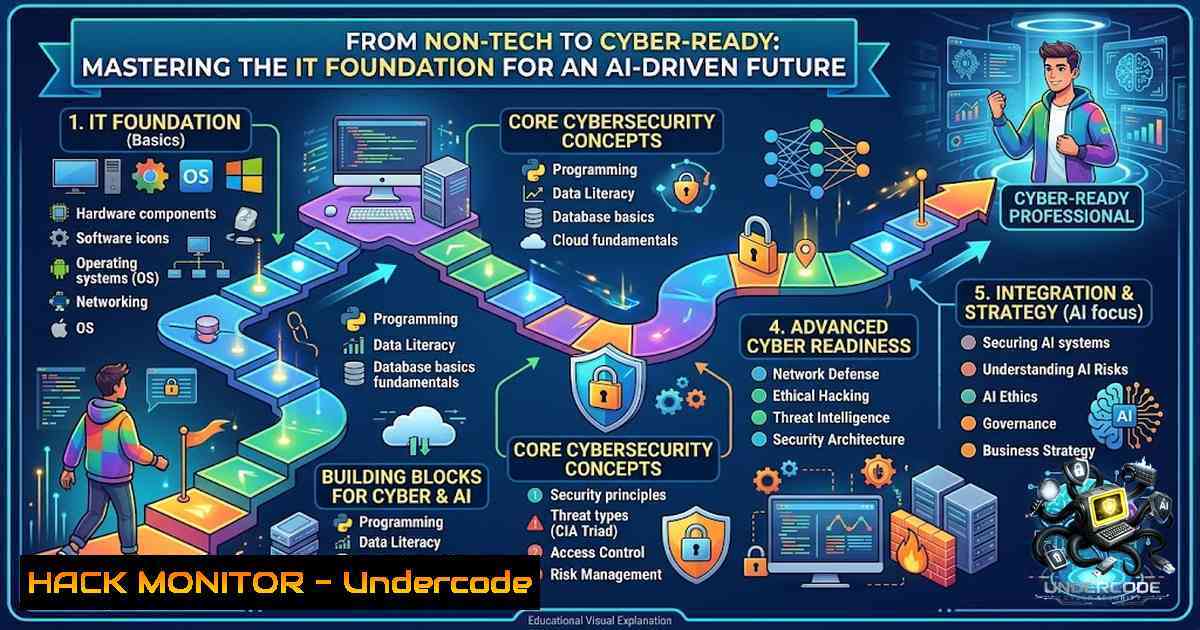
Introduction:
The pathway into information technology is no longer a monolithic journey reserved for computer science graduates. As digital transformation accelerates across every sector, professionals from finance, biology, and the humanities are seeking to pivot into tech roles, particularly in high-growth areas like artificial intelligence, cybersecurity, and cloud computing. Bridging the gap between a non-technical background and the demands of a master’s program in IT requires a structured, hands-on foundation in core principles—from operating systems and networking to programming and database management. This article provides a comprehensive, technical roadmap for aspiring IT professionals, detailing the essential commands, tools, and hardening techniques needed to confidently step into the world of advanced computing.
Learning Objectives:
- Master foundational programming concepts in Python, including variables, loops, and functions.
- Acquire proficiency in essential Linux and Windows command-line operations for system navigation and administration.
- Understand core networking concepts and diagnostic commands for troubleshooting connectivity.
- Learn foundational SQL commands for database creation, querying, and data manipulation.
- Explore basic cybersecurity practices and cloud infrastructure hardening techniques.
You Should Know:
1. Python Programming Fundamentals: Your First Script
Python is a cornerstone of modern IT, data science, and AI development. For a beginner, the journey starts with understanding the language’s clear syntax and interactive shell. Python can be run in two primary modes: interactively, where commands are executed one at a time, or in scripting mode, where a series of commands are saved in a file and executed together. This flexibility makes it an ideal language for both learning and rapid prototyping. To verify your Python installation and start the interactive interpreter, open your terminal or command prompt and type `python` or python3.
Step-by-Step Guide:
- Installation: Download and install Python from the official website (python.org). During installation, ensure you check the box to “Add Python to PATH”.
- Your First Program: Open a text editor and create a file named
hello.py. Add the following line:print("Hello, World!"). Save the file. - Running the Script: Navigate to the directory containing `hello.py` in your terminal and run the command
python hello.py. The output will be “Hello, World!”. - Working with Variables: Python supports various data types. Open the interactive shell and practice assigning values:
x = 5
y = "Hello"
print(x, y)
- Basic Operations: Use Python as a calculator to perform arithmetic. In the interpreter, type `2 + 3 4` and press Enter to see the result.
2. Operating Systems: Navigating Linux and Windows
A fundamental understanding of operating systems is crucial for any IT professional. Both Linux and Windows offer powerful command-line interfaces that allow for efficient system management and automation. While Linux is the dominant OS for servers and cybersecurity tools, Windows remains prevalent in enterprise environments. Familiarity with both platforms’ core commands is essential. For instance, listing directory contents is performed with `ls` in Linux and `dir` in Windows, while changing directories is done with `cd` in both.
Step-by-Step Guide:
1. Linux Navigation:
- Open a terminal.
- Use `pwd` to print the current working directory.
- List all files in the current directory:
ls -la. - Create a new directory:
mkdir my_project.
2. Windows Navigation:
- Open Command Prompt (cmd).
- Display the current directory:
cd. - List files: `dir /A` to show all files, including hidden ones.
- Create a new directory:
mkdir my_project.
3. System Information:
- On Linux, view system processes:
ps aux. - On Windows, view running processes:
tasklist.
3. Networking Technologies: Diagnostic and Configuration Commands
Networking forms the backbone of all IT infrastructure. Understanding how to diagnose and troubleshoot network issues is a critical skill. This involves using commands to check connectivity, display IP configurations, and trace network paths. For example, the `ping` command tests reachability to a host, while `ipconfig` (Windows) or `ifconfig` (Linux) displays network interface settings.
Step-by-Step Guide:
1. Checking Connectivity:
- Open your terminal or command prompt.
- Ping a known server to test your connection: `ping -c 4 8.8.8.8` (Linux/macOS) or `ping 8.8.8.8` (Windows). The `-c 4` flag in Linux sends four packets.
2. Displaying IP Configuration:
- On Windows, run `ipconfig /all` to see detailed IP, subnet mask, gateway, and MAC address information.
- On Linux, use `ifconfig` or the newer `ip addr` to view interface configurations.
3. Tracing Network Path:
- Use `tracert google.com` on Windows or `traceroute google.com` on Linux to see the path packets take to reach a destination.
4. Viewing Network Statistics:
- Run `netstat -an` to display all active connections and listening ports on your system.
4. Database Management: Structured Query Language (SQL)
Databases are essential for storing, retrieving, and managing data in almost every application. SQL is the standard language for interacting with relational databases. The core operations are known as CRUD: Create, Read, Update, and Delete. Mastering basic SQL commands allows you to efficiently manage and query data, a skill vital for roles in data analysis, backend development, and cybersecurity.
Step-by-Step Guide:
- Connecting to a Database: Access your database server (e.g., MySQL, PostgreSQL). The command often looks like
mysql -u username -p. - Viewing Databases: Once connected, list all available databases:
SHOW DATABASES;. - Creating a New Database: Create a database for your project:
CREATE DATABASE my_app;. - Selecting a Database: Tell the system which database to use:
USE my_app;. - Creating a Table: Define a table to store user data:
CREATE TABLE users (
id INT PRIMARY KEY AUTO_INCREMENT,
name VARCHAR(100),
email VARCHAR(100) UNIQUE
);
- Inserting and Querying Data: Add data and retrieve it:
INSERT INTO users (name, email) VALUES ('John Doe', '[email protected]');
SELECT  FROM users WHERE name = 'John Doe';
5. Cybersecurity Essentials: Tools and Commands
Cybersecurity is a top priority in the modern IT landscape, focusing on protecting systems, networks, and data from digital attacks. Foundational knowledge includes understanding how to use security tools for network scanning, packet analysis, and vulnerability assessment. Tools like `nmap` for network discovery and `Wireshark` for packet analysis are industry standards.
Step-by-Step Guide:
1. Network Scanning with Nmap:
- Install Nmap. On Linux, use
sudo apt-get install nmap. - Scan your local network to discover active hosts: `nmap -sn 192.168.1.0/24` (adjust the IP range to your network).
2. Packet Analysis with Wireshark:
- Download and install Wireshark.
- Start a capture on your active network interface.
- Apply a filter, for example, `http` to see HTTP traffic, or `dns` to see DNS queries.
3. System Monitoring and Hardening:
- On Linux, check for open ports and listening services:
sudo netstat -tulpn. - Use `iptables` (Linux firewall) to configure rules. For example, to block all incoming traffic except SSH: `sudo iptables -A INPUT -p tcp –dport 22 -j ACCEPT` and
sudo iptables -A INPUT -j DROP.
6. Cloud Infrastructure Hardening: Multi-Cloud Security
As organizations migrate to the cloud, securing infrastructure across platforms like AWS, Azure, and GCP is paramount. Hardening involves implementing CIS benchmarks, enabling logging, and managing identities and access (IAM). For example, in AWS, one must enable CloudTrail for audit logging and configure password policies. This proactive approach transforms cloud security from a reactive measure into a continuous improvement discipline.
Step-by-Step Guide:
1. AWS Hardening:
- Enable CloudTrail:
aws cloudtrail create-trail --1ame my-trail --s3-bucket-1ame my-bucket. - Enable GuardDuty for threat detection:
aws guardduty create-detector --enable.
2. Azure Hardening:
- Enable Azure Defender for Cloud:
az security auto-provisioning-setting update --1ame default --auto-provision On. - Configure Key Vault for secret management:
az keyvault create --1ame myKeyVault --resource-group myResourceGroup.
3. GCP Hardening:
- Enable Security Command Center:
gcloud scc settings update --organization=ORGANIZATION_ID. - Use Cloud Armor to set up a web application firewall (WAF) policy:
gcloud compute security-policies create my-policy.
What Undercode Say:
- Key Takeaway 1: The transition into IT is not about erasing your past but augmenting your existing expertise with powerful technical skills. The SmartStart program exemplifies this by creating a structured bridge for professionals from diverse fields.
- Key Takeaway 2: Practical, hands-on experience with fundamental tools—from Python scripts to cloud hardening commands—is more valuable than theoretical knowledge alone. The ability to execute and understand these commands is the bedrock of a successful IT career.
Analysis: The modern IT landscape is increasingly interdisciplinary. The integration of AI and cybersecurity into every domain means that professionals who can combine domain expertise with technical proficiency are in high demand. Programs like the one offered by WWSI are not just about learning to code; they are about developing a problem-solving mindset and the practical skills to build, secure, and manage complex systems. The inclusion of industry partnerships with Cisco, AWS, Microsoft, and Red Hat ensures that the curriculum remains relevant to current market needs. This approach is a direct response to the skills gap, where employers seek candidates who can contribute from day one. The future of IT education lies in this fusion of accessibility and rigor, empowering a new generation of technologists to drive innovation from any starting point.
Prediction:
- +1 The demand for IT professionals with cross-disciplinary backgrounds will surge, leading to a proliferation of bridge programs and bootcamps that focus on applied skills over pure theory.
- +1 Cybersecurity and AI will become foundational components of all IT curricula, not just specializations, as these technologies become integral to all aspects of computing.
- -1 The rapid evolution of technology will create a continuous need for upskilling and reskilling, placing a premium on lifelong learning and adaptability over a single, static degree.
- +1 Hands-on, lab-based learning will increasingly replace traditional lecture formats, with institutions investing in cloud-based virtual labs that provide safe environments for experimentation.
- -1 The cybersecurity skills gap will continue to widen, creating significant vulnerabilities for organizations that cannot find or train qualified personnel to secure their infrastructure.
- +1 The integration of AI tools into development and security workflows will accelerate, changing the nature of IT work and requiring professionals to learn how to effectively collaborate with AI systems.
▶️ Related Video (84% Match):
🎯Let’s Practice For Free:
🎓 Live Courses & Certifications:
Join Undercode Academy for Verified Certifications
🚀 Request a Custom Project:
Secure, high-velocity infrastructure and disruptive technological engineering. Contact our engineering team for high-tier development and proprietary systems:
[email protected]
💎 Smart Architecture | 🛡️ Secure by Design | ⭐ Trusted by Thousands
IT/Security Reporter URL:
Reported By: Andrzej %C5%BCy%C5%82awski – Hackers Feeds
Extra Hub: Undercode MoN
Basic Verification: Pass ✅


