Listen to this Post
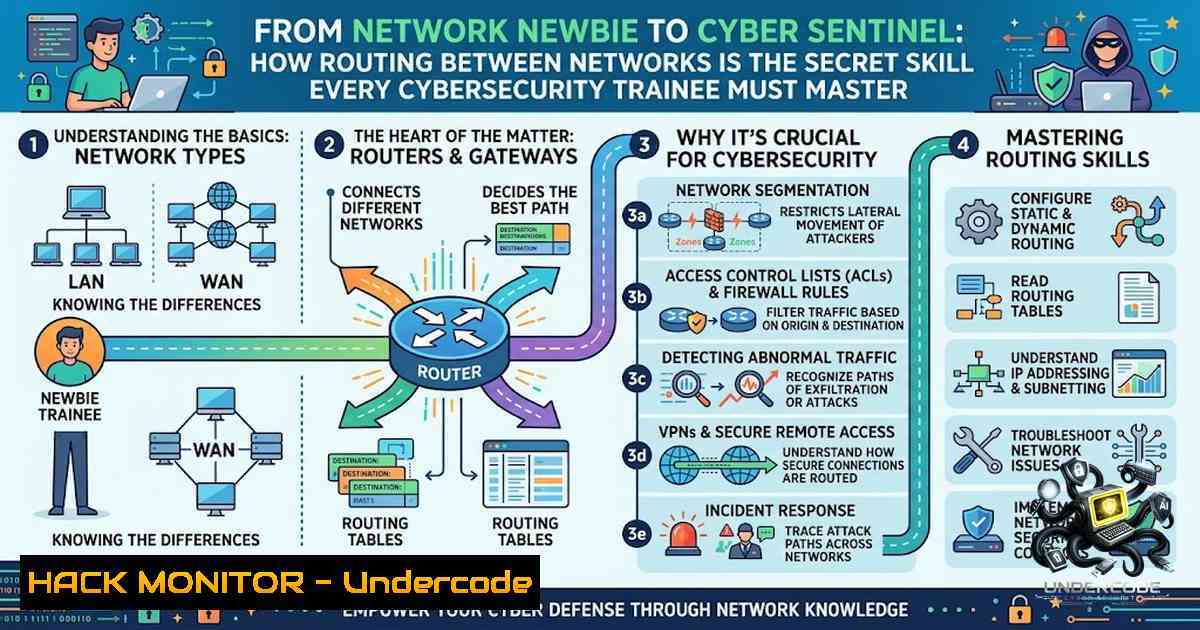
Introduction:
In the digital battlefield, data doesn’t just magically appear at its destination; it navigates a complex web of interconnected pathways. For a cybersecurity trainee, understanding how routers forward data from one network to another is not just about passing a module—it is foundational to understanding network architecture, attack vectors, and defense strategies. This article expands on a recent trainee milestone, deconstructing the core concepts of inter-1etwork routing and providing actionable technical insights, including command-line verification and security hardening techniques.
Learning Objectives:
- Define the fundamental differences between routing and switching and their roles in data transmission.
- Utilize native Linux and Windows commands to trace, analyze, and verify network routing paths.
- Implement security best practices to harden routing protocols against common exploitation techniques.
You Should Know:
1. Routing Fundamentals: The Art of Packet Forwarding
Routing is the process of selecting paths in a network along which to send network traffic. At its core, a router maintains a routing table that contains a list of known networks and the best paths to reach them. When a packet arrives, the router examines the destination IP address, checks its routing table for the most specific matching route, and forwards the packet to the next hop.
To verify routing tables and paths on your own system, you can use the following commands. For Linux, use `ip route` or the classic `route -1` to view the kernel IP routing table. For Windows, open Command Prompt and use route print.
- Linux Command: `ip route show` or `netstat -r` (displays the routing table).
- Windows Command: `tracert google.com` (traces the route to a host, showing each hop).
2. Step‑by‑Step Guide: Tracing Your Digital Footprint
Understanding the path your data takes is critical for both troubleshooting and security analysis. Here is how to map a network route from your device to an external server.
- Open Terminal/Command On Linux, press
Ctrl+Alt+T. On Windows, pressWin+R, typecmd, and press Enter. - Execute Traceroute/Tracert: For Linux, type `traceroute google.com` (install with `sudo apt install traceroute` if needed). For Windows, type
tracert google.com. - Analyze the Output: The command lists each hop (router) your packet passes through, including the round-trip time (RTT). High latency or dropped packets at a specific hop can indicate network congestion or potential filtering.
- Security Insight: An unexpected hop or a high number of hops can be a sign of a misconfiguration or, in rare cases, an on-path attack. Understanding this baseline helps in anomaly detection.
-
Deep Dive: Routing Protocols and Their Security Implications
Routers don’t guess; they use routing protocols to discover and share path information. Key protocols include RIP (Routing Information Protocol), OSPF (Open Shortest Path First), and BGP (Border Gateway Protocol). From a security perspective, these protocols are prime targets.
- BGP Hijacking: This occurs when a malicious actor announces prefixes they do not own, diverting traffic. Mitigation involves implementing Resource Public Key Infrastructure (RPKI) to validate route origins.
- OSPF/Attack Vectors: OSPF uses authentication (simple password or MD5/SHA). If left unauthenticated, an attacker can inject false routes into the network.
- Verification: Check active routing protocols on a Cisco router using
show ip protocols. In a Linux environment, examine `/etc/network/interfaces` or `nmcli` for routing configurations.
4. Practical Network Hardening and Configuration
Securing routing requires a multi-layered approach. This section provides a short checklist and code snippets for hardening.
- Disable IP Redirects: Prevent your server from being used as a routing relay.
- Linux: `sudo sysctl -w net.ipv4.conf.all.send_redirects=0`
– Linux: `sudo sysctl -w net.ipv4.conf.default.send_redirects=0`
– Implement ACLs (Access Control Lists): Filter traffic to restrict which hosts can access routing interfaces. This is typically configured on the router itself. - Cisco IOS Example: `access-list 10 deny 192.168.1.0 0.0.0.255` (Denies a specific subnet).
- VPN and Secure Tunnels: For connecting networks, use IPsec or WireGuard to encrypt traffic in transit, protecting it from eavesdropping between routers.
- The Role of AI and Automation in Modern Routing
Artificial Intelligence is revolutionizing network management. Predictive routing uses AI/ML models to analyze traffic patterns and predict failures, automatically rerouting traffic before latency spikes occur. For the cybersecurity trainee, this means AI can assist in anomaly detection by analyzing routing protocol updates in real-time, flagging unusual BGP announcements or inconsistent OSPF link-state advertisements (LSAs).
What Undercode Say:
- The “Blue Team” Perspective: Understanding routing is the first step in threat modeling. If you don’t know where data should go, you can’t detect where it is going. This fundamental knowledge is paramount.
- The “Red Team” Perspective: Routing protocols are a soft target. A network misconfigured with default credentials or lacking MD5 authentication is a playground for exploiting trust relationships, leading to man-in-the-middle attacks or Denial of Service.
- Analysis: The post highlights a critical milestone in a student’s journey. However, the depth of knowledge required in industry is beyond basic “hello world” routing. Trainees must graduate to understanding policy-based routing, VRF (Virtual Routing and Forwarding), and segment routing. The hands-on use of `traceroute` and `ip route` is excellent, but the next step is to combine these with packet capture analysis using Wireshark to visualize the routing decisions in real time. The integration of AI in routing also shifts the focus from static configuration to dynamic, automated security, demanding that trainees upskill in data science principles alongside traditional networking.
Prediction:
- -1 The reliance on legacy routing protocols without proper encryption will continue to expose enterprises to BGP hijacks and routing leaks, requiring significant financial investment in RPKI and secure routing infrastructure.
- +1 The integration of AI-driven networking will lead to self-healing networks that can isolate and reroute traffic around cyber attacks within milliseconds, reducing the impact of DDoS and lateral movement.
- +1 For cybersecurity trainees, the convergence of networking and AI creates a high-demand niche for “AI Network Security Engineers,” pushing salaries and career growth significantly upward.
- -1 As networks become more complex (hybrid cloud, SD-WAN), the skills gap will widen, leaving many organizations vulnerable due to a lack of personnel who deeply understand both routing and security.
▶️ Related Video (70% Match):
🎯Let’s Practice For Free:
🎓 Live Courses & Certifications:
Join Undercode Academy for Verified Certifications
🚀 Request a Custom Project:
Secure, high-velocity infrastructure and disruptive technological engineering. Contact our engineering team for high-tier development and proprietary systems:
[email protected]
💎 Smart Architecture | 🛡️ Secure by Design | ⭐ Trusted by Thousands
IT/Security Reporter URL:
Reported By: Joshua Mayowa – Hackers Feeds
Extra Hub: Undercode MoN
Basic Verification: Pass ✅


