Listen to this Post
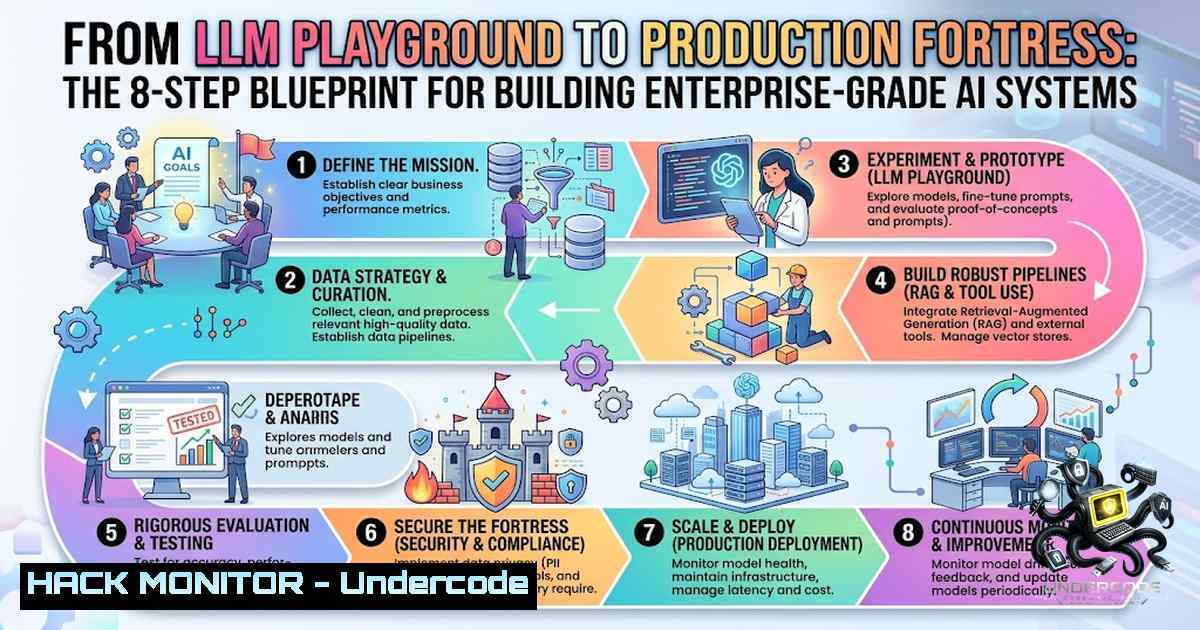
Introduction:
The journey from a simple API call to a production-ready AI system is paved with architectural decisions that separate experimental prototypes from mission-critical deployments. Large Language Models (LLMs) serve as the reasoning engine, but the true power emerges when they are orchestrated with retrieval mechanisms, vector databases, and external tooling through frameworks like LangChain and LlamaIndex. This article dissects the essential eight-step pipeline for building robust, secure, and scalable AI applications—transforming raw models into intelligent agents that can reason, retrieve, and act on your enterprise data.
Learning Objectives:
- Master the end-to-end RAG pipeline architecture from model selection to production deployment
- Implement secure API integrations and function calling for agentic workflows
- Deploy open-source LLMs locally with vLLM, Ollama, and NVIDIA NIM for privacy-critical applications
- Selecting the Right LLM and Framework: The Foundation of Your AI Stack
The choice of your foundational model and orchestration framework determines your system’s capabilities, latency, and cost structure. Popular LLMs include OpenAI GPT, Meta Llama, and Mistral, each offering different trade-offs in reasoning, multilingual support, and context window size. Frameworks such as LangChain, LangGraph, LlamaIndex, Haystack, and Semantic Kernel abstract away the complexity of prompt management, memory, and workflow orchestration.
Step‑by‑Step Guide:
- Evaluate Model Requirements: Define your use case—chat, summarization, code generation, or multi-step reasoning. For general-purpose QA, GPT-4 or Llama 3.1 70B are strong candidates. For low-latency edge deployments, consider Mistral 7B or Llama 3.2 3B.
2. Select an Orchestration Framework:
- LangChain: Best for general-purpose chaining and RAG pipelines with extensive community support.
- LangGraph: Ideal for stateful, cyclical agent workflows requiring multi-step reasoning.
- LlamaIndex: Optimized for data indexing and retrieval-heavy applications.
- Haystack: Excellent for search and QA systems with modular design.
3. Set Up Your Development Environment:
 Python environment setup
python -m venv ai-env
source ai-env/bin/activate  Linux/Mac
 or .\ai-env\Scripts\activate  Windows

Install core dependencies
pip install langchain langchain-community langchain-openai
pip install llama-index chromadb tiktoken
pip install sentence-transformers transformers
4. Initialize Your LLM Client:
from langchain_openai import ChatOpenAI
from langchain_community.llms import Ollama

Cloud-based
llm = ChatOpenAI(model="gpt-4", temperature=0.7)

Local with Ollama
llm_local = Ollama(model="llama3.1:70b", temperature=0.7)
2. Data Collection, Processing, and Embedding Creation
AI systems require clean, reliable business data. Tools like Crawl4AI, Firecrawl, Docling, Unstructured, and LlamaParse handle document ingestion from PDFs, websites, and databases. Once collected, text must be converted into numerical vectors (embeddings) that capture semantic meaning using models like OpenAI Embeddings or open-source Sentence Transformers.
Step‑by‑Step Guide:
1. Ingest and Parse Documents:
from langchain_community.document_loaders import PyPDFLoader, WebBaseLoader

Load PDF
loader = PyPDFLoader("enterprise_data.pdf")
documents = loader.load()

Load web content
web_loader = WebBaseLoader("https://your-docs.company.com")
web_docs = web_loader.load()
2. Chunk Documents for Optimal Retrieval:
Production RAG systems typically use chunk sizes of 512 tokens with 50-token overlap for general-purpose retrieval. For specialized domains, adaptive chunking strategies may improve performance.
from langchain.text_splitter import RecursiveCharacterTextSplitter

text_splitter = RecursiveCharacterTextSplitter(
chunk_size=512,
chunk_overlap=50,
separators=["\n\n", "\n", " ", ""]
)
chunks = text_splitter.split_documents(documents)
3. Generate Embeddings:
from langchain_openai import OpenAIEmbeddings
from sentence_transformers import SentenceTransformer

API-based (OpenAI)
embed_model = OpenAIEmbeddings(model="text-embedding-3-large")

Local (Sentence Transformers) - all-MiniLM-L6-v2: 384 dimensions, lightweight
local_embedder = SentenceTransformer('all-MiniLM-L6-v2')
embeddings = local_embedder.encode(["Your text here"])
3. Storing Embeddings in Vector Databases
Vector databases serve as the external knowledge-retrieval layer, storing embeddings and enabling fast similarity search. Popular options include Pinecone (serverless managed service), Qdrant (high-performance Rust), Weaviate (graph-like relationships), and Milvus (enterprise Kubernetes-1ative).
Step‑by‑Step Guide:
1. Choose a Vector Database:
- Pinecone: Managed, serverless, ideal for teams avoiding infrastructure overhead.
- Qdrant: Excellent filtering and hybrid search capabilities.
- Weaviate: Best for graph-like relationships and multi-modal data.
- Milvus: GPU-accelerated, suitable for large-scale enterprise deployments.
- Chroma: Lightweight, open-source, perfect for prototyping.
2. Set Up Chroma (Local Development):
from langchain_community.vectorstores import Chroma

vector_store = Chroma.from_documents(
documents=chunks,
embedding=embed_model,
persist_directory="./chroma_db"
)
3. Set Up Pinecone (Production):
from pinecone import Pinecone, ServerlessSpec
from langchain_pinecone import PineconeVectorStore

pc = Pinecone(api_key="YOUR_API_KEY")
index_name = "rag-index"

Create index if not exists
if index_name not in pc.list_indexes().names():
pc.create_index(
name=index_name,
dimension=1536,  OpenAI embedding dimension
metric="cosine",
spec=ServerlessSpec(cloud="aws", region="us-east-1")
)

vector_store = PineconeVectorStore.from_documents(
documents=chunks,
embedding=embed_model,
index_name=index_name
)
4. Building the RAG Pipeline
Retrieval-Augmented Generation (RAG) allows an LLM to answer questions using trusted business data, significantly improving accuracy and reducing hallucinations. A production RAG pipeline must consider retrieval quality, search speed, and response quality.
Step‑by‑Step Guide:
1. Implement Basic RAG Retrieval:
from langchain.chains import RetrievalQA

retriever = vector_store.as_retriever(search_kwargs={"k": 4})
qa_chain = RetrievalQA.from_chain_type(
llm=llm,
chain_type="stuff",
retriever=retriever
)

response = qa_chain.invoke("What is our Q4 revenue projection?")
print(response['result'])
2. Enhance with Hybrid Search:
Combine vector similarity with keyword search (BM25/TF-IDF) for improved recall. Weaviate offers this as a single API call; Qdrant requires manual fusion logic.
 Example with Weaviate hybrid search
response = vector_store.similarity_search(
query="revenue projection",
k=4,
hybrid=True,
alpha=0.5  Balance between vector and keyword
)
3. Implement Advanced RAG Patterns:
- Multi-Query Retrieval: Generate multiple variations of the user query to improve recall.
- Parent Document Retriever: Retrieve smaller chunks but return larger context windows.
- Self-Query Retrieval: Use the LLM to extract metadata filters from natural language queries.
- Connecting Tools and APIs: Function Calling and Agentic Workflows
Modern AI systems do more than generate text. Using function calling, agents, or MCP-based integrations, an AI application can search databases, generate reports, trigger workflows, and interact with enterprise applications. Major LLM providers—OpenAI, Anthropic, Google—have converged on JSON-based tool schemas.
Step‑by‑Step Guide:
1. Define Tool Schemas:
from langchain.tools import tool

@tool
def get_revenue(quarter: str) -> str:
"""Get revenue for a specific quarter."""
 Database query logic here
return f"Q{quarter} revenue: $12.4M"

@tool
def send_report(email: str, content: str) -> str:
"""Send a report via email."""
 Email sending logic
return f"Report sent to {email}"
2. Create an Agent with Tool Access:
from langchain.agents import create_react_agent, AgentExecutor
from langchain.prompts import PromptTemplate

tools = [get_revenue, send_report]
agent = create_react_agent(llm, tools, prompt)
agent_executor = AgentExecutor(agent=agent, tools=tools, verbose=True)

result = agent_executor.invoke({
"input": "Get Q4 revenue and email the report to [email protected]"
})
3. Implement NVIDIA NIM Function Calling:
NVIDIA NIM supports function calling by providing a list of available functions; the model outputs function arguments for execution.
 NIM tool calling example
tools = [{"type": "function", "function": {"name": "get_revenue", ...}}]
response = client.chat.completions.create(
model="meta/llama3-70b-instruct",
messages=[{"role": "user", "content": "Get Q4 revenue"}],
tools=tools
)
6. Deploying Open-Source and Local Models
Organizations use open-source models when they need additional privacy, customization, or infrastructure control. Common platforms include vLLM (fast, efficient serving), LocalAI (runs on any hardware, no GPU required), and NVIDIA NIM (secure, enterprise-grade microservices).
Step‑by‑Step Guide:
1. Deploy with Ollama (Easiest Local Setup):
Ollama has emerged as one of the most popular tools for local LLM deployment, with excellent token-per-second throughput and GPU acceleration for NVIDIA (CUDA), Apple Silicon (Metal), and AMD (ROCm).
 Install Ollama
curl -fsSL https://ollama.com/install.sh | sh  Linux/Mac
 Windows: Download from ollama.com

Pull and run a model
ollama pull llama3.1:70b
ollama run llama3.1:70b

Serve with API
ollama serve
2. Deploy with vLLM (High-Throughput Production):
vLLM provides easy, fast, and cheap LLM serving with PagedAttention for memory efficiency.
 Install vLLM
pip install vllm

Serve a model
python -m vllm.entrypoints.openai.api_server \
--model meta-llama/Llama-3.1-70B-Instruct \
--tensor-parallel-size 4 \
--max-model-len 8192
3. Deploy with NVIDIA NIM (Enterprise Security):
NVIDIA NIM, part of NVIDIA AI Enterprise, provides secure, reliable deployment of high-performance AI model inferencing across clouds, data centers, and workstations.
 Pull NIM container
docker pull nvcr.io/nvidia/nim:llama3-70b-instruct

Run with GPU access
docker run --gpus all -p 8000:8000 \
-e NVIDIA_NIM_API_KEY=your_key \
nvcr.io/nvidia/nim:llama3-70b-instruct
- Securing Your AI Pipeline: OWASP Top 10 for LLMs
The 2025 OWASP Top 10 for GenAI/LLMs shifts focus from prompt tricks to real-world risks: RAG pipeline vulnerabilities, agent tooling, and cost spikes from misuse. Vector and embedding weaknesses are a new entry targeting vulnerabilities in RAG systems and vector databases.
Step‑by‑Step Guide:
1. Prevent Prompt Injection:
- Implement input sanitization and validation.
- Use system prompts that clearly separate user input from instructions.
- Deploy guardrails with tools like Rebuff or NeMo Guardrails.
2. Secure Vector Database and Embedding Pipelines:
- Validate indexed content before ingestion.
- Authenticate embedding pipelines to prevent data poisoning.
- Implement fine-grained authorization for retrieval access.
3. Monitor and Rate-Limit API Usage:
from slowapi import Limiter
from slowapi.util import get_remote_address

limiter = Limiter(key_func=get_remote_address)

@app.post("/chat")
@limiter.limit("10/minute")
async def chat(request: Request):
 Rate-limited endpoint
pass
4. Implement Red Teaming and Adversarial Testing:
Regular red-teaming exercises help identify vulnerabilities in RAG systems and agentic workflows. Use frameworks like DeepTeam for systematic LLM security testing.
8. Production Monitoring and MLOps
Production AI systems require observability, logging, and continuous evaluation. Tools like LangSmith provide tracing and debugging for LangChain pipelines. MLOps practices ensure model performance degrades gracefully over time.
Step‑by‑Step Guide:
1. Enable LangSmith Tracing:
import os
os.environ["LANGCHAIN_TRACING_V2"] = "true"
os.environ["LANGCHAIN_API_KEY"] = "your_key"
2. Implement Evaluation Metrics:
- Faithfulness: Check if responses are grounded in retrieved context.
- Relevancy: Measure if retrieved documents are relevant to the query.
- Latency: Track p95 response times for user experience.
3. Set Up Continuous Integration:
 .github/workflows/ai-pipeline.yml
name: RAG Pipeline Tests
on: [bash]
jobs:
test:
runs-on: ubuntu-latest
steps:
- uses: actions/checkout@v3
- name: Run RAG evaluation
run: python evaluate_rag.py --test-suite regression
What Undercode Say:
- Key Takeaway 1: The eight-step pipeline—model selection, framework choice, data processing, embeddings, vector storage, RAG, tool integration, and local deployment—forms a complete blueprint for production AI systems. Each step introduces architectural decisions that impact security, latency, and cost.
-
Key Takeaway 2: Security must be baked into every layer, not added as an afterthought. The 2025 OWASP Top 10 for LLMs highlights RAG exploitation and embedding abuse as emerging threats, requiring organizations to implement input validation, pipeline authentication, and continuous red-teaming.
-
Key Takeaway 3: The open-source ecosystem (vLLM, Ollama, LocalAI, Sentence Transformers) now rivals commercial offerings in performance and flexibility, enabling privacy-critical deployments without sacrificing capability. The choice between cloud APIs and local models ultimately depends on security requirements, hardware budgets, and latency tolerances.
-
Analysis: The convergence of RAG, agentic workflows, and local model deployment represents a maturity inflection point in enterprise AI. Organizations are moving beyond simple ChatGPT wrappers toward sophisticated systems that combine retrieval, reasoning, and action. However, this complexity introduces new attack surfaces—prompt injection, data poisoning, and embedding manipulation—that demand security-first design. The winners in this space will be those who treat AI systems as mission-critical infrastructure, complete with monitoring, evaluation, and incident response. The trend toward local and open-source models, driven by privacy and cost concerns, will accelerate as vLLM, Ollama, and NVIDIA NIM continue to close the performance gap with cloud providers.
Prediction:
-
+1 Enterprise AI spending will shift from experimental pilot programs to production-grade RAG systems by late 2026, with vector databases becoming as common as relational databases in the data stack.
-
+1 Open-source model deployment platforms (Ollama, vLLM, LocalAI) will capture 40%+ of the enterprise LLM serving market by 2027 as organizations prioritize data sovereignty and cost predictability.
-
-1 RAG pipeline vulnerabilities will become the primary attack vector for AI system breaches in 2026-2027, with prompt injection and embedding poisoning incidents increasing 3x year-over-year.
-
-1 The complexity of agentic workflows (multi-step reasoning, tool calling, memory management) will lead to a “agent sprawl” crisis, where unmonitored agents cause data leaks and cost overruns—mirroring the early days of cloud adoption.
-
+1 Standardization around MCP (Model Context Protocol) and tool-calling schemas will reduce integration friction, enabling plug-and-play AI components across frameworks and cloud providers.
-
-1 Organizations that neglect security guardrails for their RAG pipelines will face regulatory scrutiny and reputational damage as embedding manipulation and adversarial retrieval attacks become mainstream.
▶️ Related Video (80% Match):
https://www.youtube.com/watch?v=cZgTMbJeJcg
🎯Let’s Practice For Free:
🎓 Live Courses & Certifications:
Join Undercode Academy for Verified Certifications
🚀 Request a Custom Project:
Secure, high-velocity infrastructure and disruptive technological engineering. Contact our engineering team for high-tier development and proprietary systems:
[email protected]
💎 Smart Architecture | 🛡️ Secure by Design | ⭐ Trusted by Thousands
IT/Security Reporter URL:
Reported By: Shehreyar Nawaz – Hackers Feeds
Extra Hub: Undercode MoN
Basic Verification: Pass ✅


