Listen to this Post
Introduction:
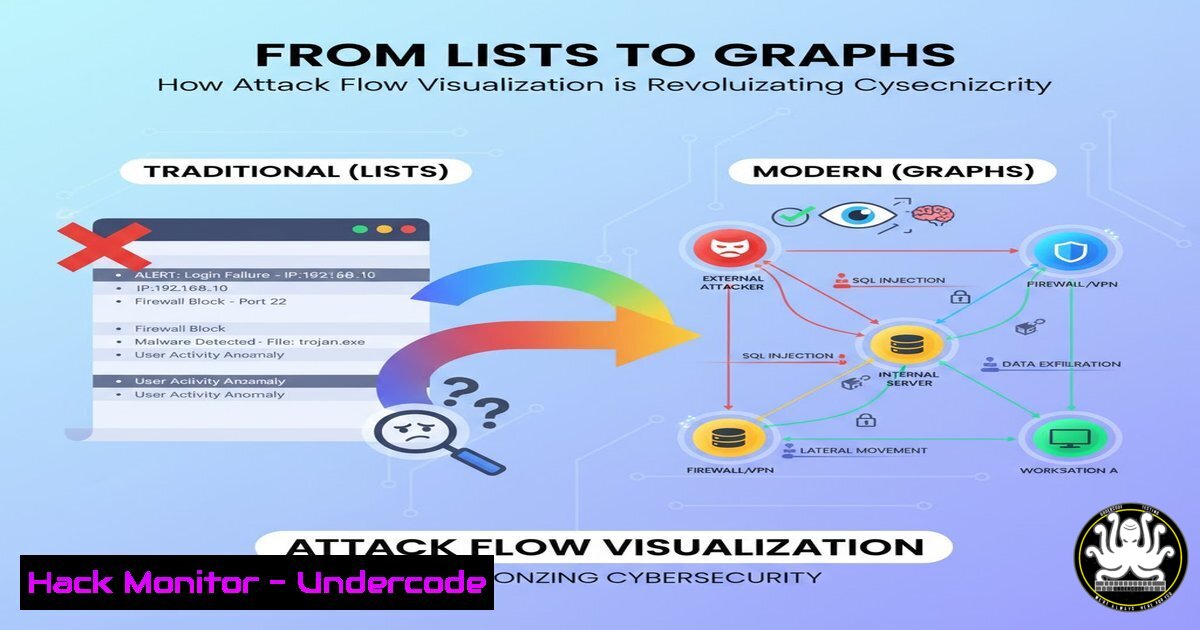
For decades, cybersecurity defense has been mired in the inefficiency of analyzing endless lists of logs and alerts. Modern attackers, however, operate by connecting discrete actions into a coherent attack path or graph. This article explores how shifting from a list-based to a graph-based investigative mindset, powered by tools like flow visualization, is fundamentally improving how we detect and respond to threats.
Learning Objectives:
- Understand the critical difference between list-based and graph-based security analysis.
- Learn the key commands and techniques for gathering data to build attack graphs.
- Implement practical steps to visualize attack flows from your own log data.
You Should Know:
- Extracting Key AWS CloudTrail Events for Graph Analysis
To build an attack graph, you must first extract the relevant telemetry. The following AWS CLI command queries CloudTrail for specific user activity, which can serve as nodes in your graph.aws cloudtrail lookup-events --lookup-attributes AttributeKey=Username,AttributeValue=johnny-appleseed --start-time 2024-01-01T00:00:00Z --end-time 2024-01-07T23:59:59Z --region us-east-1 --output json
Step-by-step guide:
- What it does: This command searches your AWS CloudTrail logs for all events associated with the IAM user `johnny-appleseed` within a specified time window.
- How to use it: Replace the `–start-time` and `–end-time` parameters with your relevant date range. The `–output json` flag formats the result for easy parsing by a downstream script or SIEM. The output will contain a list of API actions (e.g.,
CreateUser,CreateAccessKey,DescribeInstances) that form the basis of your attack graph nodes.
2. Enumerating User Session Logons on Windows
Lateral movement is a key component of an attack graph. On Windows, you can query for logon events to track user movement.
Get-WinEvent -FilterHashtable @{LogName='Security'; ID=4624} | Where-Object { $<em>.Properties[bash].Value -eq "johnny-appleseed" } | Select-Object TimeCreated, @{Name='LogonType';Expression={$</em>.Properties[bash].Value}}
Step-by-step guide:
- What it does: This PowerShell command filters the Windows Security log for successful logon events (Event ID 4624) for a specific user and displays the time and logon type.
- How to use it: Run this in PowerShell with appropriate administrative privileges. The `LogonType` (e.g., 2 for interactive, 3 for network) helps determine the nature of the access, which is crucial for understanding the attack path’s progression.
3. Mapping Network Connections with `netstat`
Understanding active network connections can reveal command and control (C2) channels and lateral movement.
netstat -tunap | grep ESTABLISHED
Step-by-step guide:
- What it does: This Linux command lists all established TCP (
-t) and UDP (-u) connections, showing the program (-p) responsible and without resolving hostnames (-n). - How to use it: Execute this on a potentially compromised host. The output shows foreign addresses and the associated processes, allowing you to map outbound connections that may be part of an attacker’s graph.
4. Querying Process Execution History
Process trees are fundamental to attack graphs. The following command audits process creation on a Linux system.
sudo ausearch -k process-execution -i | head -20
Step-by-step guide:
- What it does: This command uses the `ausearch` utility to read audit logs for events tagged with the “process-execution” key, making it easy to trace the lineage of running processes.
- How to use it: Ensure Linux auditd is configured to capture `execve` system calls. This output helps you visualize which process spawned another, directly contributing to the graph’s structure.
5. Investigating IAM Access Key Usage
Following the initial example, detecting failed API attempts is key to identifying reconnaissance.
aws cloudtrail lookup-events --lookup-attributes AttributeKey=AccessKeyId,AttributeValue=ASIAEXAMPLE --query 'Events[?contains(EventName, <code>Error</code>)]' --output table
Step-by-step guide:
- What it does: This command filters CloudTrail for events associated with a specific access key and then further narrows the results to only those events with “Error” in the name, such as `UnauthorizedOperation` or
AccessDenied. - How to use it: Insert the suspicious Access Key ID. These failed attempts are critical nodes in your graph, indicating the attacker’s goals and attempted resource access.
6. Configuring Panther for Automated Graph Generation
While manual queries are useful, automation is key. The following is a conceptual YAML snippet for a Panther detection rule that could trigger graph analysis.
AnalysisType: sql
Enabled: true
FileName: suspicious_iam_sequence.sql
AnalysisSpec:
Query: |
SELECT
userIdentity.userName,
eventName,
awsRegion,
eventTime
FROM panther_logs.public.aws_cloudtrail
WHERE
userIdentity.userName = 'johnny-appleseed'
AND eventTime > CURRENT_DATE - 7
Step-by-step guide:
- What it does: This is a template for a detection rule in Panther. It continuously queries the data lake for all activity from a specific IAM user over the past week.
- How to use it: In the Panther console, you would configure this rule. When it fires, it could be integrated with an “agentic alert triage” system to automatically execute the graph-building queries and present the visualization to an analyst.
- Leveraging External Tools like FlowViz for Threat Modeling
As mentioned in the comments, tools like FlowViz.io help visualize attack flows from threat intelligence reports.
Step-by-step guide:
- What it does: FlowViz uses AI to extract attack patterns from text and visualizes them as a MITRE ATT&CK flow.
- How to use it: Navigate to the FlowViz website. You can paste the text from a threat report or article describing an attack technique. The tool will automatically generate a flow chart, helping your team preemptively understand and model the attack graph before you even see it in your own logs.
What Undercode Say:
- Graphs Expose the “Why,” Not Just the “What”: A list of alerts tells you what happened; a graph reveals why it happened and how the pieces connect, transforming random events into a coherent narrative with a clear beginning, middle, and end.
- Automation is Non-Negotiable for Scale: Manually building these graphs is not feasible. The future lies in agentic AI systems, like the one Panther demonstrated, that can dynamically query data lakes and construct visualizations in real-time, allowing analysts to focus on critical decision-making rather than data wrangling.
The shift from lists to graphs represents a fundamental maturation of the SOC. It moves analysts from a reactive posture of closing tickets to a proactive one of understanding campaigns. The commentary on the original post highlights the community’s readiness for this evolution, with mentions of integration into standards like MITRE Attack Flow. This indicates that flow-based analysis is not a niche tool but is becoming a core component of a modern, intelligence-driven security program.
Prediction:
The integration of attack flow visualization with large-scale data lakes and agentic AI will become the standard for Security Operations Centers within five years. This will drastically reduce mean time to detect (MTTD) and mean time to respond (MTTR). Furthermore, we will see the emergence of “predictive graphs,” where AI will not only map active attacks but also simulate potential future attack paths based on current TTPs, allowing defenders to harden systems against threats before they are even fully executed.
🎯Let’s Practice For Free:
IT/Security Reporter URL:
Reported By: Jacknaglieri Flowcharts – Hackers Feeds
Extra Hub: Undercode MoN
Basic Verification: Pass ✅


