Listen to this Post
Introduction:
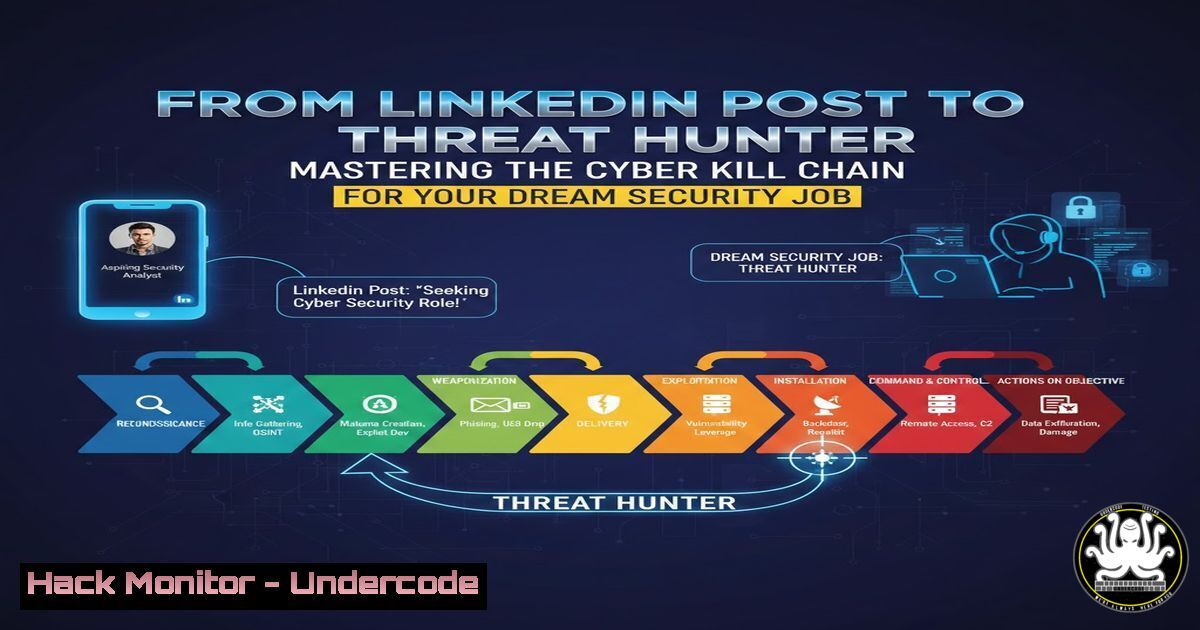
In today’s escalating cyber warfare landscape, moving from a theoretical understanding to practical, hands-on threat hunting is what separates candidates from hires. As seen in recent high-profile interview processes, like those with IBM X-Force, demonstrating fluency in the Cyber Kill Chain and MITRE ATT&CK framework is no longer optional—it’s the baseline. This article deconstructs the kill chain into actionable, command-level steps you must master to excel in scenario-based interviews and real-world incident response.
Learning Objectives:
- Deconstruct the Cyber Kill Chain into its seven core phases with practical, hands-on exercises.
- Execute and detect adversary actions across Linux and Windows environments using common security tools.
- Build a defensible security posture by mapping kill chain phases to MITRE ATT&CK techniques and implementing countermeasures.
You Should Know:
1. Reconnaissance & Weaponization: The Adversary’s Blueprint
This initial phase involves intelligence gathering and malware creation. Adversaries use OSINT (Open-Source Intelligence) and scanning to identify targets and vulnerabilities.
Step-by-step guide explaining what this does and how to use it:
External Recon Simulation (Linux): Use `theHarvester` to gather emails and subdomains, and `nmap` for service discovery.
 Install tools
sudo apt install theharvester nmap
 Gather OSINT data (replace with target domain)
theHarvester -d example.com -b all -f report.html
 Perform a stealthy SYN scan on the target
nmap -sS -T4 -p- -oA recon_scan <target_IP>
Weaponization Context: Understand how attackers pair this data with exploit kits (e.g., Metasploit) to create weaponized documents or phishing links. As a defender, monitor for unusual outbound DNS queries and spikes in port scanning activity from single sources.
2. Delivery & Exploitation: The Breach Moment
Delivery mechanisms (email, USB, web) bring the weaponized payload to the environment. Exploitation is the trigger that compromises a vulnerability.
Step-by-step guide explaining what this does and how to use it:
Detecting Malicious Delivery (Windows CMD): Use PowerShell to analyze processes and network connections spawned from typical delivery vectors like Office applications.
 List processes with network connections, focusing on Office apps
Get-NetTCPConnection | Select-Object LocalAddress, LocalPort, RemoteAddress, OwningProcess | Get-Process -Id {OwningProcess} | Where-Object {$_.ProcessName -match "winword|excel|powerpnt"}
Exploitation Mitigation: Ensure endpoint protection is blocking known exploit behavior (e.g., shellcode injection). On Linux, use `execshield` or `PaX` to enforce non-executable memory segments. Apply patches for CVEs identified in your `nmap` scans promptly.
- Installation & Command & Control (C2): Establishing Foothold
Post-exploitation, malware installs a persistent backdoor and establishes a communication channel (C2) for remote control.
Step-by-step guide explaining what this does and how to use it:
Persistence Detection (Linux): Hunt for common persistence mechanisms like cron jobs, systemd services, or modified `~/.bashrc` files.
 Check for anomalous cron jobs
crontab -l
sudo cat /etc/crontab
 Look for hidden or recently modified service files
find /etc/systemd/system -type f -mtime -7
 Check for suspicious autorun scripts
cat ~/.bashrc | tail -20
C2 Beaconing Identification: Use network monitoring tools to detect beaconing. A simple `tcpdump` command can spot regular, timed outbound connections.
 Capture outbound ICMP (ping) or HTTP traffic to a suspicious IP
sudo tcpdump -i eth0 'dst host <suspicious_IP> and (icmp or port 80)'
Windows C2 Detection: Use `netstat` to find established connections to unknown external IPs.
netstat -ano | findstr ESTABLISHED
- Actions on Objectives & Mitigation: The Endgame and Defense
The final phase is the adversary’s goal: data exfiltration, encryption, or destruction. Your defense hinges on disrupting the chain early.
Step-by-step guide explaining what this does and how to use it:
Exfiltration Alerting (Linux): Monitor for large, unexpected data transfers using tools like `iftop` or by auditing `outbound` bandwidth on key servers.
 Monitor real-time network usage by host
sudo iftop -P -i eth0
Windows Defender for Endpoint (Advanced Hunting): In an enterprise setting, use KQL (Kusto Query Language) to hunt for multi-phase kill chain activities.
// Sample query looking for process execution following a network connection
DeviceNetworkEvents
| where RemoteIP == "<suspicious_IP>"
| join (DeviceProcessEvents) on DeviceId, Timestamp
| project Timestamp, DeviceName, InitiatingProcessFileName, RemoteIP, FileName
Mitigation Strategy: Implement the Principle of Least Privilege (PoLP), segment networks to limit lateral movement, and deploy robust EDR (Endpoint Detection and Response) solutions configured to alert on MITRE ATT&CK techniques (T-code) like T1048 (Exfiltration) or T1486 (Data Encrypted for Impact).
What Undercode Say:
- The Interview is a Simulation: Top-tier security teams like IBM X-Force don’t just ask about the kill chain; they simulate it. Your ability to articulate both the attack path and the corresponding detective/preventive controls at each stage is critical.
- Tools Are Secondary, Mindset is Primary: Fluency with `nmap` or PowerShell is a checkbox. The prized skill is the analytical mindset to connect discrete alerts (a weird process, an odd connection) into a narrative of intrusion.
Prediction:
The integration of AI into both offensive and defensive cybersecurity operations will accelerate. For threat hunters, AI will automate the correlation of kill chain indicators across petabytes of data, shifting the human role towards strategic threat modeling, adversarial emulation design, and interpreting complex AI-generated hypotheses of attacks. Interview scenarios will soon incorporate “AI-assisted attack” simulations, requiring candidates to understand how machine learning can be weaponized in the reconnaissance and weaponization phases, and how AI-powered defense systems can be tuned to counter them. The future belongs to professionals who can think in chains, not just check points.
🎯Let’s Practice For Free:
IT/Security Reporter URL:
Reported By: Leigh Trinity – Hackers Feeds
Extra Hub: Undercode MoN
Basic Verification: Pass ✅


