Listen to this Post
Introduction:
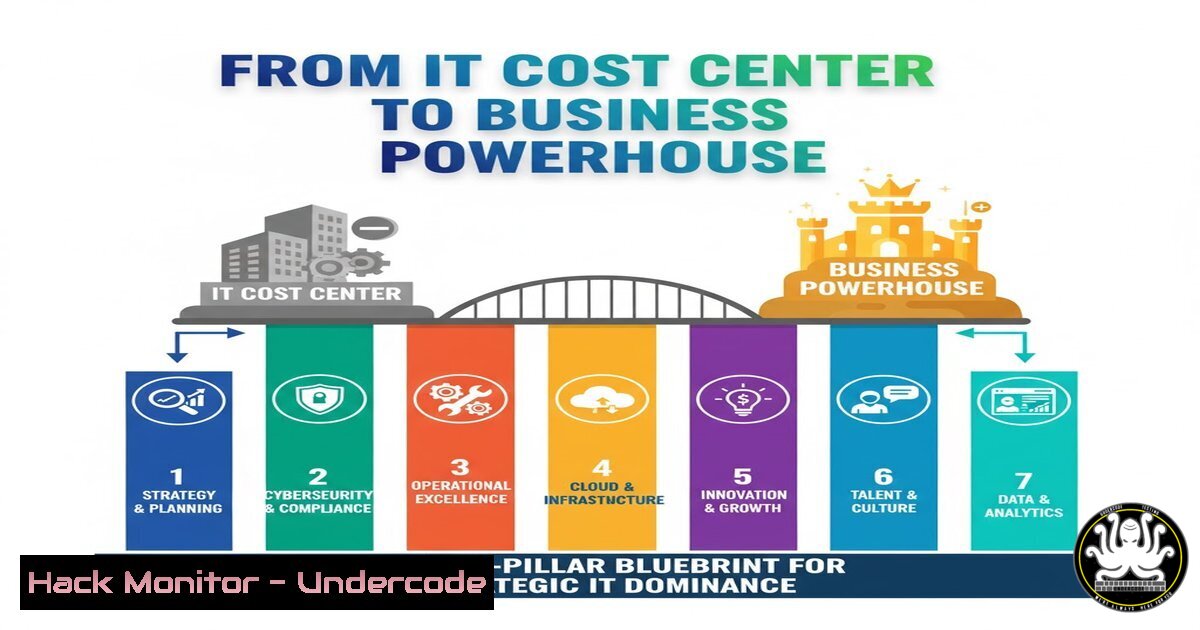
In today’s rapidly evolving digital landscape, Information Technology has fundamentally shifted from a supportive back-office function to the core engine driving business performance and resilience. This transformation requires a holistic approach where technological vision seamlessly marries corporate strategy, creating an integrated framework that propels competitive advantage rather than merely managing infrastructure. The modern IT leader must now architect systems that are not only operationally sound but also strategically aligned with business expansion, innovation, and customer experience objectives.
Learning Objectives:
- Understand the seven critical technological pillars essential for modern IT architecture and strategic alignment.
- Learn practical commands and configurations to harden security across Identity and Access Management (IAM) and network infrastructure.
- Develop a framework for transitioning IT from a cost center to a value-generating business powerhouse.
You Should Know:
1. Mastering Network Connectivity & Secure Remote Access
A robust network foundation is non-negotiable. This encompasses Local Area Networks (LAN), Wireless LANs (WLAN), and the interconnections between distant sites via Wide Area Networks (WAN) or Software-Defined WAN (SD-WAN). Secure remote access is the gateway to your corporate resources and represents a primary attack vector if not properly secured.
Step‑by‑step guide explaining what this does and how to use it.
Assess Your Current Wireless Security: On a Linux system connected to your network, you can scan for available wireless networks and their security protocols using:
`sudo iwlist scanning | grep -E “ESSID|Encryption key”`
This command lists nearby Wi-Fi networks and indicates whether they use encryption. Look for WPA2 or WPA3; WEP is critically vulnerable.
Harden Your VPN Configuration (Example for OpenVPN): For remote access, a VPN is essential. Ensure your server configuration file (server.conf) includes strong encryption:
`cipher AES-256-CBC`
`auth SHA512`
`tls-version-min 1.2`
These directives enforce AES-256 encryption, SHA512 for hashing, and a modern TLS version, significantly raising the bar against eavesdropping and attacks.
Windows: Verify Active Directory Network Login Protocols: To prevent weak authentication, enforce Kerberos. Check your domain policy or run:
`Get-ItemProperty “HKLM:\SYSTEM\CurrentControlSet\Control\Lsa\MSV1_0” | Select-Object-Property NtlmMinClientSec`
A value of `0x20080000` or higher requires NTLMv2 and 128-bit encryption, mitigating credential relay attacks.
2. Implementing Ironclad Identity and Access Management (IAM)
IAM is the security cornerstone, controlling who can access what within your systems. It secures digital identities and ensures access to applications and data is compliant and auditable. A breach here compromises everything.
Step‑by‑step guide explaining what this does and how to use it.
Enforce Strong Password Policies via Windows Group Policy: In an Active Directory environment, use Group Policy Management Editor. Navigate to Computer Configuration -> Policies -> Windows Settings -> Security Settings -> Account Policies -> Password Policy. Set “Minimum password length” to 14 characters and “Password must meet complexity requirements” to Enabled.
Linux: Audit Sudo Privileges: Unrestricted sudo access is a major risk. Regularly audit which users have elevated privileges:
`sudo grep -r “ALL=(ALL) ALL” /etc/sudoers`
This command searches all sudoers files for users who have full root access. Restrict this to only absolutely necessary administrative accounts.
Implement Multi-Factor Authentication (MFA) Script Check: For cloud services like AWS, use the CLI to check if MFA is enabled for the root user:
`aws iam get-account-summary | grep “AccountMFAEnabled”`
A return value of `1` indicates MFA is active. It should be mandatory for all privileged accounts.
3. Architecting Resilient Cloud, Virtualization, and Data Systems
The modern data center is a hybrid of on-premises virtualization and cloud platforms. Resilience, scalability, and secure data storage are paramount. Misconfigurations in cloud storage services are a leading cause of data breaches.
Step‑by‑step guide explaining what this does and how to use it.
Secure an AWS S3 Bucket: A publicly readable S3 bucket is a massive data leak risk. Use the AWS CLI to block public access at the bucket level:
`aws s3api put-public-access-block –bucket YOUR-BUCKET-NAME –public-access-block-configuration BlockPublicAcls=true,IgnorePublicAcls=true,BlockPublicPolicy=true,RestrictPublicBuckets=true`
Linux: Encrypt a Data Volume using LUKS: For data at rest on Linux servers, use LUKS encryption.
1. Create the encrypted container: `sudo cryptsetup luksFormat /dev/sdX`
2. Open it: `sudo cryptsetup open /dev/sdX secret_volume`
3. Create a filesystem: `sudo mkfs.ext4 /dev/mapper/secret_volume`
4. Mount it: `sudo mount /dev/mapper/secret_volume /mnt/encrypted`
VMware ESXi Security Hardening: On your ESXi host shell, disable outdated SSL protocols and ciphers by editing `/etc/vmware/rhttpproxy/config.xml` and ensuring the `
- Integrating Cybersecurity and Governance, Risk, and Compliance (GRC)
Cybersecurity is not a separate silo; it must be woven into every IT pillar. A dual focus on operational security (firewalls, EDR) and strategic governance (policies, risk management, compliance) creates a defensible and audit-ready environment.
Step‑by‑step guide explaining what this does and how to use it.
Perform a Vulnerability Scan with Nmap NSE: Use the powerful Nmap Scripting Engine to find common vulnerabilities.
`nmap -sV –script vuln `
This scans for known vulnerabilities on open ports. Warning: Only run on your own networks or with explicit permission.
Windows: Enable and Audit PowerShell Script Block Logging: This is critical for detecting malicious PowerShell scripts. Run PowerShell as Administrator and execute:
`Set-ItemProperty -Path “HKLM:\SOFTWARE\Policies\Microsoft\Windows\PowerShell\ScriptBlockLogging” -Name “EnableScriptBlockLogging” -Value 1`
Logs will appear in the Windows Event Log, providing visibility into potentially malicious activity.
GRC Framework Setup: Initiate a simple risk register using a spreadsheet. Columns should include: Asset, Threat, Vulnerability, Likelihood, Impact, Risk Score (Likelihood x Impact), and Mitigation Strategy. Review this quarterly.
5. Executing the Strategic IT Operating Model
The most brilliant strategy fails with poor execution. The Operating Model defines how IT delivers and manages services. It encompasses processes (like ITIL), organizational structure, and governance, ensuring the IT strategy is executed effectively and can adapt to business changes like M&A (Carve-In/Out).
Step‑by‑step guide explaining what this does and how to use it.
Automate IT Asset Discovery with a Bash Script: For visibility during a merger or audit, create a simple script to inventory Linux servers.
`!/bin/bash`
`echo “Hostname: $(hostname)” > /tmp/it-inventory.txt`
`echo “Kernel: $(uname -r)” >> /tmp/it-inventory.txt`
`echo “IP Addr: $(hostname -I)” >> /tmp/it-inventory.txt`
`df -h | grep -v tmpfs >> /tmp/it-inventory.txt`
Run this across your estate to gather consistent baseline data.
Windows: Use PowerShell for User Provisioning in M&A: During a “Carve-In,” automate user account creation from a CSV file.
`Import-Csv .\new_users.csv | ForEach-Object { New-ADUser -Name $_.Name -SamAccountName $_.SamAccount -Department $_.Dept -Enabled $True -AccountPassword (ConvertTo-SecureString “TempPassword123!” -AsPlainText -Force) }`
This demonstrates efficient, repeatable process execution during complex transitions.
What Undercode Say:
- Strategic Alignment is the New Firewall: The most sophisticated technical controls are undermined if IT is not deeply integrated with business goals. Understanding expansion plans and customer experience targets is what allows IT to build proactive, value-creating systems rather than just maintaining reactive infrastructure.
- Governance Fuels Agility: A strong GRC framework and a well-defined Operating Model are not about bureaucracy; they are the bedrock that allows for secure innovation and rapid, resilient adaptation to market changes, including mergers and acquisitions.
The post correctly identifies that IT can no longer afford to be a cost center. The provided seven-pillar blueprint offers a comprehensive roadmap. The critical analysis point is that these pillars are interdependent; weak IAM cripples cybersecurity, and poor network design undermines cloud performance. The call for a “Schéma Directeur du Système d’Information” (IT Master Plan) is the crucial first step—it’s the strategic document that binds these pillars together, ensuring technology decisions are made not in isolation, but in direct service of the business’s core mission and future growth, especially in emerging digital economies like the DRC.
Prediction:
The failure to adopt this integrated, strategic view of IT will become a primary differentiator between market leaders and those left behind. Companies that treat IT as a pure utility will face escalating security breaches, operational inefficiencies, and an inability to innovate or adapt. Conversely, organizations that successfully fuse business strategy with the seven technological pillars will achieve unprecedented resilience, using their IT infrastructure not just to defend against threats but to proactively enter new markets, drive customer engagement, and execute complex corporate strategies like M&A with speed and confidence.
🎯Let’s Practice For Free:
IT/Security Reporter URL:
Reported By: Renato Nsumbu – Hackers Feeds
Extra Hub: Undercode MoN
Basic Verification: Pass ✅


