Listen to this Post
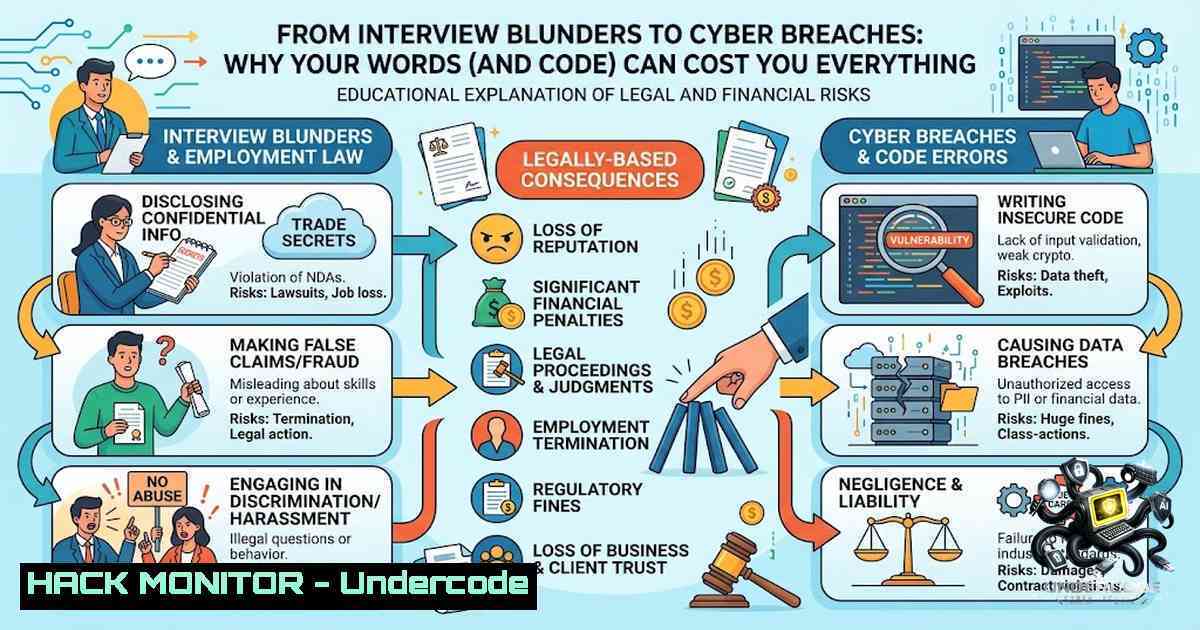
Introduction:
In the high-stakes world of cybersecurity, the line between a job offer and a career catastrophe often comes down to what you don’t say. While Dr. Miro Bada’s recent viral post on “9 Things Not to Say in an Interview” serves as a crucial primer for general career success, its principles take on a life-or-death significance when applied to the realms of IT security, AI, and cloud infrastructure. A poorly worded response during a security interview doesn’t just signal a lack of preparation; it can reveal a dangerous mindset that overlooks critical vulnerabilities, misconfigures firewalls, and ultimately invites ransomware onto your network.
Learning Objectives:
- Master the art of translating common interview faux pas into actionable security hardening strategies.
- Identify and remediate critical misconfigurations in Linux, Windows, and cloud environments that stem from “lazy” or “uninformed” administrative habits.
- Implement AI-driven threat detection and response protocols to proactively mitigate the risks highlighted by poor security communication.
You Should Know:
- “My Main Focus is Work-Life Balance” → The Zero-Trust Mindset
Saying you are looking for a 9-to-5 in a security role is the equivalent of telling an attacker you only monitor logs during business hours. In cybersecurity, threats are persistent (APT) and do not adhere to human schedules. This mentality often leads to “set-it-and-forget-it” configurations, which are the death of network security.
Step‑by‑step guide to implementing a Zero-Trust Architecture (ZTA):
- Define Your Attack Surface: Identify all resources (data, compute, applications) that need protection. This is your “crown jewels” list.
- Implement Micro‑segmentation: Use network policies to isolate workloads. On Linux, you can use `iptables` or `nftables` to restrict traffic between containers.
Example: Block all incoming traffic except SSH on a Linux server
iptables -P INPUT DROP
iptables -A INPUT -p tcp --dport 22 -j ACCEPT
iptables -A INPUT -m state --state ESTABLISHED,RELATED -j ACCEPT
- Enforce Least Privilege: Ensure users and devices have only the minimum access necessary. On Windows, use Group Policy Objects (GPO) to restrict local admin rights.
PowerShell: Remove a user from the local Administrators group
Remove-LocalGroupMember -Group "Administrators" -Member "CONTOSO\JohnDoe"
- Continuous Monitoring: Assume breach. Continuously verify every access request. Implement SIEM (Security Information and Event Management) tools like Splunk or ELK Stack to log and analyze all traffic.
-
“My Last Manager Was Really Unfair” → Blaming the Firewall for Misconfigurations
Blaming a previous employer for failure is a red flag. In IT, blaming the firewall or the “legacy system” for a breach is equally unprofessional. Security failures are rarely the fault of a single tool; they are the result of poor implementation. You must take accountability for your configurations.
Step‑by‑step guide to auditing firewall rules (Linux iptables/Windows Defender):
1. List Current Rules: Before blaming the firewall, see what it is actually doing.
– Linux: `sudo iptables -L -v -1`
– Windows: `Get-1etFirewallRule | Where-Object { $_.Enabled -eq $True }`
2. Identify Overly Permissive Rules: Look for rules allowing traffic from `0.0.0.0/0` (anyone) or `ANY` protocol.
3. Implement a “Default Deny” Stance: Change the default policy to deny all inbound traffic that isn’t explicitly allowed.
4. Log Dropped Packets: Configure logging to see what is being blocked. If you see legitimate traffic being dropped, that is a configuration error, not a “bad firewall.”
 Linux: Log dropped packets
iptables -A INPUT -j LOG --log-prefix "DROPPED: " --log-level 4
- “So, What Does Your Company Do?” → Ignoring the OSINT Threat
Not researching the company is a sign of laziness. In cybersecurity, failing to conduct Open Source Intelligence (OSINT) on your own organization is negligent. You cannot protect what you do not know. Attackers are using OSINT to profile your company’s email formats, domain names, and cloud infrastructure.
Step‑by‑step guide to conducting a basic OSINT audit of your organization:
1. Domain and DNS Enumeration: Use tools like `dnsrecon` or `theHarvester` to find subdomains and email addresses associated with your domain.
 Using theHarvester to find emails/subdomains
theHarvester -d example.com -b all
2. Cloud Asset Discovery: Use tools like `CloudEnum` or `AWS CLI` to list exposed S3 buckets.
 AWS CLI: List all S3 buckets (ensure you have the right permissions)
aws s3 ls
 Check if a bucket is public
aws s3api get-bucket-acl --bucket your-bucket-1ame
3. GitHub Leak Detection: Use `truffleHog` to scan public GitHub repositories for secrets (API keys, passwords).
trufflehog github --repo https://github.com/yourcompany/repo
4. Remediate: If you find exposed data, immediately rotate the keys and restrict access. This shows you are proactive, not reactive.
- “How Fast Can I Get Promoted?” → Rapid Patching Without Testing
Asking about promotion before proving value is akin to applying critical security patches without testing them in a staging environment. Speed without accuracy leads to system crashes and downtime. The “move fast and break things” mentality is the enemy of stable security.
Step‑by‑step guide to a safe patch management cycle:
- Inventory: Know what you have. Use `nmap` to scan your network and identify all devices.
nmap -sn 192.168.1.0/24 Ping sweep to find live hosts
- Test in a Sandbox: Apply the patch to a non-production environment first. On Windows, you can use Windows Sandbox or a test VM.
- Backup and Snapshot: Before applying patches to production, take a snapshot (VMware/Hyper-V) or a full system backup.
- Rollout in Stages: Deploy patches to a small group of servers first (Canary deployment). Monitor for errors in Event Viewer (Windows) or `/var/log/syslog` (Linux).
- Rollback Plan: Have a clear rollback script ready.
Example: Rollback a package on Ubuntu
sudo apt-get install --reinstall package_name=previous_version
-
“I Need at Least
 Salary" → Negotiating API Security
Focusing solely on salary without discussing value is like demanding high throughput from an API without securing the endpoints. You get what you pay for, and insecure APIs are the number one attack vector for data breaches (OWASP Top 10).</p></li>
</ol>

<h2 style="color: yellow;">Step‑by‑step guide to hardening REST APIs:</h2>

<ol>
<li>Implement Rate Limiting: Prevent brute force and DoS attacks. On Linux with Nginx:
[bash]
limit_req_zone $binary_remote_addr zone=mylimit:10m rate=10r/s;
- Use Strong Authentication: Never rely on API keys alone. Implement OAuth 2.0 or JWT with short expiry times.
- Validate Input: Never trust client-side input. Use strict schema validation.
Python Flask example: Validate JSON input
from flask import request
if not request.json or 'username' not in request.json:
abort(400)
-
Encrypt Traffic: Enforce HTTPS/TLS 1.3. Redirect all HTTP traffic to HTTPS.
Nginx redirect server { listen 80; return 301 https://$server_name$request_uri; } -
“I’m Open to Any Role You Have” → Desperation Leads to Default Credentials
Desperation leads to bad decisions. In security, the most common critical vulnerability is the use of default credentials on routers, IoT devices, and databases. Attackers use automated scripts to scan for these “open doors.”
Step‑by‑step guide to eradicating default credentials:
- Scan for Default Creds: Use `Nessus` or `OpenVAS` to scan your network for devices using default passwords.
- Automate Password Rotation: Use a Privileged Access Management (PAM) solution. For Linux, you can use `chage` to force password changes.
Force password change on next login for a user
sudo chage -d 0 username
- Disable Unused Services: If you don’t need the admin interface on a printer, turn it off.
-
Inventory Management: Maintain a hardware/software asset list (CMDB). If you don’t know it’s there, you can’t secure it.
-
“I Don’t Have Any Questions” → No Curiosity About Incident Response
Not asking questions shows a lack of engagement. In a security interview, not asking about the incident response (IR) plan is a fatal mistake. It implies you don’t care about what happens when (not if) a breach occurs.
Step‑by‑step guide to building a basic Incident Response Playbook:
1. Preparation: Define roles (Incident Commander, Lead Investigator, Communications).
2. Detection: Implement EDR (Endpoint Detection and Response) like CrowdStrike or Microsoft Defender.
3. Containment: Have scripts ready to isolate a compromised host.
 Linux: Isolate a host via iptables (drop all traffic)
iptables -A INPUT -s 192.168.1.100 -j DROP
iptables -A OUTPUT -d 192.168.1.100 -j DROP
 Windows: Disable network adapter via PowerShell
Disable-1etAdapter -1ame "Ethernet" -Confirm:$false
4. Eradication: Wipe the system and reinstall from a known good image.
5. Recovery: Restore data from clean backups.
- Lessons Learned: Hold a post-mortem meeting. What did we miss? How can we improve?
What Undercode Say:
- Key Takeaway 1: The “9 Things Not to Say” framework is universally applicable; translating these soft skills into hard technical defenses reveals a maturity that separates junior admins from senior security architects.
- Key Takeaway 2: Proactive defense (Zero Trust, patching, OSINT) is the technical equivalent of “prepared, authentic, and thoughtful” communication. It demonstrates that you are not just a ticket-closer, but a strategic asset.
Analysis:
The core of Dr. Bada’s advice is about perception and accountability. In cybersecurity, accountability is paramount. When an interviewer hears “I’m not sure,” they hear “I won’t take responsibility for a misconfiguration.” When they hear “I need a 9-5,” they hear “I won’t be available during the next zero-day exploit.” The technical countermeasures provided above—from `iptables` rules to API rate limiting—are not just commands; they are the physical manifestation of a mindset that values preparation, security, and continuous improvement. The integration of AI tools like Teal’s resume builder suggests a future where AI assists in both career growth and security automation, but the human element of strategic thinking remains irreplaceable. Ultimately, the goal is to sound like someone who has already thought about the worst-case scenario and has a plan to fix it.
Prediction:
- +1 The convergence of AI-driven resume tools and AI-driven threat detection will create a new breed of “Cyber-Humanists”—professionals who are as skilled in communication and emotional intelligence as they are in Python and PowerShell.
- +1 Organizations will increasingly use behavioral analysis (similar to interview techniques) to assess the security posture of third-party vendors, moving beyond questionnaires to real-time “security conversations.”
- -1 The skills gap will widen, as many traditional IT admins fail to adopt the “Zero-Trust” mindset, leaving their networks vulnerable to simple misconfigurations that could have been avoided by a simple `iptables -L` audit.
- -1 As AI automates more technical tasks (like patching), the human ability to articulate risk and strategy will become the most valuable—and scarcest—commodity in the industry. Those who cannot communicate will be replaced by those who can.
▶️ Related Video (78% Match):
🎯Let’s Practice For Free:
🎓 Live Courses & Certifications:
Join Undercode Academy for Verified Certifications
🚀 Request a Custom Project:
Secure, high-velocity infrastructure and disruptive technological engineering. Contact our engineering team for high-tier development and proprietary systems:
[email protected]
💎 Smart Architecture | 🛡️ Secure by Design | ⭐ Trusted by Thousands
IT/Security Reporter URL:
Reported By: Drmirobada 9 – Hackers Feeds
Extra Hub: Undercode MoN
Basic Verification: Pass ✅


