Listen to this Post
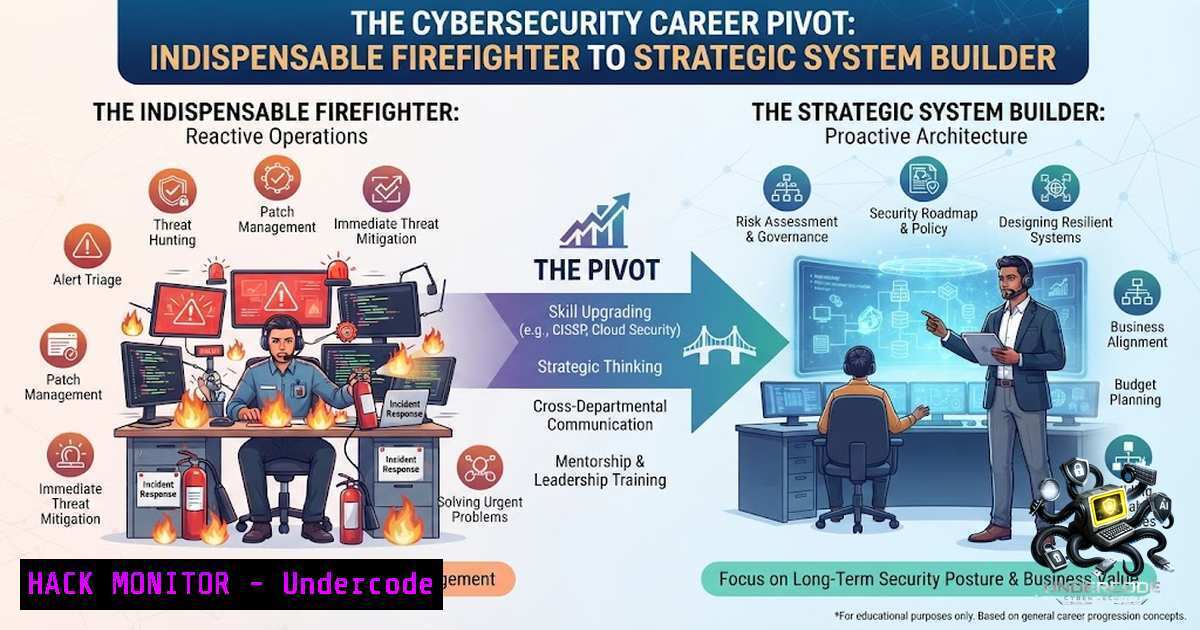
Introduction:
In the high-stakes world of cybersecurity, being the go-to person for every emergency, system patch, and access request might feel like job security. But as HR leaders have long observed, being indispensable in reactive, repetitive tasks often becomes a career trap rather than a path to strategic influence. This article bridges the gap between the HR insight that “maintaining the system and improving the system are not viewed the same way” and the technical reality of cybersecurity operations, offering a practical roadmap for transforming from a needed firefighter into a visible, value-creating system architect.
Learning Objectives:
- Understand how to shift from reactive operational security tasks to proactive system design and automation
- Master the technical commands and configurations to build resilient, self-healing security systems
- Learn how to document, automate, and measure security improvements to gain strategic visibility
- Automating the “Same Questions Over and Over” with SIEM and Log Analysis
The HR professionals described in the original post were answering the same questions repeatedly. In cybersecurity, this translates to manually checking logs, investigating identical alerts, and responding to recurring incidents. The first step toward becoming a system builder is implementing a Security Information and Event Management (SIEM) solution to automate log collection, correlation, and alerting.
What this does:
A SIEM aggregates logs from firewalls, servers, endpoints, and applications, normalizes the data, and applies correlation rules to identify suspicious patterns. Instead of manually reviewing each log, you build rules that surface only the most critical events.
How to use it:
Linux Implementation with Wazuh (Open Source SIEM):
Step 1: Install Wazuh Server on Ubuntu 22.04
 Update system packages
sudo apt update && sudo apt upgrade -y

Install prerequisites
sudo apt install -y curl apt-transport-https

Install Wazuh repository
curl -s https://packages.wazuh.com/key/GPG-KEY-WAZUH | sudo apt-key add -
echo "deb https://packages.wazuh.com/4.x/apt/ stable main" | sudo tee /etc/apt/sources.list.d/wazuh.list

Install Wazuh manager
sudo apt update
sudo apt install -y wazuh-manager

Start and enable the service
sudo systemctl start wazuh-manager
sudo systemctl enable wazuh-manager
Step 2: Configure a Custom Alert Rule
Create `/var/ossec/etc/rules/local_rules.xml` to catch failed SSH attempts with a defined threshold:
<group name="local,ssh,bruteforce">
<rule id="100001" level="10">
<if_matched_group>ssh_failed</if_matched_group>
<frequency>5</frequency>
<timeframe>120</timeframe>
<description>Multiple SSH login failures from same source</description>
</rule>
</group>
Step 3: Deploy an Agent on a Client Machine
 Install Wazuh agent (on endpoint)
curl -s https://packages.wazuh.com/key/GPG-KEY-WAZUH | sudo apt-key add -
echo "deb https://packages.wazuh.com/4.x/apt/ stable main" | sudo tee /etc/apt/sources.list.d/wazuh.list
sudo apt update
sudo apt install -y wazuh-agent

Configure agent to connect to server
sudo sed -i 's/MANAGER_IP/YOUR_SERVER_IP/g' /var/ossec/etc/ossec.conf
sudo systemctl start wazuh-agent
sudo systemctl enable wazuh-agent
Windows Implementation with PowerShell + Sysmon:
Step 1: Install Sysmon for Enhanced Logging
 Download Sysmon and configuration
Invoke-WebRequest -Uri "https://download.sysinternals.com/files/Sysmon.zip" -OutFile "$env:TEMP\Sysmon.zip"
Expand-Archive -Path "$env:TEMP\Sysmon.zip" -DestinationPath "$env:TEMP\Sysmon"

Install with default configuration
Start-Process -FilePath "$env:TEMP\Sysmon\Sysmon64.exe" -ArgumentList "-accepteula -i" -Wait
Step 2: Create a PowerShell Script for Automated Log Analysis
 Automated Security Log Analysis Script
$EventLogs = Get-WinEvent -FilterHashtable @{
LogName='Security'
ID=4624,4625,4672  Successful/Failed Logons, Special Privileges
StartTime=(Get-Date).AddHours(-24)
}

$FailedAttempts = $EventLogs | Where-Object { $<em>.Id -eq 4625 } | Group-Object { $</em>.Properties[bash].Value }

Alert if any source has more than 10 failures in 24 hours
$FailedAttempts | ForEach-Object {
if ($<em>.Count -gt 10) {
Write-Warning "Brute force detected from $($</em>.Name) - $($_.Count) attempts"
 Send alert to SIEM or email
}
}
Step 3: Schedule the Script to Run Hourly
$Action = New-ScheduledTaskAction -Execute "PowerShell.exe" -Argument "-File C:\Scripts\LogAnalysis.ps1"
$Trigger = New-ScheduledTaskTrigger -Daily -At 9am -RepetitionInterval (New-TimeSpan -Hours 1)
Register-ScheduledTask -TaskName "SecurityLogAnalysis" -Action $Action -Trigger $Trigger
2. Reducing Questions by Building Self-Service Security Portals
The original post highlighted HR professionals stuck answering the same employee questions. Similarly, security teams spend enormous time answering “How do I request access?” “What’s the approval process?” and “Why can’t I install this tool?” Building a self-service portal with embedded workflows eliminates repetitive questions and demonstrates strategic thinking.
What this does:
Creates a centralized, automated system where employees can request permissions, report incidents, or check compliance status without manual intervention. This reduces ticket volume, improves response times, and provides audit trails.
How to use it:
Building with Open Source Tools (Snipe-IT + Custom Workflow):
Step 1: Install Snipe-IT Asset Management
 Install dependencies on Ubuntu
sudo apt install -y apache2 mysql-server php8.1 libapache2-mod-php8.1 php8.1-mysql php8.1-gd php8.1-curl php8.1-zip php8.1-xml php8.1-mbstring git

Clone Snipe-IT
cd /var/www/html
sudo git clone https://github.com/snipe/snipe-it.git
sudo chown -R www-data:www-data /var/www/html/snipe-it

Configure .env file
cd snipe-it
sudo cp .env.example .env
sudo php artisan key:generate
Step 2: Create Custom Request Workflow Using API
The Snipe-IT API allows you to build custom front-end request forms:
 API endpoint for creating access requests
curl -X POST https://your-snipe-instance/api/v1/accessories/requests \
-H "Authorization: Bearer YOUR_API_TOKEN" \
-H "Content-Type: application/json" \
-d '{
"asset_id": 123,
"user_id": 456,
"request_date": "2026-07-03",
"status": "pending_approval",
"justification": "Need access for project deployment"
}'
Step 3: Implement Approval Workflow with Python Flask
from flask import Flask, request, jsonify
import requests
import smtplib
from email.mime.text import MIMEText

app = Flask(<strong>name</strong>)

@app.route('/request_access', methods=['POST'])
def request_access():
data = request.json
 Validate request
if not data.get('asset_id') or not data.get('user_email'):
return jsonify({"error": "Missing required fields"}), 400

Check approval matrix from external source
approval_required = check_approval_required(data['asset_id'])

if approval_required:
 Send approval request to manager
manager_email = get_manager_email(data['user_email'])
send_approval_request(manager_email, data)
return jsonify({"status": "pending", "message": "Approval requested"})
else:
 Auto-approve and provision via API
provision_access(data['asset_id'], data['user_email'])
return jsonify({"status": "approved", "message": "Access granted"})

def check_approval_required(asset_id):
 Logic to determine if approval is needed based on asset classification
sensitive_assets = [1, 2, 3, 4, 5]
return asset_id in sensitive_assets

if <strong>name</strong> == '<strong>main</strong>':
app.run(host='0.0.0.0', port=5000)
Step 4: Create a Simple Frontend Request Form
<!DOCTYPE html>
<html>
<head>
<title>Security Access Request</title>
</head>
<body>

<form id="requestForm">
<label>Employee Email: <input type="email" id="email" required></label><br>
<label>Access Type:
<select id="accessType">
<option value="vpn">VPN Access</option>
<option value="database">Database Access</option>
<option value="app">Application Access</option>
</select>
</label><br>
<label>Justification: <textarea id="justification" required></textarea></label><br>
<button type="submit">Submit Request</button>
</form>

<div id="result"></div>

<script>
document.getElementById('requestForm').addEventListener('submit', async (e) => {
e.preventDefault();
const response = await fetch('/request_access', {
method: 'POST',
headers: {'Content-Type': 'application/json'},
body: JSON.stringify({
user_email: document.getElementById('email').value,
asset_id: document.getElementById('accessType').value,
justification: document.getElementById('justification').value
})
});
const result = await response.json();
document.getElementById('result').innerHTML = `Status: ${result.status}

${result.message}</p>`;
});
</script>

<p></body>
</html>
- Teaching Managers to Own More: The Role of Access Governance
The HR insight about teaching managers to own more responsibilities directly parallels the cybersecurity principle of access governance. Instead of security teams manually approving every access request, implement role-based access control (RBAC) with delegated management capabilities. This shifts the burden of responsibility to those who understand business context—managers.
What this does:
Implements a system where managers can approve access for their team members based on predefined roles, while security controls enforce boundaries and provide auditing.
How to use it:
Active Directory Delegation (Windows):
Step 1: Create Role-Based Security Groups
 Create OU and security groups for delegation
New-ADOrganizationalUnit -1ame "ManagedAccess" -Path "DC=yourdomain,DC=com"

Create groups for each department
New-ADGroup -1ame "Marketing_Role" -GroupScope Global -GroupCategory Security -Path "OU=ManagedAccess,DC=yourdomain,DC=com"
New-ADGroup -1ame "Finance_Role" -GroupScope Global -GroupCategory Security -Path "OU=ManagedAccess,DC=yourdomain,DC=com"
New-ADGroup -1ame "IT_Role" -GroupScope Global -GroupCategory Security -Path "OU=ManagedAccess,DC=yourdomain,DC=com"
Step 2: Delegate Control to Managers Using PowerShell
 Delegate group membership management to designated managers
$Manager = "CN=JohnManager,OU=Users,DC=yourdomain,DC=com"
$Group = "CN=Marketing_Role,OU=ManagedAccess,DC=yourdomain,DC=com"

Allow manager to add/remove users from their department group
dsacls "CN=Marketing_Role,OU=ManagedAccess,DC=yourdomain,DC=com" /G "$($Manager):WP;member" /I:T
Step 3: Create Manager Self-Service PowerShell Script
 ManagerAccessTool.ps1 - Run by managers to manage team access
param(
[Parameter(Mandatory=$true)]
[bash]$Action,  "Add" or "Remove"
[Parameter(Mandatory=$true)]
[bash]$UserName,
[bash]$Role = "Marketing_Role"
)

Log all actions
$LogFile = "C:\SecurityLogs\AccessChanges_$(Get-Date -Format yyyy-MM).log"

function Audit-Log {
param($Message)
$timestamp = Get-Date -Format "yyyy-MM-dd HH:mm:ss"
Add-Content -Path $LogFile -Value "[$timestamp] $Message"
}

try {
 Verify user is authorized to manage this role (security check)
$CurrentUser = [System.Security.Principal.WindowsIdentity]::GetCurrent().Name
$UserRole = Get-ADGroupMember -Identity $Role -Server "yourdomain.com"

Check if current user is the designated manager for this role
$IsAuthorized = (Get-ADGroup -Identity $Role -Properties ManagedBy).ManagedBy -eq $CurrentUser

if (-1ot $IsAuthorized) {
Audit-Log "UNAUTHORIZED: $CurrentUser attempted to modify $Role"
Write-Error "You are not authorized to manage this role."
exit
}

if ($Action -eq "Add") {
Add-ADGroupMember -Identity $Role -Members $UserName
Audit-Log "ADDED: $UserName to $Role by $CurrentUser"
Write-Host "User $UserName added to $Role successfully."
} elseif ($Action -eq "Remove") {
Remove-ADGroupMember -Identity $Role -Members $UserName -Confirm:$false
Audit-Log "REMOVED: $UserName from $Role by $CurrentUser"
Write-Host "User $UserName removed from $Role successfully."
} else {
Write-Error "Invalid action. Use 'Add' or 'Remove'."
}
} catch {
Audit-Log "ERROR: $($<em>.Exception.Message)"
Write-Error "Operation failed: $($</em>.Exception.Message)"
}
Step 4: Implement Periodic Access Reviews
 Quarterly access review automation
$ReviewDate = Get-Date
$NextReview = $ReviewDate.AddMonths(3)

Generate review report for managers
$AllRoles = Get-ADGroup -Filter {GroupCategory -eq "Security"} -SearchBase "OU=ManagedAccess,DC=yourdomain,DC=com"

foreach ($Role in $AllRoles) {
$Members = Get-ADGroupMember -Identity $Role
$Manager = (Get-ADGroup -Identity $Role -Properties ManagedBy).ManagedBy

Send email to manager with current members list
$EmailBody = @"
Access Review Required for $($Role.Name)
Current Members:
$($Members | Out-String)
Please review and remove any users who no longer require access.
Due date: $NextReview
"@

Send-MailMessage -To $Manager -Subject "Quarterly Access Review: $($Role.Name)" -Body $EmailBody -SmtpServer "smtp.yourdomain.com"
}
- Redesigning Processes: Vulnerability Management as a System, Not a Task
The original post mentioned “redesigning the process” as key to moving from needed to visible. In security, vulnerability management is often a reactive nightmare. The shift is from scanning and praying to building a vulnerability management lifecycle with automated remediation.
What this does:
Implements a continuous vulnerability management program with automated scanning, prioritization, and remediation workflows. The system handles 80% of the routine work, allowing security teams to focus on complex threats.
How to use it:
Open Vulnerability Assessment Toolkit (OpenVAS/Greenbone):
Step 1: Install Greenbone Community Edition (Ubuntu)
 Add Greenbone repository
wget -q -O - https://www.greenbone.net/GB-GPG-KEY-GREENBONE-2023.gpg | sudo apt-key add -
echo "deb [arch=amd64] https://www.greenbone.net/apt/$VERSION_CODENAME $VERSION_CODENAME main" | sudo tee /etc/apt/sources.list.d/greenbone.list

Install Greenbone
sudo apt update
sudo apt install -y gvmd gsad openvas ospd-openvas

Configure OpenVAS
sudo gvm-setup
sudo gvmd --create-user=admin --password=YourStrongPassword
Step 2: Automate Scans with Python
import requests
import json
import schedule
import time
from datetime import datetime

class GreenboneAutomation:
def <strong>init</strong>(self, url, username, password):
self.url = url
self.session = requests.Session()
self.authenticate(username, password)

def authenticate(self, username, password):
login_data = {
"username": username,
"password": password
}
response = self.session.post(f"{self.url}/api/v1/login", json=login_data)
self.token = response.json().get('token')
self.session.headers.update({"Authorization": f"Bearer {self.token}"})

def create_scan(self, target_ip, config="Full and fast", schedule_time=None):
"""Create a vulnerability scan target"""
scan_data = {
"target": target_ip,
"config": config,
"schedule": schedule_time or datetime.now().isoformat()
}
response = self.session.post(f"{self.url}/api/v1/scans", json=scan_data)
return response.json().get('scan_id')

def get_scan_results(self, scan_id):
"""Retrieve and analyze scan results"""
response = self.session.get(f"{self.url}/api/v1/scans/{scan_id}/results")
results = response.json()

Filter critical vulnerabilities
critical = [vuln for vuln in results if vuln.get('severity') == 'Critical']
high = [vuln for vuln in results if vuln.get('severity') == 'High']

return {
'critical': critical,
'high': high,
'total': len(results)
}

def generate_report(self, scan_id):
"""Generate structured report with remediation steps"""
results = self.get_scan_results(scan_id)
report = f"""
VULNERABILITY SCAN REPORT
Timestamp: {datetime.now().isoformat()}
Scan ID: {scan_id}

SUMMARY:
- Total Vulnerabilities: {results['total']}
- Critical: {len(results['critical'])}
- High: {len(results['high'])}

CRITICAL FINDINGS:
"""
for vuln in results['critical'][:5]:  Top 5 critical findings
report += f"""
Vulnerability: {vuln.get('name')}
CVSS Score: {vuln.get('cvss_score')}
Remediation: {vuln.get('solution')}
CVE Reference: {vuln.get('cve')}
"""
return report

Automated scheduler
scheduler = GreenboneAutomation("https://your-gvmd-server", "admin", "YourStrongPassword")

def scheduled_scan():
 Scan weekly on Sunday at 2 AM
production_targets = ["10.0.0.1/24", "10.0.1.0/24", "192.168.10.0/24"]
for target in production_targets:
scan_id = scheduler.create_scan(target)
time.sleep(10)  Wait for scan to start
report = scheduler.generate_report(scan_id)
 Send report to security team
print(f"Scan complete for {target}: {len(report)} findings")

Schedule weekly scans
schedule.every().sunday.at("02:00").do(scheduled_scan)

while True:
schedule.run_pending()
time.sleep(60)
- System Builder Mindset: Infrastructure as Code for Security
The original post emphasized moving from “answer holder to system builder.” In security, this means treating infrastructure and security controls as code—version-controlled, testable, and automated.
What this does:
Implements Infrastructure as Code (IaC) for security controls, allowing security teams to build resilient, auditable, and scalable systems rather than manual configurations.
How to use it:
Terraform Security Module Example:
Step 1: Create a Terraform Module for AWS Security Baseline
 modules/security-baseline/main.tf
 AWS Security Baseline Module
resource "aws_security_group" "web_tier" {
name = "web-tier-sg"
description = "Security group for web tier with security defaults"
vpc_id = var.vpc_id

HTTP traffic
ingress {
from_port = 80
to_port = 80
protocol = "tcp"
cidr_blocks = ["0.0.0.0/0"]
description = "HTTP from internet"
}

HTTPS traffic
ingress {
from_port = 443
to_port = 443
protocol = "tcp"
cidr_blocks = ["0.0.0.0/0"]
description = "HTTPS from internet"
}

SSH from bastion only
ingress {
from_port = 22
to_port = 22
protocol = "tcp"
cidr_blocks = var.bastion_cidr
description = "SSH from bastion"
}

egress {
from_port = 0
to_port = 0
protocol = "-1"
cidr_blocks = ["0.0.0.0/0"]
}

tags = {
Name = "web-tier-sg"
Environment = var.environment
ManagedBy = "Terraform"
}
}

Enable VPC Flow Logs
resource "aws_flow_log" "vpc_flow_log" {
iam_role_arn = var.flow_log_role_arn
log_destination = var.flow_log_bucket_arn
traffic_type = "ALL"
vpc_id = var.vpc_id

tags = {
Environment = var.environment
Purpose = "Security monitoring"
}
}

GuardDuty Enablement
resource "aws_guardduty_detector" "main" {
enable = true

datasources {
s3_logs {
enable = true
}
}

tags = {
Environment = var.environment
}
}
Step 2: Terraform Variables File
 variables.tf
variable "vpc_id" {
description = "VPC ID for security resources"
type = string
}

variable "environment" {
description = "Environment (dev, staging, prod)"
type = string
default = "prod"
}

variable "bastion_cidr" {
description = "CIDR block for bastion host SSH access"
type = list(string)
default = ["10.0.0.0/16"]
}

variable "flow_log_role_arn" {
description = "IAM role for VPC flow logs"
type = string
}

variable "flow_log_bucket_arn" {
description = "S3 bucket ARN for flow logs"
type = string
}
Step 3: Terragrunt Configuration for Multi-Environment Management
 terragrunt.hcl
remote_state {
backend = "s3"
config = {
bucket = "security-terraform-state"
key = "baseline/${path_relative_to_include()}/terraform.tfstate"
region = "us-east-1"
encrypt = true
dynamodb_table = "terraform-locks"
}
}

inputs = {
environment = "production"
vpc_id = "vpc-123456789"
bastion_cidr = ["192.168.1.0/24"]
}
Step 4: CI/CD Pipeline Integration (GitLab CI)
 .gitlab-ci.yml
stages:
- validate
- plan
- apply
- verify

variables:
TF_VERSION: "1.5.0"

terraform_validate:
stage: validate
image: hashicorp/terraform:$TF_VERSION
script:
- terraform init
- terraform fmt -check
- terraform validate
only:
- merge_requests

terraform_plan:
stage: plan
image: hashicorp/terraform:$TF_VERSION
script:
- terraform init
- terraform plan -out plan.tfplan
artifacts:
paths:
- plan.tfplan
expire_in: 1 day
only:
- main

terraform_apply:
stage: apply
image: hashicorp/terraform:$TF_VERSION
script:
- terraform init
- terraform apply -auto-approve plan.tfplan
only:
- main
when: manual

security_scan_terraform:
stage: verify
image: aquasec/trivy
script:
- trivy config .
only:
- main
6. Making Work Visible: Security Metrics Dashboard
The HR professionals in the post were “invisible to the business.” In cybersecurity, the shift from reactive to strategic requires showing business stakeholders what security is achieving. Build a dashboard that translates technical metrics into business risk metrics.
What this does:
Creates a visibility dashboard that shows security posture, incident trends, and risk reduction in business terms, making security efforts visible to executives.
How to use it:
Grafana + Prometheus Security Dashboard:
Step 1: Configure Prometheus to Collect Security Metrics
 prometheus.yml
global:
scrape_interval: 15s
evaluation_interval: 15s

scrape_configs:
- job_name: 'security_metrics'
static_configs:
- targets: ['localhost:9090']

<ul>
<li>job_name: 'vulnerability_metrics'
static_configs:</li>
<li>targets: ['vuln-scanner:9100']</p></li>
<li><p>job_name: 'incident_metrics'
static_configs:</p></li>
<li>targets: ['incident-db:9100']
Step 2: Create Prometheus Metric Exporters
 security_metrics_exporter.py
from prometheus_client import start_http_server, Gauge, Counter, Info
import random
import time
import requests

Define metrics
VULNERABILITIES = Gauge('security_vulnerabilities_total', 'Total number of vulnerabilities', ['severity'])
PATCHED_SYSTEMS = Gauge('security_patched_systems_percent', 'Percentage of systems patched')
INCIDENTS_COUNTER = Counter('security_incidents_total', 'Total security incidents', ['type'])
RISK_SCORE = Gauge('security_risk_score', 'Current organizational risk score')
MTTD = Gauge('security_mttd_seconds', 'Mean Time to Detect', ['category'])
MTTR = Gauge('security_mttr_seconds', 'Mean Time to Respond', ['category'])

class SecurityMetricsCollector:
def collect_metrics(self):
 In production, these would come from actual data sources
vuln_data = self.get_vulnerability_data()
for severity, count in vuln_data.items():
VULNERABILITIES.labels(severity=severity).set(count)

patch_data = self.get_patch_data()
PATCHED_SYSTEMS.set(patch_data)

risk_data = self.calculate_risk_score()
RISK_SCORE.set(risk_data)

def get_vulnerability_data(self):
 Example: Query vulnerability management database
return {
'critical': 5,
'high': 12,
'medium': 28,
'low': 45
}

def get_patch_data(self):
 Example: Query patch management system
return 87.5  percentage

def calculate_risk_score(self):
 Business risk calculation: weighted combination of metrics
vuln_risk = sum([
self.get_vulnerability_data()['critical']  10,
self.get_vulnerability_data()['high']  5
])
patch_risk = 100 - self.get_patch_data()
return min(100, (vuln_risk  0.6) + (patch_risk  0.4))

if <strong>name</strong> == '<strong>main</strong>':
start_http_server(9100)
collector = SecurityMetricsCollector()
while True:
collector.collect_metrics()
time.sleep(60)
Step 3: Business-Focused Dashboard Queries (Grafana)
 Vulnerability Trend (Last 30 Days)
sum(security_vulnerabilities_total) by (severity)

Risk Score Over Time
security_risk_score

Patch Compliance by Department
sum(security_patched_systems_percent) by (department)

Incident Trends
rate(security_incidents_total[bash])

MTTD/MTTR Trends
security_mttd_seconds / 3600  Convert to hours
security_mttr_seconds / 3600

Security Cost per Incident (Business Metrics)
avg(security_incident_cost) by (severity)
Step 4: Build Dashboard JSON Configuration
{
"title": "Security Posture Dashboard",
"panels": [
{
"title": "Risk Score",
"targets": [
{
"expr": "security_risk_score",
"format": "time_series"
}
],
"type": "gauge",
"gridPos": {"h": 6, "w": 6, "x": 0, "y": 0}
},
{
"title": "Vulnerability Distribution",
"targets": [
{
"expr": "sum(security_vulnerabilities_total) by (severity)",
"format": "time_series"
}
],
"type": "piechart",
"gridPos": {"h": 6, "w": 6, "x": 6, "y": 0}
},
{
"title": "Patch Compliance",
"targets": [
{
"expr": "security_patched_systems_percent",
"format": "time_series"
}
],
"type": "stat",
"gridPos": {"h": 6, "w": 6, "x": 12, "y": 0}
},
{
"title": "Incident Trends (Last 30 Days)",
"targets": [
{
"expr": "sum(rate(security_incidents_total[bash])) by (type)",
"format": "time_series"
}
],
"type": "graph",
"gridPos": {"h": 8, "w": 24, "x": 0, "y": 6}
}
]
}
What Undercode Say:
Key Takeaway 1: Being indispensable in cybersecurity often means being stuck in reactive operations. The shift to strategic visibility requires building systems that reduce your own workload, not just managing it.
Key Takeaway 2: The tools that make you visible—SIEM automation, self-service portals, access governance, and vulnerability management—are the same tools that reduce your day-to-day firefighting, creating space for strategic thinking.
Analysis: The parallel between HR career stagnation and cybersecurity career progression is striking. Both fields value deep operational knowledge, but reward system-building. The technical professionals who succeed are those who can articulate their value in business terms—reduced risk, faster response times, and lower operational costs. The dashboard approach makes this visible. The HR insight about “teaching managers to own more” translates perfectly into access governance and delegated responsibility. The professionals who move from “answer holder” to “system builder” not only advance their careers but also create more resilient organizations. The key differentiator is the ability to build systems that work without constant intervention.
Prediction:
+N: Security professionals who automate their operational tasks and build self-service systems will experience accelerated career progression, as their visibility to leadership increases through measurable metrics and business-aligned reporting.
+N: The shift to AI-enhanced SOCs will create demand for professionals who understand system design and can build automated workflows, making traditional “button-pushers” obsolete but system architects highly valuable.
+N: Organizations will increasingly value security teams that can demonstrate business risk reduction through quantifiable metrics, favoring system builders over operational firefighters in promotion decisions.
+N: The democratization of security tools through managed solutions and open-source platforms will enable smaller organizations to build mature security programs without massive headcount, benefiting professionals with system-building skills.
+N: Cybersecurity professionals who document their systems, create self-service portals, and reduce ticket volume will have stronger cases for promotion, as they demonstrate not just technical competence but strategic thinking and business alignment.
-1: Security professionals who remain focused solely on technical depth without building visibility into their work may find themselves overlooked for promotions, regardless of their technical excellence.
-1: The automation of repetitive security tasks will displace roles focused purely on operational execution, forcing professionals to upskill in system design and automation to remain relevant.
▶️ Related Video (76% Match):
🎯Let’s Practice For Free:
🎓 Live Courses & Certifications:
Join Undercode Academy for Verified Certifications
🚀 Request a Custom Project:
Secure, high-velocity infrastructure and disruptive technological engineering. Contact our engineering team for high-tier development and proprietary systems:
[email protected]
💎 Smart Architecture | 🛡️ Secure by Design | ⭐ Trusted by Thousands
IT/Security Reporter URL:
Reported By: Caseymwebster The – Hackers Feeds
Extra Hub: Undercode MoN
Basic Verification: Pass ✅


