Listen to this Post
Introduction
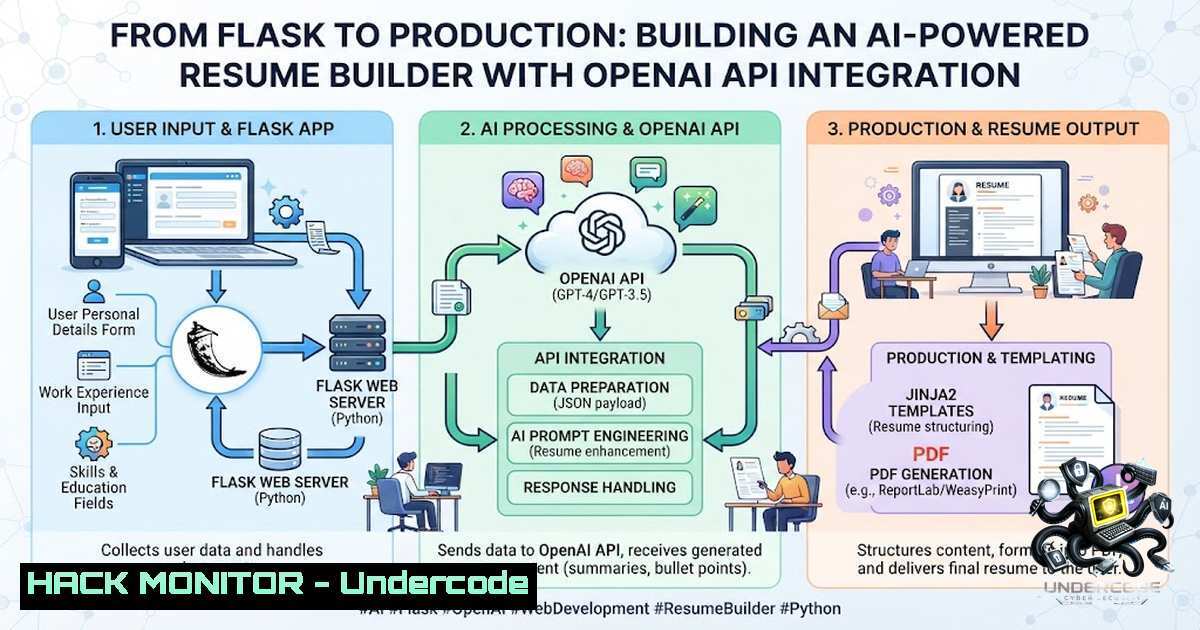
The intersection of artificial intelligence and web development has created unprecedented opportunities for automating complex document processing tasks. Smart Resume Builder, a university capstone project developed by Noor Fatima and her team at the BSCS program, demonstrates how AI-powered applications can transform the traditional resume creation process through intelligent parsing, content generation, and ATS optimization. This project showcases the practical implementation of OpenAI’s API within a Flask web framework, addressing the growing demand for tools that help job seekers navigate increasingly sophisticated applicant tracking systems while maintaining user control and data privacy.
Learning Objectives
- Understand the architecture of an AI-powered web application integrating OpenAI API with document processing pipelines
- Master prompt engineering techniques for generating tailored, ATS-optimized resume content
- Implement secure API key management and error handling in production-grade Flask applications
You Should Know
- Document Parsing Pipeline: From Upload to Structured Data
The Smart Resume Builder implements a robust document ingestion system capable of handling multiple file formats through Python libraries. The parsing workflow begins with file validation and MIME type checking before delegating to format-specific handlers. For PDF documents, pypdf extracts text content while preserving structural elements like headings and bullet points. The python-docx library handles DOCX files through the python-docx package, which exposes paragraph and table structures for granular content extraction. TXT files are processed with basic text splitting and encoding detection to handle various character sets.
Linux Implementation Example:
 Install required system dependencies for PDF processing on Ubuntu/Debian
sudo apt-get update
sudo apt-get install -y poppler-utils libpoppler-dev
pip install pypdf python-docx PyPDF2

Install additional text extraction tools
pip install pdfplumber python-magic
Windows Setup:
 Using Chocolatey for dependency management
choco install poppler
pip install pypdf python-docx python-magic-bin
The parsing pipeline implements error handling for corrupted files through try-except blocks and fallback mechanisms. When OCR is required for scanned documents, the system can integrate Tesseract via pytesseract, though this increases processing time. The extracted text undergoes preprocessing including whitespace normalization, encoding standardisation to UTF-8, and removal of non-printable characters. This cleaned data then populates the application’s internal data model, mapping fields like contact information, work experience, education, and skills to database columns. The system maintains audit logs of all parsing activities, crucial for debugging and user support.
2. OpenAI API Integration and Secure Configuration
Connecting the Flask application to OpenAI’s API requires careful attention to security, error handling, and response streaming. The implementation uses environment variables for API keys, never hardcoding credentials within the source code. A configuration class loads settings from a .env file using python-dotenv, ensuring development and production environments remain separate. The API client implements retry logic with exponential backoff to handle rate limiting and temporary network failures.
Configuration File Example (.env):
OPENAI_API_KEY=sk-xxxxxxxxxxxxxxxxxxxxxxxxxxxxxxxxxxxxxxxx
OPENAI_MODEL=gpt-4-turbo
MAX_TOKENS=2000
TEMPERATURE=0.7
RATE_LIMIT_PER_MINUTE=60
Secure API Call Implementation:
import openai
from functools import lru_cache
import time
from flask import current_app

class OpenAIClient:
def <strong>init</strong>(self):
self.api_key = os.environ.get('OPENAI_API_KEY')
if not self.api_key:
raise ValueError("OPENAI_API_KEY not found in environment")

openai.api_key = self.api_key
self.model = os.environ.get('OPENAI_MODEL', 'gpt-3.5-turbo')
self.max_retries = 3

def generate_content(self, prompt, temperature=0.7, max_tokens=1500):
for attempt in range(self.max_retries):
try:
response = openai.ChatCompletion.create(
model=self.model,
messages=[
{"role": "system", "content": "You are a professional resume writer with expertise in ATS optimization."},
{"role": "user", "content": prompt}
],
temperature=temperature,
max_tokens=max_tokens
)
return response.choices[bash].message.content
except openai.error.RateLimitError:
time.sleep(2  attempt)  Exponential backoff
except openai.error.APIError as e:
current_app.logger.error(f"OpenAI API error: {e}")
if attempt == self.max_retries - 1:
raise
return None
The application implements prompt engineering strategies that enhance output quality. System messages establish the assistant’s role, while user prompts include structured templates with placeholders for user data. The prompt incorporates ATS-specific keywords extracted from job descriptions, guiding the AI to generate relevant content. For content improvement, the system sends existing resume sections with improvement instructions, maintaining consistency with the user’s voice. The streaming implementation uses Server-Sent Events (SSE) to provide real-time generation feedback, improving user experience for lengthy content creation.
3. Real-Time Preview and Dynamic Template Rendering
The Smart Resume Builder employs a dual-pane interface where users view template selection and edit content simultaneously. The frontend uses HTML5, CSS3, and vanilla JavaScript for DOM manipulation, with jsPDF and html2canvas handling PDF export. The preview updates in real-time through event listeners triggered by form inputs, storing application state in JavaScript objects serialized as JSON. The three template options—Classic, Modern, and Minimal—are implemented as CSS stylesheets with distinct layout algorithms and typography choices.
Frontend State Management Example:
class ResumeState {
constructor() {
this.data = {
personal: { name: '', email: '', phone: '', address: '' },
experience: [],
education: [],
skills: [],
summary: ''
};
this.template = 'modern';
this.listeners = [];
}

update(field, value) {
this.data[bash] = value;
this.notify();
}

notify() {
this.listeners.forEach(fn => fn(this.data));
}
}

// Real-time preview rendering
function renderPreview(data) {
const preview = document.getElementById('preview-pane');
preview.innerHTML = generateTemplateHTML(data, currentTemplate);
}
The PDF export functionality uses html2canvas to capture the rendered preview as an image, then jsPDF converts it to PDF format. This approach ensures WYSIWYG accuracy but requires careful handling of font embedding and page breaks for multi-page resumes. The system implements a print-optimized stylesheet for better PDF generation, hiding UI elements and adjusting margins. For production deployment, the application could integrate with headless browsers like Puppeteer for more reliable PDF generation, though this increases infrastructure complexity.
4. ATS Keyword Extraction and Optimization Engine
The ATS optimization feature implements a multi-stage process for keyword analysis and suggestion. The system uses natural language processing to extract keywords from job descriptions, performing frequency analysis and TF-IDF scoring to identify critical terms. These keywords are then incorporated into resume sections through prompt engineering, guiding the AI to naturally integrate relevant terminology while maintaining readability. The implementation supports multiple job descriptions per user session, allowing for role-specific customization.
Keyword Extraction Python Script:
from sklearn.feature_extraction.text import TfidfVectorizer
import re
from collections import Counter
import nltk
nltk.download('stopwords')
from nltk.corpus import stopwords

class ATSExtractor:
def <strong>init</strong>(self):
self.stop_words = set(stopwords.words('english'))
self.vectorizer = TfidfVectorizer(stop_words='english', max_features=100)

def extract_keywords(self, job_description, num_keywords=15):
 Clean and tokenize
text = re.sub(r'[^\w\s]', '', job_description.lower())
words = text.split()

Remove stopwords
filtered_words = [w for w in words if w not in self.stop_words]

Count frequencies
word_freq = Counter(filtered_words)

Calculate TF-IDF for relevance scoring
tfidf_matrix = self.vectorizer.fit_transform([bash])
feature_names = self.vectorizer.get_feature_names_out()

Sort by TF-IDF score
tfidf_scores = tfidf_matrix.toarray()[bash]
keyword_scores = list(zip(feature_names, tfidf_scores))
keyword_scores.sort(key=lambda x: x[bash], reverse=True)

return [kw[bash] for kw in keyword_scores[:num_keywords]]

def suggest_keyword_placement(self, resume_text, keywords):
 Identify sections that should include specific keywords
suggestions = {}
for keyword in keywords:
if keyword not in resume_text.lower():
suggestions[bash] = "Consider adding this keyword to your skills or experience section"
return suggestions
The system provides users with a keyword gap analysis, highlighting missing terms and suggesting placement within the resume structure. This feature addresses the common challenge of resumes failing automated screening systems, with studies showing that 75% of applications are rejected by ATS before human review. The implementation maintains a balance between keyword optimization and natural language flow, preventing keyword stuffing that degrades readability.
5. Error Handling and Production-Ready Deployment
Production deployment of the Smart Resume Builder requires robust error handling, logging, and performance monitoring. The Flask application implements global exception handlers returning appropriate HTTP status codes and JSON error responses. The logging configuration captures application events, API errors, and user actions, integrating with services like Sentry for real-time error tracking. The deployment architecture uses Gunicorn as the WSGI server with Nginx as a reverse proxy, providing load balancing and static file serving.
Flask Error Handlers:
from flask import Flask, jsonify, request
import logging

app = Flask(<strong>name</strong>)

@app.errorhandler(400)
def bad_request(error):
return jsonify({
'error': 'Bad Request',
'message': str(error.description)
}), 400

@app.errorhandler(500)
def internal_error(error):
app.logger.error(f'Server Error: {error}')
return jsonify({
'error': 'Internal Server Error',
'message': 'An unexpected error occurred'
}), 500

Request logging middleware
@app.before_request
def log_request_info():
app.logger.info(f'Request: {request.method} {request.url}')
app.logger.info(f'Headers: {request.headers}')
app.logger.info(f'Body: {request.get_data()}')

Rate limiting implementation
from flask_limiter import Limiter
from flask_limiter.util import get_remote_address

limiter = Limiter(
app,
key_func=get_remote_address,
default_limits=["200 per day", "50 per hour"]
)

@app.route('/api/generate', methods=['POST'])
@limiter.limit("10 per minute")
def generate_content():
 API endpoint with rate limiting
pass
The deployment configuration includes database migrations using Alembic for schema versioning, with PostgreSQL recommended for production use. The application uses Flask-SQLAlchemy for ORM, implementing model relationships between users, resumes, and template preferences. Session management employs Flask-Login for authentication and uses secure HTTP-only cookies. The deployment checklist includes setting proper file permissions, configuring SSL/TLS certificates, and implementing a Web Application Firewall for additional protection.
Deployment Commands:
 Production deployment with Gunicorn and Nginx
 Install Gunicorn and required dependencies
pip install gunicorn flask-limiter python-dotenv

Start Gunicorn with multiple workers
gunicorn -w 4 -b 127.0.0.1:8000 app:app

Nginx configuration sample
 /etc/nginx/sites-available/smartresume
server {
listen 80;
server_name your-domain.com;

location / {
proxy_pass http://127.0.0.1:8000;
proxy_set_header Host $host;
proxy_set_header X-Real-IP $remote_addr;
proxy_set_header X-Forwarded-For $proxy_add_x_forwarded_for;
proxy_set_header X-Forwarded-Proto $scheme;
}

location /static {
alias /path/to/static/files;
expires 1d;
}
}
What Undercode Say
- AI-Assisted Not AI-Dependent: The Smart Resume Builder exemplifies the principle that AI tools should augment human judgment rather than replace it. The editable content model ensures users maintain final control over their professional narrative, avoiding the pitfalls of fully automated systems that produce generic, unauthentic results.
-
Security as a Foundation: Proper API key management, environment configuration, and error handling are not afterthoughts but foundational elements of production AI applications. The implementation demonstrates that security considerations must permeate every layer of the stack.
The project’s approach to prompting illustrates that successful AI integration requires understanding both the capabilities and limitations of language models. By incorporating ATS keyword extraction and providing real-time previews, the system addresses the complex challenge of balancing optimization with readability. The architecture choice of using Flask with simple document processing libraries keeps the application accessible while maintaining professional-grade functionality. This project serves as a blueprint for AI-powered document processing applications, showing that with careful design and proper security practices, student teams can build professional tools that provide real value to end users.
Prediction
+1 The trend toward AI-assisted resume building will accelerate adoption of similar tools across educational and professional platforms, creating new opportunities for developers specializing in prompt engineering and document automation.
+1 Continued integration of large language models with traditional web frameworks will lower the barrier to creating sophisticated AI applications, enabling more students and small teams to build innovative solutions.
-1 The reliance on external AI APIs introduces cost and reliability challenges that must be carefully managed, as businesses may become dependent on services subject to pricing changes and availability issues.
-1 Without stringent data privacy measures and clear user consent mechanisms, these applications risk exposing sensitive personal information through API interactions, requiring comprehensive GDPR and CCPA compliance frameworks.
▶️ Related Video (82% Match):
🎯Let’s Practice For Free:
🎓 Live Courses & Certifications:
Join Undercode Academy for Verified Certifications
🚀 Request a Custom Project:
Secure, high-velocity infrastructure and disruptive technological engineering. Contact our engineering team for high-tier development and proprietary systems:
[email protected]
💎 Smart Architecture | 🛡️ Secure by Design | ⭐ Trusted by Thousands
IT/Security Reporter URL:
Reported By: Noorfatimabhattii Universityproject – Hackers Feeds
Extra Hub: Undercode MoN
Basic Verification: Pass ✅


