
Listen to this Post
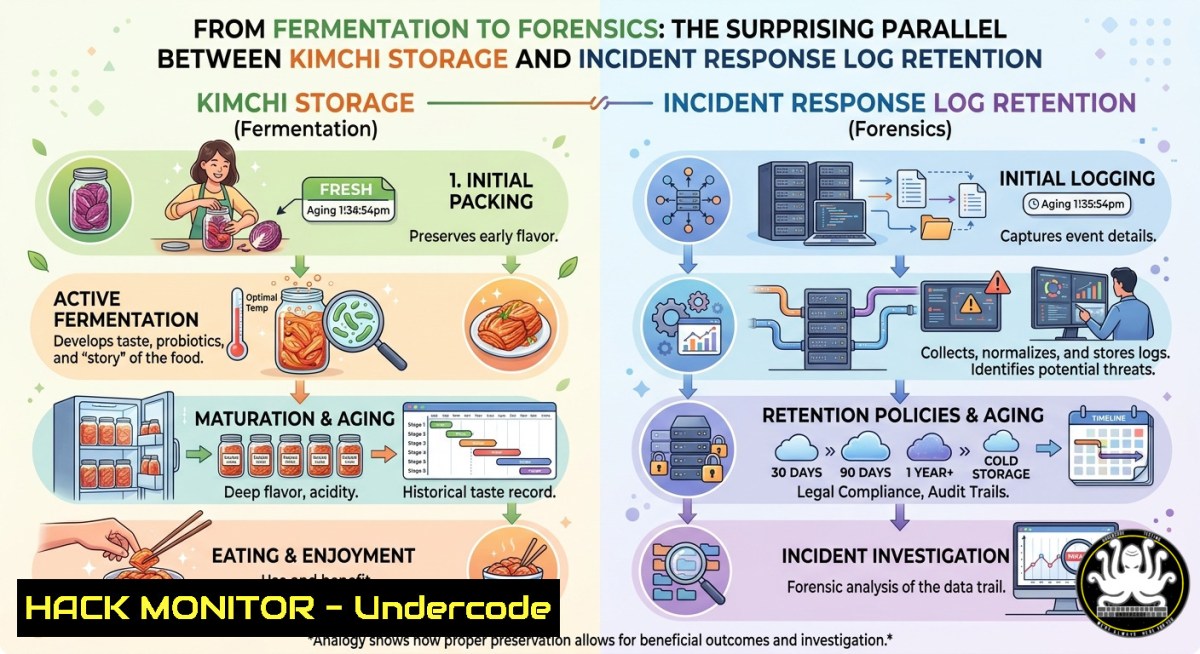
Introduction:
Just as homemade kimchi undergoes fermentation with an optimal storage window before quality degrades, cybersecurity logs and incident response artifacts have finite retention periods that balance utility against storage costs and compliance risks. The seemingly casual poll question—“How long can I store homemade kimchi in the fridge?”—mirrors a critical operational dilemma faced by security teams: should you keep raw telemetry for 3 months, 6 months, 1 year, or “until it embalms itself”? In this article, we unpack the technical shelf‑life of incident response data, adversary simulation TTPs, and email security logs, providing actionable commands and step‑by‑step guides for Linux, Windows, and cloud environments.
Learning Objectives:
- Determine optimal log retention windows (3, 6, 12+ months) based on regulatory mandates, threat intelligence, and storage ROI.
- Implement TTP‑driven incident response workflows that keep adversary simulation artifacts fresh and actionable.
- Master email security hardening and phishing incident response using open‑source tools and native OS commands.
You Should Know:
- The 3‑6‑12 Month Rule for Log Retention – Why Your SIEM Is Not a Pickle Jar
Log retention directly impacts your ability to investigate compromises and comply with standards (PCI‑DSS 3.4, HIPAA, GDPR). Treat logs like kimchi: too short a window (3 months) misses slow‑burn APTs; too long (1+ year) accumulates noise and cost. Most mature teams adopt a tiered approach:
– 3 months: high‑volume firewall, DNS, and DHCP logs.
– 6 months: authentication logs (Windows Event ID 4624, Linux auth.log).
– 12+ months: critical security alerts, full packet captures (PCAPs) of confirmed incidents, and forensic memory dumps.
Linux – logrotate configuration for /var/log/secure (6‑month retention):
cat /etc/logrotate.d/secure
/var/log/secure {
monthly
rotate 6
compress
delaycompress
missingok
notifempty
create 0600 root root
}
Windows – manage Security Event Log retention via PowerShell (6 months, 200 MB):
 Set max size and retention policy
wevtutil sl Security /ms:204800 /rt:true
 View current settings
wevtutil gl Security | findstr "retention maxSize"
Step‑by‑step: Evaluate your compliance obligations, then script scheduled purges. Never delete logs older than your shortest required retention unless space forces a risk acceptance. Use a SIEM (e.g., Wazuh, Splunk) to index and tier cold storage to S3 Glacier or Azure Blob Archive tier after 6 months.
- TTP Documentation Shelf‑Life – Keeping Adversary Simulation Fresh
Tactics, Techniques, and Procedures (TTPs) from last year’s red team exercise may be as stale as kimchi left open on the counter. Attackers constantly evolve; your threat emulation must reflect the current MITRE ATT&CK® v14+ landscape. The post’s claim of “Unique TTP & Elite Adversary Simulation” demands continuous updates. Use Atomic Red Team to test technique freshness.
Linux – clone and run a recent TTP (e.g., T1059 – Command and Scripting Interpreter):
git clone https://github.com/redcanaryco/atomic-red-team.git
cd atomic-red-team/atomics/T1059
./T1059.yaml -t "Command and Scripting Interpreter"
Windows – invoke an atomic test for T1566 (Phishing):
Invoke-AtomicTest T1566 -TestNames "Spearphishing Attachment"
Step‑by‑step guide:
a) Map your environment’s crown jewels to MITRE ATT&CK.
b) Schedule monthly TTP refresh sessions: review newly added techniques, retest mitigations.
c) Retire any technique that has not been observed in the wild for six consecutive months (check ATT&CK Groups or CISA alerts).
d) Document the “best‑by” date on every adversary simulation report.
- Email Security Incident Response – Real‑Time Phishing Triage
Email remains the 1 initial access vector. The original post highlights “Email Security” as a core service. When a suspected phishing email arrives, treat it with the same urgency as checking kimchi for mold. Below is a validated IR playbook.
Step‑by‑step guide for phishing incident response:
- Isolate the threat: instruct the user to mark the email as junk and move it to a quarantine folder. On Exchange Online:
Get-Mailbox -ResultSize Unlimited | Search-Mailbox -SearchQuery 'Subject:"Invoice overdue"' -DeleteContent
- Extract indicators: using Linux `grep` and `awk` on an email EML file:
cat suspicious.eml | grep -E "From:|Return-Path|X-Originating-IP" | uniq
- Check URLs safely (without clicking): use `curl` with a sandboxed resolver:
curl -sI https://example-phish-link.com | head -n 1
- Block at gateway: add domain or sender to block list (example for Postfix):
echo "bad-domain.com REJECT" >> /etc/postfix/access && postmap /etc/postfix/access && systemctl reload postfix
- Hunt across environment for similar messages using O365 Graph API or grep of mail logs.
-
Adversary Simulation Setup with Open‑Source Tools – From Kimchi Brine to Full Control
To simulate elite adversaries, build a repeatable lab using CALDERA (by MITRE) or Infection Monkey. This section provides a 20‑minute setup on Linux.
Linux – install CALDERA and run an automated attack plan (plugin):
git clone https://github.com/mitre/caldera.git --recursive
cd caldera
pip3 install -r requirements.txt
python3 server.py --insecure
 Access http://localhost:8888, default admin/admin
Create a custom adversary profile based on the FIN7 TTPs:
1. Navigate to “Adversaries” → “New”.
- Add phases: Recon (T1595), Resource Development (T1587), Initial Access (T1566), Execution (T1059).
- Deploy agents on a Windows target (download Caldera agent via PowerShell).
- Run the operation and collect telemetry to tune your detection rules.
Windows – run Atomic Red Team for a single TTP (T1134 – Access Token Manipulation):
Install-Module -Name AtomicRedTeam -Force
Import-Module AtomicRedTeam
Invoke-AtomicTest T1134
- Cloud Hardening for Incident Response – Immutable Logging and Rapid Triage
Cloud environments require different “storage recipes” than on‑prem. Use native services to enforce log immutability and rapid search.
AWS – enable CloudTrail log validation and 365‑day retention with S3 Object Lock (like “embalm yourself” mode):
aws s3api put-bucket-versioning --bucket my-security-logs --versioning-configuration Status=Enabled
aws s3api put-object-lock-configuration --bucket my-security-logs --object-lock-configuration 'ObjectLockEnabled="Enabled",Rule={DefaultRetention={Mode="GOVERNANCE",Days=365}}'
Azure – set diagnostic settings for all subscriptions to send to a Log Analytics workspace with 6‑month retention:
$workspace = Get-AzOperationalInsightsWorkspace -Name "securityWorkspace"
Set-AzOperationalInsightsWorkspace -ResourceGroupName "secRG" -Name "securityWorkspace" -RetentionInDays 180
Step‑by‑step cloud incident readiness:
- Enable GuardDuty (AWS) or Microsoft Defender for Cloud.
- Create a CloudWatch Event rule that triggers a Lambda function on high‑severity findings to automatically isolate compromised EC2 instances.
- Test the response monthly – treat as “kimchi taste test”.
- Vulnerability Exploitation and Mitigation – The Patch Cycle as Fermentation Control
Just as kimchi pH drops over time, vulnerabilities age and become more dangerous as public exploits mature. Use the 3‑6‑12 patch window: critical (3 days), high (6 days), moderate (12 days). But beyond 12 months, a vulnerability is either “embalmed” (mitigated by compensating controls) or a ticking bomb.
Linux – check for kernel vulnerabilities and apply live patch (canonical livepatch):
sudo apt install snapd
sudo snap install canonical-livepatch
sudo canonical-livepatch enable YOUR_TOKEN
Windows – list installed patches and missing security updates:
Get-HotFix | Select-Object InstalledOn, HotFixID
Get-WUList | Where-Object { $<em>.IsInstalled -eq $false -and $</em>.Severity -eq "Critical" }
Mitigation command (disable SMBv1 as a compensating control):
Set-SmbServerConfiguration -EnableSMB1Protocol $false -Force
- Incident Response Evidence Preservation – The Forensics “Jar”
When an incident occurs, preserve the digital evidence exactly as you would seal kimchi to prevent contamination. Use the following order of volatility (RFC 3227).
Linux – capture memory (LiME) and disk hashes:
sudo dd if=/dev/mem of=memdump.raw bs=1M
sudo sha256sum /dev/sda1 > disk_hash.txt
Windows – acquire memory with WinPMEM (open source) and FTK Imager (command line):
.\winpmem_mini_x64_rc2.exe memdump.raw
 FTK Imager CLI (if installed)
.\ftkimager.exe --drive 0 --destination evidence.E01 --hash sha256
Step‑by‑step evidence handling:
- Run `lsof` (Linux) or `Handle` (Windows) to list open files before shutdown.
- Create a write‑blocked copy of the disk (use `dd` with
conv=noerror,sync). - Compute hashes and store in a separate secure location.
- Document chain of custody exactly like a recipe log – including timestamps, personnel, and tool versions.
What Undercode Say:
- Key Takeaway 1: Log retention is not “set and forget” – adopt a tiered 3/6/12‑month strategy that aligns with compliance, storage costs, and threat intelligence updates, just as kimchi storage depends on temperature, salt levels, and desired sourness.
- Key Takeaway 2: Adversary simulation TTPs expire faster than most security teams realize; schedule monthly refreshes using MITRE ATT&CK® v14+ and open‑source tools like CALDERA or Atomic Red Team to avoid running stale attacks that no longer reflect real adversaries.
Analysis (~10 lines): The original LinkedIn poll about kimchi storage cleverly masks a fundamental security governance question: how long should you retain anything – logs, TTP documentation, evidence, or even access credentials – before it loses value or becomes a liability? Most breaches are discovered after more than 100 days (average dwell time), making 3‑month retention dangerously short. Yet keeping everything for “1 year or embalmed” leads to exabyte‑scale data lakes that nobody audits. The sweet spot is a risk‑based, dynamic policy: retain raw telemetry for 6 months, pivot to aggregated metadata for 12+, and purge at 36 months unless legally held. The “kimchi principle” also applies to attack simulations – TTPs older than 6 months should be revalidated, because threat actors ferment new techniques faster than your red team updates its playbook. In short: don’t let your security program’s shelf‑life expire like forgotten homemade kimchi.
Prediction:
By 2027, AI‑driven log management will automate retention tiering based on real‑time threat intelligence and legal holds, dynamically shrinking or extending windows without human intervention. However, the rise of adversarial machine learning will also accelerate TTP evolution, forcing incident response teams to update their simulation libraries every two weeks – not every six months. Organizations that treat log retention and TTP freshness with the same seasonal discipline as fermenting kimchi will gain a decisive advantage; those who don’t will find their evidence “embalmed” in useless, unsearchable blobs or their adversary simulations completely disconnected from the modern threat landscape. Expect compliance frameworks (SOC 3, NIST 2.0) to mandate explicit “TTP refresh intervals” by 2026, turning the kimchi poll into a prescient security best practice.
▶️ Related Video (78% Match):
🎯Let’s Practice For Free:
IT/Security Reporter URL:
Reported By: Internetarchaeology Hope – Hackers Feeds
Extra Hub: Undercode MoN
Basic Verification: Pass ✅
🎓 Live Courses & Certifications:
Join Undercode Academy for Verified Certifications
🚀 Request a Custom Project:
Secure, high-velocity infrastructure and disruptive technological engineering. Contact our engineering team for high-tier development and proprietary systems:
[email protected]


