Listen to this Post
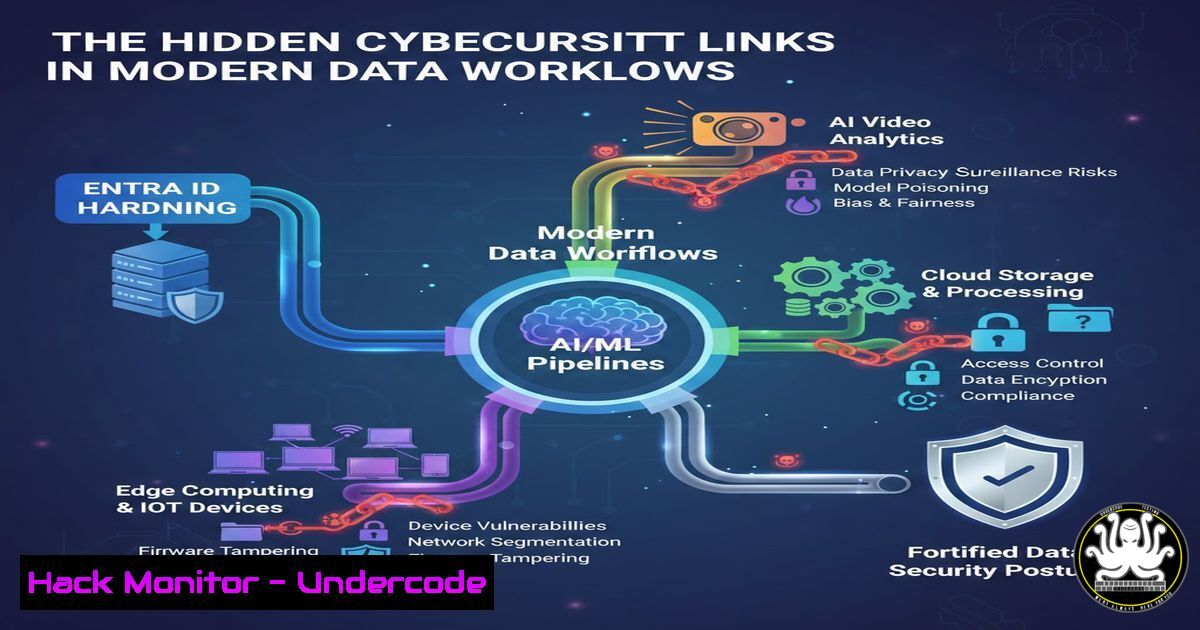
Introduction:
While scrolling through LinkedIn, you might see a casual post about data-heavy work on a train, flanked by automated marketing messages about AI-optimized video performance. This seemingly mundane interaction forms a microcosm of the modern digital ecosystem, where cloud identity management, data analytics, and AI-driven marketing tools converge, creating a complex and often overlooked attack surface. For cybersecurity and IT professionals, understanding the technical seams between platforms like Microsoft Entra ID (formerly Azure AD), cloud data pipelines, and third-party AI APIs is critical for securing both enterprise infrastructure and digital marketing assets.
Learning Objectives:
- Understand how to secure Entra ID/Azure environments against common misconfigurations that could expose sensitive data.
- Learn to analyze and secure data pipelines used for heavy analytics, such as those referenced in “data-heavy” work.
- Identify and mitigate security risks in integrated third-party services and AI-driven marketing APIs.
You Should Know:
- Securing the Foundation: Hardening Entra ID and Azure Subscriptions
The post author’s expertise in replacing lengthy audit reports with actionable Entra ID assessments highlights a critical pain point: overwhelming data leading to inaction. The core security begins with a hardened identity layer.
Step-by-Step Guide:
Step 1: Inventory and Reduce Attack Surface.
Use Microsoft Graph PowerShell to list all applications and service principals, identifying unused or overly permissive entries.
 Connect to Microsoft Graph (Requires Module <code>Microsoft.Graph</code>)
Connect-MgGraph -Scopes "Application.Read.All", "Directory.Read.All"
 Get all service principals
$servicePrincipals = Get-MgServicePrincipal -All
 Filter for those with high-risk permissions (e.g., Directory.ReadWrite.All)
$highRiskSPs = $servicePrincipals | Where-Object { $<em>.AppRoles | Where-Object { $</em>.Value -eq "Directory.ReadWrite.All" } }
$highRiskSPs | Format-List DisplayName, AppId, Id
Step 2: Enforce Conditional Access Policies.
Move beyond reporting to enforcement. Create a policy to block legacy authentication and require multi-factor authentication (MFA) for all users, especially those accessing analytics or marketing portals.
 While policies are GUI-configured in Entra ID, their status can be queried via CLI
 Using Azure CLI:
az account set --subscription <Your-Subscription-ID>
 List Conditional Access policies
az rest --method get --url 'https://graph.microsoft.com/v1.0/identity/conditionalAccess/policies'
Step 3: Implement Privileged Identity Management (PIM).
Configure just-in-time admin access for roles like Global Reader, Security Administrator, and anyone managing video analytics or AI model data. This limits the “standing access” that attackers seek.
2. Analyzing “Data-Heavy” Workflows: Security in Analytics Pipelines
The mention of “VERY data heavy” work implies the use of services like Azure Synapse, Data Factory, or Power BI. These pipelines are goldmines for data exfiltration if not properly segmented and monitored.
Step-by-Step Guide:
Step 1: Encrypt Data at Rest and in Transit.
Ensure all analytics storage (Azure SQL, Storage Accounts) uses customer-managed keys (CMK) in Azure Key Vault, not Microsoft-managed keys.
 Create a Key Vault and key for SQL Server TDE
az keyvault create --name <YourKeyVault> --resource-group <YourRG> --location eastus
az keyvault key create --vault-name <YourKeyVault> --name myTDEEKey --protection software
 Assign the key to your SQL Server for Transparent Data Encryption (TDE)
Step 2: Implement Network Segmentation.
Use Private Endpoints for analytics services. Do not allow public internet access to databases containing marketing performance data or user engagement metrics.
 Create a Private Endpoint for an Azure Storage Account (holding video analytics data)
az network private-endpoint create \
--resource-group <YourRG> \
--name pe-storage-analytics \
--connection-name conn-storage-analytics \
--private-connection-resource-id "/subscriptions/<SubID>/resourceGroups/<YourRG>/providers/Microsoft.Storage/storageAccounts/<StorageAccountName>" \
--group-id blob \
--subnet <YourPrivateSubnetID>
Step 3: Audit Data Access.
Enable Diagnostic Settings on all data-related services (Data Factory, Storage) and stream logs to a secured Log Analytics workspace. Create alerts for suspicious bulk data downloads.
- The New Threat Vector: Securing Integrated AI & Marketing APIs
The LinkedIn marketing bot promotes a webinar analyzing “13,000 video ads using AI and machine learning.” Integrating such third-party AI insights tools via API (the “Watch now” link) introduces new risks.
Step-by-Step Guide:
Step 1: API Key and Secret Management.
Never hardcode API keys (e.g., for LinkedIn Marketing, Google Analytics, video AI tools) in source code or config files. Use Azure Key Vault or AWS Secrets Manager.
 Example Python code to retrieve an API secret securely from Azure Key Vault
from azure.identity import DefaultAzureCredential
from azure.keyvault.secrets import SecretClient
credential = DefaultAzureCredential()
secret_client = SecretClient(vault_url="https://<YourKeyVault>.vault.azure.net/", credential=credential)
retrieved_secret = secret_client.get_secret("LinkedInVideoAI-API-Key")
api_key = retrieved_secret.value
 Use api_key in your request
Step 2: Implement Strict API Scope and Consent.
When an application (like a marketing dashboard) requests access to Entra ID or other data, review the requested OAuth2 scopes (User.Read, Analytics.Read.All) meticulously. Use admin consent where appropriate and avoid over-provisioning.
Step 3: Monitor for Anomalous API Activity.
Use Microsoft Defender for Cloud Apps (or similar CASB) to monitor traffic to sanctioned and unsanctioned cloud applications. Look for anomalous data transfers to external marketing or AI service IP addresses.
- From 1000 Findings to 3 Actions: Prioritizing with Threat Modeling
The core philosophy mentioned is reducing noise. Apply a simple threat model to prioritize actions based on the “data-heavy” and “AI video” context: 1) What is valuable? (Video performance data, customer engagement insights, Entra ID admin credentials). 2) How can it be attacked? (Via misconfigured Entra ID apps, unencrypted data pipelines, leaked marketing API keys). 3) What is the easiest to fix with highest impact? This turns audit reports into a strategic action plan.
5. Incident Response Preparation for Compromised Analytics Data
Assume a breach of your video marketing analytics platform. Have a playbook ready.
Step 1: Containment.
Immediately rotate all API keys and secrets related to the compromised service (LinkedIn Marketing API, video AI tool). Revoke existing OAuth tokens in Entra ID.
 Revoke sessions for a specific service principal (application)
Revoke-MgServicePrincipalSignInSession -ServicePrincipalId <ObjectId-of-Suspicious-App>
Step 2: Investigation.
Query your Log Analytics workspace for all data access events from the IP address or user context associated with the marketing tool in the hour/day before detection.
Step 3: Notification.
Determine if the breached analytics data contained personal data (PII) from video viewers or performance data constituting trade secrets, and execute your legal/compliance notification plan.
What Undercode Say:
- Convergence is the New Attack Surface: The greatest modern risks exist not in isolated systems, but in the interconnections between them—like between Entra ID, a cloud data warehouse, and a third-party AI video analytics API. Securing the “glue” is paramount.
- Action Over Information: The industry shift, as highlighted by the author’s mission, from exhaustive reporting to prioritized, executable security actions is not just efficient—it’s a strategic necessity to reduce mean time to remediation (MTTR).
Analysis: The LinkedIn post, though brief, perfectly frames a modern IT professional’s reality: performing complex, data-intensive work across borders (cloud regions) while being inundated with AI-powered productivity tools. The cybersecurity imperative is to ensure that this efficiency and insight does not come at the cost of security. The data-heavy analytics must be encrypted and access-controlled. The enticing AI marketing tools must be integrated with zero-trust principles. By applying hardened identity governance, secure data pipeline configurations, and rigorous API security to these everyday workflows, organizations can protect their most valuable assets—their data and their customer trust—in a hyper-connected digital landscape.
Prediction:
The fusion of AI-driven business intelligence (like video ad optimization) with core IT infrastructure will accelerate, making AI APIs a primary attack target. We will see a rise in sophisticated supply-chain attacks targeting the libraries and APIs used by marketing and analytics teams. Furthermore, AI will be used offensively to analyze public data (like LinkedIn posts about tech stacks) to craft hyper-targeted phishing campaigns against engineers and analysts, making security awareness training for these “data-heavy” roles as critical as any technical control. The future of cybersecurity in this space lies in automated, AI-powered security tools that can keep pace with the scale and complexity of the AI-driven business tools they are designed to protect.
▶️ Related Video (76% Match):
🎯Let’s Practice For Free:
IT/Security Reporter URL:
Reported By: Obrien David – Hackers Feeds
Extra Hub: Undercode MoN
Basic Verification: Pass ✅


