Listen to this Post
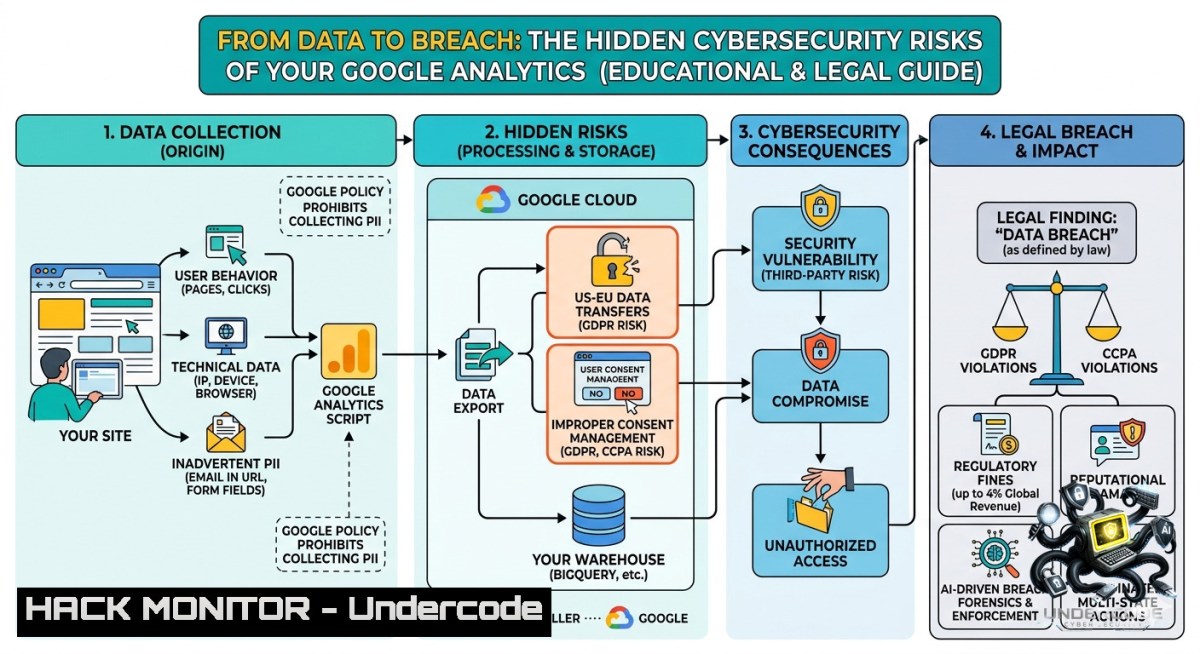
Introduction:
Web analytics platforms like Google Analytics are essential for understanding user behavior and optimizing business growth, as Digital Promotion highlights in their recent post. However, the very data that drives smarter marketing decisions—such as audience location, interaction flows, and conversion metrics—has become a prime target for cybercriminals and a significant source of compliance risk. This article explores the hidden security vulnerabilities in standard analytics implementations and provides a technical roadmap for hardening your tracking infrastructure against data leakage, API abuse, and privacy regulation violations.
Learning Objectives:
- Implement server‑side tagging to prevent client‑side data exposure and block ad‑blocker evasion.
- Harden Google Analytics API credentials and automate secure data extraction using Python.
- Configure privacy‑first alternatives and consent management systems to meet GDPR/PECR requirements.
You Should Know:
1. Client‑Side Tracking Vulnerabilities and Server‑Side Mitigation
Standard Google Analytics implementations rely on JavaScript snippets (gtag.js) that run directly in the user’s browser. This exposes tracking logic and data transmission to malicious actors, who can intercept HTTP requests, inject false events, or scrape sensitive parameters like User IDs and custom dimensions. Moreover, ad‑blockers often block client‑side requests, leading to incomplete datasets. Server‑side tagging creates an intermediary layer on your infrastructure that processes, filters, and forwards data to Google Analytics, thereby bypassing ad‑blockers and keeping raw data out of the client’s reach. A server‑side Google Tag Manager (sGTM) container running on a first‑party subdomain (e.g., analytics.yourdomain.com) ensures that all tracking calls appear as legitimate first‑party traffic.
Step‑by‑Step Guide to Deploy Server‑Side Tagging with Google Cloud Run
Prerequisites: A Google Cloud project with billing enabled, a verified domain, and a Google Analytics 4 property.
Linux / macOS (using `gcloud` CLI)
 1. Install and authenticate Google Cloud SDK
curl https://sdk.cloud.google.com | bash
exec -l $SHELL
gcloud init
gcloud auth login

<ol>
<li>Enable required APIs
gcloud services enable run.googleapis.com \
tagmanager.googleapis.com \
cloudbuild.googleapis.com</p></li>
<li><p>Deploy the sGTM container image
gcloud run deploy sgtm \
--image gcr.io/cloud-tagging-10302018/gtm-cloud-image:stable \
--platform managed \
--region us-central1 \
--allow-unauthenticated \
--memory 512Mi</p></li>
<li><p>Note the generated URL (e.g., https://sgtm-xyz-uc.a.run.app)</p></li>
<li>In Google Tag Manager UI, create a new server container and set the URL to your Cloud Run service
Windows (using PowerShell + gcloud)
 Download and install Google Cloud SDK from https://cloud.google.com/sdk/docs/install
 After installation, run in PowerShell as Administrator:
gcloud init
gcloud auth login
gcloud services enable run.googleapis.com tagmanager.googleapis.com
gcloud run deploy sgtm --image gcr.io/cloud-tagging-10302018/gtm-cloud-image:stable --platform managed --region us-central1 --allow-unauthenticated
Verification: After deployment, open your browser’s developer tools (F12 → Network tab) and load a page containing your GA4 tag. All hits should now go to `analytics.yourdomain.com` instead of www.google-analytics.com. Use `curl` to test endpoint availability:
curl -I https://analytics.yourdomain.com/collect
 Expected HTTP/2 200 or 204
- Securing GA4 API Access and Automating Data Extraction
Many organizations expose Google Analytics API credentials in insecure ways—embedding service account keys in frontend code, committing them to public GitHub repositories, or failing to rotate secrets. Attackers who obtain these credentials can exfiltrate years of user behavior data or inject malicious configuration. To prevent this, always use OAuth 2.0 for server‑to‑server authentication, restrict API keys by IP address, and implement automated rotation.
Step‑by‑Step: Python Script to Extract GA4 Data with Secured Credentials
- Create a Service Account in Google Cloud Console
– IAM & Admin → Service Accounts → Create new service account.
– Assign role Analytics Viewer.
– Generate a JSON key and store it in a secrets manager (e.g., HashiCorp Vault, AWS Secrets Manager). Never commit it to version control.
2. Install Required Python Libraries
pip install google-analytics-data pandas requests
3. Script to Fetch Real‑Time Metrics
Save the following as `ga4_secure.py`:
import os
from google.analytics.data_v1beta import BetaAnalyticsDataClient
from google.analytics.data_v1beta.types import RunReportRequest
from google.oauth2 import service_account

Load credentials from environment variable (set in CI/CD or secret manager)
creds_json = os.getenv("GA4_SERVICE_ACCOUNT_JSON")
if not creds_json:
raise ValueError("Missing GA4_SERVICE_ACCOUNT_JSON environment variable")

Authenticate
credentials = service_account.Credentials.from_service_account_info(
eval(creds_json),  Replace with proper JSON loader in production
scopes=["https://www.googleapis.com/auth/analytics.readonly"]
)
client = BetaAnalyticsDataClient(credentials=credentials)

Set your GA4 property ID
property_id = "YOUR_GA4_PROPERTY_ID"

Build request
request = RunReportRequest(
property=f"properties/{property_id}",
dimensions=[{"name": "pageTitle"}, {"name": "city"}],
metrics=[{"name": "activeUsers"}],
date_ranges=[{"start_date": "7daysAgo", "end_date": "today"}],
limit=100
)

Execute and print results
response = client.run_report(request)
for row in response.rows:
print(f"Page: {row.dimension_values[bash].value}, City: {row.dimension_values[bash].value}, Users: {row.metric_values[bash].value}")
4. Environment Hardening (Linux)
 Store credentials in environment (temporary, for demo)
export GA4_SERVICE_ACCOUNT_JSON='{"type":"service_account", ...}'

Run script
python3 ga4_secure.py
For automated pipelines, use a cron job or systemd timer with restricted file permissions (600) on the credential file.
What This Accomplishes:
The script programmatically retrieves top pages and user geographic data without exposing any data to the client side. Credentials never leave the server and can be centrally revoked. Attackers who compromise the web server would still need the specific JSON key—defense in depth.
- Achieving GDPR Compliance Through Consent Mode and Data Anonymization
Global privacy regulations (GDPR, CCPA, PECR) mandate that analytics cookies require explicit user consent before placement. However, many websites either ignore this or use incomplete implementation, leading to fines and data leakage lawsuits. Google’s Consent Mode addresses this by adjusting tag behavior based on user consent status—without blocking analytics entirely. When a user denies consent, Google tags anonymize IP addresses, disable advertising cookies, and use cookieless pings for conversion modeling.
Implementation Workflow (Step‑by‑Step)
- Add Consent Mode Snippet Before Any Google Tag
Place this in the `` of your webpage (before gtag.js):window.dataLayer = window.dataLayer || []; function gtag(){dataLayer.push(arguments);} gtag('consent', 'default', { 'ad_storage': 'denied', 'analytics_storage': 'denied', 'functionality_storage': 'denied', 'personalization_storage': 'denied', 'security_storage': 'granted' });
2. Integrate a Consent Management Platform (CMP)
Popular CMPs like CookieYes or Usercentrics provide a UI for users to toggle preferences. Upon user interaction, update consent:
// Called when user clicks "Accept All"
function acceptAll() {
gtag('consent', 'update', {
'ad_storage': 'granted',
'analytics_storage': 'granted'
});
}
3. Enable IP Anonymization in GA4
In your GA4 property, go to Admin → Data Streams → Click your stream → Additional settings → Adjust to mask IP addresses. This replaces the last octet of the IP with zeros.
4. Set Data Retention to Minimum
Admin → Data Settings → Data Retention → Set event data retention to 2 months (instead of 14 months) and reset on new activity.
Testing on Linux / Windows
 Use curl to inspect the consent cookie (default domain)
curl -I https://yourwebsite.com | grep -i "set-cookie._ga"
 If consent is denied, the _ga cookie should not appear in first response
4. Hardening Self‑Hosted Privacy‑First Analytics Alternatives
For organizations in regulated industries (healthcare, finance) or those seeking complete data sovereignty, self‑hosting an analytics platform like Plausible or Matomo eliminates third‑party data sharing. However, self‑hosting introduces server‑level security responsibilities: patch management, firewall rules, database encryption, and DDoS protection.
Deploy Plausible (Open Source, Cookieless) on a VPS
Prerequisites: Ubuntu 22.04 or Debian 12, Docker & Docker Compose, a domain name.
Step‑by‑Step Commands
 1. Update system and install Docker
sudo apt update && sudo apt upgrade -y
sudo apt install docker.io docker-compose -y
sudo systemctl enable docker --1ow

<ol>
<li>Clone Plausible CE repository
git clone https://github.com/plausible/analytics.git
cd analytics</p></li>
<li><p>Configure environment variables
cp plausible-conf.env .env
nano .env
Edit: BASE_URL=https://analytics.yourdomain.com
SECRET_KEY_BASE=(generate with: openssl rand -base64 48)
CLICKHOUSE_PASSWORD=(strong random password)</p></li>
<li><p>Start services (PostgreSQL, ClickHouse, Plausible)
docker-compose up -d</p></li>
<li><p>Set up HTTPS with Nginx and Let's Encrypt
sudo apt install nginx certbot python3-certbot-1ginx -y
sudo nano /etc/nginx/sites-available/analytics
Example Nginx configuration:
server {
listen 80;
server_name analytics.yourdomain.com;
return 301 https://$server_name$request_uri;
}
server {
listen 443 ssl;
server_name analytics.yourdomain.com;
location / {
proxy_pass http://localhost:8000;
proxy_set_header Host $host;
proxy_set_header X-Forwarded-For $proxy_add_x_forwarded_for;
}
}
sudo ln -s /etc/nginx/sites-available/analytics /etc/nginx/sites-enabled/
sudo certbot --1ginx -d analytics.yourdomain.com
sudo systemctl restart nginx
Security Hardening Checklist
- Run `sudo ufw allow 22/tcp; sudo ufw allow 443/tcp; sudo ufw enable`
– Install Fail2ban: `sudo apt install fail2ban -y`
– Schedule automatic updates: `sudo apt install unattended-upgrades -y`
– Regularly rotate ClickHouse and PostgreSQL passwords.
- Auditing Web Analytics for Data Leakage with Developer Tools
Even with proper configurations, PII (personally identifiable information) can inadvertently leak through URL parameters, custom dimensions, or event labels. Common examples include `[email protected]` in page paths or sending user IDs as event parameters. Google Analytics policy strictly prohibits sending PII, but unintentional leaks happen frequently. Regular automated scans can detect and block such leaks.
Linux Command: Scan Access Logs for Potential PII
 Extract all GA4 hit payloads from your nginx access log
grep "/collect" /var/log/nginx/access.log | \
grep -E "(email|@|phone|ssn|password|username)" | \
awk '{print $1, $7}' | uniq -c | sort -1r
Windows PowerShell Script to Inspect Outgoing Requests
 Monitor outbound HTTP requests to Google Analytics endpoints
netsh trace start capture=yes provider=Microsoft-Windows-WinINet tracefile=C:\capture.etl
 After capturing, convert to readable format
netsh trace convert C:\capture.etl
Select-String -Path C:\capture.xml -Pattern "google-analytics.com"
Recommended Mitigation:
- Implement a custom tag in Google Tag Manager that scrubs URL parameters before sending to GA4.
- Use a regex filter to block any hit containing
[a-zA-Z0-9._%+-]+@[a-zA-Z0-9.-]+\.[a-zA-Z]{2,}. - Regularly audit custom dimensions using the GA4 API script shown earlier.
What Undercode Say:
- Analytics is double‑edged: While Digital Promotion correctly emphasizes tracking for growth, the post omits the cybersecurity and compliance burden that comes with collecting user data. Every tracked click is a potential liability.
- Server‑side tagging is no longer optional: For any business handling EU traffic or sensitive data, moving from client‑side to server‑side tagging is the single most effective control to reduce data leakage and defeat ad‑blockers. The cloud deployment steps provided above can be completed in under 30 minutes.
Key Takeaways
- Implement consent mode and IP anonymization immediately if you operate in GDPR/CCPA jurisdictions.
- Automate credential rotation and API monitoring to prevent data exfiltration via compromised service accounts.
- Consider self‑hosted alternatives when data residency or HIPAA compliance is required—but only if you have the DevSecOps maturity to secure the underlying infrastructure.
The core tension remains: business growth demands rich analytics, but regulators demand privacy. The forward‑looking approach is to embed security and consent controls into the analytics pipeline itself—not as an afterthought.
Prediction:
- -1 By 2027, regulatory fines for improper analytics data collection will surpass ransomware payouts as the top financial cyber risk for mid‑sized enterprises. Expect at least one major cloud analytics provider to face a class‑action lawsuit over PII leakage through default tracking configurations.
- +1 The rise of privacy‑enhancing technologies (PETs) such as differential privacy and on‑device aggregation will enable “cookieless analytics” that are both GDPR‑compliant and highly accurate. Open‑source platforms like Plausible will gain enterprise adoption, forcing Google to release a fully on‑prem version of GA4.
▶️ Related Video (84% Match):
🎯Let’s Practice For Free:
🎓 Live Courses & Certifications:
Join Undercode Academy for Verified Certifications
🚀 Request a Custom Project:
Secure, high-velocity infrastructure and disruptive technological engineering. Contact our engineering team for high-tier development and proprietary systems:
[email protected]
💎 Smart Architecture | 🛡️ Secure by Design | ⭐ Trusted by Thousands
IT/Security Reporter URL:
Reported By: 3 Simple – Hackers Feeds
Extra Hub: Undercode MoN
Basic Verification: Pass ✅


