Listen to this Post
Introduction:
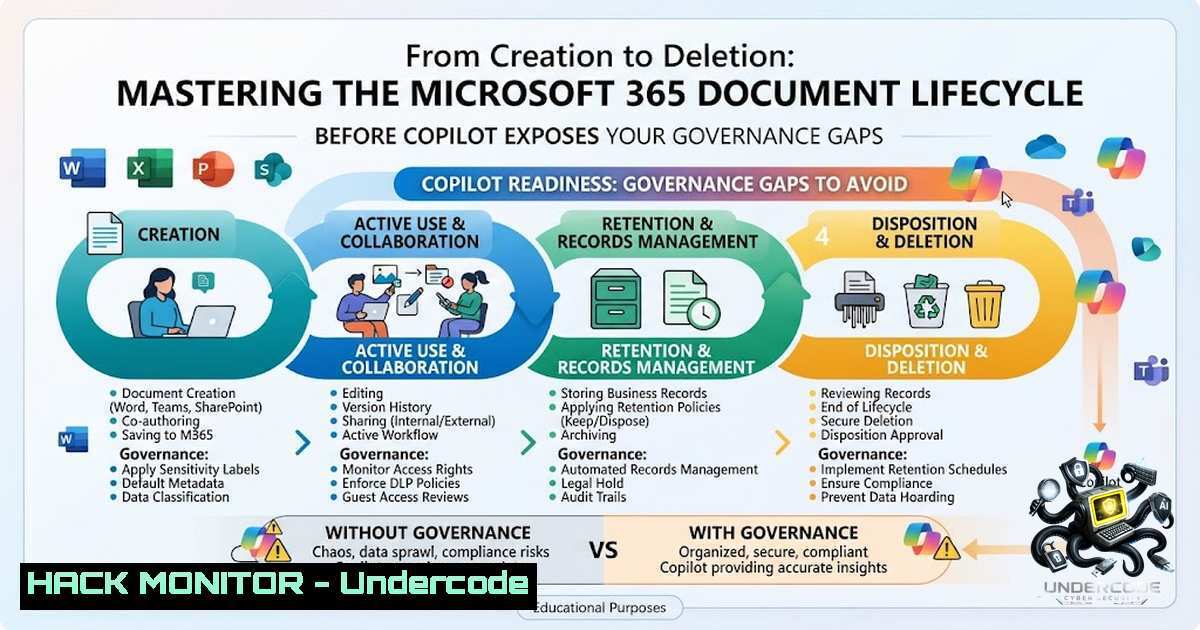
A confidential document doesn’t stay in one place. It moves through people, apps, AI, and policies — and every stage of its journey demands a different control. In Microsoft 365 environments, particularly after deploying Copilot, governance is no longer about static perimeters but about a dynamic system that evolves alongside the document as it flows through the digital lifecycle. This article breaks down the five critical stages of document governance and provides actionable steps to secure each one.
Learning Objectives:
- Understand the five-stage document lifecycle in Microsoft 365 and the unique risks at each phase
- Implement sensitivity labels, DLP policies, and retention rules to enforce governance automatically
- Secure Microsoft 365 Copilot by fixing permissions before AI exposes existing oversharing issues
- Use PowerShell and Purview compliance tools to automate and audit governance controls
- Stage 1: Creation – Automatic Classification Is Non‑Negotiable
When a user creates a document, three questions must be answered immediately: Is it automatically classified? Does it have a sensitivity label? Who should own this document? Relying on users to manually tag content is a recipe for failure. Instead, configure auto-labeling policies in Microsoft Purview to apply sensitivity labels based on content patterns or predefined conditions.
Step‑by‑step: Enable auto‑labeling for new documents
- Navigate to Microsoft Purview compliance portal > Information protection > Auto-labeling.
- Create a new auto-labeling policy and choose Apply a label to content that contains sensitive information types.
- Select the sensitivity label (e.g., “Confidential,” “Internal Only”) and define the conditions (e.g., credit card numbers, passport IDs).
- Set the policy to run in simulation mode first to review accuracy, then switch to enforce.
5. Enable audit logging to track label applications.
PowerShell: Enable sensitivity labels for SharePoint sites
 Connect to SharePoint Online
Connect-SPOService -Url https://yourtenant-admin.sharepoint.com

Enable MIP labels for all sites
Set-SPOTenant -EnableMIPLabels $true

Verify the setting
Get-SPOTenant | Select-Object EnableMIPLabels
- Stage 2: Sharing – DLP Policies Must Block Risky Sharing Before It Happens
The document is shared across Teams, SharePoint, or email. At this stage, you must enforce controls that answer: Who can access this file? Is external sharing allowed? Will DLP block risky sharing?
Step‑by‑step: Create a DLP policy that blocks external sharing of labeled content
1. Go to Microsoft Purview compliance portal > Data loss prevention > Policies > Create policy.
2. Choose a template (e.g., General data protection) or select Custom.
3. Name the policy and scope it to SharePoint, OneDrive, and Exchange.
4. Under Rules, add a condition: Content contains > Sensitivity labels > select “Confidential”.
5. Add an action: Restrict access or encrypt the content and set Block external sharing.
6. Configure user notifications and policy tips to educate users before they share.
7. Test in simulation mode, then activate.
Key consideration: Sensitivity labels are more reliable than pattern matching because the classification decision already exists.
- Stage 3: Copilot – AI Doesn’t Create Exposure; It Reveals What Governance Already Allowed
A user asks Copilot to summarize or analyze a document. The critical insight: Copilot uses the access rights of the end user to determine which data can be presented. If permissions are messy, Copilot doesn’t create the exposure — it reveals what governance already allowed. This makes the Copilot stage especially dangerous for organizations with inherited access and poorly maintained permissions.
Step‑by‑step: Audit and fix permissions before Copilot deployment
- Run a permission audit across SharePoint, OneDrive, and Teams using the Microsoft 365 Access Reviews tool.
- Identify sites with external sharing enabled and over-permissioned users.
- Use Microsoft Purview Insider Risk Management to detect anomalous access patterns.
- Apply least-privilege access by reviewing each site’s permission groups.
- Create a custom DLP policy targeting the Microsoft 365 Copilot and Copilot Chat location to block sensitive content from being surfaced.
PowerShell: Review site permissions
 Connect to SharePoint Online
Connect-SPOService -Url https://yourtenant-admin.sharepoint.com

Get all sites with external sharing enabled
Get-SPOSite | Where-Object { $_.SharingCapability -1e "Disabled" } | Select-Object Url, SharingCapability

Review unique permissions on a specific site
Get-SPOSite -Identity https://yourtenant.sharepoint.com/sites/ProjectX | Select-Object
- Stage 4: Retention – Inactive Documents Still Pose Legal and Compliance Risks
The document becomes inactive but still exists. You must determine: How long should it be retained? Does a retention policy apply? Is legal hold required?
Step‑by‑step: Implement retention labels and legal hold
- In Microsoft Purview compliance portal > Data lifecycle management > Microsoft 365 > Retention labels.
- Create retention labels for different content types (e.g., “Financial Records – 7 years,” “HR Records – 5 years”).
- Publish the labels to specific locations (Exchange, SharePoint, OneDrive).
- For legal hold, use eDiscovery > Hold to preserve content indefinitely for litigation purposes.
- Enable retention lock to prevent any administrator from disabling or reducing retention periods — this requires PowerShell as it cannot be done via UI.
PowerShell: Apply retention lock
 Connect to Security & Compliance PowerShell
Connect-IPPSSession

Create a new retention label with retention lock
New-ComplianceTag -1ame "Regulatory_7Year" -DisplayName "Regulatory – 7 Year Retention" -RetentionAction Keep -RetentionDuration 2555 -RetentionComplianceTagInheritance None -RetentionLock $true
- Stage 5: Deletion – Secure Disposal Must Be Logged and Audited
The document reaches the end of its lifecycle. Ask: Has the retention period expired? Can the file be deleted safely? Is disposal being logged and audited?
Step‑by‑step: Configure secure deletion with audit trails
- In the retention label, define the disposition action (e.g., “Delete automatically” or “Review before deletion”).
- Enable disposition review so that designated users can approve or reject deletion.
- Ensure audit logging is enabled in Microsoft Purview to track all deletion events.
- Use eDiscovery to perform a final search before deletion to confirm no legal holds apply.
- Generate a disposition report to demonstrate compliance during audits.
PowerShell: Enable unified audit log
 Enable audit logging for the tenant
Set-AdminAuditLogConfig -UnifiedAuditLogIngestionEnabled $true

Search audit logs for deletion events
Search-UnifiedAuditLog -Operations "FileDeleted" -StartDate (Get-Date).AddDays(-30) -EndDate (Get-Date)
6. Hardening the Entire Lifecycle with Microsoft Purview
Microsoft Purview provides a unified framework to manage security, compliance, and governance across the entire data lifecycle. The Foundational Deployment Blueprint for Copilot recommends using Purview to prevent data loss, mitigate insider risk, and ensure compliance with organizational and regulatory requirements.
Essential Purview configurations:
- Sensitive Information Types (SITs): Define custom SITs for industry-specific data (e.g., patient records, financial statements).
- Exact Data Match (EDM): Use EDM-based classification for precise detection of sensitive data.
- Auto-labeling: Deploy auto-labeling policies based on SITs, not just user actions.
- Endpoint DLP: Extend protection to devices to prevent data exfiltration via USB or cloud uploads.
- Windows and Linux Commands for Microsoft 365 Governance
While Microsoft 365 is cloud-1ative, administrators often manage hybrid environments. Below are essential commands for integrating on-premises systems with M365 governance.
Windows (PowerShell) – Connect to Microsoft 365
 Install Microsoft Graph PowerShell module
Install-Module Microsoft.Graph -Scope CurrentUser

Connect to Microsoft Graph
Connect-MgGraph -Scopes "User.Read.All", "Group.ReadWrite.All", "SensitivityLabel.Read.All"

Get all sensitivity labels
Get-MgSecurityDataSecurityAndGovernanceSensitivityLabel | Format-Table DisplayName, Id
Linux (bash) – Using Microsoft Graph API with curl
 Obtain an access token (using client credentials flow)
curl -X POST https://login.microsoftonline.com/your-tenant-id/oauth2/v2.0/token \
-d "client_id=your-client-id" \
-d "client_secret=your-client-secret" \
-d "scope=https://graph.microsoft.com/.default" \
-d "grant_type=client_credentials"

Use the token to list sensitivity labels
curl -X GET https://graph.microsoft.com/v1.0/security/dataSecurityAndGovernance/sensitivityLabels \
-H "Authorization: Bearer $TOKEN"
Azure CLI – Manage Microsoft 365 compliance settings
 Login to Azure
az login

Get Microsoft 365 compliance settings (requires Azure Resource Graph)
az rest --method get --url "https://management.azure.com/providers/Microsoft.OperationalInsights/workspaces?api-version=2021-12-01-preview"
What Undercode Say:
- Key Takeaway 1: Governance is not a static perimeter but a dynamic system that must evolve alongside the document as it flows through the digital lifecycle. Good intentions won’t save sensitive data — clear labels, permissions, and policies will.
-
Key Takeaway 2: The Copilot stage is the new critical frontier. AI doesn’t create a new permission model; it exposes the one you already have. If your governance is held together with hope and inherited access, Copilot will make that terrifyingly visible.
Analysis: The most profound shift in modern Microsoft 365 governance is the transition from reactive, point-in-time controls to proactive, lifecycle-based strategies. Organizations that treat governance as a “set it and forget it” exercise are uniquely vulnerable when AI tools like Copilot begin querying their data estate. The reality is that M365 provides the tools for protection, yet the efficacy of those controls ultimately depends on an intentional, lifecycle-based strategy that treats every stage from creation to deletion as a critical security gate. When designing these workflows, the sharing and Copilot stages are most often overlooked by teams trying to balance security with ease of use. The solution is not more tools but better orchestration of existing ones — labels, DLP, retention, and auditing must work in concert, not in silos.
Prediction:
- +1 Organizations that proactively fix permissions and implement auto-labeling before Copilot deployment will gain a significant competitive advantage, as their AI assistants will deliver accurate insights without leaking sensitive data.
-
+1 Microsoft Purview will continue to expand its AI-1ative capabilities, enabling real-time classification and dynamic policy adjustments based on user behavior and content context.
-
-1 Companies that delay governance modernization will face an increasing number of data breach notifications, regulatory fines, and reputational damage as AI tools expose decades of accumulated permission debt.
-
-1 The shortage of skilled Microsoft 365 governance professionals will drive up consultancy costs and create a “haves vs. have-1ots” divide in enterprise security maturity.
-
+1 The integration of Copilot with Purview DLP will mature rapidly, allowing organizations to set granular controls on what AI can access, summarize, and share — turning AI from a risk into a governance enforcer.
▶️ Related Video (76% Match):
https://www.youtube.com/watch?v=2Cr5x38ocYg
🎯Let’s Practice For Free:
🎓 Live Courses & Certifications:
Join Undercode Academy for Verified Certifications
🚀 Request a Custom Project:
Secure, high-velocity infrastructure and disruptive technological engineering. Contact our engineering team for high-tier development and proprietary systems:
[email protected]
💎 Smart Architecture | 🛡️ Secure by Design | ⭐ Trusted by Thousands
IT/Security Reporter URL:
Reported By: Johnpj A – Hackers Feeds
Extra Hub: Undercode MoN
Basic Verification: Pass ✅


