Listen to this Post
Introduction:
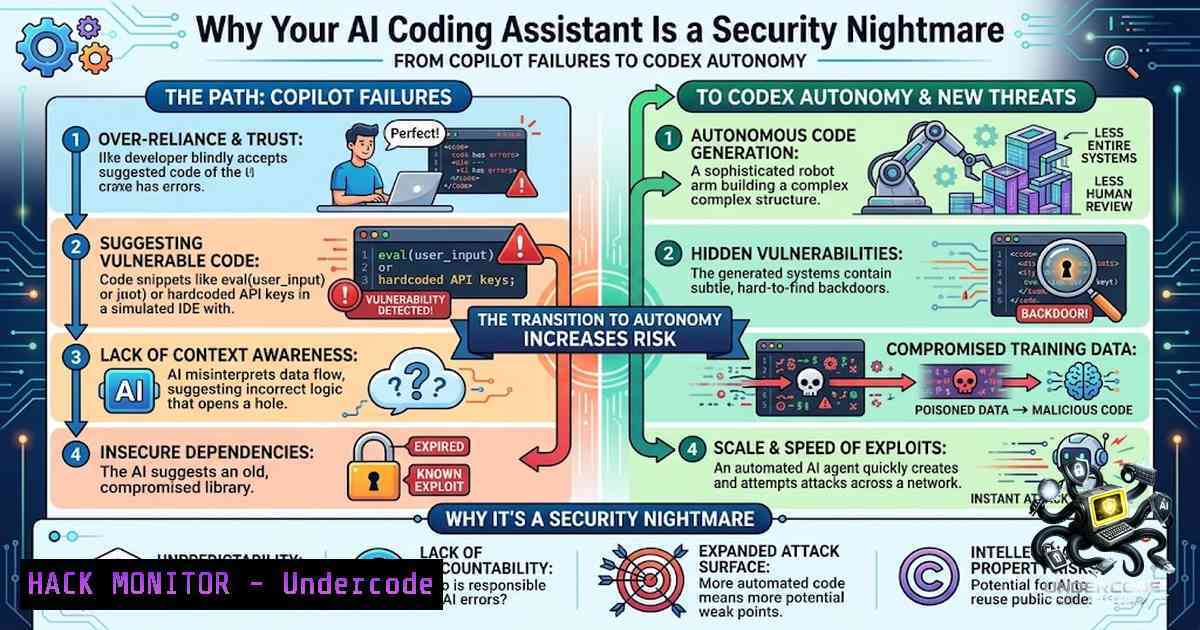
The AI coding revolution has delivered unprecedented productivity gains to developers worldwide, but it has also introduced a sprawling attack surface that most organizations are ill-equipped to manage. When a simple request to insert a table of contents stumps Copilot while Codex autonomously generates complete Low-Level Design (LLD) documents from an Obsidian vault, the contrast reveals not just capability gaps but fundamental security blind spots that threat actors are actively exploiting. As AI pair programming becomes ubiquitous, understanding the cybersecurity implications of these tools is no longer optional—it is an operational necessity.
Learning Objectives:
- Understand the architectural and security differences between GitHub Copilot and OpenAI Codex in production environments
- Identify and mitigate common vulnerabilities in AI-generated code, including injection flaws and insecure dependencies
- Secure Model Context Protocol (MCP) server deployments and Obsidian integrations against remote code execution and credential theft
- Implement practical defense-in-depth strategies for AI-assisted development workflows
You Should Know:
- Copilot vs. Codex: Understanding the AI Assistant Spectrum
The confusion between GitHub Copilot and OpenAI Codex persists because they are related but serve fundamentally different purposes in AI-assisted development. Copilot functions as an intelligent code completion tool that integrates directly into your IDE, providing real-time, synchronous suggestions as you type. It excels at pattern recognition, reducing repetitive coding tasks, and offering inline completions based on immediate context.
Codex, in its current 2025 incarnation, operates as an autonomous software engineering agent that can complete entire development tasks independently. It works asynchronously, taking ownership of tasks that may take minutes or hours to complete, handling end-to-end feature development and complex multi-file projects. Codex operates in isolated cloud environments where it can execute code, run tests, and iterate on solutions without direct developer intervention.
The original OpenAI Codex that powered early versions of Copilot has been superseded by more advanced GPT-4-level code models. Today’s Copilot uses these newer models, while Codex has evolved into a more capable autonomous agent. Many developers now use both complementarily: Copilot for daily coding efficiency and Codex for tackling larger, more complex development tasks.
2. The Hidden Security Cost of AI-Generated Code
Empirical research has revealed alarming security weaknesses in AI-generated code. A comprehensive study analyzing 733 code snippets from GitHub projects found that 29.5% of Python snippets and 24.2% of JavaScript snippets generated by Copilot contained security weaknesses. These vulnerabilities span 43 Common Weakness Enumeration (CWE) categories, including critical issues like CWE-330 (Use of Insufficiently Random Values), CWE-94 (Improper Control of Generation of Code), and CWE-79 (Cross-site Scripting). Notably, eight of these CWEs appear in the 2023 CWE Top-25, underscoring their severity.
The root cause lies in the training data: Copilot’s underlying models are pre-trained on untrusted public GitHub repositories, which are known to contain insecure code patterns. This creates a dangerous feedback loop where insecure patterns propagate through AI suggestions. Research indicates that using AI code generation can lead to a 40% increase in code vulnerabilities and rising maintenance costs in the form of senior developer time.
Beyond individual vulnerabilities, AI-generated code introduces supply chain risks. Nearly half of code snippets produced by leading AI models contain exploitable bugs. AI generators frequently import packages that do not exist, creating opportunities for “slopsquatting” attacks where threat actors publish malicious packages with similar names. With 85-95% of modern applications powered by open-source code, and AI models trained on this same code, attackers are increasingly targeting the foundation everyone builds on.
- CVE-2025-62453 and CVE-2025-62222: Real-World Exploits in the Wild
The theoretical risks of AI coding assistants have materialized into documented vulnerabilities. CVE-2025-62453 affects GitHub Copilot and Visual Studio Code, where improper validation of generative AI output allows an authorized attacker to bypass security features locally. This vulnerability, discovered in June 2025, exposed private source code and secrets to attackers by allowing hidden prompts in pull requests that could exfiltrate private repository data and control Copilot’s responses.
Even more critical is CVE-2025-62222, a command injection flaw in the Visual Studio Code Copilot Chat Extension. This vulnerability allows an unauthorized attacker to execute arbitrary commands on the system over a network due to insufficient input validation in agentic AI components. Affected versions range from 0.27.0 up to but not including 0.32.5. A remote attacker can pass specially crafted data to the application and execute arbitrary commands, effectively gaining control of the developer’s machine.
These CVEs demonstrate that AI coding assistants are not just productivity tools but also attack vectors that require the same rigorous security scrutiny as any other software component in your supply chain.
- MCP Servers: The New Frontier of AI Supply Chain Attacks
The Model Context Protocol (MCP), introduced by Anthropic in late 2024, has become a critical standard for connecting LLMs to external tools and data sources. Major hosts now include Claude Code, Claude Desktop, Cursor, Continue, Cline, and dozens of agent frameworks. However, this standardization has introduced severe security vulnerabilities that threaten the entire AI agent ecosystem.
Security researchers have demonstrated that industry-leading LLMs can be coerced to use MCP tools and compromise an AI developer’s system through malicious code execution, remote access control, and credential theft. The MCP design carries inherent risks because agents concatenate descriptions of all tools they are using into a single context string, allowing one compromised tool to contaminate another through prompt injection.
Perhaps most alarming is the remote code execution vulnerability in MCP’s architectural design. MCP supports STDIO transport, where client applications can start MCP servers as subprocesses and pass parameters that can include arbitrary commands executed with the parent process’s permissions. Security researchers at OX Security found this exploit allowed them to directly execute commands on six official services of real companies and take over thousands of public servers spanning over 200 popular open-source GitHub projects with hundreds of millions of downloads.
While Anthropic argues this behavior is “by design” and that sanitizing configurations is the developer’s responsibility, researchers counter that “the pattern of allowing user-supplied strings to flow directly into a shell execution environment is an anti-pattern that should be deprecated”. They recommend implementing command allowlists by default that block high-risk binaries like sh, bash, powershell, curl, and rm.
5. Securing Obsidian MCP Integrations: A Practical Guide
The integration of Obsidian vaults with AI coding tools via MCP servers represents both a productivity breakthrough and a significant security concern. Cortex, an Obsidian plugin that runs a local MCP server, exposes your vault to AI coding tools like Claude Code, Codex, and OpenCode over HTTP on port 27182. This allows AI tools to read, write, search, and organize notes without cloud services.
To secure this integration:
Linux/macOS Verification:
 Check if port 27182 is already in use
sudo lsof -i :27182
 Test MCP server connectivity
curl http://127.0.0.1:27182/mcp
 Monitor MCP server activity
tail -f ~/.obsidian/plugins/cortex/logs/.log
Windows (PowerShell):
 Check port usage
netstat -ano | findstr :27182
 Test connectivity
Invoke-WebRequest -Uri http://127.0.0.1:27182/mcp
 Monitor logs
Get-Content -Path "$env:APPDATA\obsidian\plugins\cortex\logs.log" -Wait
Security Best Practices:
- Never expose MCP servers to the internet — they should listen only on localhost (127.0.0.1)
- Vet third-party MCP servers before installation — check tool descriptions for suspicious prompts
- Limit tool access — only enable the specific tools your workflow requires
- Audit MCP server activity — monitor for unexpected file reads or writes
- Use project-specific folders — configure AI tools to map to specific Obsidian folders rather than the entire vault
6. Building a Security-Focused AI Development Workflow
Organizations must move beyond blind trust in AI-generated code. The Open Source Security Foundation (OpenSSF) has published “Security-Focused Guide for AI Code Assistant Instructions,” emphasizing that clear, careful, and security-focused prompts can greatly increase the chance that AI assistants produce correct and secure code.
Essential Security Controls:
- Human-in-the-loop review — never deploy AI-generated code directly to production without human review and automated scanning
-
Automated vulnerability scanning — integrate SAST/DAST tools into CI/CD pipelines to catch AI-introduced vulnerabilities
-
Environment isolation — run AI coding assistants in isolated environments with limited permissions
-
Secret management — never allow AI assistants to output API keys, passwords, or secrets; use environment variables or secure vault references
-
Command filtering — implement allowlists for commands executed by AI tools, blocking dangerous binaries
Linux Command for AI Code Security Scanning:
 Install Semgrep for security scanning
pip install semgrep
 Scan AI-generated code for vulnerabilities
semgrep --config=p/security-audit ./ai-generated-code/
 Use OWASP Dependency Check
dependency-check --scan ./ai-generated-code/ --format HTML
Windows PowerShell for Security Scanning:
 Using Snyk for vulnerability scanning
snyk code test ./ai-generated-code/ --severity-threshold=high
 Check dependencies for known vulnerabilities
snyk test --file=package.json
7. Training and Upskilling for the AI Era
The human element remains the most critical line of defense. The Linux Foundation offers “Secure AI/ML-Driven Software Development” (LFEL1012), a free self-paced course that teaches developers to balance speed with security when using AI assistants. This one-hour course covers analyzing security risks and benefits of AI code assistants and provides a digital badge upon completion.
The OWASP Top 10 for LLM Applications (2025) provides a standardized framework for securing AI-powered applications, addressing risks like prompt injection, insecure output handling, and supply chain vulnerabilities. Organizations should map their AI security controls to these frameworks and conduct regular security training for development teams.
What Undercode Say:
- Key Takeaway 1: The productivity gains from AI coding assistants come with a significant security tax — nearly 30% of generated code contains vulnerabilities that must be caught before production.
- Key Takeaway 2: The Model Context Protocol introduces systemic risks that threaten the entire AI agent ecosystem, with architectural flaws enabling remote code execution across thousands of servers.
- Key Takeaway 3: Organizations must implement layered security controls — human review, automated scanning, environment isolation, and continuous training — to safely leverage AI coding tools.
- Key Takeaway 4: The distinction between Copilot (real-time assistant) and Codex (autonomous agent) is critical for risk assessment, as each presents different threat models and requires different security approaches.
- Key Takeaway 5: Security-focused prompting and explicit instructions can significantly reduce the likelihood of AI-introduced vulnerabilities, making developer training as important as technical controls.
Prediction:
- -1 The widening gap between AI coding capabilities and organizational security controls will lead to a major data breach involving AI-generated code within the next 12-18 months, likely through a supply chain attack exploiting slopsquatting or MCP vulnerabilities.
- +1 The cybersecurity industry will respond with specialized AI code security tools, and we will see the emergence of “AI security engineers” as a distinct role focused on securing AI-assisted development pipelines.
- -1 Regulatory scrutiny will intensify, with frameworks like the EU AI Act imposing stricter requirements for AI-generated code validation, potentially slowing adoption but improving security posture.
- +1 Open-source security initiatives like OpenSSF’s AI code assistant guidelines will mature into industry standards, providing practical, battle-tested guidance for secure AI development.
- -1 Organizations that fail to implement mandatory human review and automated scanning for AI-generated code will face increasing technical debt and remediation costs, potentially offsetting any productivity gains from AI adoption.
▶️ Related Video (78% Match):
🎯Let’s Practice For Free:
🎓 Live Courses & Certifications:
Join Undercode Academy for Verified Certifications
🚀 Request a Custom Project:
Secure, high-velocity infrastructure and disruptive technological engineering. Contact our engineering team for high-tier development and proprietary systems:
[email protected]
💎 Smart Architecture | 🛡️ Secure by Design | ⭐ Trusted by Thousands
IT/Security Reporter URL:
Reported By: Jamesagombar In – Hackers Feeds
Extra Hub: Undercode MoN
Basic Verification: Pass ✅


