
Listen to this Post
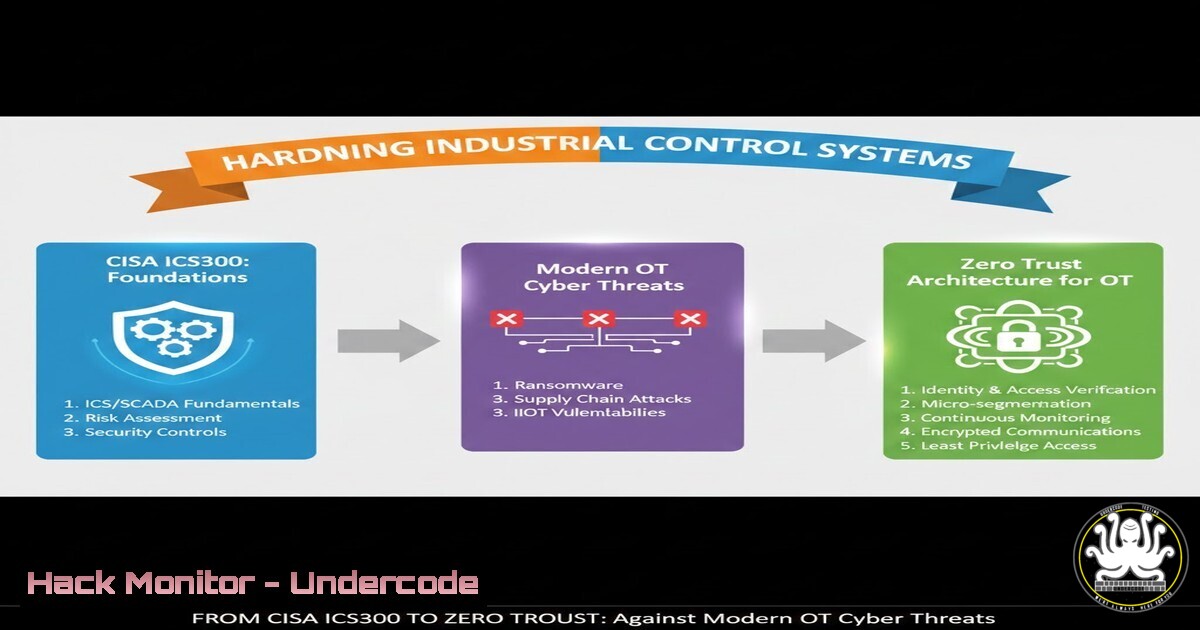
Introduction:
Industrial Control Systems (ICS) and Operational Technology (OT) environments were once protected by air gaps and proprietary protocols. Today, they are prime targets for nation-state actors and ransomware syndicates. The U.S. Department of Homeland Security (DHS) CISA ICS300 training course—”Intermediate Industrial Control System Cybersecurity”—bridges the gap between theoretical frameworks and hands-on defense-in-depth strategies. This article extracts the technical core of that training, delivering actionable commands, vulnerability exploitation insights, and hardening procedures across Windows, Linux, and ICS-specific appliances.
Learning Objectives:
- Understand the architectural weaknesses of legacy ICS/SCADA protocols and how to isolate them using modern network segmentation.
- Execute practical commands and tool configurations for OT asset discovery, vulnerability scanning, and log analysis.
- Apply Zero Trust principles to programmable logic controllers (PLCs), human-machine interfaces (HMIs), and engineering workstations.
You Should Know:
- Asset Discovery and Network Mapping in Air-Gapped OT Enclaves
Before securing an ICS environment, you must see it. In ICS300, emphasis is placed on passive asset discovery to avoid disrupting production cycles.
Step‑by‑step guide explaining what this does and how to use it:
Linux (Kali/Parrot) – Passive Reconnaissance with GRASSMARLIN:
GRASSMARLIN is a DHS-developed tool for passive network mapping and generating topological diagrams.
 Install and run GRASSMARLIN (Java required)
sudo apt update && sudo apt install openjdk-11-jre -y
wget https://github.com/iadgov/GRASSMARLIN/releases/download/v3.0.3/GRASSMARLIN.zip
unzip GRASSMARLIN.zip -d grassmarlin
cd grassmarlin && sudo java -jar GRASSMARLIN.jar
– Use the GUI to load a PCAP capture or listen live on a SPAN port.
– Identify PLC brands (Siemens, Rockwell, Schneider) via proprietary protocol fingerprints.
Windows – Asset Identification using PowerShell and Nmap (Limited Mode):
On an engineering workstation, run:
 List all active ARP entries – reveals connected IPs
arp -a

Use Test-NetConnection to sweep a /24 subnet (non‑intrusive)
1..254 | ForEach-Object { Test-NetConnection -ComputerName "10.0.10.$<em>" -Port 102 -WarningAction SilentlyContinue } | Where-Object { $</em>.TcpTestSucceeded }
Port 102 indicates Siemens S7 communication. Adjust ports for Modbus (502) or EtherNet/IP (44818).
2. Configuring Secure Remote Access for OT Vendors
ICS300 highlights the danger of direct VPN connections into the OT control network. The recommended alternative is a jump box with Just-In-Time (JIT) access.
Step‑by‑step guide explaining what this does and how to use it:
Linux – Deploying a Hardened Jump Host (Ubuntu Server 22.04):
 Update system and install firewall
sudo apt update && sudo apt upgrade -y
sudo ufw allow OpenSSH
sudo ufw enable

Install auditd for session logging
sudo apt install auditd audispd-plugins -y
sudo auditctl -w /var/log/auth.log -p wa -k ssh_logins

Restrict SSH to key-based authentication only
sudo sed -i 's/PasswordAuthentication yes/PasswordAuthentication no/' /etc/ssh/sshd_config
sudo sed -i 's/PubkeyAuthentication yes/PubkeyAuthentication yes/' /etc/ssh/sshd_config
sudo systemctl restart sshd
– Enforce source IP whitelisting via UFW:
sudo ufw allow from 203.0.113.0/24 to any port 22
Windows Server – Configuring Remote Desktop Gateway (RD Gateway):
– Install RD Gateway role via Server Manager.
– Create Connection Authorization Policies (CAP) requiring smart card or Azure MAM.
– Enforce device compliance (Windows Defender ATP) before granting access to OT subnet.
3. Protocol Deep-Dive: Exploiting and Mitigating Modbus/TCP Vulnerabilities
Modbus is the lingua franca of ICS, yet it lacks authentication and integrity checks. ICS300 labs demonstrate both exploitation and mitigation.
Step‑by‑step guide explaining what this does and how to use it:
Exploitation (Authorized Penetration Testing only):
Using Metasploit on Kali:
msf6 > use auxiliary/scanner/scada/modbusdetect
msf6 > set RHOSTS 192.168.1.100-110
msf6 > set RPORT 502
msf6 > run
If a device is detected, read coil status:
msf6 > use auxiliary/scanner/scada/modbus_findunitid
msf6 > set RHOST 192.168.1.100
msf6 > run
Mitigation – ACLs on Cisco IOS for Industrial Switches:
access-list 101 permit tcp host 10.10.10.10 host 192.168.1.100 eq 502
access-list 101 permit tcp host 10.10.10.11 host 192.168.1.100 eq 502
access-list 101 deny tcp any any eq 502
interface GigabitEthernet0/1
ip access-group 101 in
Only the HMI and engineering workstation can initiate Modbus commands.
4. Harden Windows-Based HMIs and Engineering Workstations
Most HMIs run Windows 10/11 IoT Enterprise or Windows Server. ICS300 mandates application whitelisting and USB blocking.
Step‑by‑step guide explaining what this does and how to use it:
AppLocker Deployment via Group Policy:
 Create AppLocker rules to allow only C:\Program Files and C:\Windows
$Policy = Get-AppLockerPolicy -Local
Set-AppLockerPolicy -Policy $Policy -RuleType Exe, Script, Msi

Block all USB storage devices via registry
New-ItemProperty -Path "HKLM:\SYSTEM\CurrentControlSet\Services\USBSTOR" -Name "Start" -Value 4 -PropertyType DWord -Force
Reboot to enforce.
Sysmon Configuration for Process Monitoring:
 Download Sysmon and config (SwiftOnSecurity recommended)
Invoke-WebRequest -Uri https://live.sysinternals.com/Sysmon.exe -OutFile C:\Windows\Sysmon.exe
Invoke-WebRequest -Uri https://raw.githubusercontent.com/SwiftOnSecurity/sysmon-config/master/sysmonconfig-export.xml -OutFile C:\Windows\sysmon.xml
C:\Windows\Sysmon.exe -accepteula -i C:\Windows\sysmon.xml
Forward events to a SIEM for correlation against known OT attack patterns (e.g., Ladder Logic overwrites).
5. Linux-Based PLC Logic Backup and Integrity Monitoring
Many Schneider Electric and Wago PLCs allow SCP/FTP retrieval of logic files. Integrity monitoring ensures malicious ladder logic isn’t loaded.
Step‑by‑step guide explaining what this does and how to use it:
Automated Backup Script (Bash):
!/bin/bash
PLC_IPS=("192.168.1.101" "192.168.1.102")
USERNAME="admin"
PASSWORD="securepass"
DATE=$(date +%Y%m%d)

for ip in "${PLC_IPS[@]}"; do
sshpass -p "$PASSWORD" scp $USERNAME@$ip:/usr/plc/project.pro $HOME/backups/$ip-$DATE.pro
done

Check if file size changed drastically (indicates logic tamper)
find $HOME/backups/ -name ".pro" -size +100k -exec ls -lh {} \;
Cron the script hourly.
AIDE (Advanced Intrusion Detection Environment) for Linux HMI:
sudo apt install aide -y
sudo aideinit
sudo mv /var/lib/aide/aide.db.new /var/lib/aide/aide.db
Daily scans compare current file hashes against the baseline. Alert on /opt/plc_logic changes.
6. Cloud-Connected ICS: API Security for Historians
Modern OT pushes data to Azure Digital Twins or AWS IoT SiteWise. Misconfigured APIs expose production data.
Step‑by‑step guide explaining what this does and how to use it:
Testing API Endpoints with Curl:
 Attempt anonymous access (common misconfiguration)
curl -X GET "https://ot-historical.cloudapp.net/api/v1/trends?tag=reactor_temp" -H "Accept: application/json"

If 200 OK, the API lacks authentication – critical finding.
Hardening Azure Function Apps for OT Data:
- Portal: Authentication/Authorization → Enable App Service Authentication (Microsoft Entra ID).
- Network: Access Restrictions → Allow only your OT subnet and corporate VPN IPs.
- Use Managed Identities instead of connection strings in code:
var credential = new DefaultAzureCredential();
var blobServiceClient = new BlobServiceClient(new Uri("https://<storage>.blob.core.windows.net"), credential);
What Undercode Say:
- Key Takeaway 1: DHS ICS300 provides vendor-agnostic, hands-on methodologies that directly translate to production OT hardening—passive discovery, strict network segmentation, and application control are non-negotiable first steps.
- Key Takeaway 2: The convergence of IT and OT means defenders must master both Windows Group Policy and Linux iptables, as well as understand proprietary SCADA protocols at the packet level to distinguish normal behavior from reconnaissance.
- Key Takeaway 3: Legacy protocol insecurity (Modbus, DNP3) cannot be patched; it must be contained through firewalls, unidirectional gateways, and deep packet inspection appliances placed at zone boundaries.
The ICS300 curriculum reinforces a fundamental shift: OT security is no longer solely about keeping the plant floor running—it is about assuming breach and building resilience into every HMI, PLC, and historian. The commands and configurations detailed above are the minimum viable defense; organizations must also invest in continuous OT threat hunting and red team exercises that specifically target safety instrumented systems (SIS).
Prediction:
Within the next 18 months, CISA will likely mandate ICS300-level training for all federal contractors operating critical manufacturing and energy assets. Concurrently, we will see the proliferation of OT-specific Security Orchestration, Automation, and Response (SOAR) playbooks that automate the isolation of compromised PLCs without waiting for human intervention. The era of “just patch Windows and forget the serial-to-Ethernet converter” is ending; regulators will soon hold asset owners accountable for insecure industrial protocols regardless of the equipment’s age.
▶️ Related Video (78% Match):
🎯Let’s Practice For Free:
IT/Security Reporter URL:
Reported By: Pall Singh – Hackers Feeds
Extra Hub: Undercode MoN
Basic Verification: Pass ✅


