Listen to this Post
Introduction:
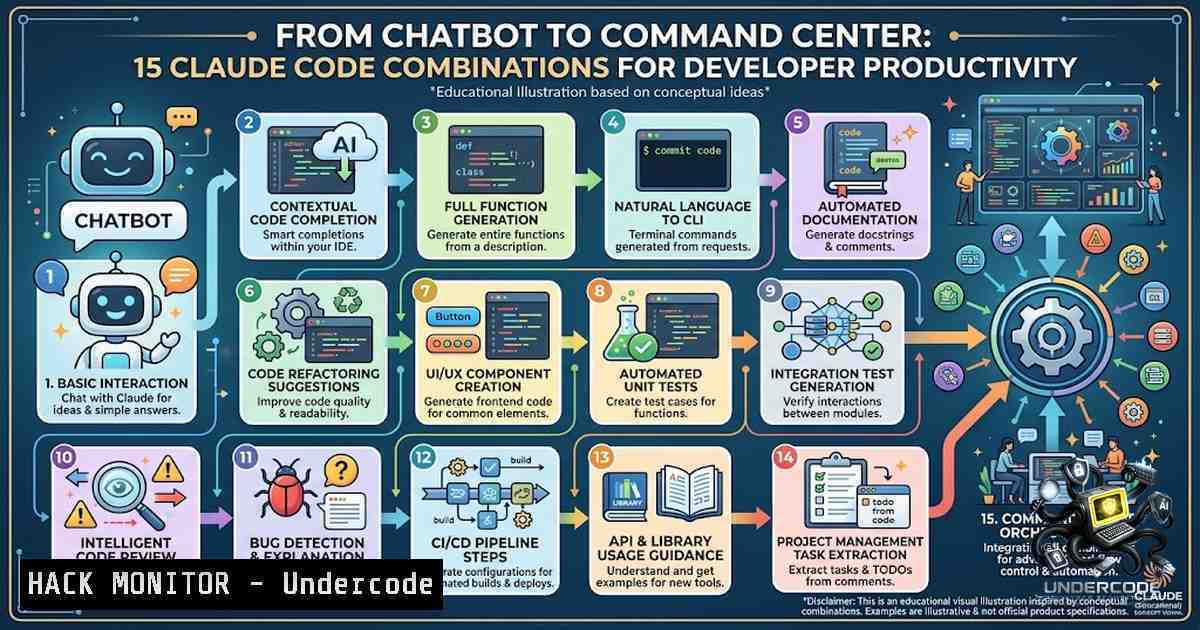
The artificial intelligence coding assistant landscape has evolved far beyond simple code completion. Claude Code, Anthropic’s agentic coding system, represents a paradigm shift in how developers interact with their toolchains—not as a standalone chatbot, but as an orchestration layer that connects disparate tools into a cohesive, AI-driven development ecosystem. The fundamental insight is this: the most significant productivity gains don’t emerge from using more AI tools, but from strategically connecting the right ones together. When Claude Code interfaces with version control, cloud infrastructure, databases, testing frameworks, and containerization platforms, it transforms from a helpful assistant into a force multiplier that can replace hours of manual work each week.
Learning Objectives:
- Master the integration of Claude Code with essential development tools including GitHub, Docker, AWS, and PostgreSQL
- Implement automated code review pipelines, container optimization strategies, and natural-language cloud deployments
- Build end-to-end workflows that leverage AI for testing, data analysis, and infrastructure management
- Claude Code + GitHub: Automated PR Review and CI/CD Orchestration
The integration between Claude Code and GitHub represents one of the most impactful combinations for development teams. When a pull request is opened or updated, Claude can automatically analyze code changes against project-specific coding standards and provide feedback as inline PR comments. This isn’t superficial linting—a fleet of specialized agents examines code changes in the context of your full codebase, looking for logic errors, security vulnerabilities, broken edge cases, and subtle regressions.
Step‑by‑step guide to implementing automated PR reviews:
- Generate an OAuth token from the Anthropic Console (console.anthropic.com) for Claude Code authentication
-
Add the token as a GitHub secret by navigating to your repository Settings → Secrets and variables → Actions, creating a new repository secret named `CLAUDE_CODE_OAUTH_TOKEN`
-
Enable Code Review at the organization level: Go to Organization settings > Claude Code, find the Code Review section, and click “Configure” to begin the GitHub App installation flow
-
Configure review triggers—reviews can automatically trigger when a PR opens, on every push, or only when manually requested via `@claude review` comments
-
Customize review behavior by adding a `CLAUDE.md` or `REVIEW.md` file to your repository, where you can define project-specific coding standards and review priorities
-
Enable auto-fix and auto-merge so Claude automatically attempts to fix CI failures it detects and merges PRs once all checks pass
For teams using GitHub Actions, the `anthropics/claude-code-action@v1` can be incorporated directly into workflows, enabling Claude to analyze code, create pull requests, implement features, and fix bugs while following project standards. The `/code-review` command also allows local diff review directly in the terminal without installing the GitHub App.
- Claude Code + Docker: Containerized Development and Optimization
Running Claude Code in containerized environments addresses critical challenges around confidentiality, reproducibility, and scalability. A multi-container Docker architecture with Claude Code provides service isolation, cleaner workspaces, and consistent cross-platform behavior.
Step‑by‑step guide for Docker integration:
- Set up a DevContainer with a config-driven multi-container architecture using Docker Compose, orchestration workspace and browser automation services in separate containers
-
Optimize Dockerfile layering by moving the Claude Code install step earlier in the Dockerfile—currently, installations after frequently-changing COPY layers bust cache on any source file change, dramatically increasing build times
-
Address memory constraints by being aware that the Claude Code installer can consume excessive memory when run as root during Docker builds; consider running as a non-root user or allocating sufficient memory
-
Leverage Claude skills for Docker—a curated collection of 22 deterministic skills teaches Claude how to write, review, and debug Docker configurations, with every skill verified against official Docker documentation to eliminate hallucinated APIs
-
Use worktree isolation by running `claude –worktree` (or
claude --worktree my_worktree) to start a session in an isolated worktree, with `–tmux` for launching in its own Tmux session
For production CI execution, multi-stage Docker builds and enterprise-grade resource management become essential. Current Claude-Code containerized CI infrastructure needs production-grade optimization for reliable, scalable execution.
- Claude Code + AWS: Natural Language Infrastructure Deployment
The ability to design, deploy, and manage cloud infrastructure through natural language represents one of the most transformative capabilities of the Claude Code + AWS combination. AWS has introduced Agent Plugins that respond to natural language requests like “Deploy to AWS,” “Host on AWS,” or “Run this on AWS”.
Step‑by‑step guide for AWS deployment:
- Add the AWS API MCP Server to Claude Code—this enables natural language commands to be translated to AWS CLI commands (e.g., a request for S3 bucket listings becomes
aws s3 ls) -
Choose an authentication method appropriate for your use case: API keys for short-term testing (< 1 week), AWS login with configurable session duration, SSO with IAM Identity Center, or direct IdP integration for production deployments
-
Deploy the Guidance for Claude Code with Amazon Bedrock stack, which implements proven patterns for secure access with user attribution, capacity management, and visibility into costs and developer productivity
-
Use the deploy-on-aws plugin which performs prerequisite checks, provides cost estimates, and handles automated orchestration—ready-to-use config files (
.claude/and.cursor/) and `AGENTS.md` / `CLAUDE.md` for project conventions are included -
Monitor deployments through the Claude Code desktop interface, which tracks PR status including CI check passes and failures using the GitHub CLI under the hood
For teams building serverless architectures, conversational AI coding with Claude Code can build full-stack serverless platforms on AWS for as little as $1/month.
4. Claude Code + PostgreSQL: Intelligent Database Management
The Model Context Protocol (MCP) server for PostgreSQL enables Claude Code to query, monitor, and analyze databases directly through natural language. This transforms database management from a series of manual SQL queries into an interactive, AI-assisted experience.
Step‑by‑step guide for PostgreSQL integration:
- Install the MCP PostgreSQL server via npm: `npx @fabriciofs/mcp-postgres` or globally with `npm install -g @fabriciofs/mcp-postgres`
- Configure Claude Code by adding to `~/.claude/settings.json` or project
.claude/settings.json:{ "mcpServers": { "postgres": { "command": "npx", "args": ["-y", "@fabriciofs/mcp-postgres"], "env": { "SQL_CONNECTION_URL": "postgres://user:password@localhost:5432/database", "READONLY": "true" } } } }Set `READONLY` to `true` for read-only schema exploration or `false` to enable write operations
-
Explore schemas by asking Claude to “list all tables in the public schema,” “describe the users table structure,” or “what views are available?”
-
Generate complex queries against your actual schema—Claude can list tables, explain foreign key relationships, or generate optimized queries based on your database structure
-
Monitor database performance using tools that track active queries, blocking sessions, wait statistics, and identify missing indexes, unused indexes, and fragmentation
For teams working with PostgreSQL at scale, pg-aiguide provides semantic search over official PostgreSQL, TimescaleDB, and PostGIS manuals, helping Claude generate dramatically better PostgreSQL code.
- Claude Code + Playwright: Automated Browser Test Generation
Perhaps one of the most practical combinations for quality assurance teams is Claude Code paired with Playwright. Write tests in plain English, and Claude generates and runs Playwright scripts automatically.
Step‑by‑step guide for test automation:
- Install Greenrun CLI:
npx greenrun-cli init—the setup wizard validates your API token, configures the Greenrun and Playwright MCP servers, installs `/greenrun` and `/greenrun-sweep` slash commands, and adds project instructions to `CLAUDE.md` - Define tests in the Greenrun dashboard or directly through Claude Code using MCP tools
-
Run tests with
/greenrun</code>—supports filters like `/greenrun tag:smoke` for smoke tests, `/greenrun /checkout` for tests matching specific pages, or `/greenrun login` for tests with "login" in the name</p></li> <li><p>Understand the script generation process: On first run, Claude walks through each test's instructions in the browser (scouting pass), observes UI states, and generates a `.spec.ts` script using real selectors. Scripts are cached and reused on future runs</p></li> <li><p>Handle test failures intelligently: If a cached script fails, an AI agent re-executes the test manually to determine whether the script is stale or there's a real bug—stale scripts are automatically cleared for regeneration</p></li> <li><p>Run impact analysis after code changes with `/greenrun-sweep` to find which tests are affected by the pages you changed, running only relevant tests</p></li> </ol> <p>This workflow supports credential sets for authentication, parallel execution, result tracking, and re-running only what's needed. <ol> <li>Claude Code + Jupyter: Accelerated Data Analysis and Prototyping</li> </ol> Data scientists and analysts can leverage Claude Code to generate complete Jupyter notebooks for exploratory data analysis, visualization, and model development. Claude works with Jupyter notebooks through two paths: the CLI that can read and run notebook cells, and direct `.ipynb` file editing that treats notebook JSON as structured data. <h2 style="color: yellow;">Step‑by‑step guide for data science workflows:</h2> <ol> <li>Set up project conventions in `CLAUDE.md` with data conventions (raw data in <code>data/raw/</code>, processed in <code>data/processed/</code>, outputs in <code>data/outputs/</code>), column naming standards (snake_case), and date handling (always parse as datetime, store UTC)</p></li> <li><p>Generate a complete EDA notebook with a single prompt: [bash] "Write Jupyter notebook cells for EDA on this dataset: File: data/raw/sales_2026.csv. Generate cells for: Load and basic info, missing value analysis, distribution of numeric columns, time series analysis, top products, regional breakdown. Use seaborn for plots, save each figure to data/outputs/."
Claude generates organized notebook sections with markdown explanation cells followed by code cells
-
Refactor notebooks into modular Python files—Claude can extract data loading and processing logic into separate Python files for better code organization and reusability
-
Use Claude Code's Jupyter tools which have built-in capabilities for reading and editing Jupyter notebooks, making it possible to transform notebooks into dashboards or production-ready code
-
Integrate with existing workflows via the `%claude` magic or by writing and running `.py` scripts in the same project directory
The most effective pattern for data science is using Claude Code in the terminal alongside an open notebook—Claude generates code, you paste and run, iterating rapidly.
What Undercode Say:
- The orchestration layer is the differentiator—Claude Code's true value isn't in isolated capabilities but in its ability to serve as a command center connecting version control, cloud infrastructure, databases, testing frameworks, and analytics environments. The 15 combinations listed represent a complete development ecosystem, not a collection of disjointed features.
-
Security and governance must evolve alongside automation—as AI agents gain capabilities to auto-fix CI failures, auto-merge PRs, and deploy infrastructure, organizations must implement robust guardrails. The sandboxing features in Claude Codeand authentication frameworks from AWSprovide a foundation, but teams need clear policies on AI agent permissions and review requirements.
Analysis:
The integration patterns emerging around Claude Code signal a fundamental shift in software development methodology. Traditional development workflows are siloed—developers context-switch between GitHub for code review, Docker for containerization, AWS for deployment, PostgreSQL for database management, Playwright for testing, and Jupyter for analysis. Claude Code's MCP (Model Context Protocol) architecture bridges these silos, creating a unified interface where natural language commands orchestrate complex multi-tool workflows.
This convergence has profound implications for team productivity. A developer can now open a PR, have Claude review it against project standards, automatically fix CI failures, deploy to AWS with a natural language prompt, run Playwright tests on the deployed environment, and analyze the results—all without leaving a single interface. The time savings are multiplicative, not additive, because context-switching overhead is eliminated.
However, this power comes with responsibility. Organizations must consider the security implications of AI agents with infrastructure access, the governance challenges of auto-merge capabilities, and the training requirements for teams to effectively leverage these tools. The enterprises that succeed will be those that treat Claude Code not as a toy but as a critical component of their development infrastructure, with appropriate security controls, monitoring, and continuous optimization.
Prediction:
+1 The integration of AI coding assistants with development toolchains will become the primary differentiator between high-performing and average engineering teams within 18-24 months, with Claude Code's MCP architecture setting the standard for how AI agents interact with external tools.
+1 The Model Context Protocol will emerge as the de facto standard for AI-tool integration, creating a thriving ecosystem of MCP servers for everything from cloud providers to monitoring systems to CI/CD platforms.
-1 Organizations that fail to implement proper governance around AI agent capabilities—particularly auto-fix, auto-merge, and infrastructure deployment features—will face significant security incidents and compliance violations as these tools become more autonomous.
+1 The combination of Claude Code with testing frameworks like Playwright will dramatically reduce the QA bottleneck in development cycles, enabling continuous testing that keeps pace with continuous deployment.
-1 The skills gap between developers who master AI-assisted workflows and those who don't will widen, potentially creating a two-tiered engineering workforce and exacerbating talent shortages in organizations slow to adopt these tools.
▶️ Related Video (80% Match):
🎯Let’s Practice For Free:
🎓 Live Courses & Certifications:
Join Undercode Academy for Verified Certifications
🚀 Request a Custom Project:
Secure, high-velocity infrastructure and disruptive technological engineering. Contact our engineering team for high-tier development and proprietary systems:
[email protected]
💎 Smart Architecture | 🛡️ Secure by Design | ⭐ Trusted by Thousands
IT/Security Reporter URL:
Reported By: Shubhamvora05 If - Hackers Feeds
Extra Hub: Undercode MoN
Basic Verification: Pass ✅


