
Listen to this Post
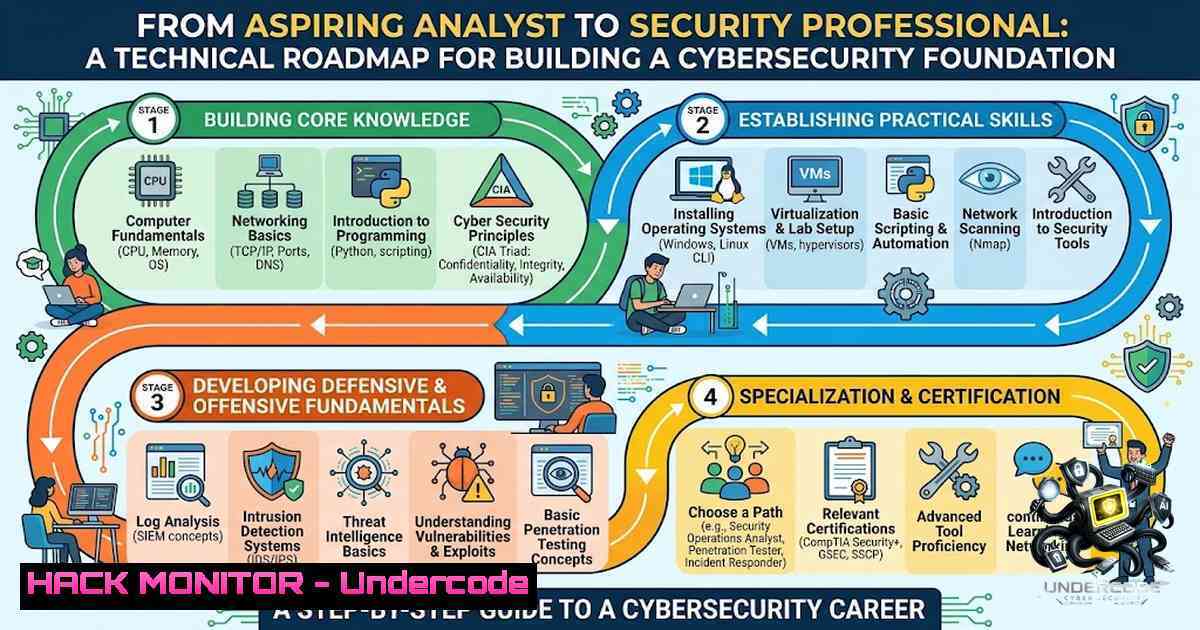
Introduction:
The journey into cybersecurity is no longer a linear path from textbook to analyst chair; it demands a hybrid approach combining theoretical risk management with practical, hands-on technical proficiency. For students and career transitioners, the challenge lies not just in learning concepts like IAM or OWASP Top 10, but in translating that knowledge into actionable skills with tools like Wireshark and Nmap. This article breaks down the essential components of building a robust security foundation, providing a technical guide—from Linux command-line mastery to network packet analysis—that transforms a student’s motivation into a demonstrable skillset, bridging the gap between education and operational readiness in a SOC or penetration testing environment.
Learning Objectives & Secrets:
- Objective 1: Master the fundamentals of network reconnaissance and vulnerability identification using industry-standard tools (Nmap, Wireshark) and OWASP principles.
- Objective 2 (Secret Tip): Go beyond basic scanning; utilize Nmap scripting engine (NSE) for automated vulnerability detection and learn to filter Wireshark traffic for anomalies like ARP poisoning or HTTP injections.
- Objective 3 (Secret Tip): Harden your Linux environment; don’t just learn commands—configure `iptables` to block suspicious traffic and set up `auditd` to monitor system calls, mimicking a real SIEM agent behavior.
You Should Know:
1. Linux Command-Line Mastery and System Hardening
While the post highlights familiarity with Linux fundamentals, a professional-grade skill involves securing the system itself. The default Kali Linux installation is a “Swiss Army knife” but is vulnerable if not hardened. Start by disabling root login via SSH and implementing key-based authentication to prevent brute-force attacks.
Step‑by‑step guide:
- Step 1: Lock down SSH. Edit
/etc/ssh/sshd_config. Set `PermitRootLogin no` andPasswordAuthentication no. Restart withsudo systemctl restart sshd. - Step 2: Manage Users and Groups. Use `sudo useradd -m -s /bin/bash analyst` and add them to specific groups like `sudo` or `wireshark` to allow packet capturing without root.
- Step 3: Configure the Firewall. Use `iptables` to block all incoming traffic except established connections: `sudo iptables -A INPUT -m conntrack –ctstate ESTABLISHED,RELATED -j ACCEPT` and
sudo iptables -A INPUT -j DROP. - Step 4: Monitor Processes. Use `ps aux | grep [bash]` and `lsof -i` to identify open ports and listening services that could be attack vectors.
- Step 5: Troubleshooting. If the network drops, use `tcpdump -i eth0` to verify interface status and `ping -c 4 8.8.8.8` to validate routing.
2. Network Reconnaissance with Nmap and Wireshark
Nmap isn’t just about scanning open ports; it’s a powerful engine for OS fingerprinting and service enumeration. To effectively identify weak points, you must use advanced scanning techniques and couple them with packet analysis.
Step‑by‑step guide:
- Step 1: Stealth SYN Scan. Run `sudo nmap -sS -T4 -p- 192.168.1.0/24` to perform a TCP SYN scan that doesn’t complete the handshake, effectively leaving less trace in application logs.
- Step 2: Service Enumeration. Add `-sV –version-intensity 5` to the command to grab service versions (e.g., Apache 2.4.49), which is crucial for CVE (Common Vulnerabilities and Exposures) matching.
- Step 3: NSE Scripts. Use `sudo nmap –script=vuln 192.168.1.10` to run the default vulnerability catalog against a target, which automatically checks for known exploits.
- Step 4: Wireshark Analysis. Start a capture with `tshark -i eth0 -f “tcp port 80″` and export to a `.pcap` file. Analyze the HTTP stream to identify methods (GET/POST) and potential SQL injection payloads in URLs.
- Step 5: Filtering. In Wireshark, use filters like `http.request.uri contains “union select”` to quickly locate malicious attempts, or `icmp` to detect network mapping via ping sweeps.
3. Web Application Security and OWASP Top 10
The student mentions “Basic vulnerability identification,” but a modern SOC analyst must be able to spot and mitigate OWASP Top 10 flaws. Specifically, Command Injection and Cross-Site Scripting (XSS) are prevalent. We can test these using simple cURL commands and Burp Suite, even without a full web environment.
Step‑by‑step guide:
- Step 1: Test for Command Injection. Suppose a web application executes a ping command. Intercept the request in Burp Suite and modify the `ip` parameter to
127.0.0.1; whoami. If the response returns the user context, the app is vulnerable. - Step 2: Basic XSS Detection. Insert a script tag `` into input fields. If an alert pops up, consider it a high-severity finding.
- Step 3: Authentication Bypass. Test for weak authentication controls by checking if the application validates the “Remember Me” token improperly. Use base64 decoding to inspect the token structure.
- Step 4: SSL/TLS Hardening. Use `openssl s_client -connect example.com:443 -tls1_2` to verify the server supports modern cipher suites and mitigates POODLE or Heartbleed.
4. Security Operations (SOC) and Logging
A critical component missing from the post but implied is log analysis. A SOC analyst spends 70% of their time correlating logs. We need to understand where logs live (/var/log/) and how to parse them.
Step‑by‑step guide:
- Step 1: Log Location. Navigate to
/var/log/. Check `auth.log` for failed SSH logins, `syslog` for system events, and `ufw.log` if using Uncomplicated Firewall. - Step 2: Parsing with
grep. Use `sudo cat /var/log/auth.log | grep “Failed password” | awk ‘{print $11}’ | sort | uniq -c` to get a count of failed password attempts per IP, identifying brute-force attempts. - Step 3: Monitoring in Real-time. Use `tail -f /var/log/syslog` to monitor logs live. Combine with `grep -v “ignore_pattern”` to exclude noise.
- Step 4: Event Correlation. If you have a SIEM concept, use `journalctl –since “1 hour ago”` to check for suspicious time-based anomalies.
5. API Security and Cloud Hardening
The modern security landscape extends beyond the network edge to API endpoints. A large portion of data breaches occur due to misconfigured APIs. Hardening S3 buckets or API endpoints is critical.
Step‑by‑step guide:
- Step 1: Testing API endpoints. Use `curl -X GET https://api.example.com/v1/users/1` to see if the API returns sensitive data (e.g., PII) without authentication.
– Step 2: Rate Limiting. If an endpoint is missing rate limiting, a single IP can cause Denial of Service. We can test this with a loop: `for i in {1..100}; do curl -X GET API_ENDPOINT; done` and observe the response time. - Step 3: Header Inspection. Ensure the server implements proper headers like `Strict-Transport-Security` (HSTS) and
X-Content-Type-Options.
What Undercode Say:
- Key Takeaway 1: Starting a cybersecurity career requires a structured blend of theoretical security principles (like IAM and risk management) and aggressive hands-on practice with tools.
- Key Takeaway 2: The effectiveness of a security professional is directly proportional to their ability to automate and script; knowing a command is different from scripting an entire analysis loop.
Analysis:
The student’s roadmap identifies the correct primary pillars—Networking, Linux, and Security Tools—but often underestimates the necessity of continuous monitoring and log analysis, which are the cornerstones of a SOC. While proficiency in Nmap and Wireshark is essential for active reconnaissance, a passive understanding of how traffic interacts with the OS (via `netstat` and /proc/net) is equally critical. For a fresher, the job readiness comes not from knowing that a command exists, but in executing a refined methodology (e.g., MITRE ATT&CK mapping). The inclusion of certifications like Google Cybersecurity is beneficial, but it should be seen as a baseline; the real differentiator is the ability to deploy `auditd` to monitor file integrity or write a Python script to parse vulnerability scans. The technical guide above is designed to bridge that gap, ensuring that practical skillset is demonstrable and verifiable.
Prediction:
- +1: The demand for entry-level SOC analysts with hybrid skills (networking + basic programming) is expected to grow by 25% over the next two years, making foundational skill-building a high-ROI investment.
- -1: The narrow focus on offensive tools (Kali Linux, HTB) without defensive logging metrics (SIEM) may leave candidates underqualified for 60% of entry-level defensive positions, increasing unemployment rates for self-taught individuals.
- +1: Initiatives like the Google Certificate will evolve to include more virtual labs, but the speed of adaptation to zero-day threats will remain slower than community-driven platforms like TryHackMe.
- -1: Without learning cloud-specific hardening (AWS IAM, Azure AD), fresh graduates risk being obsolete, as 70% of new infrastructures are cloud-1ative.
▶️ Related Video (80% Match):
🎯Let’s Practice For Free:
🎓 Live Courses & Certifications:
Join Undercode Academy for Verified Certifications
🚀 Request a Custom Project:
Secure, high-velocity infrastructure and disruptive technological engineering. Contact our engineering team for high-tier development and proprietary systems:
[email protected]
💎 Smart Architecture | 🛡️ Secure by Design | ⭐ Trusted by Thousands
IT/Security Reporter URL:
Reported By: https://lnkd.in/p/eiQ-mwgu – Hackers Feeds
Extra Hub: Undercode MoN
Basic Verification: Pass ✅


