Listen to this Post
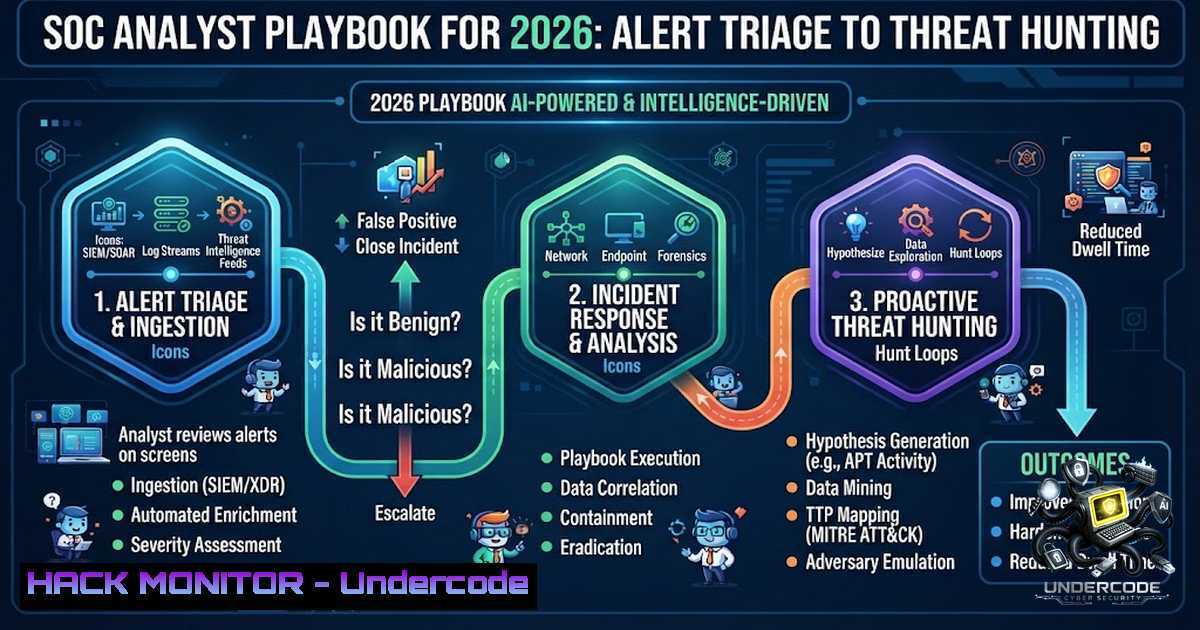
Introduction:
In an era where cyberattacks disrupt enterprises daily, organizations urgently need vigilant Security Operations Center (SOC) analysts who can detect and stop threats fast. A SOC Analyst serves as the first line of defense—monitoring security events, investigating suspicious activities, maintaining security tools, and collaborating with the broader security team to ensure processes remain effective and up to date. With modern SIEMs and ingestion strategies, much of the necessary data is already within easy reach; the challenge lies in developing the analysis, triage, and investigation skills to act on it decisively.
Learning Objectives:
- Master SIEM platforms (Splunk, QRadar, Elastic) and learn to investigate, triage, and move beyond automation via SOAR
- Develop proficiency in log analysis, process investigation, and network triage using PowerShell and Linux command-line tools
- Understand and apply threat hunting methodologies using frameworks like MITRE ATT&CK, NIST, and CIS Controls
- Build and operate a home lab with an operational SIEM and EDR solution to develop a compelling portfolio
You Should Know:
- Mastering the SOC Analyst Tier Structure and Core Responsibilities
Security Operations Centers typically operate on a three-tier structure that defines career progression and escalating responsibilities.
Tier 1 (Entry-Level) analysts focus on alert monitoring, initial triage, and runbook execution. Daily responsibilities include monitoring SIEM dashboards, performing initial triage to determine if alerts are real threats or false alarms, documenting every security event, executing response procedures via SOAR platforms, and escalating complex threats to Tier 2 analysts. The key to success at this level is speed and accuracy—separating real threats from false alarms while maintaining detailed records that support compliance audits against frameworks such as SOC 2, ISO 27001, and PCI DSS.
Tier 2 analysts handle confirmed incidents requiring deeper investigation, while Tier 3 professionals lead incident response, make architectural decisions, and define SOC processes. High-performing SOCs target Mean Time to Detect (MTTD) under 15 minutes and Mean Time to Respond (MTTR) under 1 hour for critical alerts.
- Essential Linux Commands for Security Monitoring and Incident Response
During security incidents, Linux command-line tools are indispensable for investigation. Here are the essential commands every SOC analyst should master:
System Monitoring and Process Analysis:
 Identify CPU-intensive tasks
top -o %CPU
htop

Check memory usage for unauthorized processes
free -h

List all running processes with full details
ps aux --sort=-%mem | head -20

Monitor network connections
ss -tulpn
netstat -tulpn

Check listening ports and associated services
lsof -i -P -1 | grep LISTEN
Log Analysis and Persistence Detection:
 Review authentication logs for failed attempts
sudo tail -f /var/log/auth.log
sudo grep "Failed password" /var/log/auth.log

Check systemd service persistence
stat /etc/systemd/system/suspicious.service
systemctl cat suspicious.service

Examine cron jobs for persistence
crontab -l
sudo cat /etc/crontab

Verify file integrity
sha256sum /etc/passwd /etc/shadow /etc/sudoers
Network Investigation:
 Identify active network connections
sudo netstat -antp | grep ESTABLISHED

DNS lookup for suspicious domains
dig suspicious-domain.com
nslookup suspicious-domain.com

Packet capture for deep inspection
sudo tcpdump -i eth0 -1 -c 100
- PowerShell Commands Every SOC Analyst Needs to Know
PowerShell is already installed on every Windows machine, requiring no additional tools or admin approval to download. These commands cover 90% of what analysts do during triage, investigation, and response.
Log Analysis (The Bread and Butter):
 Pull failed logon attempts (Event ID 4625)
Get-WinEvent -FilterHashtable @{LogName='Security'; ID=4625} -MaxEvents 50

Filter by time range (last 24 hours)
$start = (Get-Date).AddHours(-24)
Get-WinEvent -FilterHashtable @{LogName='Security'; ID=4625; StartTime=$start}

Search event messages for specific usernames or IPs
Get-WinEvent -FilterHashtable @{LogName='Security'; ID=4624} -MaxEvents 200 | Where-Object {$_.Message -like "adminuser"}

Retrieve PowerShell Script Block Logs (Event 4104) - captures decoded scripts
Get-WinEvent -FilterHashtable @{LogName='Microsoft-Windows-PowerShell/Operational'; ID=4104} -MaxEvents 20 | Select-Object TimeCreated, Message
Process and Network Investigation:
 Top 20 processes by CPU usage with file paths
Get-Process | Sort-Object CPU -Descending | Select-Object -First 20 Name, Id, CPU, Path

Find processes running from suspicious locations
Get-Process | Where-Object {$<em>.Path -like "C:\Users\Public\" -or $</em>.Path -like "C:\Temp\"}

Check active network connections
Get-1etTCPConnection | Where-Object {$_.State -eq "Established"}

Hash files for IOC matching
Get-FileHash -Path C:\Windows\System32\notepad.exe -Algorithm SHA256

Registry persistence checks
Get-ChildItem "HKLM:\Software\Microsoft\Windows\CurrentVersion\Run"
Get-ChildItem "HKCU:\Software\Microsoft\Windows\CurrentVersion\Run"
4. SIEM Configuration and Log Forwarding
Modern SOCs rely on SIEM platforms to aggregate and analyze security data. Common SIEM systems include Splunk (JSON format), IBM QRadar (CEF or LEEF format), Elastic, Microsoft Sentinel, and ArcSight.
Basic Splunk Search Examples:
 Failed logins in the last 24 hours
index=security sourcetype=WinEventLog:Security EventCode=4625 | stats count by src_ip, user

Suspicious PowerShell execution
index=windows sourcetype=XmlWinEventLog EventCode=4104 | search ScriptBlockText= -EncodedCommand

Authentication anomalies
index=security sourcetype=WinEventLog:Security EventCode=4624 | timechart count by user
QRadar AQL Query Example:
SELECT sourceIP, username, COUNT() FROM events WHERE eventID = 4625 GROUP BY sourceIP, username
- Cloud Security Hardening Across AWS, Azure, and GCP
Cloud security requires a layered defense strategy. AWS, Azure, and GCP each provide comprehensive tools for building resilient architectures.
Key Hardening Practices:
- Restrict inbound and outbound traffic with security groups, firewalls, and network access controls
- Implement private subnets for critical workloads
- Enable encryption at rest and in transit using AWS KMS, Azure Key Vault, and GCP Cloud KMS
- Enforce least-privilege IAM policies across all three providers
AWS CLI Security Commands:
 List all IAM users and their attached policies
aws iam list-users
aws iam list-attached-user-policies --user-1ame <username>

Check CloudTrail configuration
aws cloudtrail describe-trails
aws cloudtrail lookup-events --max-results 10

Review security group rules
aws ec2 describe-security-groups --group-ids <sg-id>
Azure CLI Security Commands:
 List role assignments
az role assignment list --all

Check network security group rules
az network nsg rule list --1sg-1ame <nsg-1ame> --resource-group <rg>
6. API Security: OWASP Top 10 Mitigations
API security remains critical, with Broken Access Control consistently ranking as the top vulnerability. OWASP API Security Top 10 (2023) remains the current standard.
Critical Mitigations:
- Use UUIDs or non-predictable identifiers instead of sequential numbers
- Implement ownership checks on every request in the backend
- Enforce proper authentication and authorization for all API endpoints
- Implement rate limiting to prevent brute-force attacks
- Building a SOC Lab and Leveraging Open-Source Resources
Hands-on practice is essential for developing SOC skills. Several excellent open-source resources are available:
SOC Analyst Hub (https://github.com/cross-samuel1/soc-analyst-hub) provides a free, fully offline interactive toolkit for Tier 1 SOC analysts covering incident response, alert triage, threat hunting, and analyst onboarding. It includes step-by-step checklists for phishing investigations, malware compromise, brute force attacks, and suspicious PowerShell activity.
SOC Incident Response Runbook (https://github.com/jacobtaylorsec/soc-runbook) contains end-to-end playbooks covering SSH brute force, phishing, malware, cloud account compromises, and DDoS attacks with Splunk queries and remediation steps.
To set up a home lab:
- Deploy a SIEM (Splunk Free, Elastic Stack, or Security Onion)
- Install an EDR solution (Wazuh or Microsoft Defender)
3. Configure log forwarding from test endpoints
4. Create detection rules and practice triage workflows
What Undercode Say:
- Speed and accuracy define the Tier 1 analyst – the ability to quickly separate real threats from false alarms while maintaining detailed documentation is non-1egotiable
- AI is transforming, not eliminating, SOC roles – traditional Tier 1 responsibilities are increasingly automated through SIEM/SOAR playbooks and ML-driven detection engines, shifting the role from “manual alert reviewer” to “automation-first analyst”
- Mastery of 20 core commands – across PowerShell and Linux, covers 90% of what analysts do during triage, investigation, and response
- The three-tier structure provides a clear career path – progression from alert monitoring (Tier 1) to architectural decisions (Tier 3) is well-defined
- Cloud security requires layered defense – no single service provides complete security; organizations must implement defense in depth across IAM, configuration, workload hardening, and logging
Prediction:
- +1 SOC analysts will increasingly function as “AI supervisors” rather than manual alert reviewers, with AI co-pilots handling high-volume triage while analysts focus on complex threat hunting and investigation
- +1 The demand for SOC analysts with cloud security expertise will continue to grow as organizations accelerate multi-cloud adoption and require unified security controls across AWS, Azure, and GCP
- -1 The skills gap in cybersecurity will widen as AI automation changes job requirements, requiring analysts to continuously upskill in automation, cloud security, and threat hunting methodologies
- +1 Open-source SOC toolkits and playbooks will become increasingly sophisticated, lowering the barrier to entry for aspiring analysts and enabling smaller organizations to establish effective security operations
- -1 Organizations that fail to adopt automation-first SOC strategies will struggle with alert fatigue and slow response times, increasing their exposure to breaches
▶️ Related Video (82% Match):
🎯Let’s Practice For Free:
🎓 Live Courses & Certifications:
Join Undercode Academy for Verified Certifications
🚀 Request a Custom Project:
Secure, high-velocity infrastructure and disruptive technological engineering. Contact our engineering team for high-tier development and proprietary systems:
[email protected]
💎 Smart Architecture | 🛡️ Secure by Design | ⭐ Trusted by Thousands
IT/Security Reporter URL:
Reported By: Neethutony Cybersecurity – Hackers Feeds
Extra Hub: Undercode MoN
Basic Verification: Pass ✅


