Listen to this Post
Introduction:
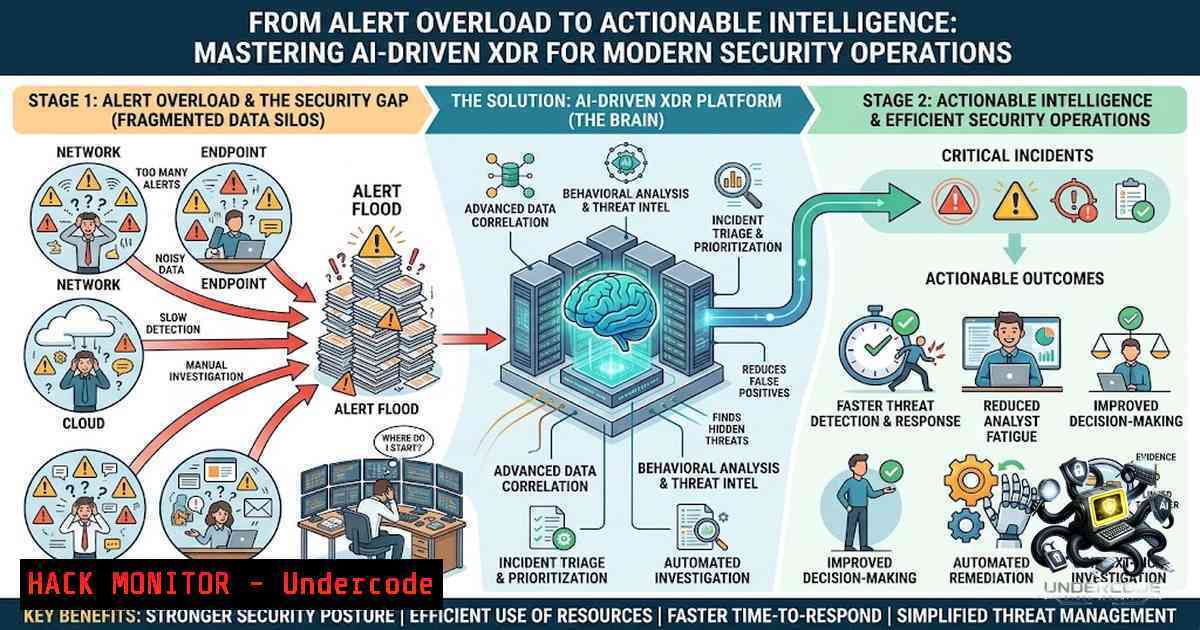
Today’s security operations centers (SOCs) are drowning—not in attacks alone, but in the noise of thousands of daily alerts that fragment visibility and exhaust limited human resources. Traditional siloed tools (firewalls, EDR, email gateways) operate independently, forcing analysts to manually correlate weak signals across disparate dashboards while sophisticated adversaries move laterally from phishing to privilege escalation in minutes. Extended Detection and Response (XDR) directly addresses this crisis by unifying telemetry across endpoints, networks, cloud workloads, and identity systems into a single, AI-augmented platform—transforming reactive firefighting into proactive, intelligence-driven defense.
Learning Objectives:
- Understand the architectural evolution from siloed EDR/SIEM tools to integrated XDR platforms and their impact on SOC efficiency.
- Master threat hunting methodologies—from hypothesis formulation to IOC search and kill—using real-world TTP mapping to the MITRE ATT&CK Framework.
- Implement automated incident response playbooks that reduce mean time to response (MTTR) by 50% or more while slashing false positives by up to 70%.
You Should Know:
- The XDR Architecture: Breaking Down Silos for Cross-Domain Visibility
XDR is not merely an upgraded EDR; it represents a fundamental shift in security architecture. While EDR focuses exclusively on endpoint telemetry (processes, file system changes, registry modifications), XDR ingests and correlates data from multiple security layers—endpoint detection, network traffic analysis (NTA), cloud service logs, identity authentication events, and email gateways—into a unified data lake. This “extended” scope is its primary differentiator: an XDR platform can stitch together a suspicious email attachment (email layer), an anomalous outbound connection (network layer), and a newly created administrative account (identity layer) into a single incident narrative, something no siloed tool can achieve alone.
At its core, XDR operates through a three-stage workflow: data ingestion (collecting normalized telemetry from all integrated sources), correlation and analytics (applying machine learning and behavioral models to detect anomalies and map activity to the MITRE ATT&CK Framework), and automated response (executing predefined or dynamic playbooks to contain and remediate threats directly from the unified console). Seqrite XDR, for example, implements this architecture with source-specific, multi-pass analytics that reduce false positives by 40–70% compared to traditional SIEM threat analytics—a critical improvement for overworked SOC teams.
Step-by-step: Validating XDR Telemetry Ingestion
For security engineers verifying XDR data flow across a hybrid environment, the following commands and checks are essential:
- Linux – Verify Endpoint Agent Connectivity:
sudo systemctl status seqrite-edr  Check EDR service status
tail -f /var/log/seqrite/edr.log | grep -i "telemetry"  Monitor real-time data transmission
curl -v https://<xdr-console-url>/api/v1/health  Test API connectivity to the XDR cloud console
What this does: Confirms that the XDR endpoint agent is running, actively sending telemetry, and can reach the central analytics engine.
-
Windows – Validate Network and Endpoint Log Forwarding:
Get-Service -1ame "SeqriteEDR" | Select-Object Status, DisplayName
Get-WinEvent -LogName "Microsoft-Windows-Sysmon/Operational" | Select-Object -First 10  Confirm Sysmon logs are being captured
Test-1etConnection -ComputerName <xdr-console-fqdn> -Port 443
What this does: Ensures the Windows agent is operational, that critical OS-level event logs (e.g., Sysmon for process creation) are being collected, and that encrypted TLS communication to the XDR backend is functional.
-
API Verification – Querying XDR for Recent Alerts (cURL example):
curl -X GET "https://<xdr-console>/api/v2/alerts?limit=10" \
-H "Authorization: Bearer $API_TOKEN" \
-H "Content-Type: application/json" | jq '.data[].alert_name, .data[].severity'
What this does: Tests the REST API integration, confirming that alert data is accessible programmatically—essential for SOAR playbook integration and custom dashboards.
- Threat Hunting with Precision: From Hypothesis to IOC Kill Chain
Proactive threat hunting is the cornerstone of modern XDR utilization. Unlike reactive alert-driven monitoring, hunting assumes that an adversary may already be present and actively seeks out hidden indicators of compromise (IOCs) and attacker behaviors. The process begins with formulating a threat hypothesis—an educated guess based on current threat intelligence, industry-specific risks, or identified gaps in MITRE ATT&CK coverage. For example: “Given recent ransomware campaigns targeting our sector, is there evidence of credential dumping (T1003) or lateral movement (T1021) across our environment?”
With a hypothesis established, the hunter gathers deep telemetry from endpoints, network flows, and cloud logs—data that XDR platforms make accessible through integrated investigative workbenches. Seqrite XDR’s threat hunting workbench, for instance, enables analysts to search across 180 days of historical data using advanced IOC queries, apply granular filters (file popularity, digital signature, behavioral context), and execute “search and kill” operations to quarantine malicious artifacts in real time. This shifts security from a reactive posture to one that continuously hunts for “low-and-slow” attacks that signature-based tools routinely miss.
Step-by-step: Executing an IOC-Driven Threat Hunt
- Step 1 – Formulate Hypothesis: Using recent threat intelligence (e.g., CISA alerts on APT groups), define a specific hypothesis. Example: “Are there signs of Cobalt Strike beaconing (T1071) or unusual PowerShell execution (T1059.001) in our environment?”
-
Step 2 – Query XDR Historical Data (Elastic DSL / KQL example):
{
"query": {
"bool": {
"must": [
{ "match": { "event.type": "process_creation" } },
{ "match": { "process.name": "powershell.exe" } },
{ "regexp": { "process.command_line": ".-enc." } } // Base64-encoded commands
]
}
}
}
What this does: Searches the XDR data lake for PowerShell processes with Base64-encoded arguments—a common evasion technique. Adapt the query to your XDR platform’s native syntax (Elastic DSL, KQL, or SPL).
-
Step 3 – Analyze Results and Investigate: Review returned events for context: parent process, network connections, file writes. Use the XDR investigative workbench to pivot to related alerts and endpoints.
-
Step 4 – Contain and Remediate: If malicious activity is confirmed, initiate response directly from the XDR console:
- Isolate endpoint: `seqrite-cli isolate –endpoint-id
`
– Kill process: `seqrite-cli kill –pid–endpoint `
– Block IOC (hash/domain/IP): `seqrite-cli block –ioc–scope global`
- Automating Incident Response: SOAR-Enabled Playbooks for SOC Efficiency
The volume of alerts in modern SOCs far exceeds human capacity to investigate each manually. XDR platforms address this through integrated Security Orchestration, Automation, and Response (SOAR) capabilities—enabling security teams to codify repeatable response procedures into automated playbooks. When an XDR detection fires (e.g., ransomware behavior on an endpoint), the platform can automatically trigger a playbook that: (1) enriches the alert with threat intelligence, (2) isolates the affected endpoint from the network, (3) kills malicious processes, and (4) creates a ticket in the ITSM system—all without human intervention.
Seqrite XDR’s playbook automation leverages built-in functions and connectors within a visual editor, enabling flexible manual, semi-automated, or fully automated response workflows. This approach not only accelerates incident response but also ensures consistency and reduces the risk of human error during high-pressure events.
Step-by-step: Building a Basic Automated Response Playbook
- Step 1 – Define Trigger Conditions: In the XDR/SOAR console, create a new playbook triggered by “Malware Detection” events with severity ≥ “High.”
-
Step 2 – Add Automated Actions (Pseudo-code / API Example):
Python pseudo-code for SOAR playbook action
def ransomware_response(alert):
endpoint_id = alert['endpoint_id']
Isolate endpoint via XDR API
requests.post(f"{XDR_API}/endpoints/{endpoint_id}/isolate", headers=HEADERS)
Kill identified malicious process
requests.post(f"{XDR_API}/endpoints/{endpoint_id}/processes/kill",
json={"pid": alert['malicious_pid']})
Block IOC globally
requests.post(f"{XDR_API}/iocs/block",
json={"hash": alert['file_hash'], "scope": "global"})
Create ticket in ServiceNow (example)
requests.post(SNOW_API, json={"short_description": f"Ransomware response: {alert['id']}"})
return "Containment complete"
What this does: Automates the core containment steps—endpoint isolation, process termination, IOC blocking, and ticketing—reducing response time from minutes to seconds.
-
Step 3 – Test and Validate: Run the playbook against a simulated alert to verify all actions execute correctly and that rollback procedures (e.g., endpoint un-isolation) are available if false positives occur.
- Leveraging AI-Powered Virtual Security Analysts to Augment Human Expertise
Even with automation, Tier 1 alert triage remains a bottleneck—analysts spend hours sifting through low-fidelity alerts. AI-powered virtual security analysts directly address this by acting as an “always-on” junior analyst capable of triaging, investigating, and even remediating common threats. Seqrite XDR’s SIA (Seqrite Intelligent Assistant), for example, provides predefined and conversational prompts—“Investigate incident UUID-12345”—that return rapid, detailed analyses with visualizations, summaries, and structured recommendations. SIA remembers ongoing conversations, displays real-time context, and surfaces key data points precisely when needed, enabling analysts to focus on high-priority, complex threats rather than drowning in alert queues.
This AI-human collaboration represents a paradigm shift: machines handle the volume (triage, correlation, initial investigation), while humans apply strategic judgment, contextual understanding, and creative threat hunting.
Step-by-step: Integrating AI Analyst into Daily SOC Workflow
- Step 1 – Configure AI Analyst Permissions: In the XDR admin console, assign SIA access to Tier 1 and Tier 2 analyst roles.
-
Step 2 – Use Prebuilt Prompts for Rapid Triage:
- “Summarize all critical alerts from the last 4 hours.”
- “Show me the MITRE ATT&CK techniques associated with Incident 5678.”
-
“What endpoints are communicating with this malicious IP: 185.xxx.xxx.xx?”
-
Step 3 – Review AI-Generated Recommendations: SIA provides structured response options (e.g., isolate, block, investigate further). Analysts approve or modify these recommendations before execution, maintaining human-in-the-loop control.
-
Step 4 – Measure Impact: Track metrics such as “time to triage” and “alerts handled per analyst” pre- and post-SIA deployment to quantify efficiency gains.
- Hardening Cloud and API Security with XDR Telemetry
As organizations accelerate cloud adoption, security must extend beyond on-premises endpoints to include cloud workloads, containers, and API gateways. XDR platforms ingest telemetry from cloud service providers (AWS, Azure, GCP) and SaaS applications, enabling detection of misconfigurations, privilege escalation, and anomalous API calls. Seqrite XDR, for instance, integrates with Zero Trust architectures to detect and prevent privilege escalation paths using AI/ML, locking down excessive permissions before attackers can exploit them.
Step-by-step: Cloud Hardening Commands and Checks
- AWS – Audit IAM Roles for Excessive Permissions (AWS CLI):
aws iam list-roles --query 'Roles[?contains(AssumeRolePolicyDocument.Statement[].Action, <code>":"</code>)]' --output table
What this does: Identifies IAM roles with overly permissive trust policies—a common cloud misconfiguration that XDR telemetry should flag.
-
Azure – Review Sign-in Logs for Anomalies (Azure CLI):
az monitor activity-log list --max-events 50 --query "[?contains(operationName.value, 'Microsoft.Authorization')]"
What this does: Pulls recent authorization activity, helping detect unauthorized role assignments or policy changes.
-
Kubernetes – Detect Privileged Container Creation:
kubectl get pods --all-1amespaces -o json | jq '.items[] | select(.spec.containers[].securityContext.privileged==true) | .metadata.namespace + "/" + .metadata.name'
What this does: Lists all pods running in privileged mode—a high-risk configuration that XDR should detect and alert on.
What Undercode Say:
- XDR is not a silver bullet but a force multiplier—it unifies fragmented data, automates mundane tasks, and empowers analysts to focus on strategic threat hunting rather than manual log correlation.
- The integration of AI-powered virtual analysts (like Seqrite SIA) is rapidly transforming SOC economics: organizations can achieve 50% greater efficiency with the same headcount by offloading Tier 1 triage to machine intelligence.
- The key to XDR success lies not in the technology alone but in disciplined playbook development, continuous threat hunting, and rigorous telemetry validation—tools are only as effective as the processes that govern them.
Prediction:
- +1 XDR platforms will increasingly absorb traditional SIEM and SOAR functions, creating unified “SecOps” platforms that reduce tool sprawl and integration complexity—driving a 30%+ CAGR in the XDR market through 2026.
- +1 AI-powered virtual security analysts will evolve from alert triage to autonomous incident response for 80%+ of common threats, with human analysts shifting to threat hunting, red teaming, and strategic security architecture roles.
- -1 The sophistication of adversarial AI (GenAI-powered polymorphic malware, automated social engineering) will outpace traditional detection methods, forcing XDR vendors to continuously retrain ML models and invest in behavioral analytics that go beyond signature-based IOCs.
- -1 Organizations that deploy XDR without corresponding investments in playbook development, analyst training, and process re-engineering will see minimal ROI—technology alone cannot compensate for immature security operations.
▶️ Related Video (82% Match):
https://www.youtube.com/watch?v=2zgjzs9nECI
🎯Let’s Practice For Free:
🎓 Live Courses & Certifications:
Join Undercode Academy for Verified Certifications
🚀 Request a Custom Project:
Secure, high-velocity infrastructure and disruptive technological engineering. Contact our engineering team for high-tier development and proprietary systems:
[email protected]
💎 Smart Architecture | 🛡️ Secure by Design | ⭐ Trusted by Thousands
IT/Security Reporter URL:
Reported By: Seqrite Xdr – Hackers Feeds
Extra Hub: Undercode MoN
Basic Verification: Pass ✅


