
Listen to this Post
Introduction:
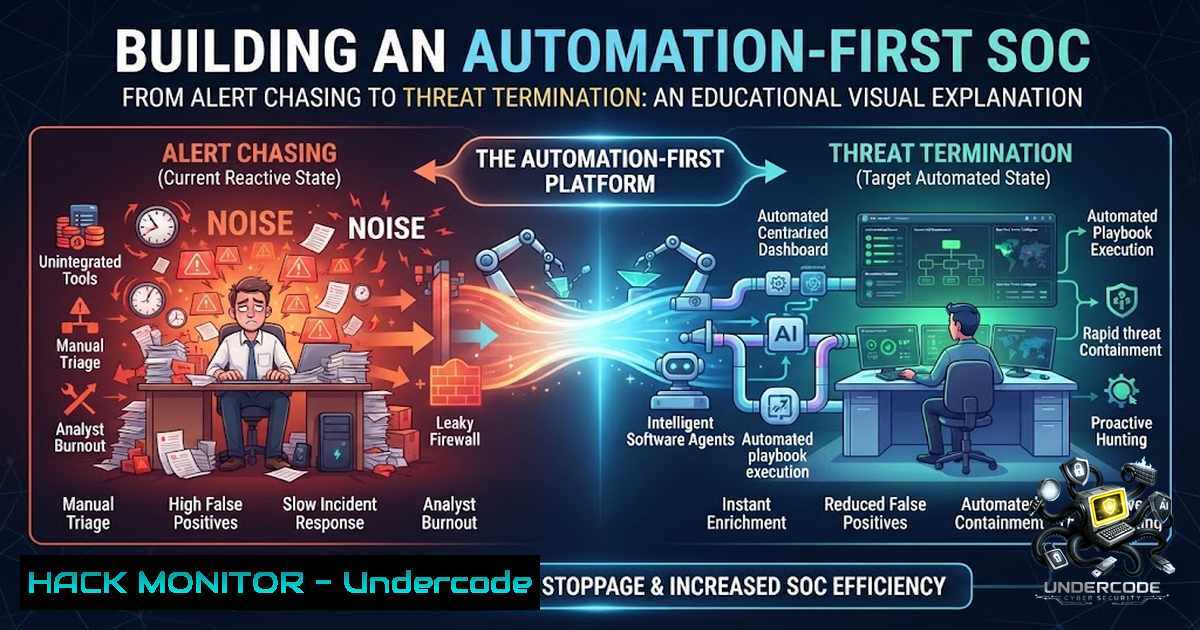
Modern Security Operations Centers (SOCs) are drowning in alerts while attackers accelerate their breakout times to under 30 minutes. The fundamental problem isn’t a lack of security tools—it’s that detection happens in one platform, investigation in another, and response coordination somewhere else entirely. This fragmentation forces analysts to manually gather evidence, switch between systems, and repeat the same tedious steps on every alert. Security Orchestration, Automation, and Response (SOAR) addresses this by automating enrichment, evidence collection, and containment workflows—transforming SOCs from reactive alert-chasing factories into proactive threat-termination engines.
Learning Objectives:
- Understand how SOAR platforms integrate with SIEM, EDR, and threat intelligence to automate the incident response lifecycle
- Master practical automation techniques including Python scripting, playbook design, and sandbox integration for malware analysis
- Learn to deploy verified Linux and Windows commands for remote incident investigation and containment
You Should Know:
- SOAR Automation Framework: From Alert to Action in Seconds
The core of any automation-first SOC is a well-designed SOAR platform that orchestrates detection, enrichment, investigation, and response. Rather than automating every possible action, the most effective approach starts with automating the repetitive tasks analysts perform daily: enrichment, evidence collection, routing, and documentation.
Step‑by‑step guide to building your first SOAR playbook:
Step 1: Identify high-value, low-risk use cases. Start with clearly defined procedures that have minimal variation and low false-positive rates—phishing email triage or suspicious login detection are ideal starting points.
Step 2: Design for human oversight. Include approval steps for high-impact actions such as account disablement or network isolation. Use binary decision criteria to reduce the need for human intervention while maintaining control.
Step 3: Implement automation rules. Configure incident-created triggers for initial triage, assignment, and notification. Set incident-updated triggers for escalation and reassignment. Use alert-created triggers for responding to alerts that don’t automatically generate incidents.
Step 4: Deploy playbooks for complex workflows. Use platforms like Azure Logic Apps (for Microsoft Sentinel) to execute multi-step response workflows triggered from any incident source.
Step 5: Monitor and tune. Regularly review automation effectiveness, adjust thresholds, and expand to additional use cases as confidence grows.
2. Interactive Malware Analysis with ANY.RUN Sandbox
Sandboxing is a critical capability for modern SOCs, enabling analysts to examine potentially malicious files in isolated environments without risking production systems. ANY.RUN’s interactive sandbox provides real-time visibility into malware behavior, allowing analysts to engage with samples just like on a standard computer. The platform supports both Windows and Linux analysis, making it versatile for diverse enterprise environments.
Step‑by‑step guide to analyzing malware in ANY.RUN:
Step 1: Access the sandbox. Sign into your ANY.RUN account and navigate to the main dashboard.
Step 2: Select analysis type. Choose “Submit URL” for suspicious links or “Submit File/Email” for file-based investigation.
Step 3: Configure the environment. Select the appropriate operating system—options include Windows 7/32-bit, Windows 7/64-bit, Windows 11, Ubuntu 22.04.2, or Debian 12.2. For legacy malware, older OS versions may be necessary for full compatibility.
Step 4: Enable advanced features. Activate MITM Proxy to intercept and analyze HTTP requests to command-and-control servers. Use FakeNet to detect network shares or interactions with non-functional C2 servers. Select the Development soft set for additional tools including Python, x64bg, and Wireshark PE.
Step 5: Run and observe. Click Run to spin up the cloud virtual machine. Monitor real-time behavior, collect Indicators of Compromise (IOCs) via the MalConf button, and export findings for SIEM integration.
Step 6: Maintain privacy. For sensitive samples, configure privacy settings to keep analysis results confidential.
3. Threat Hunting Automation: Moving Beyond Reactive Detection
Threat hunting is the practice of proactively searching for threats within systems, sitting between external attack surface management and SOC operations. Automation enhances this by using machine learning to establish behavioral baselines and flag deviations. Modern threat hunting frameworks generate hypotheses with minimal human intervention and automate data collection and analysis.
Step‑by‑step guide to automated threat hunting:
Step 1: Formulate hypotheses. Use threat intelligence and MITRE ATT&CK mappings to identify potential adversary behaviors. Leverage AI-driven systems to generate hypotheses automatically.
Step 2: Collect and analyze data. Deploy automated scripts to gather telemetry from SIEM, EDR, and network sources. Use Python-based tools for log parsing and anomaly detection.
Step 3: Verify findings. Cross-reference detected patterns against known TTPs using MITRE ATT&CK mappings. Enrich indicators via threat intelligence APIs (VirusTotal, AbuseIPDB, Shodan).
Step 4: Escalate confirmed threats. Trigger SOAR playbooks for containment and remediation when threats are validated.
Essential Linux commands for threat hunting:
 Check for suspicious processes
ps aux | grep -E "(nc|ncat|netcat|reverse|shell|bash -i)"

Investigate network connections
ss -tunap | grep ESTABLISHED
netstat -tulpn | grep LISTEN

Review authentication logs
grep "Failed password" /var/log/auth.log | tail -20
grep "Accepted password" /var/log/auth.log | tail -20

Check for persistence mechanisms
crontab -l
ls -la /etc/cron
systemctl list-timers --all

Identify recently modified files
find / -type f -mtime -1 -ls 2>/dev/null | head -20
Essential Windows PowerShell commands for threat hunting:
 Investigate running processes
Get-Process | Sort-Object -Property CPU -Descending | Select-Object -First 20

Check network connections
Get-1etTCPConnection | Where-Object {$_.State -eq 'Established'}

Review security event logs
Get-WinEvent -LogName Security -MaxEvents 50 | Where-Object {$_.Id -in @(4624,4625,4672)}

Check scheduled tasks
Get-ScheduledTask | Where-Object {$_.State -1e 'Disabled'}

Investigate startup items
Get-CimInstance -ClassName Win32_StartupCommand
4. SIEM-SOAR Integration: Bridging Detection and Response
SIEM and SOAR solve different parts of the same problem. SIEM collects logs, normalizes events, runs correlation logic, and surfaces suspicious activity. SOAR enriches alerts, opens cases, triggers playbooks, coordinates response, and documents everything. Without SOAR, analysts repeat manual steps—checking reputation sources, searching endpoint data, pulling user context, opening tickets, notifying stakeholders, and writing post-incident notes.
Step‑by‑step guide to SIEM-SOAR integration:
Step 1: Ensure accurate alerting. Response actions depend on signal accuracy. Use watchlists and reliable threat intelligence to reduce false positives.
Step 2: Automate enrichment first. Before automating full response, automate the enrichment process. Pull threat intelligence, user context, and asset information automatically.
Step 3: Design playbooks for common scenarios. Create playbooks for phishing response, malware containment, and vulnerability prioritization. Use platform-agnostic YAML formats compatible with Tines, Torq, and similar platforms.
Step 4: Implement automated containment. Deploy playbooks that isolate compromised hosts, disable suspicious users, and block malicious IP addresses automatically.
Step 5: Document everything. Ensure all automated actions are logged and audit trails are maintained for compliance and post-incident review.
5. Python Automation for SOC Workflows
Python has become the go-to language for SOC automation due to its extensive library ecosystem and ease of use. From IOC extraction to threat enrichment and alert triage, Python scripts can dramatically reduce manual analyst workload.
Step‑by‑step guide to building Python automation scripts:
Step 1: Set up the environment. Clone a SOC toolkit repository or create your own structure with dedicated folders for scripts, detection rules, playbooks, and threat intelligence utilities.
git clone https://github.com/yourusername/soc-analyst-toolkit.git
cd soc-analyst-toolkit
pip install -r requirements.txt
Step 2: Extract IOCs from logs or reports. Use regex-powered extraction for IPs, domains, hashes, and CVEs.
 Example: IOC extraction
python scripts/ioc_extractor.py --input logs/suspicious_email.txt
 Output: IPs found: 3, Domains found: 2, MD5 hashes: 1, CVEs found: 1
Step 3: Enrich threat indicators. Integrate with threat intelligence APIs including VirusTotal, AbuseIPDB, and Shodan.
python scripts/threat_enricher.py --ioc 45.33.32.156 --type ip
 Output: VirusTotal: Malicious (12/87 engines), AbuseIPDB: Confidence 94%
Step 4: Implement alert triage. Score and prioritize SIEM alerts using risk-based logic.
 Example: Alert scoring based on severity, asset criticality, and threat intelligence
 Implement risk-based prioritization to filter noise and highlight critical incidents
Step 5: Schedule automated execution. Use cron (Linux) or Task Scheduler (Windows) to run scripts periodically for continuous monitoring.
6. Cloud Security Hardening and API Security
As organizations migrate to cloud environments, securing APIs and cloud infrastructure becomes paramount. Automation plays a key role in continuous compliance monitoring and threat detection.
Step‑by‑step guide to cloud security automation:
Step 1: Implement continuous monitoring. Deploy scripts that regularly audit cloud configurations against CIS benchmarks and industry standards.
Step 2: Automate vulnerability prioritization. Cross-reference detected CVEs against CISA’s Known Exploited Vulnerabilities catalog to identify actively weaponized vulnerabilities.
 Example: Vulnerability risk prioritization
 Ingest asset inventory, cross-reference with CISA KEV, generate prioritized alerts
Step 3: Secure API endpoints. Implement rate limiting, authentication, and input validation. Use API security tools to detect and block anomalous requests.
Step 4: Automate incident response in cloud environments. Deploy playbooks that automatically isolate compromised cloud resources, revoke IAM credentials, and trigger forensic collection.
Step 5: Maintain compliance documentation. Automatically generate compliance reports for audits using collected telemetry and incident records.
What Undercode Say:
- Automation isn’t about replacing analysts—it’s about amplifying their effectiveness. The most successful SOCs automate the mundane so analysts can focus on complex investigations and proactive threat hunting.
- Start small, measure, and expand. Begin with high-value, low-risk use cases. Once automation proves successful, gradually expand to more complex scenarios.
The shift from alert chasing to threat termination requires a fundamental mindset change. Organizations implementing extensive security AI and automation decrease data breach costs significantly compared to those with no automation. The key is recognizing that SIEM and SOAR aren’t competing solutions—they’re complementary layers of a unified detection and response stack.
Modern SOCs must stop treating alerts as isolated tasks and start treating them as part of an integrated workflow. By automating enrichment, evidence collection, and routine response actions, teams can reduce mean time to detect (MTTD) and mean time to respond (MTTR) while reducing analyst burnout.
The tools are available—SOAR platforms, interactive sandboxes, Python automation frameworks, and cloud security solutions. The question isn’t whether to automate, but how quickly organizations can implement automation-first strategies before attackers exploit the gaps in manual processes.
Prediction:
- +1 SOC automation will become the primary differentiator between effective and ineffective security teams by 2027, with organizations achieving 70% faster incident response through integrated SIEM-SOAR workflows.
- +1 AI-driven threat hunting will reduce the need for manual hypothesis generation, enabling smaller teams to detect sophisticated attacks that currently evade traditional detection methods.
- -1 Organizations that fail to implement automation will face increasingly severe breach impacts as attacker breakout times continue to compress below 20 minutes.
- +1 The integration of interactive sandboxes like ANY.RUN with SOAR platforms will become standard practice, enabling fully automated malware analysis pipelines that deliver IOCs directly to SIEM systems.
- -1 The cybersecurity skills gap will widen as automation transforms SOC roles, requiring analysts to develop programming and automation skills alongside traditional security expertise.
▶️ Related Video (80% Match):
🎯Let’s Practice For Free:
🎓 Live Courses & Certifications:
Join Undercode Academy for Verified Certifications
🚀 Request a Custom Project:
Secure, high-velocity infrastructure and disruptive technological engineering. Contact our engineering team for high-tier development and proprietary systems:
[email protected]
💎 Smart Architecture | 🛡️ Secure by Design | ⭐ Trusted by Thousands
IT/Security Reporter URL:
Reported By: %F0%9D%97%A6%F0%9D%98%81%F0%9D%97%BC%F0%9D%97%BD %F0%9D%97%B0%F0%9D%97%B5%F0%9D%97%AE%F0%9D%98%80%F0%9D%97%B6%F0%9D%97%BB%F0%9D%97%B4 – Hackers Feeds
Extra Hub: Undercode MoN
Basic Verification: Pass ✅


