Listen to this Post
Introduction:
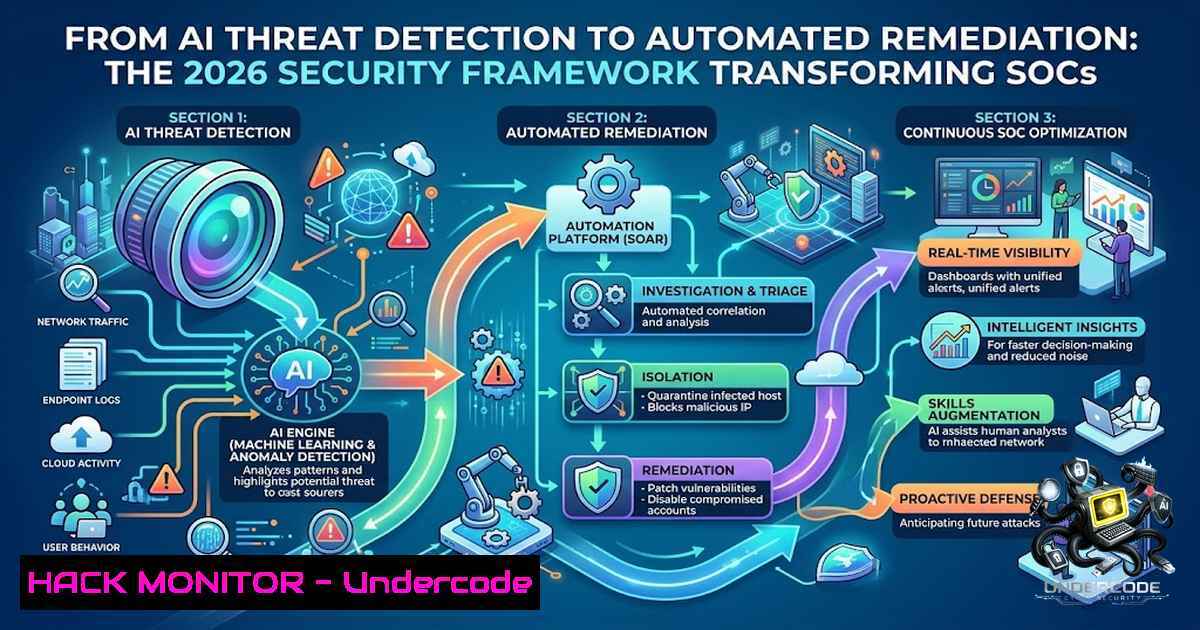
The cybersecurity landscape has reached an inflection point where traditional detection-and-response models can no longer keep pace with the velocity and sophistication of modern attacks. Organizations are increasingly turning to AI-driven frameworks that bridge the critical gap between threat identification and autonomous remediation—moving from passive alerting to proactive, machine-speed defense. This structured approach not only enhances threat detection accuracy but also aligns resources for maximum operational impact, enabling security teams to focus on strategic initiatives rather than drowning in alert fatigue.
Learning Objectives:
- Understand the end-to-end architecture of AI-powered security frameworks from anomaly detection to automated remediation
- Master practical implementation techniques including SIEM integration, LLM-based threat analysis, and SOAR workflows
- Acquire hands-on command-line skills for deploying, monitoring, and tuning AI security agents across Linux and Windows environments
You Should Know:
- Building the AI Security Pipeline: From Log Ingestion to Autonomous Response
The foundation of any AI-driven security framework begins with comprehensive telemetry collection and intelligent processing. Modern AI-SOC pipelines integrate open-source SIEM platforms like Wazuh or Elastic with large language models to automatically intercept high-severity alerts, analyze them using AI, and generate contextual remediation steps. This architecture typically follows a five-phase active defense lifecycle: predicting attack paths before they materialize, deploying self-evolving deception, dynamically mutating the attack surface, autonomously containing threats, and continuously learning from each incident.
Step-by-Step Guide to Deploying an AI-SOC Pipeline:
- Deploy the SIEM Layer: Install Wazuh or Elastic SIEM on a dedicated server. For Wazuh on Ubuntu:
curl -s https://packages.wazuh.com/key/GPG-KEY-WAZUH | sudo apt-key add -
echo "deb https://packages.wazuh.com/4.x/apt/ stable main" | sudo tee /etc/apt/sources.list.d/wazuh.list
sudo apt update && sudo apt install wazuh-manager
sudo systemctl start wazuh-manager && sudo systemctl enable wazuh-manager
-
Configure Log Forwarding: On each endpoint, install the Wazuh agent:
curl -s https://packages.wazuh.com/key/GPG-KEY-WAZUH | sudo apt-key add -
echo "deb https://packages.wazuh.com/4.x/apt/ stable main" | sudo tee /etc/apt/sources.list.d/wazuh.list
sudo apt update && sudo apt install wazuh-agent
sudo sed -i 's/MANAGER_IP/YOUR_WAZUH_MANAGER_IP/g' /var/ossec/etc/ossec.conf
sudo systemctl start wazuh-agent
-
Integrate the LLM Layer: Deploy a local LLM (e.g., Llama 3.1) using Ollama:
curl -fsSL https://ollama.com/install.sh | sh
ollama pull llama3.1:8b
-
Build the Automation Bridge: Use n8n or a custom Python script to connect SIEM alerts to the LLM for analysis and trigger automated responses via APIs.
2. Implementing AI-Driven Anomaly Detection with Machine Learning
Anomaly detection sits at the heart of AI threat detection, leveraging algorithms like Isolation Forest, statistical Z-score analysis, and behavioral analytics through User Behavior Analytics (UBA) agents. These models continuously ingest telemetry from distributed systems to detect deviations that may indicate malicious activity. The key is deploying these models in a production environment where they can operate in real-time without introducing latency.
Linux Implementation for Anomaly Detection:
 anomaly_detector.py - Isolation Forest for system call anomaly detection
import pandas as pd
from sklearn.ensemble import IsolationForest
import psutil
import time
import json

Collect system metrics
def collect_metrics():
return {
'cpu_percent': psutil.cpu_percent(interval=1),
'memory_percent': psutil.virtual_memory().percent,
'disk_io_counters': psutil.disk_io_counters().read_count,
'network_bytes_sent': psutil.net_io_counters().bytes_sent,
'network_bytes_recv': psutil.net_io_counters().bytes_recv
}

Train Isolation Forest model on baseline data
baseline_data = [collect_metrics() for _ in range(1000)]
df = pd.DataFrame(baseline_data)
model = IsolationForest(contamination=0.01, random_state=42)
model.fit(df)

Real-time anomaly detection loop
while True:
current = pd.DataFrame([collect_metrics()])
prediction = model.predict(current)
if prediction[bash] == -1:
print(f"ALERT: Anomaly detected at {time.ctime()}: {current.to_dict('records')[bash]}")
 Trigger automated remediation workflow
time.sleep(5)
Windows PowerShell Equivalent for Event Log Anomaly Detection:
 Windows anomaly detection using Get-WinEvent
$baseline = @()
for ($i=0; $i -lt 100; $i++) {
$events = Get-WinEvent -LogName Security -MaxEvents 100 | Where-Object { $_.Id -in 4624,4625,4672 }
$baseline += $events.Count
}
$threshold = ($baseline | Measure-Object -Average).Average + (3  ($baseline | Measure-Object -StandardDeviation).StandardDeviation)

while ($true) {
$current = (Get-WinEvent -LogName Security -MaxEvents 100 | Where-Object { $_.Id -in 4624,4625,4672 }).Count
if ($current -gt $threshold) {
Write-Host "ALERT: Anomalous event volume detected: $current events (threshold: $threshold)" -ForegroundColor Red
 Trigger automated response
}
Start-Sleep -Seconds 10
}
3. Automated Remediation: From Detection to Containment
Automated remediation represents the culmination of the AI security framework—where detection triggers predefined or AI-generated response actions without human intervention. Google’s AI Threat Defense, for example, integrates Gemini’s reasoning capabilities with Wiz’s contextual risk prioritization and CodeMender’s code patching abilities to detect and remediate vulnerabilities before exploitation. The system follows a four-step process: Prepare (reduce exposure), Detect (identify threats), Analyze (prioritize risk), and Remediate (execute automated fixes).
Linux Automated Remediation Script:
!/bin/bash
 auto_remediate.sh - Automated threat containment script

Detect and block suspicious IPs from fail2ban logs
grep "Ban" /var/log/fail2ban.log | awk '{print $NF}' | sort -u > /tmp/suspect_ips.txt

while read ip; do
 Check if IP is in threat intelligence feed
if curl -s "https://api.threatintel.com/check?ip=$ip" | grep -q "malicious"; then
 Block IP using iptables
sudo iptables -A INPUT -s $ip -j DROP
echo "Blocked malicious IP: $ip at $(date)" >> /var/log/auto_remediate.log

Isolate affected container if applicable
if docker ps -q --filter "label=com.docker.compose.project" | xargs; then
docker network disconnect bridge $(docker ps -q --filter "label=com.docker.compose.project" | head -1)
fi
fi
done < /tmp/suspect_ips.txt

Remediate vulnerable packages
sudo apt update && sudo apt upgrade -y --only-upgrade
Windows Automated Remediation (PowerShell):
 auto_remediate.ps1 - Windows automated threat response

Fetch threat intelligence and block malicious IPs
$maliciousIPs = Invoke-RestMethod -Uri "https://api.threatintel.com/feed" | Select-Object -ExpandProperty ips

foreach ($ip in $maliciousIPs) {
 Add to Windows Firewall block rule
New-1etFirewallRule -DisplayName "Blocked Malicious IP: $ip" -Direction Inbound -Action Block -RemoteAddress $ip
Write-Host "Blocked malicious IP: $ip" -ForegroundColor Green
}

Isolate compromised endpoint by disabling network adapter
$compromisedEndpoint = "DESKTOP-XXXXX"
if (Get-1etAdapter -1ame "Ethernet" | Where-Object { $_.Status -eq "Up" }) {
Disable-1etAdapter -1ame "Ethernet" -Confirm:$false
Write-Host "Isolated compromised endpoint: $compromisedEndpoint" -ForegroundColor Red
}
4. Leveraging Agentic AI for Autonomous Security Operations
Agentic AI represents the next evolution in security automation—autonomous agents that not only detect threats but also proactively hunt, investigate, and respond without human prompting. Tools like SentinelAI continuously monitor the open web for emerging threats, discover CVEs, correlate them against your environment, assess vendor risk, detect credential leaks, and autonomously generate remediation plans. Similarly, SafeBreach Helm orchestrates three purpose-built AI agents to operationalize the Continuous Threat Exposure Management (CTEM) framework at enterprise scale, translating findings into actionable guidance shared with workflow management tools.
Deploying an AI Security Agent with Docker:
 Deploy SentinelAI agent
docker run -d \
--1ame sentinelai \
-e API_KEY="your_api_key" \
-e ENVIRONMENT="production" \
-v /var/log:/var/log:ro \
-v /etc/hosts:/etc/hosts:ro \
eslamanwar/sentinelai:latest

Monitor agent logs
docker logs -f sentinelai --tail 100

Trigger on-demand vulnerability scan
docker exec sentinelai python scan.py --target 192.168.1.0/24 --depth full
Configuring AI Agent with MITRE ATT&CK Mapping:
 agent_config.yaml
agent:
name: "ThreatHunter-Prod"
framework_mappings:
- mitre_attack: v14.1
- nist_csf: "2.0"
- mitre_atlas: "latest"

detection_engines:
- isolation_forest:
contamination: 0.01
n_estimators: 200
- behavioral_analysis:
window_size: 3600
anomaly_threshold: 3.5

remediation_playbooks:
- id: "block_ip"
actions:
- type: "firewall_block"
- type: "endpoint_isolation"
- id: "patch_vulnerability"
actions:
- type: "auto_patch"
- type: "service_restart"
- Cloud Hardening and API Security with AI-Driven Guardrails
As organizations migrate to multi-cloud environments, securing APIs and cloud workloads becomes paramount. AI-driven frameworks now integrate real-time visibility across cloud workloads, Kubernetes clusters, identities, and AI environments. Remediation generates and validates new guardrail policies that are deployed into the live environment, creating a continuous feedback loop of improvement. For API security, AI models analyze request patterns to detect anomalies indicative of API abuse, credential stuffing, or injection attacks.
Kubernetes Security Hardening with AI Policies:
 network-policy.yaml - Restrict pod communication
apiVersion: networking.k8s.io/v1
kind: NetworkPolicy
metadata:
name: ai-security-policy
spec:
podSelector:
matchLabels:
app: ai-detector
policyTypes:
- Ingress
- Egress
ingress:
- from:
- namespaceSelector:
matchLabels:
name: trusted-1amespace
ports:
- protocol: TCP
port: 8080
egress:
- to:
- ipBlock:
cidr: 10.0.0.0/8
ports:
- protocol: TCP
port: 443
API Rate Limiting with AI Anomaly Detection (NGINX + Lua):
-- api_rate_limit.lua
local redis = require "resty.redis"
local red = redis:new()
red:connect("127.0.0.1", 6379)

local client_ip = ngx.var.remote_addr
local key = "rate_limit:" .. client_ip
local current = red:incr(key)
if current == 1 then
red:expire(key, 60)
end

-- AI anomaly detection - flag unusual request patterns
if current > 100 then
ngx.log(ngx.WARN, "Potential API abuse from IP: ", client_ip)
-- Trigger automated response via webhook
os.execute('curl -X POST http://ai-agent:8080/anomaly -d "{\"ip\":\"' .. client_ip .. '\",\"requests\":' .. current .. '}"')
end

if current > 200 then
ngx.exit(429) -- Too Many Requests
end
6. Threat Hunting and TTP Analysis Using LLMs
Large Language Models are revolutionizing threat hunting by providing semantic understanding of security logs and mapping them to adversary tactics, techniques, and procedures (TTPs). Frameworks like LogRESP-Agent integrate LLM-based anomaly detection with semantic explanation, contextual threat reasoning via Retrieval-Augmented Generation (RAG), and automated TTP analysis. This enables security analysts to ask natural language questions about their environment and receive actionable intelligence.
Linux Command for Log Analysis with AI:
 Extract suspicious SSH login attempts
grep "Failed password" /var/log/auth.log | awk '{print $11}' | sort | uniq -c | sort -1r | head -20

Feed into local LLM for TTP mapping
echo "Analyze these failed login attempts and map to MITRE ATT&CK techniques:" > /tmp/prompt.txt
grep "Failed password" /var/log/auth.log | tail -50 >> /tmp/prompt.txt
ollama run llama3.1:8b < /tmp/prompt.txt
Windows Event Log TTP Analysis:
 Extract suspicious PowerShell command-line arguments
Get-WinEvent -LogName "Microsoft-Windows-PowerShell/Operational" |
Where-Object { $_.Message -match "CommandLine" } |
Select-Object TimeCreated, Message |
Out-File -FilePath C:\temp\ps_events.txt

Use AI to analyze for obfuscation patterns
 Invoke local LLM via REST API
$body = @{ prompt = "Analyze these PowerShell commands for obfuscation and map to MITRE ATT&CK: $(Get-Content C:\temp\ps_events.txt -Raw)" } | ConvertTo-Json
Invoke-RestMethod -Uri "http://localhost:11434/api/generate" -Method Post -Body $body -ContentType "application/json"
7. Security Testing and Red Teaming with AI
Automated red teaming has emerged as a continuous, scalable approach to adversarial testing using purpose-built AI systems. Tools like s0-cli leverage LLMs to run classic SAST scanners and AI-slop detectors, then triage every finding with self-optimizing capabilities. This approach enables organizations to continuously test their defenses rather than relying on periodic penetration tests.
Running an AI-Powered Security Scan:
 Install s0-cli for AI-driven SAST
pip install s0-cli

Scan a repository for vulnerabilities and AI-slop patterns
s0 scan --path /path/to/repo --output json > scan_results.json

Parse results and generate remediation plan
cat scan_results.json | jq '.findings[] | select(.severity=="critical")' > critical_findings.json

Use LLM to generate fix suggestions
ollama run llama3.1:8b "Generate remediation steps for these security findings: $(cat critical_findings.json)"
Docker-Based Security Testing:
 Deploy offsec-ai container for comprehensive security testing
docker run -it --rm \
-v $(pwd):/target \
htunnthuthu/offsec-ai:latest \
--scan /target \
--level full \
--report html
What Undercode Say:
- Key Takeaway 1: The transition from passive detection to autonomous remediation represents a paradigm shift in cybersecurity operations, with Gartner rating Autonomous Exposure Remediation as “Transformational” despite its current “Embryonic” maturity—market penetration below 1% with a five-to-ten-year plateau. Organizations that invest early in building AI security frameworks will gain a significant competitive advantage in threat resilience.
-
Key Takeaway 2: Integration of established frameworks—MITRE ATT&CK, NIST CSF 2.0, MITRE ATLAS, and NIST AI RMF—provides the foundational structure needed for effective AI security implementation. The most successful deployments combine open-source tools (Wazuh, Elastic, Ollama) with purpose-built AI agents, creating a cost-effective yet powerful security operations center that operates at machine speed.
Analysis: The convergence of AI and cybersecurity is no longer theoretical—it’s operational. Research shows AI-driven approaches could lift SOC efficiency by roughly 40% by 2026 compared to 2024 levels. However, the path to fully autonomous security is fraught with challenges: false positives, model drift, adversarial AI attacks, and the need for human oversight in critical decision points. The frameworks emerging today—from Google’s AI Threat Defense to open-source AI-SOC pipelines—are laying the groundwork for a future where security operations are fundamentally AI-1ative. Organizations must balance the promise of automation with the reality that AI systems themselves become attack surfaces requiring continuous validation and hardening.
Prediction:
- +1 By 2028, AI-driven autonomous remediation will become the standard for enterprise security operations, reducing mean time to remediation (MTTR) from hours to seconds and enabling security teams to scale their coverage 10x without proportional headcount growth.
-
+1 The integration of agentic AI with CTEM frameworks will create self-healing security architectures that continuously adapt to emerging threats, effectively creating “immune systems” for digital infrastructure.
-
-1 The proliferation of AI security agents will introduce new attack vectors—adversarial prompt injection, model poisoning, and AI agent hijacking—that will require entirely new defense paradigms and potentially create a “cyber arms race” between attackers and defenders.
-
-1 Organizations that fail to implement structured AI security frameworks will face a widening gap in threat detection and response capabilities, potentially leading to catastrophic breaches as attackers increasingly leverage AI to automate and scale their operations.
▶️ Related Video (80% Match):
https://www.youtube.com/watch?v=2Zou_-EyeAA
🎯Let’s Practice For Free:
🎓 Live Courses & Certifications:
Join Undercode Academy for Verified Certifications
🚀 Request a Custom Project:
Secure, high-velocity infrastructure and disruptive technological engineering. Contact our engineering team for high-tier development and proprietary systems:
[email protected]
💎 Smart Architecture | 🛡️ Secure by Design | ⭐ Trusted by Thousands
IT/Security Reporter URL:
Reported By: Nijisha From – Hackers Feeds
Extra Hub: Undercode MoN
Basic Verification: Pass ✅


