
Listen to this Post
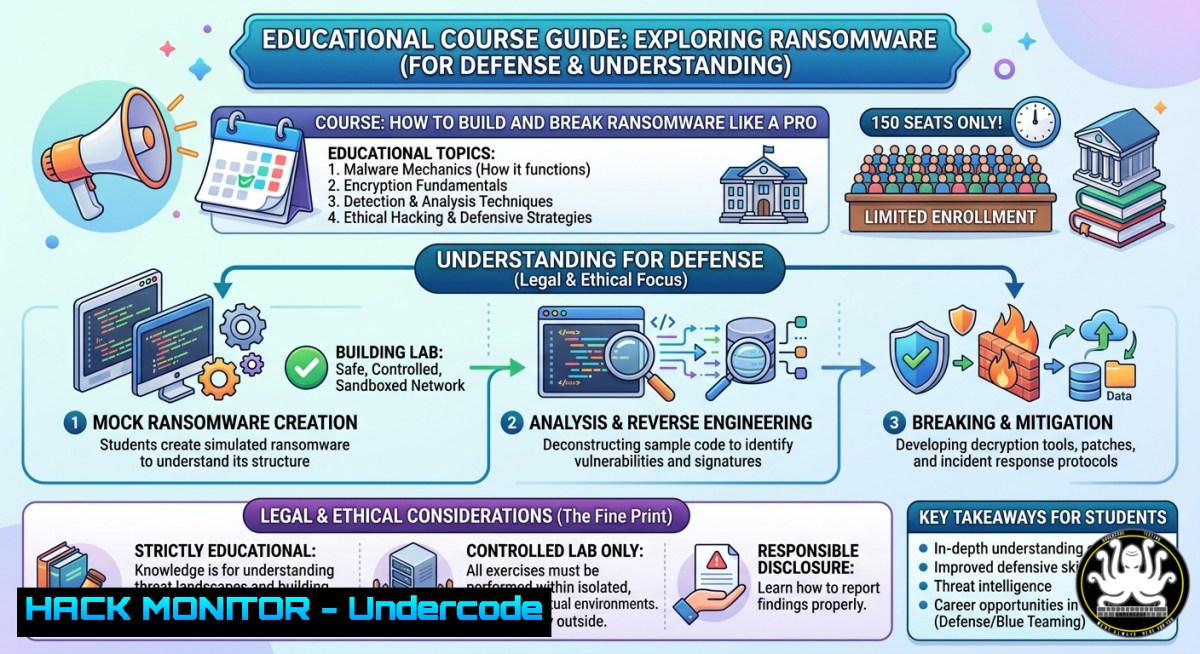
Introduction:
Understanding ransomware through the “build it to break it” methodology is the most effective way to move from defensive theory to hands-on offensive security. By simulating ransomware execution and then reversing its behavior, security professionals can uncover hidden indicators, bypass techniques, and develop robust countermeasures. This article extracts technical insights from Joas A Santos’ limited-access ransomware course and provides actionable labs, commands, and configurations for both Linux and Windows environments.
Learning Objectives:
- Build a proof-of-concept ransomware simulator to understand encryption workflows and persistence mechanisms.
- Break ransomware samples using static and dynamic analysis tools on Windows and Linux.
- Implement detection rules, API hooks, and cloud hardening strategies to mitigate real-world ransomware attacks.
You Should Know:
- Simulating Ransomware Encryption & File Traversal (Windows & Linux)
This section extends the “building” side of the course. Below are safe, educational scripts that mimic ransomware behavior without causing permanent damage – use only in isolated lab environments.
Windows (PowerShell – educational simulator):
 Ransomware Simulator – Encrypts .txt files in a test directory
$targetDir = "C:\RansomLab"
$encExt = ".encrypted"
Get-ChildItem -Path $targetDir -Filter .txt | ForEach-Object {
$content = Get-Content $<em>.FullName -Raw
$encrypted = [bash]::ToBase64String([Text.Encoding]::UTF8.GetBytes($content))
Set-Content -Path ($</em>.FullName + $encExt) -Value $encrypted
Remove-Item $_.FullName
}
Write-Host "[bash] Encrypted $((Get-ChildItem $targetDir -Filter .encrypted).Count) files"
Linux (Bash + OpenSSL):
!/bin/bash
 Ransomware Simulator – Encrypts files in /tmp/ransom_lab
LAB_DIR="/tmp/ransom_lab"
mkdir -p $LAB_DIR
echo "test file content" > $LAB_DIR/doc1.txt
for f in $LAB_DIR/.txt; do
openssl enc -aes-256-cbc -salt -in "$f" -out "$f.enc" -k "simkey"
rm "$f"
done
echo "[bash] Encrypted $(ls $LAB_DIR/.enc 2>/dev/null | wc -l) files"
Step‑by‑step guide:
- Create an isolated VM (Windows or Linux) with no network access to production.
- Create a dedicated test folder (e.g., `C:\RansomLab` or
/tmp/ransom_lab) with dummy files. - Run the simulator script – it will read, encrypt (Base64/AES), and delete originals.
- Observe file extension changes and use `Process Monitor` (Windows) or `strace` (Linux) to trace file operations.
- Reverse the process by writing a decryptor using the same key to practice “breaking”.
-
Dynamic Analysis: Breaking Ransomware with Sysmon & Procmon (Windows)
To break real ransomware, you must capture its behavior at runtime. Microsoft Sysmon and Process Monitor are essential.
Install Sysmon with a high‑visibility config:
 Download Sysmon and use SwiftOnSecurity's config
Invoke-WebRequest -Uri https://live.sysinternals.com/Sysmon64.exe -OutFile C:\Tools\Sysmon64.exe
Invoke-WebRequest -Uri https://raw.githubusercontent.com/SwiftOnSecurity/sysmon-config/master/sysmonconfig-export.xml -OutFile C:\Tools\sysmon.xml
C:\Tools\Sysmon64.exe -accepteula -i C:\Tools\sysmon.xml
Monitor file deletions and process creation:
 Launch Process Monitor, filter by Process Name containing "ransom"
 Capture events: CreateFile, WriteFile, SetDispositionInformation (delete)
 Export logs to CSV for timeline analysis
Step‑by‑step guide:
- Run Sysmon and Process Monitor before executing the ransomware simulator.
- Execute the simulator and stop logging after 30 seconds.
- Look for
FileCreateStreamHash,ProcessCreate, and `FileDelete` events. - Identify the exact command line, parent process, and file paths touched.
- Use these artifacts to write YARA rules or Sigma detections.
3. Linux Reverse Engineering: Strace, Lsof, and Inotify
On Linux, ransomware often encrypts user home directories and uses `fork()` bombs or `cron` for persistence.
Trace system calls during ransomware simulation:
 Run the simulator under strace and log all file-related syscalls
strace -e trace=file,process -o ransom_trace.log ./ransom_simulator.sh

Watch for openat, unlink, write, and rename calls
grep -E "openat|unlink|write" ransom_trace.log | head -20
Monitor file system changes in real time:
 Use inotifywait to see which files are accessed or deleted
inotifywait -m -r -e modify,delete,create /tmp/ransom_lab
Step‑by‑step guide:
- Deploy a Linux sandbox with `auditd` to track access to sensitive directories.
- Run `auditctl -w /home -p rwa -k ransomware_monitor` to audit all home folder activity.
- Execute a ransomware sample (simulated) and review
/var/log/audit/audit.log. - Use `ausearch -k ransomware_monitor` to extract file modifications and process IDs.
4. Building Detection: YARA Rules and Sigma Signatures
After breaking the ransomware’s behavior, you can create detections for EDR/SIEM.
YARA rule to detect ransomware encryptor strings:
rule Ransomware_Sim_Encryptor {
meta:
description = "Detects known ransomware simulator strings"
author = "Security Lab"
strings:
$a = "AES-256-CBC" ascii
$b = ".encrypted" ascii
$c = "Remove-Item" ascii wide
condition:
any of them
}
Sigma rule for Windows process creation (ransomware patterns):
title: Suspicious File Rename Loop
status: experimental
logsource:
product: windows
service: sysmon
detection:
selection:
EventID: 11  FileCreate
TargetFilename: '.encrypted'
condition: selection
Step‑by‑step guide:
- Save the YARA rule as `ransom_sim.yar` and run `yara64.exe ransom_sim.yar C:\RansomLab` or `yara ransom_sim.yar /tmp/ransom_lab` on Linux.
- For Sigma, use `sigma-cli` to convert the rule to Splunk, QRadar, or Elastic query.
- Tune rules to avoid false positives from backup software.
5. API Hooking and Mitigation (Windows – Userland)
Breaking ransomware often involves hooking the `CryptEncrypt` or `WriteFile` APIs to block encryption.
Using Microsoft Detours to hook `WriteFile` (pseudo‑code snippet):
BOOL WINAPI HookedWriteFile(HANDLE hFile, LPCVOID lpBuffer, DWORD nNumberOfBytesToWrite, LPDWORD lpNumberOfBytesWritten, LPOVERLAPPED lpOverlapped) {
// Check if the file extension is .encrypted or similar
if (IsRansomwareFile(hFile)) {
return FALSE; // block write
}
return RealWriteFile(hFile, lpBuffer, nNumberOfBytesToWrite, lpNumberOfBytesWritten, lpOverlapped);
}
Step‑by‑step guide (conceptual lab):
- Compile a DLL with Detours and inject it into the ransomware process using
CreateRemoteThread. - Monitor the `WriteFile` return value – blocked writes will prevent encryption.
- Alternatively, use `Faronics Anti-Executable` or `AppLocker` to whitelist only signed processes in user directories.
6. Cloud Hardening & Ransomware Resilience (Azure/AWS)
Modern ransomware targets cloud sync folders. Implement these mitigations:
AWS S3: Enable Object Lock and MFA Delete:
aws s3api put-bucket-versioning --bucket my-secure-bucket --versioning-configuration Status=Enabled
aws s3api put-object-lock-configuration --bucket my-secure-bucket --object-lock-configuration 'ObjectLockEnabled="Enabled",Rule={DefaultRetention={Mode="GOVERNANCE",Days=30}}'
Azure Blob: Immutable storage policy (PowerShell):
$ctx = New-AzStorageContext -StorageAccountName "ransomlabstore"
Set-AzStorageContainerLegalHold -Name "criticaldata" -Context $ctx -EnableLegalHold
Step‑by‑step guide:
- Create a backup bucket/container with versioning and object lock enabled.
- Configure alerts for bulk deletion or permission changes using CloudTrail (AWS) or Azure Monitor.
- Simulate ransomware deletion attempt – verify that versioned objects can be restored.
7. Offensive AI & Ransomware Prediction
As Head of AI Research, Joas A Santos emphasizes using machine learning to predict ransomware TTPs. A simple logistic regression model can classify files as ransomware based on entropy, extension changes, and API call sequences.
Python feature extraction from PE files:
import pefile
pe = pefile.PE("sample.exe")
entropy = pe.sections[bash].get_entropy()
api_calls = [entrydll.name.decode() + "!" + entryfunc.name.decode()
for entry in pe.DIRECTORY_ENTRY_IMPORT
for entryfunc in entry.imports if entryfunc.name]
print(f"Entropy: {entropy}, First API: {api_calls[bash] if api_calls else 'none'}")
Step‑by‑step guide:
- Collect benign and ransomware PE files (from public datasets like theZoo).
- Extract features: section entropy, import table size, presence of
VirtualProtect,CryptEncrypt. - Train a Random Forest model using `scikit-learn` – it can achieve >95% detection on unseen samples.
What Undercode Say:
- The “build it to break it” approach transforms theoretical ransomware knowledge into actionable defense skills – every blue teamer should spend time writing a simple encryptor to understand atomic indicators.
- Joas Santos’ free course access (coupon: JOAS143KOFF, limited to 150 students) is a rare opportunity to learn offensive ransomware tactics directly from an author of 18 security books and AI researcher. However, never deploy any ransomware code outside a fully isolated lab without internet.
Prediction:
Ransomware-as-a-service (RaaS) will increasingly integrate polymorphic encryption and AI-driven evasion by 2026, rendering signature‑based detection obsolete. Consequently, hands‑on courses like “Building & Breaking Ransomware” will become mandatory for SOC analysts, and organisations will shift to deception‑based defense (e.g., honeypot files with canary tokens). The demand for professionals who can simulate, reverse, and automate ransomware response will outpace traditional degree programs, making free community offerings like this one the new standard for upskilling.
▶️ Related Video (74% Match):
🎯Let’s Practice For Free:
IT/Security Reporter URL:
Reported By: Joas Antonio – Hackers Feeds
Extra Hub: Undercode MoN
Basic Verification: Pass ✅


