Listen to this Post
Introduction:
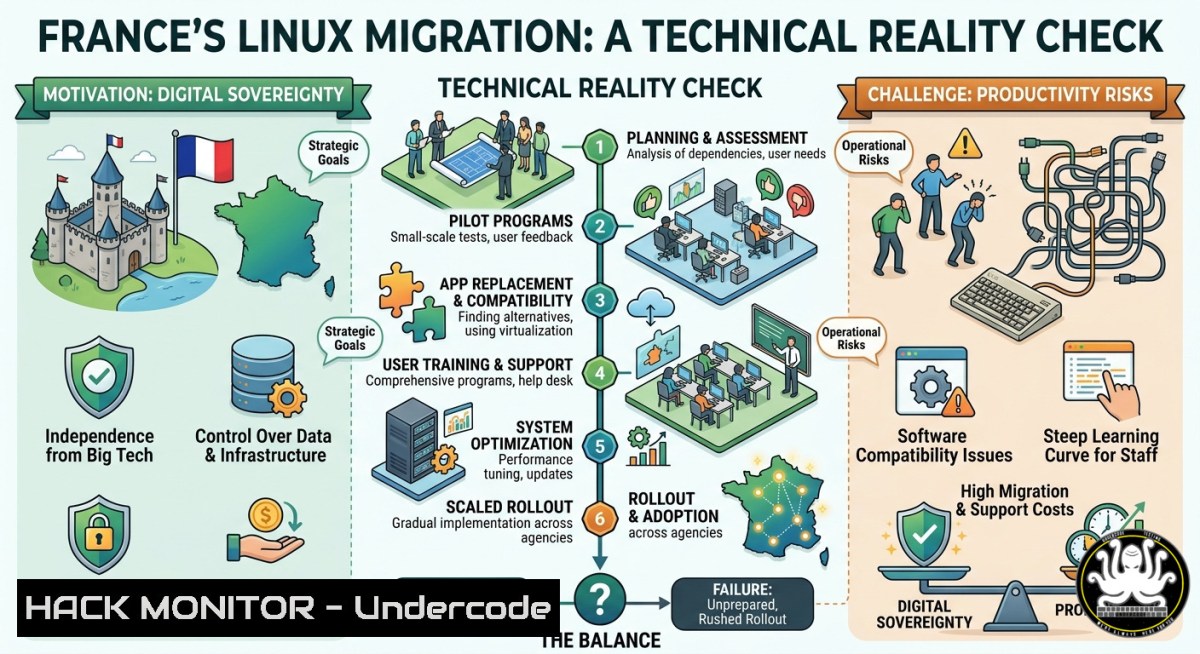
France has ordered every ministry to replace Windows with Linux across 2.5 million civil servant desktops, abandoning Microsoft Teams and Office for a homegrown productivity suite. While digital sovereignty aims to decouple public IT from US tech giants, the migration introduces massive retraining costs, compatibility gaps with specialist software, and risks of productivity collapse—without any published KPIs for citizen service quality or rollback thresholds.
Learning Objectives:
- Assess the hidden costs and technical risks of migrating millions of users from Windows to Linux in a government environment.
- Implement hybrid compatibility strategies, including containerization and virtualization, for legacy Windows-dependent applications.
- Evaluate cloud infrastructure sovereignty and build provider-agnostic hardening measures to avoid partial dependency swaps.
You Should Know:
- Measuring the Migration Baseline: Inventory, Compatibility, and KPI Definition
Before moving a single desktop, you must inventory all Windows software, drivers, and peripherals. Use PowerShell to scan installed applications and flag those without native Linux equivalents.
Windows discovery command:
`Get-WmiObject -Class Win32_Product | Select-Object Name, Version, Vendor | Export-Csv -Path “app_inventory.csv”`
Linux alternative audit (after pilot install):
`dpkg -l > linux_packages.txt` or `rpm -qa > linux_packages.txt`
Then define rollback KPIs: e.g., “If citizen service ticket resolution time increases >40% for two consecutive weeks, pause migration.” Without such metrics, sovereignty becomes a blind leap.
Step-by-step:
- Run the above PowerShell command across all domain workstations (via Group Policy or SCCM).
- Categorize apps into: Native Linux (replace), Runs via Wine/containers (compatible), Windows-only critical (virtualize).
- Establish a baseline of average task completion time (e.g., opening a case file, submitting a form) using `Measure-Command` in PowerShell.
- Create a publicly accessible dashboard (using Grafana + Prometheus) to track post-migration performance.
-
User Environment Migration: From Active Directory and GPO to LDAP and Ansible
Replacing Active Directory and Group Policy with open-source LDAP (389 Directory Server or OpenLDAP) and configuration management (Ansible) is non-trivial. User state—desktop settings, mapped drives, printer configurations—must be preserved.
Join Linux to an existing AD (hybrid phase):
`sudo apt install realmd sssd`
`sudo realm discover yourdomain.com`
`sudo realm join yourdomain.com -U Administrator`
Export Windows GPOs for translation:
On Windows DC: `Get-GPO -All | Export-GPO -Path “C:\GPOBackup”`
Then manually convert security policies to Ansible playbooks.
Step-by-step migration:
- Deploy SSSD on pilot Linux machines to authenticate against existing AD (no immediate LDAP cutover).
- Use `rsync` or `puppet` to copy user profiles from Windows roaming profiles:
`rsync -avz /mnt/windows_profiles/ /home/linux_users/`
- Write Ansible roles to enforce desktop hardening (e.g., `security_policy.yml` configuring SELinux, firewall rules, usbguard).
- Automate printer deployment via CUPS + LDAP: `lpadmin -p “PrinterName” -E -v ipp://printer-server -m everywhere`
- Productivity Suite Transition: Replacing Microsoft 365 with Open Source Alternatives
The French government plans a “homegrown productivity suite” likely based on LibreOffice, Nextcloud, and a chat alternative to Teams (e.g., Element/Matrix). Bulk file conversion from .docx/.xlsx to ODF must preserve macros and complex formatting.
Bulk conversion command (LibreOffice headless):
`libreoffice –headless –convert-to odt –outdir /converted_files/ .docx`
Nextcloud migration script (sync from SharePoint if allowed):
`occ files:scan –path=”user_files”`
Use rclone: `rclone copy sharepoint:documents nextcloud:root -v`
Step-by-step:
- Install LibreOffice on a test Linux desktop and run batch conversion on a sample of 10,000 documents.
- Validate macro functionality: LibreOffice Basic vs VBA—use `vba2oo` converter.
- Deploy Matrix Synapse server for chat:
sudo apt install matrix-synapse, then configure federation with European nodes only. - Train civil servants using interactive tutorials (e.g., `libreoffice –quickstart –help` is insufficient; deploy Moodle-based courses).
-
Cloud Infrastructure Sovereignty: Auditing Your Dependencies on AWS/Azure
Even with Linux desktops, if backend cloud remains AWS or Azure, you have only cosmetic sovereignty. Audit all cloud resources and migrate to European providers like OVHCloud, Hetzner, or Deutsche Telekom’s OpenTelekom Cloud.
Check current cloud provider (Linux):
`curl -s http://169.254.169.254/latest/meta-data/instance-id` (AWS)
`curl -s http://169.254.169.254/metadata/instance?api-version=2019-06-01` (Azure)
Use OpenTofu (open-source Terraform) to rebuild infrastructure on OVH:
provider "ovh" {
endpoint = "https://ca.ovh.com/cloud"
}
resource "ovh_cloud_project_instance" "server" {
region = "GRA"  France
plan_code = "vm-linux"
}
Step-by-step hardening:
- Enforce data residency at API gateway level: Configure Kong or Traefik to reject any request that would replicate data outside EU.
- Implement end-to-end encryption where cloud provider cannot access keys: Use `age` encryption for backups, store keys in HashiCorp Vault on-prem.
- Regularly audit with `cloudfox` (AWS/Azure) or `ScoutSuite` (multi-cloud) to detect accidental US-region resources.
- For Kubernetes clusters, use Kyverno policies to block images from US-hosted registries (e.g.,
deny gcr.io, `deny quay.io` unless mirrored). -
Specialist Software Compatibility: Healthcare, Finance, and Legacy Apps
The post highlights specialist software (e.g., in healthcare) that may only run on Windows. Leaving these on isolated Windows machines creates a split-state, increasing support costs. Use containerization or full virtualization.
Run a Windows app via Wine:
`wine installation.exe`
`wine app.exe` (test thoroughly; many medical apps fail due to driver dependencies)
Virtualization with KVM (closest to native performance):
`sudo apt install qemu-kvm virt-manager`
`virt-install –name win10-vm –ram 4096 –disk path=/var/lib/libvirt/images/win10.qcow2,size=50 –os-variant win10 –cdrom /iso/win10.iso`
Step-by-step for legacy apps:
- Enumerate Windows-only apps from the inventory (Section 1). Flag those with custom hardware (e.g., card readers, lab equipment).
- For hardware-tethered apps, use USB passthrough in KVM: Edit VM XML, add
<hostdev mode='subsystem' type='usb'/>. - Deploy RemoteApp on Windows Server (temporary) and expose via Apache Guacamole—Linux thin clients can access.
- Create a decision matrix: if the app cannot run in Wine or KVM within <20% overhead, keep on dedicated Windows 10 LTSC with no internet access (air-gapped).
-
Measuring Trade-offs: Performance Benchmarks and Citizen Satisfaction KPIs
Without transparent metrics, the migration cannot be evaluated. Baseline before cutting over. After migration, compare same tasks.
Baseline on Windows (PowerShell):
`Measure-Command {Start-Process “winword.exe” -ArgumentList “C:\docs\large_report.docx” -Wait}`
Same test on Linux (LibreOffice):
`time libreoffice –headless –convert-to pdf large_report.docx`
Disk I/O benchmark (cross-platform):
`fio –randread –size=1G –directory=./test` (both Windows through WSL or native fio.exe, and Linux).
Step-by-step monitoring:
- Deploy Prometheus node_exporter on all workstations, aggregate metrics into Grafana.
- Define SLOs: “95% of form submissions complete within 30 seconds from click to confirmation.”
- Publish a public dashboard at `data.gouv.fr` showing pre/post migration performance by department.
- Create a “citizen feedback” API endpoint (secured with OAuth2) where complaints about service slowness are automatically correlated with system metrics.
-
Hardening the Sovereign Stack: Linux Security vs Windows Security Posture
Sovereignty without security is fragile. Linux offers granular controls, but default configurations often miss what Windows has out-of-the-box (e.g., HVCI, Credential Guard). Implement these hardening steps.
On Linux (Ubuntu 22.04+):
- Enable SELinux (or AppArmor in enforcing mode): `sudo aa-enforce /etc/apparmor.d/`
- Set kernel parameters for memory protection: `echo “kernel.randomize_va_space=2” >> /etc/sysctl.conf`
- Use firewalld with default deny: `sudo firewall-cmd –set-default-zone=drop`
- Harden SSH:
PermitRootLogin no,PasswordAuthentication no, `AllowUsers [email protected]`
On remaining Windows systems (legacy):
- Deploy LAPS for local admin password rotation.
- Enable Attack Surface Reduction rules via PowerShell:
`Set-MpPreference -AttackSurfaceReductionRules_Ids 75668c1f-73b5-4cf0-bb93-3ecf5cb7cc84 -AttackSurfaceReductionRules_Actions Enabled`
Step-by-step sovereign hardening:
- Centralize Linux auditing with `auditd` and ship logs to a European SIEM (e.g., Wazuh or gravwell).
- Implement mandatory access control: write AppArmor profiles for every custom productivity app.
- For cloud workloads, enforce that all stored secrets are encrypted with HSM keys held by a French government entity (not cloud provider’s KMS).
- Regularly test for dependency chain attacks: `pip-audit` and `npm audit` on any internally developed tools; replace US PyPI mirrors with `https://mirror.eu.python.org/`.
What Undercode Say:
- Digital sovereignty without infrastructure-layer independence is cosmetic. France’s desktop migration avoids addressing AWS/Azure dependencies, leaving the state vulnerable to US Cloud Act subpoenas and supply-chain decoupling.
- The absence of measurable KPIs and rollback thresholds turns industrial policy into a high-risk gamble. Without baselines for citizen service quality, the migration could degrade public sector efficiency for years, with no mechanism to revert.
The LinkedIn discussion rightly questions whether sovereignty improves citizen services—or just shifts control to a different set of vendors. The technical commands above prove that migration is possible, but the operational ledger is brutal: retraining 2.5 million people, rewriting GPOs into Ansible, and containerizing legacy healthcare apps are multi-year efforts. Europe must decide if it’s building resilience or just burning budget on symbolism. The most honest answer from the comment section comes from Heiko Joerg Schick: we should debate digital resilience—the ability to absorb shocks—rather than purity of sovereignty. That means hybrid environments, transparent cost accounting, and realistic timelines.
Prediction:
Within 24 months, France will quietly maintain dual-boot or VDI-based Windows environments for at least 30% of civil servants—especially in healthcare, finance, and law enforcement—due to specialist software incompatibilities. This will create a de facto two-tier system, increasing support costs and security fragmentation. Meanwhile, the EU will accelerate a sovereign cloud certification (like Gaia-X 2.0) but struggle to attract major software vendors to port their apps to Linux. The real winner will be open-source remote desktop tools (Apache Guacamole, Kasm) that allow Linux front-ends to stream Windows backend apps, preserving sovereignty theater while avoiding productivity meltdown. By 2028, the conversation will shift from “replace everything” to “secure interoperability across sovereign stacks.”
▶️ Related Video (78% Match):
🎯Let’s Practice For Free:
IT/Security Reporter URL:
Reported By: Luvelasco Digital – Hackers Feeds
Extra Hub: Undercode MoN
Basic Verification: Pass ✅


