
Listen to this Post
Introduction:
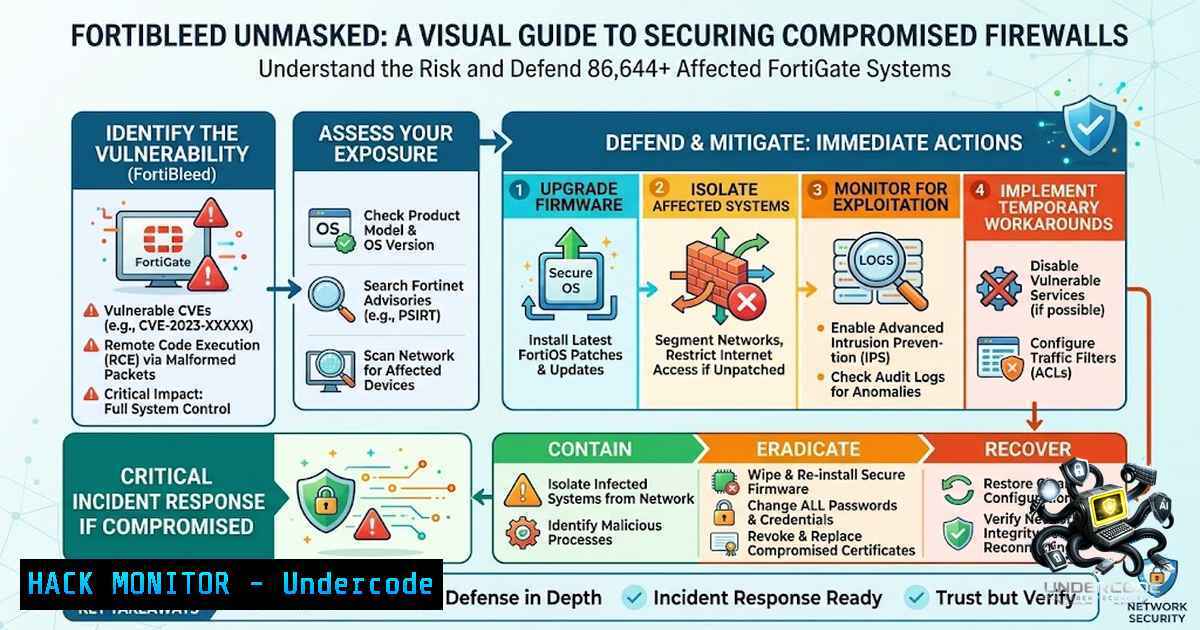
The FortiBleed campaign represents one of the most extensive credential theft operations ever documented, with over 86,644 verified FortiGate firewall and VPN gateway credentials compromised across 194 countries. Unlike traditional zero-day exploits, this attack weaponizes operational security failures—primarily the widespread reuse of credentials leaked in prior breaches and the continued exposure of administrative interfaces to the public internet. The attackers employ a fully automated, self-sustaining strategy: they scan for Fortinet devices, test known leaked passwords, and upon successful compromise, monitor network traffic to harvest additional credentials, feeding them back into the attack cycle. With impacted organizations spanning telecom, government, healthcare, and energy sectors, and named victims including Oracle, Chevron, Samsung, and Siemens, the urgency for immediate remediation cannot be overstated.
Learning Objectives:
- Understand the mechanics of the FortiBleed credential theft campaign and distinguish it from zero-day exploitation.
- Implement immediate mitigation measures including credential rotation, session termination, and multifactor authentication enforcement.
- Apply advanced hardening techniques for FortiGate devices, including secure credential storage (PBKDF2), local-in policies, and management interface lockdown.
- Utilize Linux, Windows, and FortiGate CLI commands to audit, monitor, and secure network perimeters against similar attacks.
- Leverage threat intelligence tools and exposure checkers to assess organizational risk and respond proactively.
You Should Know:
- The Anatomy of FortiBleed: How Attackers Automate Global Compromise
The FortiBleed campaign is not a sophisticated zero-day; it is a masterclass in credential reuse and automation. The threat actor, believed to be a Russian-speaking group, exposed their operational server, revealing a treasure trove of tools, scripts, and victim data. The attack follows a two-phase loop:
- Phase 1 – Credential Spraying: The attackers mass-scan the internet for FortiGate remote login endpoints. Using a bespoke tool, they spray a curated list of known passwords—derived from previous Fortinet breaches and default credentials—against each device. Generic admin accounts (35%) and built-in Fortinet system accounts (28.3%) constitute the majority of compromised credentials, highlighting a systemic failure to rename or disable default accounts.
- Phase 2 – Passive Harvesting: Once inside a device, the attacker installs a listener that monitors all passing traffic, capturing any additional credentials (e.g., VPN logins, domain admin passwords). These fresh credentials are then fed back into the scanner, enabling the attacker to pivot to other devices within the same network and beyond.
This self-feeding system means that one compromised device can lead to a cascade of breaches across an entire organization. The attackers verify every credential before adding it to their database, ensuring that the 86,644 entries are not guesses but confirmed, working logins.
Step‑by‑Step Guide: Immediate Incident Response
If you suspect your FortiGate device is compromised or want to proactively check, follow this triage process:
- Check Exposure: Visit SOCRadar’s free FortiBleed Exposure Checker (https://socradar.io/free-tools/fortibleed) and enter your IP address or domain. No sign-up is required.
- Terminate All Active Sessions: Immediately terminate all active SSL VPN and administrative sessions to kick out any potential attackers.
– FortiGate CLI:
execute vpn sslvpn terminate all
execute vpn sslvpn kill <user>
– FortiGate GUI: Navigate to Dashboard > Users & Devices > Active Sessions and manually terminate suspicious sessions.
3. Rotate All Credentials: Reset every admin and VPN password. Do not reuse old passwords.
– FortiGate CLI (change admin password):
config system admin
edit <admin_name>
set password <new_strong_password>
next
end
– Bulk VPN Password Reset (Linux script example): Use `expect` or `ssh` to loop through users, but ensure you have a secure automation framework.
4. Enforce Multifactor Authentication (MFA): Require phishing-resistant MFA for all administrative and remote access accounts.
– FortiGate CLI (enable FortiToken):
config system admin
edit <admin_name>
set two-factor fortitoken
set fortitoken <serial_number>
next
end
– Integrate with RADIUS or LDAP servers that support MFA (e.g., Duo, Okta).
5. Review Logs: Scrutinize firewall, VPN, authentication, and domain controller logs for signs of lateral movement, unusual access patterns, or unauthorized configuration changes.
– Linux log analysis (example): `grep “Failed password” /var/log/auth.log` or journalctl -u sshd | grep "Failed".
– Windows Event Viewer: Check Security logs (Event ID 4625 for failed logins, 4624 for successful logins).
2. Hardening FortiGate: Beyond the Basics
The FortiBleed campaign underscores that a software patch alone is insufficient. Organizations must adopt a defense-in-depth strategy that addresses configuration and operational hygiene. CISA and Fortinet have provided clear guidance on hardening FortiGate devices.
Step‑by‑Step Guide: Advanced Hardening
- Secure Credential Storage with PBKDF2: Fortinet introduced PBKDF2-based hashing for admin credentials in FortiOS 7.2.11, 7.4.8, and 7.6.1. However, upgrading alone does not convert existing SHA-256 hashes; each admin must log in after the upgrade to trigger the re-hash.
– Enforce PBKDF2 globally (FortiGate CLI):
config system global
set admin-password-hash pbkdf2
end
– Verify that all admin accounts are using PBKDF2 by checking the configuration file or using the CLI: diagnose sys admin list.
2. Lock Down Management Interfaces: Administrative access must never be exposed to the public internet.
– FortiGate CLI (restrict trusted hosts):
config system admin
edit <admin_name>
set trusthost1 <IP_address> <netmask>
set trusthost2 <IP_address> <netmask>
next
end
– Disable HTTP and Telnet: Use only HTTPS and SSH for administration.
config system global
set admin-https-redirect enable
set admin-port <custom_port>
set admin-ssh-port <custom_port>
end
– Local-in Policies: Control which traffic reaches the FortiGate itself. For example, allow SSH/HTTPS only from trusted IPs.
config firewall local-in-policy
edit 1
set intf "wan1"
set srcaddr "trusted_subnet"
set dstaddr "all"
set action accept
set service "HTTPS" "SSH"
next
end
3. Remove Unnecessary Accounts and Services: Disable or delete any default or unused admin accounts. Generic accounts like `admin` or `maintainer` should be renamed or removed.
– FortiGate CLI (delete admin):
config system admin
delete <admin_name>
end
4. Implement DoS Policies: Protect against brute-force and scanning attempts.
– FortiGate CLI:
config firewall dos-policy
edit 1
set interface "wan1"
set srcaddr "all"
set dstaddr "all"
set service "ALL"
set anomaly "tcp_syn_flood" "enable" "threshold" 1000
next
end
3. Leveraging Threat Intelligence and Continuous Monitoring
Proactive defense requires visibility into the threat landscape. SOCRadar’s research provides a critical dataset for identifying exposure. Organizations should integrate threat intelligence feeds into their SIEM or SOAR platforms to correlate indicators of compromise (IoCs) with internal logs.
Step‑by‑Step Guide: Setting Up Threat Intelligence Integration
- Consume FortiBleed IoCs: Download the list of compromised IPs and domains from trusted sources (e.g., SOCRadar, CISA). Use this list to block outbound and inbound traffic.
– Linux (iptables) example:
while read ip; do iptables -A INPUT -s $ip -j DROP; done < fortibleed_ips.txt
– Windows (Netsh) example:
netsh advfirewall firewall add rule name="Block_FortiBleed" dir=in action=block remoteip=<IP_list>
2. Monitor for Credential Reuse: Use a password manager or enterprise identity solution to enforce unique, complex passwords and rotate them automatically. Conduct regular audits using tools like `hashcat` to test password strength against known breach databases.
3. Deploy Network Segmentation: Isolate critical infrastructure from general network segments. Use VLANs and firewall rules to limit lateral movement.
– FortiGate CLI (create a VLAN):
config system interface
edit "vlan_10"
set vlanid 10
set interface "port1"
set ip 192.168.10.1 255.255.255.0
set allowaccess ping
next
end
- Understanding the Broader Implications: API Security and Cloud Hardening
While FortiBleed targets network edge devices, the lessons extend to API security and cloud infrastructure. The attack demonstrates how credential stuffing and session hijacking can bypass even well-defended perimeters. Organizations must apply similar hardening to their cloud environments:
- API Security: Implement rate limiting, strong authentication (OAuth 2.0 with PKCE), and regular rotation of API keys.
- Cloud Hardening: For AWS, Azure, or GCP, enforce MFA, use IAM roles with least privilege, and enable detailed logging (CloudTrail, Azure Monitor).
- Zero Trust Architecture: Adopt a zero-trust model where every access request is authenticated, authorized, and encrypted, regardless of origin.
Step‑by‑Step Guide: Applying FortiBleed Lessons to the Cloud
- Audit IAM Policies: Review all IAM users, roles, and policies. Remove unused or overly permissive policies.
– AWS CLI (list users): `aws iam list-users`
– Azure CLI (list roles): `az role definition list`
2. Enable MFA for All Users: Enforce MFA for root and IAM users.
– AWS CLI (enable MFA): `aws iam enable-mfa-device –user-1ame
3. Implement Network Segmentation in the Cloud: Use VPCs, subnets, and security groups to restrict access.
– AWS CLI (create security group): `aws ec2 create-security-group –group-1ame
– Azure CLI (create NSG): `az network nsg create –resource-group
5. The Role of Training and Certification in Preventing Future Breaches
The FortiBleed incident highlights a critical skills gap: many organizations lack the expertise to properly configure and maintain network security devices. Professionals with certifications like CISSP, CEH, and CASP+ are better equipped to implement defense-in-depth strategies. Continuous training in threat intelligence, incident response, and cloud security is essential.
Step‑by‑Step Guide: Building a Security Training Program
- Assess Current Capabilities: Use frameworks like NIST CSF to evaluate your team’s skills.
- Invest in Certifications: Encourage staff to pursue relevant certifications (e.g., Fortinet NSE, CISSP, CCSP).
- Conduct Regular Drills: Simulate credential theft and lateral movement scenarios using tools like Caldera or Atomic Red Team.
- Stay Informed: Subscribe to threat intelligence feeds (e.g., SOCRadar, CISA alerts) and participate in information-sharing communities.
What Undercode Say:
- Key Takeaway 1: FortiBleed is not a vulnerability but a consequence of poor credential hygiene and exposed management interfaces. The fix is operational, not patching.
- Key Takeaway 2: The attack’s self-sustaining mechanism—harvesting credentials from compromised devices to fuel further breaches—demonstrates the critical need for network segmentation and continuous monitoring.
Analysis: The FortiBleed campaign serves as a stark reminder that the human element—neglecting password rotation, leaving default accounts, and exposing admin panels—remains the weakest link in cybersecurity. While the immediate response is clear (rotate credentials, enable MFA, lock down interfaces), the long-term solution requires a cultural shift toward proactive defense. Organizations must treat every internet-facing device as a potential entry point and implement zero-trust principles. The fact that 86,644 devices were compromised without a single zero-day underscores that attackers are exploiting operational laziness, not technical wizardry. This incident should catalyze a broader review of identity and access management (IAM) policies, not just for Fortinet devices but across the entire enterprise. The involvement of Russian-speaking actors and the targeting of NATO-member organizations also highlight the geopolitical dimensions of such campaigns, suggesting that nation-state adversaries are increasingly using credential theft as a low-cost, high-impact espionage tool. Moving forward, automation in both attack and defense will escalate; organizations must leverage AI and machine learning to detect anomalies and respond in real-time.
Prediction:
- -1 The FortiBleed dataset will likely be sold or leaked on dark web forums, leading to a secondary wave of attacks against already compromised organizations. Even those who rotate credentials may face residual risk if the attackers have established persistent backdoors.
- -1 Regulatory bodies (e.g., GDPR, CCPA) may impose fines on organizations found to have neglected basic security hygiene, as the campaign exposes widespread non-compliance with data protection standards.
- +1 The incident will accelerate adoption of passwordless authentication and zero-trust architectures, as enterprises realize that traditional password-based security is fundamentally broken.
- +1 Fortinet and other vendors will likely enhance their default configurations to enforce MFA and disable default accounts out-of-the-box, reducing the attack surface for future campaigns.
- -1 Small and medium-sized businesses (SMBs) with limited IT resources will remain disproportionately vulnerable, as they lack the expertise to implement the recommended hardening measures.
- +1 The cybersecurity insurance market will tighten requirements, forcing organizations to demonstrate robust credential management and MFA enforcement to obtain coverage.
- -1 The attackers’ operational server exposure may lead to attribution and potential law enforcement action, but the decentralized nature of cybercrime makes prosecution unlikely.
- +1 The FortiBleed campaign will become a case study in cybersecurity training, driving home the importance of operational security over reliance on patching alone.
- -1 Supply chain attacks may emerge as attackers leverage compromised FortiGate devices to pivot into partner networks, amplifying the damage beyond direct victims.
- +1 Threat intelligence sharing platforms will see increased participation, as organizations recognize the value of collective defense against credential-based attacks.
▶️ Related Video (74% Match):
🎯Let’s Practice For Free:
🎓 Live Courses & Certifications:
Join Undercode Academy for Verified Certifications
🚀 Request a Custom Project:
Secure, high-velocity infrastructure and disruptive technological engineering. Contact our engineering team for high-tier development and proprietary systems:
[email protected]
💎 Smart Architecture | 🛡️ Secure by Design | ⭐ Trusted by Thousands
IT/Security Reporter URL:
Reported By: Harunseker Fortibleed – Hackers Feeds
Extra Hub: Undercode MoN
Basic Verification: Pass ✅


