
Listen to this Post
Introduction:
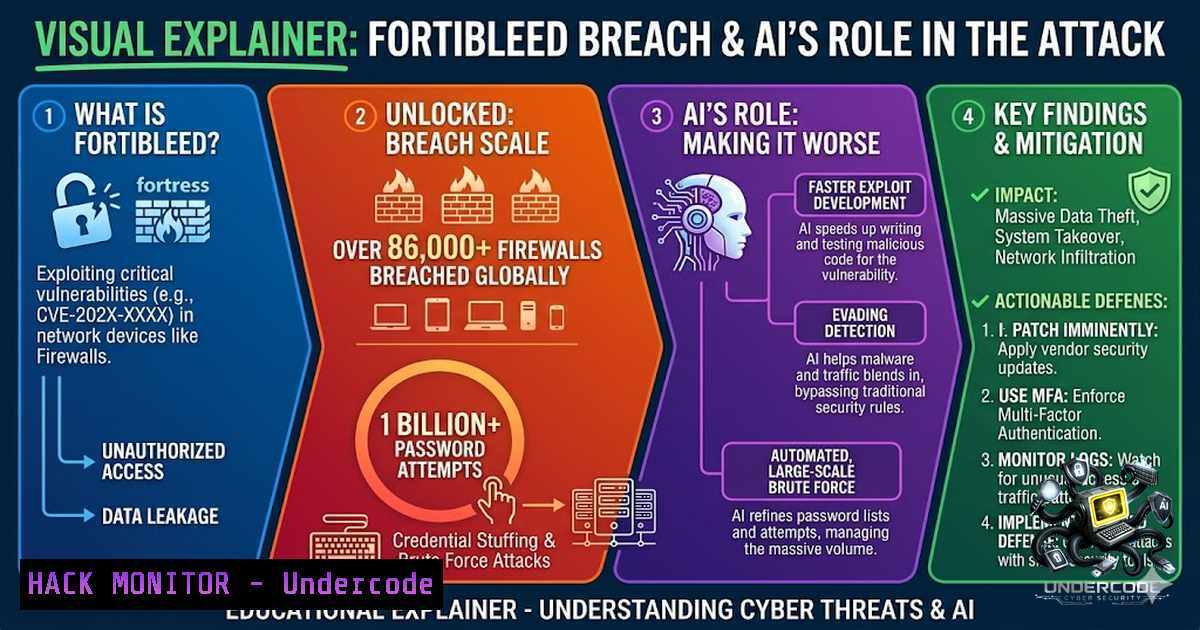
The perimeter is dead. For years, cybersecurity teams have relied on next-generation firewalls as the last line of defense between their internal networks and the open internet. The FortiBleed campaign, uncovered by SOCRadar and security researcher Volodymyr Diachenko, has systematically compromised over 86,000 Fortinet FortiGate firewalls and VPN gateways across 194 countries, harvesting nearly one million verified credentials from more than 100,000 organizations worldwide. This is not a software vulnerability that can be patched with a single update — it is an industrialized, self-feeding credential operation that treats your firewall as both the target and the collection sensor.
Learning Objectives:
- Understand the technical mechanics of the FortiBleed credential harvesting campaign and how attackers automate large-scale firewall compromise
- Learn to identify indicators of compromise (IOCs) and implement CISA-recommended hardening measures for Fortinet devices
- Master incident response procedures, log analysis techniques, and credential rotation strategies to contain and remediate FortiBleed exposure
You Should Know:
- The FortiBleed Attack Chain: How 86,000 Firewalls Fell
The FortiBleed operation is built around full automation. Attackers scan the internet for Fortinet devices, test a curated list of known passwords against each one, and record every successful login. Once a device is compromised, they use it as a listening post, monitoring traffic passing through and collecting any additional credentials that flow by. Those freshly collected passwords are then fed back into the scanner to compromise even more devices. The system feeds itself.
What makes this campaign particularly dangerous is the scale of the cracking infrastructure. The attackers intercepted SSL VPN authentication hashes and cracked them using a massive, dedicated 45-GPU cluster managed through Hashtopolis. According to Diachenko’s analysis, the threat actors conducted approximately 1.16 billion credential attempts against 320,777 FortiGate targets and an additional 2.1 billion attempts against 163,650 Microsoft SQL Server systems.
The password list is not random — it is a carefully assembled collection of credentials leaked from Fortinet devices in earlier incidents, meaning many targets may have never changed their passwords after a prior breach. When FortiOS devices are upgraded from older versions, administrator passwords remain stored as weak SHA-256 hashes until the administrator manually logs in after the upgrade. Attackers leveraged this weakness to systematically break these hashes at scale.
Linux Command to Check for FortiGate Exposure:
 Scan for exposed FortiGate SSL VPN portals on your network
nmap -p 443,8443 --script http-title -Pn <target_IP_range> | grep -i "fortigate|fortinet"

Check for FortiGate administrative interfaces exposed to the internet
shodan search "http.FortiGate" --limit 100
Windows PowerShell Command to Check for Compromised Credentials:
 Check for accounts with passwords that haven't been changed in over 90 days
Get-ADUser -Filter  -Properties PasswordLastSet | Where-Object {$_.PasswordLastSet -lt (Get-Date).AddDays(-90)} | Select-Object Name, PasswordLastSet

Enumerate all admin accounts on FortiGate-connected systems
Get-LocalGroupMember -Group "Administrators"
- No CVE, No Patch: Why Traditional Vulnerability Management Fails Here
This is perhaps the most unsettling aspect of FortiBleed: there is no CVE and there is no patch to apply. Security researcher Volodymyr “Bob” Diachenko discovered the dataset after finding the attackers’ own server accidentally left open on the internet, complete with tooling, scripts, and logs. The exposed data appears to be a combination of information from previous incidents and credential-harvesting activity rather than a new vulnerability.
SOCRadar emphasized that they did not find any evidence of exploited Fortinet flaws in the operation and are considering it strictly as a credential-compromise campaign. As one security expert noted, “There’s no zero-day, no exploit, no actual ‘bleed.’ Despite the name, this isn’t a vulnerability but a pile of credentials leaked in earlier Fortinet breaches, fired back at organizations that never bothered to change them”.
However, this does not mean organizations are safe. The campaign exploits a fundamental flaw in FortiOS credential management: when devices are upgraded from older versions, administrator passwords remain stored as weak SHA-256 hashes until the administrator manually logs in after the upgrade. Bitsight Threat Intelligence has confirmed active exploitation tied to the FortiBleed campaign, including at least one threat actor on a Russian cybercrime forum selling content related to the threat. Post-exploitation tooling observed includes tunneling tools Chisel and Neo-reGeorg, both previously observed in state-sponsored campaigns targeting Fortinet perimeter devices.
Verifying FortiOS Version and Hash Storage:
 SSH into FortiGate and check firmware version
get system status | grep "Version"

Check admin credential hash type (FortiOS CLI)
diagnose sys admin list
 Look for "hash" field - if it shows "SHA-256" instead of "PBKDF2", credentials are vulnerable

Enforce PBKDF2 hashing (FortiOS 7.2.11+)
config system admin
edit <admin_name>
set password <new_password>
next
end
- The Victim Profile: Who Is Affected and How to Check
The victim list spans every sector of the global economy. Among the 86,644 compromised access points identified, SOCRadar found entries belonging to banks, telecom operators, hospitals, universities, government agencies, energy companies, and multinational corporations with revenues in the tens of billions of dollars. Government entities alone account for 591 entries across 111 domains, and telecoms represent one of the most heavily targeted sectors with 5,616 entries.
Hudson Rock’s analysis of the dataset revealed 73,932 unique firewall URLs across 194 countries, impacting 21,632 unique domains. Organizations confirmed in the dataset include Chevron, Samsung, Foxconn, Comcast, AT&T, Mercedes-Benz, Toyota, Sinopec, State Grid, Siemens, Lenovo, PwC, Accenture, and Oracle. The attackers maintained detailed logs of successful compromises and assembled a database containing verified credentials with comments listing each organization’s industry, revenue, and number of employees — likely for planning attacks.
The geographic spread covers Asia, Europe, the Americas, and beyond. The highest number of affected devices was in India, the United States, Taiwan, Mexico, Turkey, Thailand, Colombia, Malaysia, Chile, and the United Arab Emirates. Approximately 50% of all internet-reachable FortiGate devices may be affected.
How to Check If Your Organization Is Affected:
 Check firewall logs for brute-force attempts (FortiOS CLI)
diagnose log filter category 2
diagnose log filter device <interface>
diagnose log display | grep -i "failed login|brute force"

Review admin login history
diagnose sys admin list
get log event | grep -i "admin login"

Check for unauthorized admin accounts
diagnose sys admin list | grep -E "admin|user"

Monitor for unusual VPN authentication patterns
diagnose vpn ssl stats
Windows Event Log Analysis for Lateral Movement:
 Check for suspicious logins from unusual IPs
Get-WinEvent -FilterHashtable @{LogName='Security'; ID=4624} | Where-Object {$<em>.Properties[bash].Value -like "10."} | Select-Object TimeCreated, @{N='User';E={$</em>.Properties[bash].Value}}, @{N='IP';E={$_.Properties[bash].Value}}

Check for privilege escalation attempts
Get-WinEvent -FilterHashtable @{LogName='Security'; ID=4672} | Select-Object TimeCreated, @{N='User';E={$_.Properties[bash].Value}}
4. CISA-Recommended Hardening: Step-by-Step Remediation
CISA has issued an urgent advisory urging impacted Fortinet customers to take immediate action. The following steps should be executed in order of priority:
Step 1: Terminate Sessions and Reset Credentials
Terminate all active SSL VPN and administrative sessions immediately. Reset all Fortinet VPN and administrative passwords, especially on internet-facing systems, and enforce strong password policies.
 Terminate all active SSL VPN sessions (FortiOS CLI)
diagnose vpn ssl terminate <session_id>

Force logout of all admin sessions
diagnose sys session kill admin
Step 2: Ensure Secure Credential Storage
Confirm your organization’s use of the Password-Based Key Derivation Function 2 (PBKDF2) algorithm to store administrator credentials and remove weaker legacy hashes per Fortinet’s guidance. This applies to FortiOS v7.2.11 and later.
 Check current hash format
diagnose sys admin list

Upgrade to PBKDF2 (FortiOS CLI)
config system admin
edit <admin_name>
set password <new_strong_password>
next
end
 The password will now be stored using PBKDF2
Step 3: Review Logs for Indicators of Compromise
Review firewall, VPN, authentication, and domain controller logs for lateral movement, unusual access, suspicious accounts, or unauthorized configuration changes.
 Review FortiGate logs for brute-force patterns
diagnose log filter device <interface>
diagnose log filter category 2  Authentication events
diagnose log display | grep -i "failed|brute|attack"

Check for configuration changes
diagnose log filter category 1  System events
diagnose log display | grep -i "config|change|modify"

Review admin login IPs
diagnose log filter category 2
diagnose log filter subtype 1  Admin logins
diagnose log display
Step 4: Enable Phishing-Resistant Multifactor Authentication
Require phishing-resistant MFA on all remote access and administrative accounts and ensure it is enforced on all external gateways and administrative interfaces.
 Enable MFA for admin accounts (FortiOS CLI)
config system admin
edit <admin_name>
set mfa-enable enable
set mfa-secret <generated_secret>
next
end

Enforce MFA for SSL VPN users
config vpn ssl settings
set req-client-cert enable
set x-content-type-options nosniff
end
Step 5: Reduce Attack Surface
Ensure the administration of your firewall is inaccessible from the public internet; restrict Fortinet management interfaces to trusted internal networks; and remove or disable any unauthorized or unnecessary accounts.
 Restrict admin access to trusted IPs (FortiOS CLI)
config system admin
edit <admin_name>
set trusthost1 <internal_IP_range>
set trusthost2 <second_IP_range>
next
end

Disable HTTP admin access - use HTTPS only
config system global
set admin-https-redirect enable
set admin-port 443
end
- Incident Response: What to Do If You Find Compromised Credentials
If an organization suspects that data relating to its Fortinet devices has been exposed, it should immediately activate incident response procedures. The following steps are critical:
Immediate Actions:
- Isolate affected devices from the network to prevent further lateral movement
- Collect forensic evidence including logs, configuration files, and network traffic captures
- Reset all credentials – every admin password, VPN user password, and service account password must be rotated
- Check for backdoor accounts – attackers often create persistent access points
Check for Backdoor Accounts:
 List all admin accounts and check creation dates
diagnose sys admin list

Check for unusual accounts created recently
diagnose sys admin list | grep -i "backup|temp|test|vpn"

Check for unauthorized firewall rules
get firewall policy | grep -i "any.any.permit"
Network Traffic Analysis:
 Monitor for suspicious outbound connections
diagnose sniffer packet any "host <suspicious_IP>" 4

Check for tunneling tools (Chisel, Neo-reGeorg)
diagnose sniffer packet any "port 8080 or port 8443 or port 53" 4

Review SSL VPN connection logs for unusual patterns
diagnose vpn ssl stats
diagnose log filter category 4  VPN events
diagnose log display | grep -i "vpn|ssl|tunnel"
6. AI-Assisted Offensive Security: The New Threat Multiplier
SOCRadar is observing signs that threat actors are leveraging AI-assisted tools and open-source AI offensive security frameworks to accelerate parts of their operation. The collected data appears to be categorized and prioritized based on victim value — a common step before access is sold to ransomware groups and other cybercriminals.
Defused recently observed exploitation attempts against Fortinet vulnerabilities where the exploit appeared to have been created using AI. This represents a significant escalation in offensive capabilities, as AI can accelerate vulnerability research, exploit development, and target prioritization at scale.
The attackers’ infrastructure remains active, with approximately 75 servers involved in the operation. SOCRadar is coordinating with relevant authorities and industry partners to help disrupt the campaign. The threat actors are believed to be Russian-speaking, and the tooling and targeting choices — heavily weighted toward organizations in NATO member countries — are consistent with this attribution.
Detecting AI-Assisted Attacks:
 Monitor for unusual scanning patterns (AI can generate evasive patterns)
 Check for credential stuffing attempts across multiple services
grep -r "failed login" /var/log/ | awk '{print $1,$2,$3,$4,$5}' | sort | uniq -c | sort -1r

Monitor for automated exploitation attempts
tail -f /var/log/fortigate.log | grep -E "exploit|attack|brute|credential"

Check for suspicious outbound DNS queries (C2 communication)
tcpdump -i any -1 port 53 | grep -v ".local|.internal"
7. Fortinet’s Response and the Road Ahead
Fortinet has confirmed it is actively tracking the widespread cyber campaign, clarifying that the security incidents are being investigated. The company has stated that the exposed data appears to be a combination of information from previous incidents and credential-harvesting activity rather than a new vulnerability. However, this distinction offers little comfort to the thousands of organizations whose credentials are now circulating in criminal underground communities.
Security experts advise all organizations utilizing Fortinet products to immediately enforce robust password policies, audit access logs, and implement Multi-Factor Authentication (MFA) to mitigate risk. The FortiBleed campaign follows a well-established pattern of threat actors systematically targeting network perimeter devices. Organizations must treat this as a fundamental shift in how perimeter security is approached — not as a one-time incident to be patched and forgotten.
What Undercode Say:
- Credential hygiene is the new perimeter defense. The FortiBleed campaign demonstrates that sophisticated attackers don’t need zero-day exploits when organizations leave default, weak, or unchanged passwords on critical infrastructure. The 1.16 billion credential attempts against FortiGate devices represent a brute-force campaign of unprecedented scale, made possible by weak hashing algorithms (SHA-256 instead of PBKDF2) and failure to rotate credentials after previous breaches. Organizations must treat credential management as a continuous security discipline, not a one-time setup task.
-
The firewall is no longer a trusted boundary. When attackers can log in with legitimate administrator credentials, the firewall becomes a pivot point for lateral movement rather than a barrier. The observed use of tunneling tools like Chisel and Neo-reGeorg indicates that attackers are establishing persistent, stealthy access. Security teams must adopt a zero-trust mindset, continuously monitoring for anomalous administrative activity and assuming that perimeter devices may already be compromised. The fact that approximately 50% of all internet-reachable FortiGate devices may be affected is a wake-up call that the traditional perimeter-based security model is fundamentally broken.
Prediction:
-1 The FortiBleed dataset is already circulating in criminal underground communities, and the credentials will remain valuable for years. Unlike a patched vulnerability, compromised credentials have a long shelf life — especially when organizations are slow to rotate them. Expect a wave of ransomware attacks over the next 6-12 months as affiliates purchase access to these compromised FortiGate devices.
-1 The use of AI in offensive operations is accelerating faster than defensive capabilities can adapt. The observation of AI-generated exploits and AI-assisted target prioritization signals a new era where attack automation outpaces human response. Organizations that do not adopt AI-driven detection and response capabilities will be at a significant disadvantage.
+1 The FortiBleed disclosure has triggered an unprecedented level of coordination between CERTs, MSSPs, and threat intelligence providers. This collaborative model may set a new standard for handling large-scale credential exposures, potentially reducing the window between discovery and remediation in future incidents.
-1 The attackers’ infrastructure remains active with approximately 75 servers involved, and the full technical report is still forthcoming. Until the operation is fully disrupted, new victims will continue to be compromised. Organizations must act now, not wait for additional guidance.
+1 The exposure of the attackers’ operational server — complete with tooling, scripts, and logs — represents a significant intelligence win for the security community. This visibility into attacker infrastructure may enable more targeted disruption efforts and provide valuable insights for defending against similar campaigns in the future.
▶️ Related Video (76% Match):
🎯Let’s Practice For Free:
🎓 Live Courses & Certifications:
Join Undercode Academy for Verified Certifications
🚀 Request a Custom Project:
Secure, high-velocity infrastructure and disruptive technological engineering. Contact our engineering team for high-tier development and proprietary systems:
[email protected]
💎 Smart Architecture | 🛡️ Secure by Design | ⭐ Trusted by Thousands
IT/Security Reporter URL:
Reported By: Huzeyfe Fortibleed – Hackers Feeds
Extra Hub: Undercode MoN
Basic Verification: Pass ✅


