
Listen to this Post
Introduction:
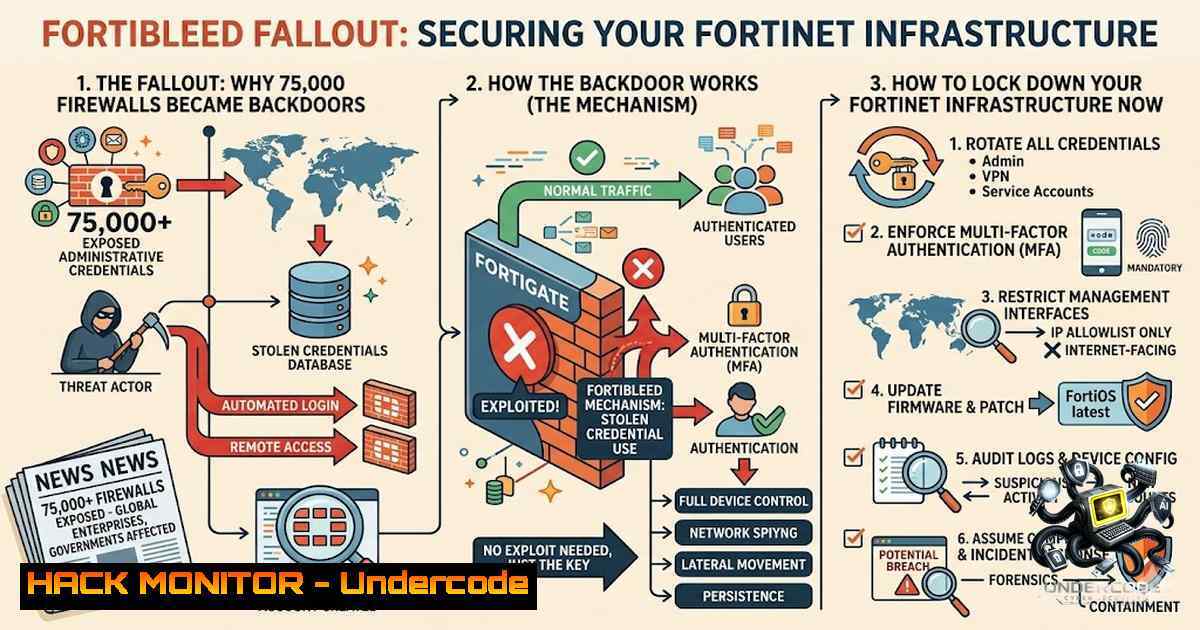
The firewall sitting at your network perimeter—the very device designed to keep attackers out—has become the attacker’s favorite entry point. In June 2026, the cybersecurity community was rocked by the disclosure of “FortiBleed,” an industrialized credential-harvesting campaign that exposed working administrator credentials for approximately 75,000 internet-facing Fortinet FortiGate firewalls across 194 countries, spanning more than 21,000 corporate domains. This is not a vulnerability with a patch to apply; it is a large-scale credential operation where threat actors systematically collected configuration files, cracked hashed passwords using a 45-GPU cluster, and used the recovered credentials to move laterally into internal Active Directory environments. The campaign was first flagged by security researcher Volodymyr “Bob” Diachenko, who discovered the attackers’ own server accidentally left open on the internet, complete with tooling, scripts, and logs. As Andy Jenkinson, an expert in internet asset and DNS vulnerabilities and threat intelligence, has long warned, Fortinet’s systemic security failures have left the world exposed—and his three-year-old threat intelligence shared with the vendor was met with the dismissive response: “We’re bigger than you, we might look and get around to it.” The time for passive defense is over.
Learning Objectives:
- Understand the mechanics of the FortiBleed credential-harvesting campaign and why it bypasses traditional vulnerability management.
- Master the forensic commands and configurations needed to audit FortiGate devices for compromise.
- Implement CISA-recommended hardening measures, including PBKDF2 hash migration and phishing-resistant MFA enforcement.
- Learn to detect lateral movement and credential theft using SIEM monitoring and packet analysis.
You Should Know:
- FortiBleed Is Not a Vulnerability—It’s an Industrial-Scale Credential Machine
The most dangerous aspect of FortiBleed is that it has no CVE and no single patch to apply. The campaign operates in phases: reconnaissance via internet-wide sweeps for FortiGate SSL VPN endpoints and exposed administrative interfaces; credential sourcing from historical Fortinet-specific leaks (including the 2021 CVE-2018-13379 exposure of roughly half a million accounts) and infostealer logs that capture plaintext credentials from infected endpoints; and credential testing at scale—approximately 1.16 billion authentication attempts were launched against more than 320,000 FortiGate targets.
For devices where credential reuse failed, the attackers intercepted SSL VPN authentication hashes during the login handshake and cracked them offline using a dedicated 45-GPU cluster managed through Hashtopolis, an open-source distributed cracking framework. Even passwords of 25 or more characters, including symbols and mixed case, were found in the dataset in plaintext because they had been harvested by infostealer malware rather than guessed. This reframes the entire risk calculus: a strong password that has passed through an infostealer infection offers the same protection as a weak one.
Step‑by‑step: How to Check if Your FortiGate Credentials Are Using Weak Hashing
The hashing algorithm used to store administrator credentials determines how easily they can be cracked offline. Fortinet migrated to the stronger PBKDF2 algorithm in early 2025, but this only protects accounts whose administrators actively re-authenticated after the firmware update was applied. Any device patched but not re-authenticated remained on the weaker SHA-256 with Salt format.
To check which hashing algorithm your FortiGate is using for admin accounts, SSH into the device and run:
 SSH into FortiGate
ssh admin@<fortigate-ip>

Check the hash type for admin accounts
diagnose system admin list

For FortiOS 7.2.11 and later, verify PBKDF2 enforcement
get system admin
To enforce PBKDF2 for all administrator accounts (FortiOS 7.2.11+), use the following commands:
config system admin
edit <admin_name>
set password-hash <new_password>
set password <new_password>
next
end

To globally enforce PBKDF2 for new admin accounts
config system global
set admin-hash-type pbkdf2
end
To verify that the change has taken effect, check the admin list again:
diagnose system admin list | grep -i pbkdf2
If you do not see PBKDF2 listed for each admin account, the device remains vulnerable to offline cracking using the weaker SHA-256 format.
- Assume Compromise: You Can’t Patch Your Way Out of This
Because the persistence lies below the operating system, patching will not mitigate all threats. The FortiGate sitting at your perimeter is supposed to be the thing standing between the internet and everything you care about—and for roughly half of the internet-facing FortiGates on the planet right now, it is instead the thing the attacker already controls. The attackers maintained detailed logs of successful compromises and assembled a database containing verified credentials for organizations across nearly every major industry sector, including Samsung, Mercedes-Benz, Foxconn, Chevron, Comcast, AT&T, Toyota, and numerous government agencies. At least four organizations were fully compromised, with confirmed lateral movement across Japan, Taiwan, Vietnam, Iraq, and Turkey; the most serious case involves a Turkish NATO defense contractor from which classified documents were allegedly stolen.
CISA urges impacted Fortinet customers to immediately terminate all active SSL VPN and administrative sessions, reset all Fortinet VPN and administrative passwords, and review firewall, VPN, authentication, and domain controller logs for signs of lateral movement, unusual access, suspicious accounts, or unauthorized configuration changes.
Step‑by‑step: Forensic Audit Commands for FortiGate Compromise Detection
Run these commands on your FortiGate to check for signs of compromise:
 Check for unauthorized admin accounts
diagnose system admin list

Review current active SSL VPN sessions
diagnose vpn ssl list

Check for unusual login attempts
diagnose log display | grep -i "login failed"

Review configuration change logs
diagnose log display | grep -i "configuration changed"

Check for backdoor users
diagnose system admin list | grep -E "trusted|backup|support"

Review firewall policies for unauthorized changes
show firewall policy

Check for unusual traffic patterns
diagnose sys session list | grep -v "ESTABLISHED"

Verify system integrity (FortiGate)
diagnose sys flash list
diagnose sys checksum verify
On the Windows domain controller side, check for signs of lateral movement:
 List recent Kerberos ticket requests (PowerShell)
Get-ADUser -Filter  -Properties LastLogonDate, PasswordLastSet |
Where-Object { $_.LastLogonDate -gt (Get-Date).AddDays(-30) } |
Export-Csv -Path "C:\temp\user_logons.csv"

Check for unusual service account logins
Get-WinEvent -LogName Security |
Where-Object { $<em>.Id -in 4624,4625,4672 } |
Select-Object TimeCreated, Id, @{Name="User";Expression={$</em>.Properties[bash].Value}} |
Group-Object User | Sort-Object Count -Descending

Review Active Directory replication for unauthorized changes
repadmin /syncall /AdeP
repadmin /replsummary

Check for suspicious scheduled tasks
Get-ScheduledTask | Where-Object { $_.TaskPath -1otlike "Microsoft" }
- Password Complexity Alone Is Not Enough—Implement Phishing-Resistant MFA
One of the most significant findings from FortiBleed is that credential complexity alone provided no defense. Hudson Rock confirmed that high-entropy credentials—25-character random strings that no brute-force effort would ever reach—appeared verbatim in the dataset because they had been keylogged off an infected workstation rather than guessed. This means that even the strongest password policy is useless if the endpoint is compromised. CISA explicitly recommends requiring phishing-resistant multifactor authentication on all remote access and administrative accounts, ensuring it is enforced on all external gateways and administrative interfaces.
Step‑by‑step: Enforcing MFA and Restricting Management Access on FortiGate
To enable two-factor authentication (2FA) for admin accounts:
config system admin
edit <admin_name>
set two-factor enable
set fortitoken <serial_number>
set email-to <admin_email>
next
end
To enforce MFA for SSL VPN users:
config vpn ssl settings
set auth-timeout 30
set login-attempt-limit 3
set login-block-time 60
set two-factor-auth enable
end
To restrict firewall management interfaces from public internet access—a critical step CISA emphasized—run:
config system interface
edit <management_interface>
set allowaccess ping https ssh
set trusted-host <internal_IP_range> 255.255.255.255
next
end

Example: Restrict HTTPS management to internal subnet only
config system interface
edit port1
set allowaccess https
set trusted-host 192.168.1.0 255.255.255.0
next
end
To verify that no unauthorized accounts exist:
diagnose system admin list | grep -v "admin"
- The Attackers Pivoted to Active Directory—Sniffing NTLM and Kerberos Hashes
Once inside the FortiGate, the attackers did not simply exfiltrate data from the firewall. They used packet sniffing to intercept network traffic, harvesting NTLM and Kerberos hashes for users across the entire environment. This means any Active Directory account could potentially be compromised. The attackers then used the recovered credentials to move laterally into internal environments, creating backdoor users and modifying security controls. Huntress strongly advises rotating credentials for all Active Directory users, not just FortiGate administrators, because adversaries possess hashed credentials that can be cracked into plaintext to regain access.
Step‑by‑step: Detecting and Blocking Lateral Movement from FortiGate to Active Directory
To monitor for suspicious authentication attempts originating from your FortiGate IP addresses, configure your SIEM to alert on the following:
- Event ID 4624 (successful logon) with source IP matching your FortiGate’s external IP
- Event ID 4672 (special privileges assigned) occurring outside business hours
- Event ID 4740 (account lockout) in rapid succession
- Event ID 4768 (Kerberos TGT request) for service accounts at unusual times
To review FortiGate logs for evidence of lateral movement, use:
 Check for admin logins from unexpected IPs
diagnose log display | grep -i "login" | grep -v <trusted_ip_range>

Review VPN authentication logs
diagnose vpn ssl log

Check for configuration changes that could indicate backdoor creation
diagnose log display | grep -i "config system admin"

Monitor for traffic to internal Domain Controllers from the FortiGate
diagnose sys session list | grep -i "domain" | grep -i "389|636|3268|3269"
On the Active Directory side, reset all user passwords using PowerShell:
 Force password reset for all AD users at next logon
Get-ADUser -Filter  | Set-ADUser -ChangePasswordAtLogon $true

Or reset passwords and force change for all users
$users = Get-ADUser -Filter  -Properties Name, SamAccountName
foreach ($user in $users) {
$newPassword = [System.Web.Security.Membership]::GeneratePassword(16, 4)
Set-ADAccountPassword -Identity $user.SamAccountName -1ewPassword (ConvertTo-SecureString -AsPlainText $newPassword -Force) -Reset
Set-ADUser -Identity $user.SamAccountName -ChangePasswordAtLogon $true
}
- Secure Credential Storage: Migrate to PBKDF2 and Remove Legacy Hashes
Fortinet did migrate to the stronger PBKDF2 hashing algorithm in early 2025, but this only protects accounts whose administrators actively re-authenticated after the firmware update was applied. Many affected systems stored administrator credentials using older hashing approaches that were significantly less resistant to offline password-cracking. CISA explicitly advises confirming your organization’s use of the PBKDF2 algorithm to store administrator credentials and removing weaker legacy hashes.
Step‑by‑step: Full PBKDF2 Migration and Validation
For FortiOS 7.2.11 and later, enforce PBKDF2 globally:
config system global
set admin-hash-type pbkdf2
end
To force all existing admin accounts to rehash their passwords using PBKDF2:
 For each admin account, reset the password
config system admin
edit <admin_name>
set password <new_strong_password>
next
end
To validate that all admin accounts are now using PBKDF2:
diagnose system admin list | grep -i pbkdf2
To check the hash format directly (advanced):
 SSH into FortiGate and check the admin configuration file
execute console
fnsysctl cat /etc/passwd | grep -i admin
If any admin account shows a hash format other than PBKDF2 (e.g., SHA-256), immediately reset that account’s password and re-verify.
- Linux and Windows Hardening Commands for Perimeter Defense
Beyond FortiGate-specific measures, organizations should harden their broader infrastructure to prevent credential harvesting and lateral movement.
Linux Commands for Endpoint Hardening:
 Disable root SSH login
sudo sed -i 's/PermitRootLogin yes/PermitRootLogin no/' /etc/ssh/sshd_config

Enforce key-based authentication only
sudo sed -i 's/PasswordAuthentication yes/PasswordAuthentication no/' /etc/ssh/sshd_config

Install and configure fail2ban to prevent brute force
sudo apt-get install fail2ban -y
sudo systemctl enable fail2ban
sudo systemctl start fail2ban

Check for unauthorized listening ports
sudo netstat -tulpn | grep LISTEN

Review authentication logs for brute force attempts
sudo grep "Failed password" /var/log/auth.log | awk '{print $(NF-3)}' | sort | uniq -c | sort -1r

Check for unusual cron jobs
sudo crontab -l
sudo ls -la /etc/cron.d/
Windows Commands for Domain Controller Hardening:
 Enforce LDAP signing to prevent NTLM relay
Set-ADObject -Identity "CN=Directory Service,CN=Windows NT,CN=Services,CN=Configuration,DC=domain,DC=com" -Replace @{"dSHeuristics"="0000002"}

Disable NTLM v1 authentication
Set-ItemProperty -Path "HKLM:\SYSTEM\CurrentControlSet\Control\Lsa" -1ame "LmCompatibilityLevel" -Value 5

Enable advanced audit logging for logon events
auditpol /set /subcategory:"Logon" /success:enable /failure:enable

Monitor for suspicious PowerShell activity
Set-ItemProperty -Path "HKLM:\SOFTWARE\Policies\Microsoft\Windows\PowerShell\ScriptBlockLogging" -1ame "EnableScriptBlockLogging" -Value 1

Check for unauthorized admin group memberships
Get-ADGroupMember "Domain Admins" | Select-Object Name, SamAccountName

Force MFA for all privileged accounts using Conditional Access (Azure AD)
Connect-MgGraph -Scopes "Policy.ReadWrite.ConditionalAccess"
 Then configure CA policy via Azure portal or PowerShell
What Undercode Say:
- Key Takeaway 1: FortiBleed proves that the industry’s reliance on CVE-based patching as the primary defense mechanism is dangerously insufficient. The campaign exploited no single vulnerability—it leveraged credential reuse, infostealer logs, and weak hashing to compromise roughly half of all internet-facing FortiGates globally. Organizations must shift from reactive patching to proactive credential hygiene and zero-trust architecture.
-
Key Takeaway 2: Andy Jenkinson’s three-year-old warning to Fortinet—dismissed with “We’re bigger than you”—has been validated on a catastrophic scale. The vendor’s systemic failure to address basic security fundamentals, from weak default hashing to inadequate response to threat intelligence, has directly contributed to the exposure of 75,000 devices. This incident underscores the critical importance of holding vendors accountable and not accepting “we’ll get around to it” as a response to security concerns.
Analysis: The FortiBleed campaign represents a paradigm shift in how attackers operate. They are no longer exploiting a single vulnerability; they are industrializing the entire credential lifecycle—harvesting, testing, cracking, and monetizing access at scale. The attackers’ operational security failure (leaving their own server exposed) provided an unprecedented window into their methods, revealing a sophisticated toolchain including automated scanning scripts, credential-testing tools, shell histories, cron jobs, GPU cluster configuration, and a verified-credential database structured by organization, sector, and revenue. This is the fingerprint of an initial-access broker packaging access for sale to ransomware crews. For defenders, the lessons are clear: patch management is no longer sufficient; credential rotation, MFA enforcement, and continuous monitoring are now baseline requirements. The fact that four organizations were fully compromised, with classified documents exfiltrated from a NATO defense contractor, demonstrates that this is not a theoretical risk—it is an active, ongoing threat that demands immediate action.
Prediction:
- +1: The FortiBleed disclosure will accelerate the adoption of passwordless authentication and phishing-resistant MFA across enterprise environments. Organizations that were previously resistant to MFA deployment will now treat it as a non-1egotiable requirement, driving a multi-billion-dollar market expansion for hardware security keys and biometric authentication solutions.
-
-1: Within the next 12 months, we will see a wave of ransomware attacks directly traceable to FortiBleed-compromised credentials. The attackers have already packaged and sold access to ransomware crews, and the downstream impact—including business disruption, data exfiltration, and extortion—will surface across healthcare, manufacturing, and critical infrastructure sectors.
-
-1: Fortinet’s reputation will suffer lasting damage. The disclosure that they dismissed credible threat intelligence three years ago will invite regulatory scrutiny, class-action lawsuits, and a loss of customer trust that may take years to rebuild. Competitors will aggressively market their security-first culture, further eroding Fortinet’s market position.
-
+1: The incident will spur the development of community-driven threat intelligence sharing platforms, breaking down the silos that allowed this campaign to go undetected for so long. Security researchers who independently verified the credentials—Kevin Beaumont, Hudson Rock, and others—have demonstrated that crowdsourced intelligence can be more effective than vendor-provided warnings.
-
-1: The attackers’ use of a 45-GPU cluster and Hashtopolis framework signals the democratization of high-powered cracking capabilities. We will see a proliferation of similar credential-harvesting campaigns targeting other firewall vendors, including Palo Alto, Cisco, and Check Point, as attackers replicate the FortiBleed playbook against other perimeter devices.
▶️ Related Video (74% Match):
https://www.youtube.com/watch?v=3AD1t63HXlk
🎯Let’s Practice For Free:
🎓 Live Courses & Certifications:
Join Undercode Academy for Verified Certifications
🚀 Request a Custom Project:
Secure, high-velocity infrastructure and disruptive technological engineering. Contact our engineering team for high-tier development and proprietary systems:
[email protected]
💎 Smart Architecture | 🛡️ Secure by Design | ⭐ Trusted by Thousands
IT/Security Reporter URL:
Reported By: Andy Jenkinson – Hackers Feeds
Extra Hub: Undercode MoN
Basic Verification: Pass ✅


