Listen to this Post
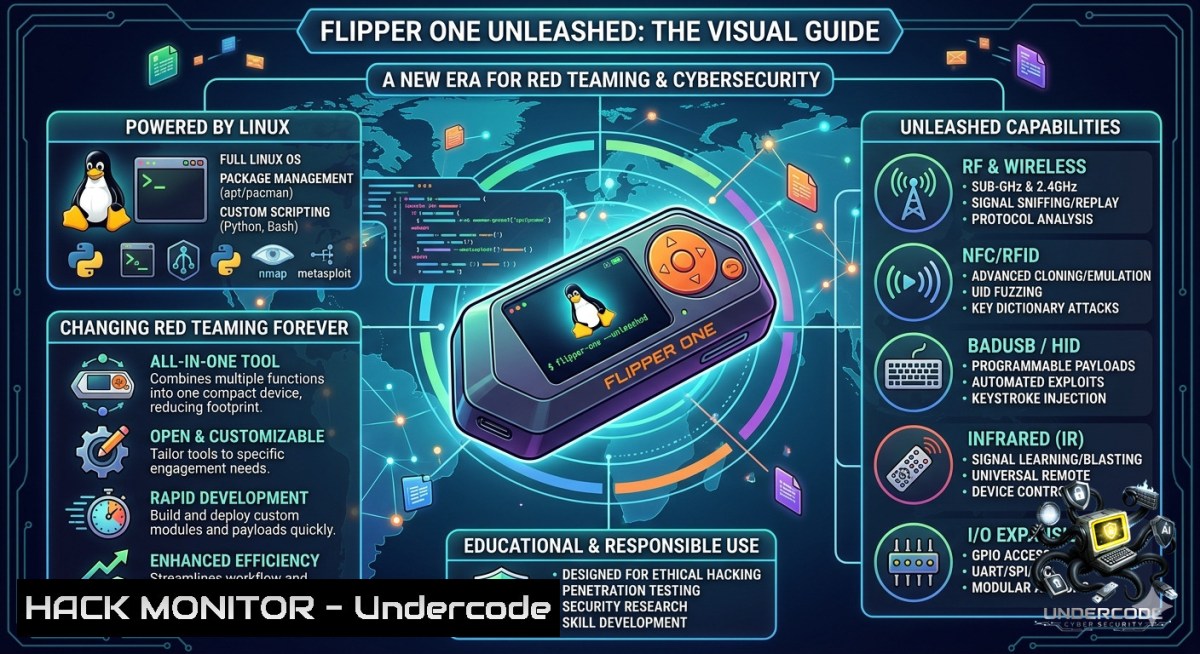
Introduction:
The security world just witnessed a seismic shift. While Flipper Zero dominated Layer 0 attacks (NFC, RFID, Sub-GHz, Infrared), the newly announced Flipper One operates at Layer 1 and above—a portable Linux platform built for IP networks. This means red teamers, pentesters, and threat actors can now carry a pocket-sized, multi-homed Linux machine with 5G, Wi-Fi 6E monitor mode injection, dual Gigabit Ethernet, and an offline LLM powered by a built-in NPU, completely redefining on-the-go offensive security.
Learning Objectives:
- Architect and deploy a portable Linux hacking platform with multiple independent network uplinks for advanced red team operations.
- Master live packet injection, wireless monitoring, and multi-homed routing attacks using real-world Linux commands.
- Leverage offline large language models (LLMs) to automate exploit generation and reconnaissance without cloud connectivity.
You Should Know:
- Enabling Monitor Mode & Packet Injection on Flipper One’s Wi-Fi 6E Interface
The Flipper One includes the MT7921AUN chipset, which supports full monitor mode and packet injection. This turns the device into a wireless audit powerhouse.
Step‑by‑step guide:
1. Identify the wireless interface
`ip a` or `iwconfig` – look for `wlan0` or similar.
2. Kill interfering processes
`sudo airmon-1g check kill`
3. Enable monitor mode
`sudo ip link set wlan0 down`
`sudo iw dev wlan0 set type monitor`
`sudo ip link set wlan0 up`
4. Verify monitor mode
`iw dev wlan0 info | grep type` → should show `type monitor`
5. Start capturing packets
`sudo tcpdump -i wlan0 -c 100 -w capture.pcap`
- Test packet injection (using `aireplay-1g` from aircrack-1g suite)
`sudo aireplay-1g -9 wlan0` → checks injection capability.
Linux commands for advanced attacks:
- Beacon flooding: `sudo mdk4 wlan0 b -1 “EvilNet” -c 6`
- Deauthentication: `sudo aireplay-1g -0 5 -a
wlan0` - WPA handshake capture: `sudo airodump-1g –bssid
-c -w handshake wlan0` Windows alternative (using USB Wi-Fi adapter with monitor mode):
Install Npcap and Wireshark, then use `aircrack-1g` via WSL or a dedicated tool likeAcrylic Wi-Fi Professional.
2. Multi‑Homed Network Attacks: Leveraging Five Independent Uplinks
The Flipper One’s five network interfaces (2x GigE, Wi‑Fi 6E, 5G/LTE, USB‑C Ethernet) allow you to route traffic asymmetrically, evade detection, and pivot across networks.
Step‑by‑step guide for source‑based routing:
1. List interfaces
`ip link show` → identify eth0, eth1, `wwan0` (5G), usb0.
2. Create custom routing tables
Edit `/etc/iproute2/rt_tables` and add:
`100 eth0_table`
`200 wwan0_table`
3. Add rules for each interface
`sudo ip route add default via 192.168.1.1 dev eth0 table eth0_table`
`sudo ip route add default via 10.0.0.1 dev wwan0 table wwan0_table`
4. Assign source‑based policies
`sudo ip rule add from 192.168.1.100 table eth0_table`
`sudo ip rule add from 10.0.0.100 table wwan0_table`
- Launch a scan where each request egresses a different interface
Use `nmap –source-ip-sS -Pn ` repeatedly with different source IPs.
Red team use case: Simultaneously scan external assets via 5G, perform internal lateral movement via Ethernet, and exfiltrate data over Wi‑Fi while masquerading as a legitimate device.
3. Offline LLM Integration for On‑the‑Go Exploit Generation
The built‑in NPU (Neural Processing Unit) enables running LLMs like Llama 2 7B or Phi‑3 locally without internet. This is game‑changing for air‑gapped environments.
Step‑by‑step to deploy an offline coding assistant:
1. Install Ollama (pre‑compiled for ARM64)
`curl -fsSL https://ollama.com/install.sh | sh`
2. Pull a lightweight model optimized for NPU
`ollama pull phi3:mini`
3. Run the model interactively
`ollama run phi3:mini` → then prompt: “Generate a Python script for ARP spoofing on a local network”
4. Create an automation script
`echo “Generate a reverse shell one-liner for Linux” | ollama run phi3:mini >> payloads.txt`
5. Use FlipCTL to wrap CLI tools – FlipperOS includes a UI framework that turns `ollama` commands into a navigable menu for rapid access.
Security implication: Offline LLMs allow real‑time payload generation, log analysis, and evasion tactics without leaving a cloud footprint – ideal for covert operations.
4. Building Swappable FlipperOS Snapshots for Persistent Campaigns
FlipperOS introduces full OS snapshots you can clone, break, and roll back. This is perfect for maintaining multiple “personalities” (e.g., a clean pentest environment vs. a forensic recovery snapshot).
Step‑by‑step snapshot management:
1. List current snapshots
`flipperos snapshot list`
- Create a new snapshot (including all tools, logs, and configs)
`sudo flipperos snapshot create –1ame “redteam_2025-06” –include /home/user/tools /etc/network`
3. Clone a snapshot for experimentation
`sudo flipperos snapshot clone redteam_2025-06 –1ame “redteam_exp”`
4. Boot into a snapshot
`sudo flipperos snapshot boot redteam_exp` (reboots into that environment)
5. Roll back after breaking something
`sudo flipperos snapshot rollback redteam_2025-06`
Under the hood: Uses overlayfs + systemd-sysext. You can manually inspect:
`mount | grep overlay` → shows live merge of snapshot layers.
- Exploiting the RP2350 Co‑processor to Bypass Power‑Off Security
The RP2350 manages display, buttons, and power even when Linux is off. This creates attack surfaces: keystroke logging, persistent backdoors, or hardware reset attacks.
Step‑by‑step to interact with the RP2350:
1. Access the co‑processor UART (GPIO pins 14/15)
`sudo screen /dev/ttyACM0 115200`
2. Send commands to query power state
`$ power status` → returns battery level, charging status.
3. Program the RP2350 to capture button presses even when main CPU is off
Using MicroPython (flashed via USB):
from machine import Pin
import time
log = open("keystrokes.txt", "a")
def record(pin):
log.write(str(time.time()) + " Button pressed\n")
log.flush()
Pin(0, Pin.IN, Pin.PULL_UP).irq(trigger=Pin.IRQ_FALLING, handler=record)
4. Extract logs later over USB – the co‑processor’s flash persists independently.
Mitigation for defenders: Physically disable JTAG/SWD lines or enforce signed firmware updates for co‑processors.
6. M.2 SDR Expansion for RF Reconnaissance
With an M.2 SDR (e.g., LimeSDR or HackRF One module), Flipper One becomes a full‑spectrum RF transceiver, covering 100 kHz to 6 GHz.
Step‑by‑step to capture and replay GSM signals:
1. Install GNU Radio and gr‑gsm
`sudo apt install gnuradio gr-osmosdr gr-gsm`
- Scan for GSM downlink frequencies (example for 900 MHz band)
`sudo grgsm_scanner -f 935M 960M`
3. Capture I/Q samples
`sudo rtl_sdr -f 942.5M -s 2.4e6 -g 40 capture.cu8` (using rtl-sdr compatible driver)
4. Decode GSM bursts
`grgsm_decode -c capture.cu8 -f 942.5M -s 2.4e6 -m BCCH`
5. Replay captured signals using the same SDR in TX mode (requires proper filtering/amplification to stay legal).
Linux command for spectrum analysis:
`sudo hackrf_sweep -f 100:6000 -w 1000 -g 20 | hackrf_sweep_to_file.py sweep.csv`
7. Defensive Hardening Against Flipper One Attacks
Enterprises must assume attackers can deploy such devices inside perimeters. Here’s how to mitigate the specific capabilities of Flipper One.
Step‑by‑step for network‑level defenses:
- Detect monitor mode cards using WIDS (Wireless Intrusion Detection)
`sudo tcpdump -i mon0 -e -s 256 -1` – look for unexpected radiotap headers. - Block deauthentication attacks by enabling `802.11w` (Management Frame Protection) on all APs.
- Prevent multi‑homed scanning using egress filtering on switches:
On a Cisco switch: `ip verify source port-security`
On Linux netfilter:
`iptables -A OUTPUT -o eth0 -m state –state NEW -m recent –set –1ame multi`
`iptables -A OUTPUT -o eth1 -m state –state NEW -m recent –update –seconds 1 –hitcount 2 –1ame multi -j DROP`
4. Detect offline LLM traffic patterns – although LLM runs locally, attackers might exfiltrate generated payloads. Monitor for unexpected large outbound SSH/SCP transfers:
`sudo auditctl -w /home/user/.ollama -p wa -k ollama_output`
- Physical countermeasures – enforce USB port access controls (e.g., `USBGuard` on Linux workstations) to block unauthorized M.2 SDR or RP2350 programmings.
What Undercode Say:
- Key Takeaway 1: Flipper One shifts the paradigm from physical-layer tricks (RFID cloning, IR hijacking) to full-stack network exploitation. Any red team lacking this capability is already obsolete.
- Key Takeaway 2: The open development model (public task trackers, Collabora-maintained kernel) drastically reduces backdoor risks, but the single binary blob (DDR trainer) remains a supply chain concern that community must eliminate.
Analysis (10 lines):
Undercode emphasizes that Flipper One is not a toy but a professional-grade attack platform. The combination of five network uplinks enables unprecedented stealth – an attacker can scan internal assets via Ethernet, exfiltrate over 5G, and jam detection logs over Wi‑Fi simultaneously. The offline NPU-driven LLM means AI-assisted exploitation can occur in SCADA or classified environments where cloud AI is banned. However, defenders should not panic; the same openness allows for signature development. The RP2350 co-processor is a double-edged sword – it enables low-power persistence but also provides a forensically isolated logging channel. Enterprises must update their physical security policies: a Flipper One in a conference room is as dangerous as a rogue laptop. Finally, the swappable OS snapshots will become standard for incident response teams – you can revert a compromised device to a known-good state in seconds, but attackers will use snapshots to leave zero traces.
Prediction:
- -1 Expect a surge in “shadow red teams” – mid-level employees using Flipper One for unauthorized internal penetration tests, leading to false positives and network disruptions until HR policies catch up.
- -1 Regulatory bodies will classify devices with monitor-mode Wi-Fi and 5G modems as “dual-use surveillance tools,” requiring export licenses – slowing availability for ethical researchers.
- +1 Open-source contributions from the Flipper community will eliminate the last binary blob within 12 months, creating a 100% auditable hardware platform for national security audits.
- +1 Offline NPU-driven LLMs will accelerate zero-day discovery – red teams can run localized fuzzing campaigns in air-gapped environments, finding bugs that cloud-dependent tools miss.
- -1 Blue teams will initially struggle to detect multi-homed routing attacks; expect a new class of SIEM rules and egress filters to emerge over the next 6–9 months.
▶️ Related Video (80% Match):
🎯Let’s Practice For Free:
🎓 Live Courses & Certifications:
Join Undercode Academy for Verified Certifications
🚀 Request a Custom Project:
Secure, high-velocity infrastructure and disruptive technological engineering. Contact our engineering team for high-tier development and proprietary systems:
[email protected]
💎 Smart Architecture | 🛡️ Secure by Design | ⭐ Trusted by Thousands
IT/Security Reporter URL:
Reported By: Charlescrampton Well – Hackers Feeds
Extra Hub: Undercode MoN
Basic Verification: Pass ✅


