
Listen to this Post
Introduction:
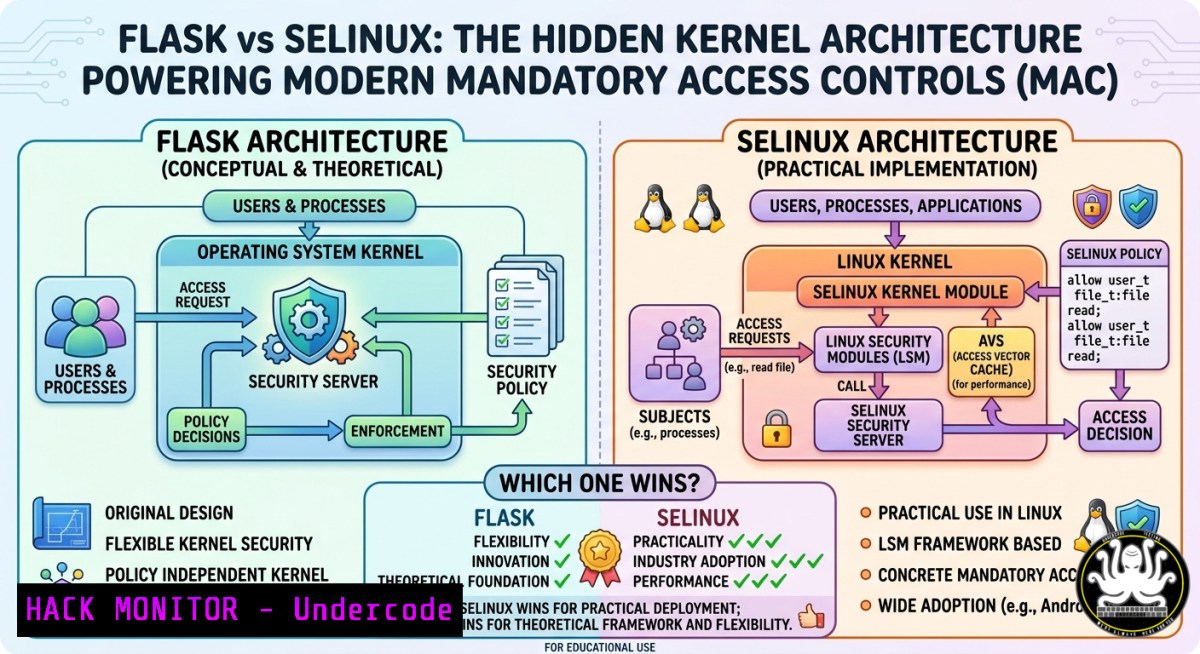
Operating system security isn’t just about firewalls and antivirus – it’s about how the kernel itself enforces who can access what. The concept of a flexible security policy architecture allows administrators to dynamically define and change access rules without recompiling the kernel, and the correct answer to the poll is Flask (not SELinux, which implements Flask). This article dissects the Flask architecture, compares it with real‑world implementations like SELinux and AppArmor, and gives you hands‑on commands to inspect, configure, and harden Linux and Windows systems using these principles.
Learning Objectives:
- Understand the Flask security architecture and its role in flexible policy enforcement.
- Differentiate between DAC, MAC, and Flask‑based implementations (SELinux, AppArmor).
- Apply practical Linux and Windows commands to audit and modify security policies.
You Should Know:
- Flask Architecture – The Core That Makes Flexible Policies Possible
Flask (Fluke Advanced Security Kernel) emerged from the University of Utah’s Fluke research operating system. Its key innovation is decoupling the policy enforcement mechanism from the policy decision logic. In traditional Unix DAC (Discretionary Access Control), a process can grant its own permissions. Flask introduces a security server that makes decisions based on a configurable policy, while the object manager enforces those decisions.
What the poll got right: SE Linux is an implementation of Flask; OSKit is a toolkit for OS components; LOMAC (Low Water‑Mark Mandatory Access Control) is a different integrity model. Flask is the architecture that provides the flexible support.
Step‑by‑step: Verify your Linux kernel’s security architecture
 Check if SELinux (Flask-based) is enabled
sestatus
 Output shows "Current mode: enforcing/permissive/disabled" and policy type

Check for AppArmor (another MAC, but not Flask-based)
sudo aa-status

See loaded security modules
cat /sys/kernel/security/lsm
 Example: "lockdown,capability,yama,apparmor" or "selinux"
To temporarily switch SELinux to permissive mode (for testing policy flexibility):
sudo setenforce 0
sudo setenforce 1  back to enforcing
Windows equivalent: Windows uses Mandatory Integrity Control (MIC) and User Account Control (UAC), which follow a similar principle of separating policy decision (Local Security Authority) from enforcement (kernel object manager).
2. DAC vs. MAC – Why Flexibility Matters
Discretionary Access Control lets file owners decide permissions – flexible, but dangerous if a process is compromised. Mandatory Access Control (MAC) enforces system‑wide rules. Flask’s flexibility allows dynamic policy changes without reboot, and type enforcement (TE) and role‑based access control (RBAC) can be mixed.
Step‑by‑step: Convert a standard Linux system to enforce a Flask‑style policy
1. Install SELinux (if not present):
sudo apt install selinux-basics selinux-policy-default -y  Debian/Ubuntu
sudo yum install selinux-policy-targeted -y  RHEL/CentOS
2. Boot with SELinux enabled (edit /etc/default/grub: add selinux=1 security=selinux).
3. View current policy booleans (flexible runtime toggles):
getsebool -a
sudo setsebool httpd_can_network_connect on  Allow Apache to make network calls
Windows – modifying integrity levels:
 Show integrity level of a process (PowerShell as Admin)
Get-Process -Name explorer | Select-Object Name, @{Name="Integrity";Expression={($<em>.GetType().GetProperty("Handle", [System.Reflection.BindingFlags]::NonPublic -bor [System.Reflection.BindingFlags]::Instance).GetValue($</em>)).ToString()}}
 Practical: lower a process' integrity level to "Low" to sandbox it
icacls C:\sandbox /setintegritylevel L
- Writing Your Own Flask‑Like Policy – SELinux Policy Modules
SELinux uses a policy language derived from Flask. You can write custom modules to enforce, for example, that a specific script can only read `/var/log` but never write to /etc.
Step‑by‑step: Create a minimal SELinux policy module
1. Create a `.te` (type enforcement) file:
cat > myapp.te << EOF
policy_module(myapp, 1.0.0)

type myapp_t;
type myapp_exec_t;
init_daemon_domain(myapp_t, myapp_exec_t)

allow myapp_t var_log_t:file read;
dontaudit myapp_t etc_t:file write;
EOF
2. Compile and load:
checkmodule -M -m -o myapp.mod myapp.te
semodule_package -o myapp.pp -m myapp.mod
sudo semodule -i myapp.pp
3. Verify:
sesearch -A -s myapp_t | grep var_log_t
4. Auditing Policy Violations – Logs and Alerts
When Flask‑based policies block an action, the system logs the denial. This is critical for tuning flexible policies without breaking applications.
Linux (SELinux audit logs):
sudo ausearch -m avc -ts recent
 Or use journalctl
sudo journalctl -t setroubleshoot --since "5 minutes ago"
Generate a denial (intentional) to see logging:
 Create a file with wrong context
touch /tmp/testfile
sudo chcon -t etc_t /tmp/testfile
cat /tmp/testfile  allowed
sudo chcon -t shadow_t /tmp/testfile
cat /tmp/testfile  denied – check /var/log/audit/audit.log
Windows – advanced audit policies (Flexible via Group Policy):
 Enable object access auditing
auditpol /set /subcategory:"File System" /success:enable /failure:enable
 Trigger an access denied event
echo test > C:\Windows\System32\config\test.txt  should fail if not admin
 Query security event log for event ID 4663 (File Access)
Get-WinEvent -FilterHashtable @{LogName='Security'; ID=4663} | Select-Object -First 5
- Cloud Hardening Using Flask Principles – Container Security
Containers (Docker, Kubernetes) rely on Linux MAC systems to isolate workloads. By default, Docker uses AppArmor or SELinux profiles inspired by Flask’s flexibility. You can enforce that a container can only write to specific volumes.
Step‑by‑step: Run a container with a custom AppArmor profile (Flask‑style policy)
1. Create an AppArmor profile:
sudo cat > /etc/apparmor.d/docker-nginx << EOF
include <tunables/global>
profile docker-nginx flags=(attach_disconnected,mediate_deleted) {
include <abstractions/base>
deny /etc/nginx/conf.d/ w,
deny /var/www/html/ w,
/var/www/uploads/ rw,
}
EOF
2. Load the profile:
sudo apparmor_parser -r /etc/apparmor.d/docker-nginx
3. Run container with that profile:
docker run --security-opt apparmor=docker-nginx -d nginx
4. Test the policy – inside the container, try writing to `/etc/nginx/conf.d/new.conf` – it will be denied.
Kubernetes: Use PodSecurityPolicies (deprecated) or OPA/Gatekeeper to enforce Flask‑like flexible admission controls.
- Exploiting Weak MAC Policies – And How to Mitigate
Even flexible architectures can be misconfigured. An overly permissive SELinux policy (e.g., `setenforce 0` in production) or a disabled AppArmor profile leaves systems vulnerable. Attackers can exploit this to escalate privileges.
Example misconfiguration: Allowing a web server to execute arbitrary binaries
 Checking dangerous booleans
getsebool httpd_execmem httpd_unified
 If both are on, an attacker can upload a malicious binary and execute it via CGI.
Mitigation – Generate a strict policy from audit logs:
sudo ausearch -m avc -ts today | audit2allow -m mypolicy
 Review the proposed rules, then create a module
sudo ausearch -m avc -ts today | audit2allow -M mypolicy
sudo semodule -i mypolicy.pp
Windows – bypassing UAC (which is a flexible integrity mechanism) is common. Block it via Group Policy:
reg add HKLM\SOFTWARE\Microsoft\Windows\CurrentVersion\Policies\System /v EnableLUA /t REG_DWORD /d 1 /f
reg add HKLM\SOFTWARE\Microsoft\Windows\CurrentVersion\Policies\System /v ConsentPromptBehaviorAdmin /t REG_DWORD /d 2 /f
This forces admin approval mode, making UAC much harder to bypass.
- API Security – Applying Flask Logic to Microservices
The Flask architecture’s “policy server” model directly inspired modern API security designs like OPA (Open Policy Agent). You can centralize authorization decisions and enforce them at the API gateway.
Step‑by‑step: Deploy OPA as a Flask‑like policy server for an API
1. Run OPA container:
docker run -d --name opa -p 8181:8181 openpolicyagent/opa run --server
2. Define a policy (allow only GET to /public):
curl -X PUT http://localhost:8181/v1/policies/example -H "Content-Type: text/plain" --data '
package example
allow { input.method == "GET"; input.path == ["public"] }'
3. Test:
curl -X POST http://localhost:8181/v1/data/example -d '{"input":{"method":"GET","path":["public"]}}'
 Returns {"result":{"allow":true}}
This mirrors how Flask’s security server makes decisions independent of the resource manager.
What Undercode Say:
- Flask is the correct answer – it’s the architecture; SELinux, AppArmor, and even Windows’ MIC are influenced by it, but Flask is the theoretical foundation.
- Flexibility without security is chaos – dynamic policies must be audited constantly; a “permissive” mode should never be permanent.
Prediction:
As zero‑trust architectures and eBPF‑based security gain traction, the core idea of Flask – separating policy decision from enforcement – will become the standard for all OS and cloud native environments. We’ll see more “policy as code” engines running inside the kernel, and traditional DAC will become a legacy fallback. The poll’s winner (Flask) may be obscure today, but its fingerprints are on every major security framework of the next decade.
▶️ Related Video (70% Match):
🎯Let’s Practice For Free:
IT/Security Reporter URL:
Reported By: UgcPost 7463781107562520577 – Hackers Feeds
Extra Hub: Undercode MoN
Basic Verification: Pass ✅


