
Listen to this Post
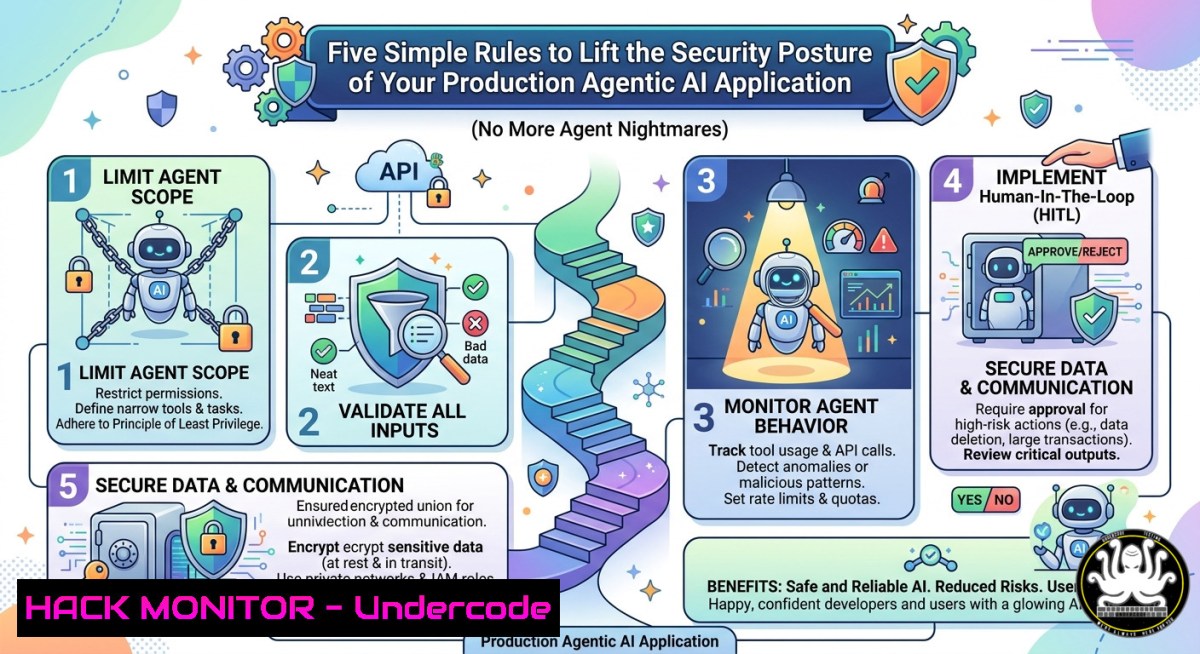
Introduction:
Agentic AI systems—autonomous agents that execute actions, call APIs, and manipulate environments—introduce a new attack surface far beyond traditional chatbots. Without strict guardrails, a single prompt injection can turn your helpful agent into a malicious insider, exfiltrating data or deleting production resources. This article extracts the core technical rules from Ryan Williams’ “Agentic AI Tips” playbook, translating them into actionable commands, cloud hardening steps, and code-level mitigations for Linux, Windows, and Kubernetes environments.
Learning Objectives:
- Implement input validation and context isolation to block prompt injection in agentic loops.
- Harden tool-calling permissions and enforce least-privilege access for AI agents.
- Deploy real-time monitoring and automated rollback mechanisms for agent-induced changes.
You Should Know:
- Isolate Agent Context & Sanitize Every Tool Call
Agentic AI often maintains conversation history and tool outputs. If an attacker poisons this context, the agent may execute malicious tool calls. The rule: never trust agent-generated parameters. Validate against an allowlist and strip any meta-instructions.
Step‑by‑step guide (Linux / Python example):
 Validate tool arguments before execution
ALLOWED_TOOLS = {"read_file", "list_dir", "send_email"}
ALLOWED_PATHS = re.compile(r"^/var/agent/data/")

def safe_tool_call(tool_name, params):
if tool_name not in ALLOWED_TOOLS:
raise PermissionError(f"Tool {tool_name} not allowed")
if tool_name == "read_file":
filepath = params.get("path", "")
if not ALLOWED_PATHS.match(filepath):
raise ValueError("Path outside allowed directory")
 Execute in a sandboxed subprocess with timeouts
subprocess.run(["sandbox-exec", "-n", tool_name, filepath], timeout=5)
Windows (PowerShell restriction):
$allowedPaths = @("C:\AgentData\")
$tool = $params.tool
if ($tool -ne "ReadFile") { throw "Tool denied" }
if ($params.path -notin $allowedPaths) { throw "Invalid path" }
 Use AppLocker or WDAC to restrict agent binary execution
- Enforce Strict Tool Permission Boundaries with OAuth2/API Gateways
Agentic AI must never hold long-lived credentials. Use short‑lived JWTs with audience‑restricted scopes and rotate keys every invocation. Implement a sidecar proxy to intercept and validate every API call the agent makes.
Step‑by‑step guide (Kong API Gateway + OAuth2):
1. Deploy Kong with OAuth2 plugin:
curl -X POST http://localhost:8001/services/agent-service/plugins \
--data "name=oauth2" \
--data "config.scopes=tools.read,tools.write" \
--data "config.mandatory_scope=true"
2. Agent requests a token scoped exactly to needed tool:
curl -X POST http://auth:8080/token -d "grant_type=client_credentials&scope=tools.read"
3. At each tool call, gateway validates scope and rejects write actions if token lacks tools.write.
4. Rotate client secrets via HashiCorp Vault:
vault write -force agent/rotate
5. Monitor failed scope requests in real time (Prometheus rule):
- alert: AgentScopeViolation
expr: rate(kong_oauth2_denied_scope_total[bash]) > 0
annotations: summary="Agent attempted prohibited tool scope"
- Implement Runtime Constraint Enforcement (cgroups, Linux seccomp, Windows Job Objects)
Agentic AI workloads often run in containers. Limit CPU, memory, and file descriptors to prevent resource exhaustion or fork bombs. Also block dangerous syscalls like reboot, iptables, or raw sockets.
Step‑by‑step guide (Docker / containerd):
- Create seccomp profile for agent container:
{ "defaultAction": "SCMP_ACT_ERRNO", "architectures": ["SCMP_ARCH_X86_64"], "syscalls": [ {"names": ["execve", "fork", "clone"], "action": "SCMP_ACT_ALLOW"}, {"names": ["reboot", "swapon", "socket"], "action": "SCMP_ACT_ERRNO"} ] } - Run container with limits:
docker run --rm --cpus="0.5" --memory="512m" --memory-swap="512m" \
--security-opt seccomp=agent-seccomp.json \
my-agent:latest
- Windows using Job Objects (PowerShell):
$job = New-Object 'System.Diagnostics.JobObject'
$job.SetLimits(@{MaxWorkingSet = 512MB; MaxCpuRate = 30})
$job.AddProcess($agentProcess.Handle)
- Automate Audit Logging of Every Agent Decision & Tool Output
Agentic AI can produce thousands of actions per minute. Log each thought‑action‑observation cycle to a tamper‑proof sink (AWS CloudTrail, Wazuh, or Splunk). Include input hashes to detect prompt injection replay attacks.
Step‑by‑step guide (Linux + Wazuh integration):
- Configure agent to send structured logs to
/var/log/agent_audit.log:timestamp=2025-05-24T10:00:01Z agent_id=prod-01 tool=delete_file params={"path":"config.bak"} result=success - Install Wazuh agent and monitor this file with FIM (File Integrity Monitoring) to prevent log tampering.
3. Create custom rule in Wazuh `/var/ossec/etc/rules/local_rules.xml`:
<rule id="100001" level="10">
<match>tool=delete_file.result=success</match>
<description>Agent deleted file without human approval</description>
</rule>
4. Forward logs to SIEM and set up alert when `tool=delete_file` exceeds 5 per minute.
5. For Windows, use PowerShell transcription + Sysmon event ID 1 (process creation):
Start-Transcript -Path "C:\AgentLogs\agent_$(Get-Date -Format yyyyMMdd).log" -Append
5. Deploy Automated Rollback & Human‑in‑the‑Loop (HITL) Hooks
Critical actions (database writes, file deletions, payment calls) must require explicit human approval. Implement a “circuit breaker” that pauses the agent after anomalous behavior, then rolls back to last known safe checkpoint.
Step‑by‑step guide (Kubernetes + Argo Rollouts):
- Define a `AnalysisTemplate` that monitors agent error rate:
apiVersion: argoproj.io/v1alpha1
kind: AnalysisTemplate
metadata:
name: agent-error-rate
spec:
metrics:</li>
<li>name: error-ratio
count: 5
interval: 1m
successCondition: result[bash] < 0.1
provider:
prometheus:
query: |
sum(rate(agent_tool_errors_total[bash])) / sum(rate(agent_tool_calls_total[bash]))
- Configure Rollout to auto‑abort if error ratio > 10%:
strategy:
canary:
analysis:
templates:</li>
<li>templateName: agent-error-rate
startingStep: 1
args:</li>
<li>name: namespace
value: production
- For HITL, use Slack + `kubectl exec` approval:
def request_approval(action):
msg = f"Agent wants to {action}. Reply 'approve' or 'deny'"
response = slack.chat_postMessage(channel="agent-approvals", text=msg)
result = wait_for_approval(response['ts'], timeout=300)
if result != "approve":
raise Exception("Action blocked by operator")
What Undercode Say:
- Key Takeaway 1: Agentic AI security is not about better prompt filtering—it’s about enforcing system‑level boundaries (seccomp, OAuth scopes, job objects) that cannot be bypassed via prompt injection.
- Key Takeaway 2: Every tool call must be idempotent or reversible; otherwise a single compromised agent step could cascade into an unrecoverable production state. Combine real‑time monitoring with automated rollback to turn agent mistakes into recoverable incidents.
Prediction:
By Q4 2026, agentic AI frameworks will ship with built‑in “security sidecars” that enforce these five rules by default. Organizations that treat agents as privileged, untrusted processes will avoid headline‑grabbing breaches; those that rely on naïve prompt‑based controls will face ransomware‑like extortion where attackers lock agent‑managed infrastructure. The shift from “can the agent be helpful?” to “what damage can it do per step?” will define the next wave of AI security tooling.
▶️ Related Video (72% Match):
🎯Let’s Practice For Free:
IT/Security Reporter URL:
Reported By: Ryan Williams – Hackers Feeds
Extra Hub: Undercode MoN
Basic Verification: Pass ✅


