Listen to this Post
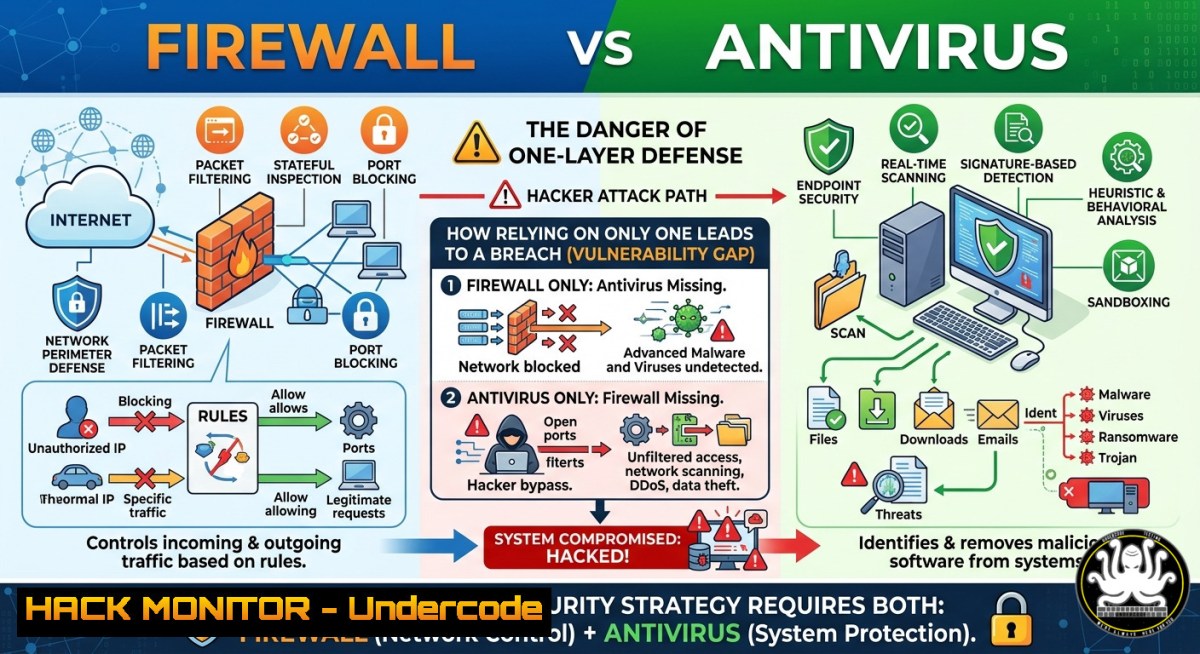
Introduction:
Firewalls and antivirus software are often confused as interchangeable, but they serve fundamentally different roles in cybersecurity. A firewall acts as a network perimeter guard, filtering incoming and outgoing traffic based on rules, while antivirus scans files and processes on your device to detect and remediate known malware. Understanding this distinction is critical because modern threats require a layered defense—neither tool alone can stop sophisticated attacks like APTs or fileless malware.
Learning Objectives:
- Differentiate between network-layer filtering (firewall) and endpoint file scanning (antivirus) with practical command-line examples.
- Implement and harden firewalls on Linux (iptables/ufw) and Windows (Defender Firewall with netsh).
- Deploy antivirus solutions (ClamAV, Windows Defender) and combine them with Web Application Firewalls for WordPress environments.
- Apply layered security principles using EDR-like monitoring (Sysmon, auditd) and AI-based anomaly detection.
You Should Know:
- Core Difference: Network Perimeter vs. Endpoint Internal Security
A firewall controls traffic based on ports, protocols, and IP addresses—it never “opens” files. Antivirus hooks into file system and process creation to scan for signatures or behavioral anomalies. Think of the firewall as a locked door and antivirus as a security camera inside the room.
Linux – Check active firewall rules (iptables):
sudo iptables -L -v -n
Linux – UFW status:
sudo ufw status verbose
Windows – View firewall profiles and rules (PowerShell as Admin):
Get-NetFirewallProfile | Select-Object Name, Enabled
Get-NetFirewallRule | Where-Object {$_.Enabled -eq 'True'} | Format-Table DisplayName, Direction, Action
Step‑by‑step:
- Run the above commands to audit current firewall settings.
- Identify any “Allow All” rules (especially outbound) – these weaken your perimeter.
- Block unnecessary inbound ports (e.g., 445 SMB from internet) using firewall rules.
-
Hardening Your Firewall – Linux (iptables/ufw) & Windows (Defender Firewall)
A default-allow firewall is useless. You must implement default-deny for inbound and outbound traffic where possible.
Linux (ufw) – Basic hardening:
sudo ufw default deny incoming
sudo ufw default allow outgoing  change to 'deny' for strict environments
sudo ufw allow ssh from 192.168.1.0/24
sudo ufw enable
Linux (iptables) – Stateful firewall example:
sudo iptables -A INPUT -m state --state ESTABLISHED,RELATED -j ACCEPT
sudo iptables -A INPUT -p tcp --dport 22 -s 10.0.0.0/8 -j ACCEPT
sudo iptables -A INPUT -j DROP
Windows (netsh & PowerShell) – Block all inbound except RDP from specific IP:
New-NetFirewallRule -DisplayName "Block All Inbound" -Direction Inbound -Action Block
New-NetFirewallRule -DisplayName "Allow RDP from Corp" -Direction Inbound -Protocol TCP -LocalPort 3389 -RemoteAddress 192.168.1.0/24 -Action Allow
Step‑by‑step:
- Backup current rules: `sudo iptables-save > iptables-backup.txt` (Linux) or `Export-NetFirewallRule` (Windows).
- Set default deny inbound, then explicitly whitelist required services (SSH, HTTP, HTTPS).
- For outbound, block known malicious IP ranges (e.g., from threat intelligence feeds) using ipset on Linux or
New-NetFirewallRule -Direction Outbound -RemoteAddress <CIDR> -Action Block. -
Deploying Antivirus & Endpoint Scanning (ClamAV, Windows Defender)
Antivirus cleans inside the device. For Linux servers, ClamAV provides on‑demand scanning; for Windows, Defender offers real-time protection.
Linux – Install and update ClamAV:
sudo apt install clamav clamav-daemon -y
sudo freshclam  update virus definitions
clamscan -r --bell -i /home  scan /home and show infected files only
Linux – Scheduled scan with cron:
echo "0 2 clamscan -r --remove /var/www" | crontab -
Windows – Run Defender offline scan and check real-time status:
Get-MpComputerStatus | Select-Object RealTimeProtectionEnabled, AntivirusEnabled
Start-MpScan -ScanType QuickScan
Start-MpWDOScan  offline scan (reboot required)
Step‑by‑step:
- Ensure real-time protection is enabled: `Set-MpPreference -DisableRealtimeMonitoring $false` (Windows).
- For Linux servers without real-time AV, implement periodic cron jobs and integrate with OSSEC or Wazuh for file integrity monitoring.
- Quarantine suspicious files automatically:
clamscan --move=/quarantine --recursive /uploads. -
The WordPress Twist – WAF vs. File-Level Scanning
As highlighted in the comments, a Web Application Firewall (WAF) blocks malicious HTTP requests (SQLi, XSS) before they hit PHP, but it cannot clean malware already inside WordPress files or the database. You need both.
Setting up ModSecurity (WAF) on Apache/Ubuntu:
sudo apt install libapache2-mod-security2 -y
sudo cp /etc/modsecurity/modsecurity.conf-recommended /etc/modsecurity/modsecurity.conf
sudo sed -i 's/SecRuleEngine DetectionOnly/SecRuleEngine On/' /etc/modsecurity/modsecurity.conf
sudo systemctl restart apache2
Manual malware scan on WordPress (find injected base64 or eval):
grep -r "eval(base64_decode" /var/www/html/
grep -r "system(" /var/www/html/wp-content/uploads/
find /var/www/html -name ".php" -exec grep -l "gzinflate" {} \;
Step‑by‑step WordPress hardening:
- Install a WAF plugin (e.g., Wordfence) or cloud WAF (Cloudflare, Sucuri) to block malicious requests at edge.
- Use file integrity monitoring: `sudo apt install aide` and run `aide –init` to baseline core WordPress files.
- Scan database for injected spam links: `wp db search “viagra”` using WP-CLI, or manually with MySQL:
SELECT FROM wp_posts WHERE post_content LIKE '%eval(%';
- Combine with real-time file scanner: `clamscan –recursive –infected /var/www/html` and set up inotify watches with `inotifywait` to trigger scans on file changes.
-
Layered Security in Practice – Firewall + AV + EDR-like Monitoring
A single antivirus or firewall is obsolete against APTs. Implement endpoint detection and response (EDR) principles using free tools: Sysmon on Windows, auditd on Linux.
Windows – Install Sysmon with SwiftOnSecurity config:
Invoke-WebRequest -Uri https://raw.githubusercontent.com/SwiftOnSecurity/sysmon-config/master/sysmonconfig-export.xml -Outfile sysmon.xml
Sysmon64.exe -accepteula -i sysmon.xml
Linux – auditd to monitor file and process execution:
sudo auditctl -w /etc/passwd -p wa -k passwd_changes
sudo auditctl -a always,exit -F arch=b64 -S execve -k process_exec
ausearch -k process_exec --format raw | aureport -f
Step‑by‑step integrated defense:
- Configure firewall to log dropped packets: `sudo iptables -A INPUT -j LOG –log-prefix “FW-DROP: “` (Linux) or enable logging in Windows Defender Firewall.
- Forward logs to a SIEM (e.g., Wazuh or Splunk free tier) to correlate firewall drops with AV detections.
- Create a response rule: if AV quarantines a file and firewall logs show outbound connection attempts from that process’s parent, automatically block source IP for 1 hour.
6. AI-Powered Threat Detection – Beyond Signatures
Traditional antivirus relies on signatures. AI models (random forest, neural networks) detect zero-day malware by analyzing API call sequences or network flow entropy. Even free tools like Windows Defender now use ML (cloud-delivered protection).
Enable Defender cloud block level (Windows):
Set-MpPreference -CloudBlockLevel High
Set-MpPreference -CloudTimeout 50
Linux – Deploy Zeek (formerly Bro) with ML plugin for anomaly detection:
sudo apt install zeek
echo '@load packages' >> /opt/zeek/share/zeek/site/local.zeek
zeekctl deploy
 Use zeek-cut to extract features for ML model (e.g., SSL entropy, connection duration)
Step‑by‑step AI integration:
- Collect network traffic features (packet sizes, protocol flags) into CSV.
- Train a simple isolation forest model using Python’s scikit-learn on your normal traffic.
- Deploy the model as a cron job to score hourly pcaps; alert on high anomaly scores.
-
Cloud & API Hardening – Where Traditional Tools Fall Short
Firewalls don’t understand API logic, and antivirus doesn’t scan JSON payloads. You need API gateways and cloud-native WAFs.
AWS – Restrict API Gateway with resource policies:
{
"Effect": "Deny",
"Principal": "",
"Action": "execute-api:Invoke",
"Resource": "arn:aws:execute-api:us-east-1:123456789012:abc123/",
"Condition": {"NotIpAddress": {"aws:SourceIp": ["203.0.113.0/24"]}}
}
Linux – Use ModSecurity with CRS (Core Rule Set) for APIs:
sudo apt install modsecurity-crs
sudo ln -s /usr/share/modsecurity-crs/ /etc/modsecurity/crs
echo "IncludeOptional /etc/modsecurity/crs/.conf" >> /etc/modsecurity/modsecurity.conf
Step‑by‑step cloud hardening:
- Implement rate limiting at firewall level (Linux:
iptables -A INPUT -p tcp --dport 443 -m limit --limit 25/minute --limit-burst 50 -j ACCEPT). - For APIs, validate input schema using JSON schema validator in your application code—firewall cannot parse nested objects.
- Use cloud provider’s WAF (AWS WAF, Azure Front Door) to block SQLi and XSS before they reach origin.
What Undercode Say:
- Key Takeaway 1: A firewall without antivirus leaves you vulnerable to email attachments and USB-borne malware; antivirus without a firewall exposes internal services to internet scans. You must implement both with proper default-deny policies.
- Key Takeaway 2: Modern threats (fileless malware, encrypted payloads, APTs) bypass traditional signature-based AV and simple port firewalls. Layer in EDR, WAF for web apps, and AI-based anomaly detection to survive post‑exploitation phases.
Analysis: The LinkedIn post rightly compares firewall to a door and antivirus to an internal guard, but real-world security requires bridging network and endpoint telemetry. A firewall log showing repeated outbound SSH attempts from a host that also triggered an AV quarantine is a clear compromise indicator—yet most organizations never correlate these. Free tools like Wazuh + Sysmon + auditd can close this gap. Additionally, WordPress comments highlight a critical blind spot: WAFs stop injection attacks but don’t scan existing files. Automating daily `clamscan` and `aide` checks with cron is non‑negotiable. Finally, AI-driven detection is no longer optional; Defender’s cloud ML blocks 99.9% of new malware, but only if you enable high‑security settings.
Prediction:
Within two years, standalone firewalls and traditional antivirus will be bundled into unified XDR (extended detection and response) agents that combine network filtering, endpoint scanning, and behavioral AI into a single lightweight sensor. Attacks will increasingly target misconfigured firewall allowlists (e.g., outbound DNS over HTTPS allowed to any IP) and memory‑only malware that never writes a file—defeating traditional AV. Organizations that still rely on separate, unmonitored firewalls and AV will suffer breaches from basic phishing + living‑off‑the‑land techniques. The future lies in zero‑trust network access (ZTNA) combined with endpoint runtime detection, rendering perimeter firewalls nearly obsolete for internal traffic.
▶️ Related Video (74% Match):
🎯Let’s Practice For Free:
IT/Security Reporter URL:
Reported By: Cybersecurity Infosec – Hackers Feeds
Extra Hub: Undercode MoN
Basic Verification: Pass ✅


