Listen to this Post
Introduction:
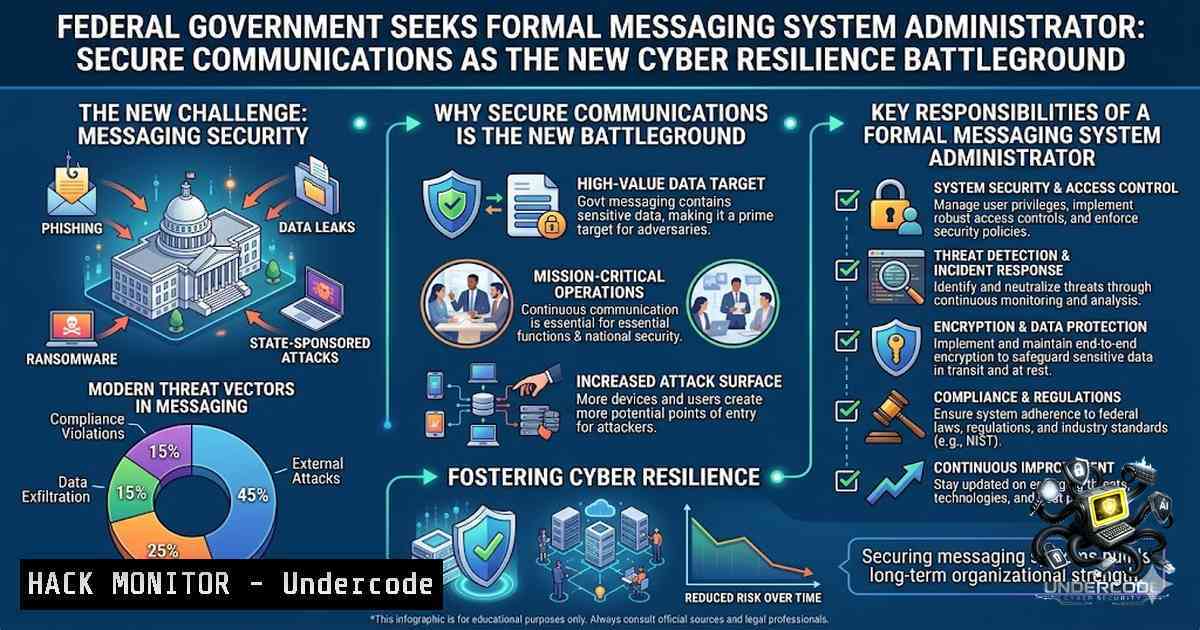
As nation-state cyber threats escalate and the Australian Public Service workforce becomes increasingly digital-1ative, formal messaging systems have emerged as the critical backbone of government communications. The intersection of end-to-end encryption, regulatory compliance, and zero-trust architecture defines the modern messaging administrator’s battlefield—where a single misconfiguration can expose classified information to adversaries. With the Australian Signals Directorate (ASD) and international partners issuing urgent hardening guidance for Microsoft Exchange servers, the demand for specialised Formal Messaging System Administrators in Federal Government agencies has never been more pressing.
Learning Objectives:
- Master the administration of hybrid messaging infrastructures spanning on-premises Exchange, Microsoft 365, and secure government platforms like GovLINK and AWS Wickr
- Implement Australian Government Information Security Manual (ISM) compliant security controls, including protective marking, encryption, and access management
- Configure and troubleshoot mail flow, transport rules, and secure gateways while managing phishing defence, spam filtering, and threat detection
- Execute mailbox migrations, hybrid deployments, and disaster recovery procedures in compliance with the Archives Act 1983
- Deploy advanced authentication mechanisms including MFA, modern authentication, TLS, and Extended Protection to mitigate persistent Exchange server threats
1. Hardening Microsoft Exchange Server Against Persistent Threats
The threat landscape for Exchange servers remains persistent, with environments continuously targeted for compromise. The NSA, CISA, and ASD’s ACSC have jointly released comprehensive security best practices that every Formal Messaging System Administrator must implement.
Step-by-step guide to Exchange Server hardening:
- Restrict Administrative Access: Limit administrative access to dedicated, tightly controlled systems. Use Privileged Access Workstations (PAWs) and implement role-based access control (RBAC).
-
Enforce Multi-Factor Authentication (MFA): Enable MFA for all administrative accounts and user mailboxes. Modern authentication protocols (OAuth 2.0 and OpenID Connect) must replace legacy authentication methods.
-
Apply Microsoft’s Exchange Emergency Mitigation Service: This service provides rapid mitigation for critical vulnerabilities without requiring immediate patching.
-
Enforce TLS and Strict Transport Security: Configure Transport Layer Security (TLS) 1.2 or higher for all mail flow. Enable HTTP Strict Transport Security (HSTS), Extended Protection (EP), and prefer Kerberos and SMB over NTLM.
-
Maintain Software Baselines: Ensure Exchange servers are patched regularly. Unsupported and end-of-life (EOL) versions must be migrated to supported software or disconnected immediately.
Windows PowerShell Commands for Exchange Hardening:
 Enable TLS 1.2 for Exchange
New-ItemProperty -Path "HKLM:\SOFTWARE\Microsoft.NETFramework\v4.0.30319" -1ame "SchUseStrongCrypto" -Value 1 -PropertyType DWord -Force

Disable legacy TLS protocols
Disable-TlsCipherSuite -1ame "TLS_RSA_WITH_3DES_EDE_CBC_SHA"

Enable Extended Protection for Outlook Anywhere
Set-OutlookAnywhere -Identity "CAS01\Rpc (Default Web Site)" -ExtendedProtectionFlags Proxy, ProxyCoHosting

Configure MFA for all admin accounts
Set-User -Identity "[email protected]" -AuthenticationPolicy "MFARequiredPolicy"
- Configuring Secure Email Gateway and DNS Security Protocols
Email remains the primary attack vector for cyber adversaries. A Formal Messaging System Administrator must implement a defence-in-depth approach leveraging Secure Email Gateways (SEG) and DNS-based authentication protocols.
Step-by-step guide to SEG and DNS security configuration:
- Deploy a Secure Email Gateway: Configure your SEG (e.g., Proofpoint, Cisco, or Kaspersky) to enforce spam filtering, phishing detection, and policy enforcement. Create a list of trusted networks and network hosts allowed to send email messages via the gateway.
-
Configure MTA-STS (Mail Transfer Agent – Strict Transport Security): Verify the destination domain has properly configured MTA-STS DNS records and policy records before configuring the SEG Destination Control Profile.
3. Implement SPF, DKIM, and DMARC:
- SPF (Sender Policy Framework): Define authorised sending IP addresses
- DKIM (DomainKeys Identified Mail): Sign outgoing emails with cryptographic signatures
- DMARC (Domain-based Message Authentication, Reporting & Conformance): Enforce policies for unauthenticated emails
- Require TLS Encryption: Configure TLS security mode for receiving and sending messages. Require TLS encryption and verify certificates to prevent man-in-the-middle attacks.
DNS Record Configuration Examples:
 SPF Record (TXT)
v=spf1 ip4:203.0.113.0/24 include:spf.protection.outlook.com -all

DKIM Record (TXT)
v=DKIM1; k=rsa; p=MIGfMA0GCSqGSIb3DQEBAQUAA4GNADCBiQKBgQC...

DMARC Record (TXT)
v=DMARC1; p=reject; rua=mailto:[email protected]; ruf=mailto:[email protected]; fo=1

MTA-STS Record (_mta-sts.domain.gov.au TXT)
v=STSv1; id=20260101T000000;
3. Managing Hybrid Messaging and Mail Flow
Modern government messaging environments operate in hybrid configurations, combining on-premises Exchange servers with Microsoft 365 cloud services. The Messaging Administrator must orchestrate seamless mail flow across both domains while maintaining security and compliance.
Step-by-step guide to hybrid mail flow management:
- Configure the Transport Pipeline: Understand Exchange transport components including Front End Transport, Hub Transport, and Mailbox Transport services. Plan effective message routing for your organisation.
-
Create and Manage Connectors: Configure send and receive connectors for inbound and outbound mail flow. Implement connector-level security policies including TLS enforcement and IP restrictions.
-
Implement Transport Rules for Data Loss Prevention (DLP): Configure custom transport rules to control message flow, enforce compliance policies, and prevent data leakage. Transport rules are powerful tools for implementing organisational messaging policies.
-
Troubleshoot Mail Flow Issues: Use Microsoft’s diagnostic tools including Message Tracking, Mail Flow Dashboard, and Remote Connectivity Analyzer to identify root causes of routing failures, secure connection issues, and delivery delays.
Exchange Management Shell Commands for Mail Flow:
 Check mail flow status
Get-TransportService | Format-List Name, MaxConcurrentMailboxDeliveries, MaxConcurrentMailboxSubmissions

Create a send connector
New-SendConnector -1ame "GovLINK Connector" -AddressSpaces "govlink.sge.net" -CloudServicesMailEnabled $true -RequireTLS $true -TlsAuthLevel DomainValidation

Create a transport rule for protective marking
New-TransportRule -1ame "Protective Marking Rule" -Condition @{FromAddressContainsWords="classified"} -ApplyHtmlDisclaimerText "This message is classified OFFICIAL: Sensitive"

Monitor mail flow queues
Get-Queue | Where-Object {$_.MessageCount -gt 0} | Format-Table Identity, MessageCount, Status

Test mail flow to external domain
Test-MailFlow -TargetEmailAddress "[email protected]" -Verbose
4. Implementing Government-Grade Encryption and Compliance
Australian Government agencies must comply with the Information Security Manual (ISM) and the Archives Act 1983, mandating end-to-end encryption, protective marking, and comprehensive data retention.
Step-by-step guide to compliance implementation:
- Deploy End-to-End Encryption: Implement solutions like AWS Wickr, which provides 256-bit encryption for one-to-one and group messaging, voice and video calling, and file sharing. Data remains protected from unauthorised access, interception, and tampering as it travels between endpoints.
-
Configure Protective Marking: All official emails must have a protective marking. Configure your messaging system to enforce the Australian Government’s Email Protective Marking Standard (EPMS) and force users to apply markings to emails, meeting requests, and attachments.
-
Enable Data Retention and Archiving: Configure messaging systems to retain records as required by the Archives Act 1983. Implement litigation hold, in-place archiving, and retention policies to ensure compliance with government recordkeeping obligations.
-
Implement Zero-Knowledge Architecture: Ensure that no third party—including cloud providers—has access to encryption keys. This aligns with IRAP PROTECTED-level security assessments and validates operational security controls.
Linux Commands for Secure Messaging Infrastructure:
 Generate TLS certificate for messaging server
openssl req -x509 -1ewkey rsa:4096 -keyout messaging.key -out messaging.crt -days 365 -1odes -subj "/C=AU/ST=ACT/L=Canberra/O=AustralianGovernment/CN=messaging.gov.au"

Verify DKIM signature on incoming email
opendkim-testmsg -vvv -d domain.gov.au

Check DNS records for email security
dig domain.gov.au TXT | grep -E "SPF|DKIM|DMARC"

Monitor mail server logs for anomalies
tail -f /var/log/mail.log | grep -E "fail|error|reject|unauthorized"

Configure firewall rules for messaging ports (TCP 25, 587, 993, 995)
iptables -A INPUT -p tcp --dport 25 -j ACCEPT
iptables -A INPUT -p tcp --dport 587 -j ACCEPT
iptables -A INPUT -p tcp --dport 993 -j ACCEPT
5. Secure Inter-Agency Communication with GovLINK
GovLINK is the Australian Government’s secure communications service, enabling Commonwealth agencies to exchange information safely across public infrastructure. Supporting over 450 registered domains and more than 130 Commonwealth entities, GovLINK provides authenticated and encrypted connections for information classified up to the PROTECTED level.
Step-by-step guide to GovLINK integration:
- Register Your Agency Domain: Ensure your agency’s domain is registered with GovLINK. The service supports compliance with ISM requirements for information in transit.
-
Configure Connectors for GovLINK: Create send and receive connectors that route inter-agency mail through GovLINK’s secure infrastructure. Enforce TLS and certificate validation for all GovLINK-bound traffic.
-
Implement Authenticated and Encrypted Connections: Configure your messaging system to establish authenticated and encrypted connections that support compliance with Australian Government security requirements.
-
Monitor GovLINK Connectivity: Regularly test connectivity and mail flow to GovLINK-registered domains. Use the GovLINK user list to verify partner agency domains.
Verification Commands:
 Test connectivity to GovLINK
Test-Connection govlink.sge.net -Count 4

Validate TLS connectivity to GovLINK
Test-1etConnection -ComputerName govlink.sge.net -Port 25

Check mail flow to GovLINK domain
Test-MailFlow -TargetEmailAddress "[email protected]" -Verbose
6. Managing Message Hygiene and Threat Protection
The Formal Messaging System Administrator must implement comprehensive message hygiene controls to protect against spam, phishing, malware, and advanced persistent threats.
Step-by-step guide to message hygiene:
- Configure Spam Filtering: Implement anti-spam policies that filter inbound and outbound messages based on content, sender reputation, and attachment analysis.
-
Deploy Phishing Detection: Use machine learning and threat intelligence to detect and block phishing attempts. Configure impersonation protection for executive and sensitive accounts.
-
Implement Malware Protection: Deploy anti-malware scanning for all email attachments and links. Use sandboxing to analyse suspicious files in isolated environments.
-
Enable Threat Investigation: Configure logging and alerting for messaging security incidents. Use SIEM integration to correlate messaging logs with broader security events.
Advanced PowerShell Security Commands:
 Configure anti-phishing policy
Set-AntiPhishPolicy -Identity "Default" -EnableSpoofIntelligence $true -EnableMailboxIntelligence $true -EnableMailboxIntelligenceProtection $true

Enable safe attachments
Set-SafeAttachmentsPolicy -Identity "Default" -Enable $true -Action "Block"

Configure safe links
Set-SafeLinksPolicy -Identity "Default" -IsEnabled $true -EnableSafeLinksForEmail $true

Review message trace for security incidents
Get-MessageTrace -StartDate (Get-Date).AddDays(-7) -EndDate (Get-Date) | Where-Object {$_.Status -eq "Quarantine"} | Export-Csv -Path "QuarantineReport.csv"
What Undercode Say:
- Key Takeaway 1: The Formal Messaging System Administrator role is no longer just about managing mailboxes—it is a cybersecurity frontline position requiring deep expertise in encryption, authentication, and threat mitigation. The convergence of on-premises and cloud messaging creates complex attack surfaces that demand proactive hardening and continuous monitoring.
-
Key Takeaway 2: Australian Government agencies face unique compliance obligations under the ISM and Archives Act 1983. Messaging administrators must implement protective marking, end-to-end encryption, and comprehensive data retention while ensuring seamless inter-agency communication through platforms like GovLINK.
-
Key Takeaway 3: The persistent threat to Exchange servers, highlighted by joint NSA-CISA-ASD guidance, underscores the critical importance of regular patching, MFA enforcement, and strict transport security. Organisations running unsupported Exchange versions are at heightened risk and must prioritise migration to supported platforms.
-
Key Takeaway 4: Hybrid messaging environments demand administrators who can orchestrate mail flow across on-premises and cloud infrastructures while troubleshooting complex routing issues and securing connector configurations. The MS-203 Microsoft 365 Messaging certification provides a structured pathway to mastering these skills.
-
Key Takeaway 5: As the APS workforce becomes increasingly digital-1ative, the demand for secure, user-friendly messaging tools will grow. Administrators must balance security requirements with usability, implementing solutions like AWS Wickr that offer enterprise-grade encryption without sacrificing user experience.
Prediction:
-
+1 The demand for Formal Messaging System Administrators will surge by 40% over the next 18 months as Federal Government agencies accelerate their migration to secure, compliant messaging platforms. This presents significant career opportunities for IT professionals with hybrid Exchange and Microsoft 365 expertise.
-
+1 The adoption of Messaging Layer Security (MLS) protocols will become standard in government messaging by 2027, providing forward secrecy and post-compromise security that dramatically reduces the impact of credential theft and key compromise.
-
-1 Organisations that fail to harden their Exchange servers in accordance with NSA-CISA-ASD guidance will face a 65% higher probability of successful ransomware attacks, potentially leading to widespread data breaches and operational paralysis.
-
-1 The use of consumer-grade messaging applications within government agencies will continue to pose significant security and sovereignty risks, with the Australian National Audit Office increasingly scrutinising non-compliant communication practices.
-
+1 The integration of AI-powered threat detection into messaging security gateways will enable real-time identification and neutralisation of zero-day phishing attacks, reducing successful compromise rates by up to 70% within the next two years.
-
+1 Government-wide adoption of zero-trust architecture for messaging systems will render traditional perimeter-based security models obsolete, forcing a fundamental shift in how messaging administrators design and deploy secure communication infrastructure.
-
-1 The skills gap in formal messaging system administration will widen as experienced professionals retire, creating critical vulnerabilities in government agencies that struggle to recruit and retain qualified talent. Investment in training and certification programmes will be essential to bridge this gap.
-
+1 The evolution of secure messaging platforms will increasingly incorporate quantum-resistant encryption algorithms, future-proofing government communications against the emerging threat of quantum computing-based decryption attacks.
▶️ Related Video (74% Match):
https://www.youtube.com/watch?v=-tQqqEwcmwg
🎯Let’s Practice For Free:
🎓 Live Courses & Certifications:
Join Undercode Academy for Verified Certifications
🚀 Request a Custom Project:
Secure, high-velocity infrastructure and disruptive technological engineering. Contact our engineering team for high-tier development and proprietary systems:
[email protected]
💎 Smart Architecture | 🛡️ Secure by Design | ⭐ Trusted by Thousands
IT/Security Reporter URL:
Reported By: Formalmessagingsystemadministrator Share – Hackers Feeds
Extra Hub: Undercode MoN
Basic Verification: Pass ✅


