
Listen to this Post
Introduction
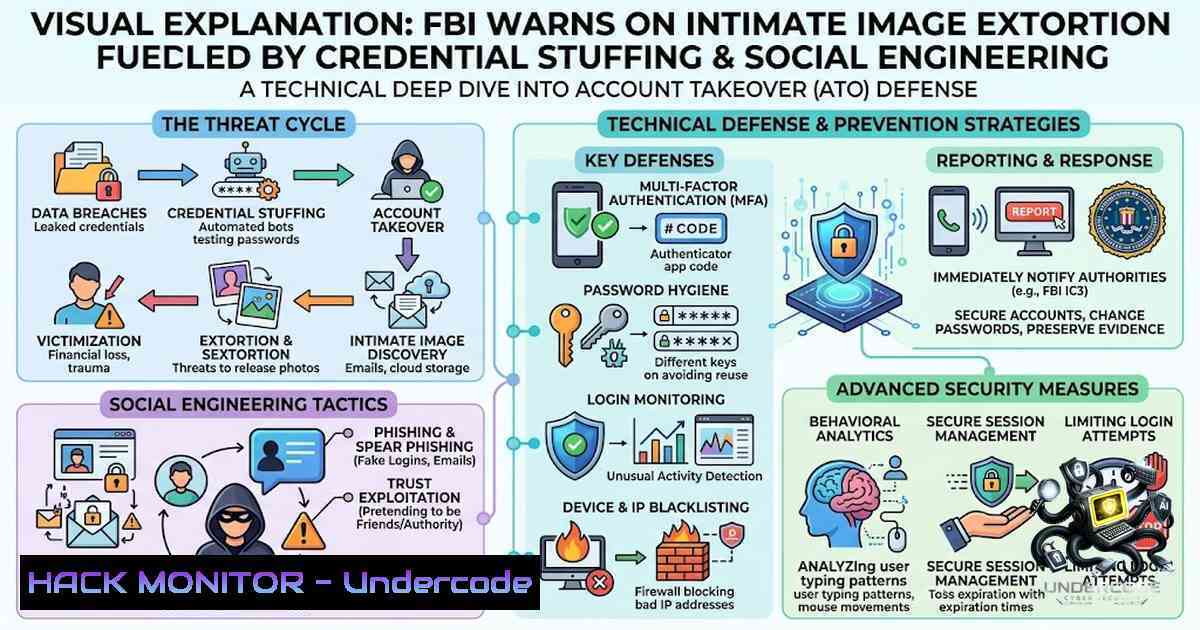
The Federal Bureau of Investigation (FBI) has issued an urgent public warning that sexual exploitation (SE) actors are systematically compromising social media and personal accounts to steal non-consensual intimate images (NCII) for sale on criminal marketplaces. These attacks leverage a combination of high-volume credential stuffing, sophisticated social engineering impersonations, and adversary-in-the-middle (AiTM) phishing techniques that bypass even multi-factor authentication (MFA). With Verizon’s 2025 DBIR reporting that compromised credentials were the initial access vector in 22% of all breaches and that credential stuffing accounts for a median 19% of all authentication attempts, the scale of this threat demands immediate and layered defensive action.
Learning Objectives
- Understand the technical mechanics of credential stuffing, social engineering, and AiTM phishing attacks used to compromise accounts
- Implement layered defense strategies including rate limiting, bot detection, IP reputation filtering, and risk-based authentication
- Deploy phishing-resistant MFA, passwordless authentication, and session integrity monitoring to prevent account takeover
You Should Know
- Credential Stuffing: The Automated Attack That Exploits Password Reuse
Credential stuffing is the practice of taking username-and-password pairs leaked from one breach and testing them, at scale and automatically, against other unrelated services. The FBI has observed SE actors using high-volume password and PIN attempts on social media and personal accounts based on curated lists obtained from data leak sites, social media, and open sources. Verizon’s analysis found that in the median case, only 49% of a user’s passwords across different services were distinct from each other—meaning an attacker who obtains your password from a low-security forum breach has roughly a coin-flip chance it also unlocks your email, bank, or retail account.
Step‑by‑step guide to detecting and mitigating credential stuffing:
- Implement rate limiting and throttling – Restrict the number of login attempts allowed from a single IP address or user account within a defined time window. When thresholds are exceeded, apply temporary account lockouts, session delays, or automated blacklisting of offending IP addresses.
-
Deploy CAPTCHA or bot‑detection mechanisms – Differentiate between human users and automated credential-stuffing bots based on spikes in login failure rates or anomalous traffic patterns.
-
Leverage IP reputation services and geofencing – Restrict login attempts from high-risk regions or block traffic originating from countries where you do not conduct business. This narrows the attack surface against automated campaigns.
-
Monitor for indicators of attack – Investigate WAF logs and IDAM providers for unusual spikes in failed login attempts, successful logins from geographically diverse IP addresses, repeated login attempts from the same IP, increased account lockouts, and unusual User-Agent strings.
-
Check credentials against breach databases – Implement breached-password detection that checks credentials against known-compromised datasets at signup and login, so reused-and-leaked passwords are caught before they’re exploited.
Linux command example – analyzing failed login attempts from auth logs:
 Count failed SSH login attempts by IP
sudo grep "Failed password" /var/log/auth.log | awk '{print $(NF-3)}' | sort | uniq -c | sort -1r

Identify brute-force patterns - IPs with >10 failures in last hour
sudo journalctl -u ssh -S "1 hour ago" | grep "Failed password" | awk '{print $11}' | sort | uniq -c | awk '$1>10 {print $2}'

Rate-limit using iptables (example: drop IPs with >5 connections per minute)
sudo iptables -A INPUT -p tcp --dport 22 -m hashlimit --hashlimit 5/min --hashlimit-burst 10 --hashlimit-mode srcip --hashlimit-1ame ssh -j ACCEPT
sudo iptables -A INPUT -p tcp --dport 22 -j DROP
Windows PowerShell command – detecting brute-force attempts on RDP:
 Get failed logon events (Event ID 4625) from last hour
Get-WinEvent -FilterHashtable @{LogName='Security'; ID=4625; StartTime=(Get-Date).AddHours(-1)} |
Group-Object {$<em>.Properties[bash].Value} |
Where-Object {$</em>.Count -gt 10} |
Select-Object Name, Count

Enable account lockout policies via Group Policy
 Computer Configuration > Windows Settings > Security Settings > Account Policies > Account Lockout Policy
 Set: Account lockout threshold = 5, Reset account lockout counter = 15 min, Account lockout duration = 15 min
2. Social Engineering: Exploiting Trust, Not Technology
The FBI has identified multiple social engineering tactics used to gain account access:
- Customer service impersonations – Attackers send victims text messages stating their social media account is being disabled unless they respond with a verification code. The attacker then requests a password reset, which generates a code sent to the victim. Once the victim shares the code, the attacker resets the password and accesses the account.
-
Phishing with look‑alike domains – Attackers create domains and email accounts emulating social media customer support, notifying victims about “new logins” and including a malicious embedded link to “change your password.” Once clicked, attackers gain account access.
-
SIM swap fraud – Attackers manipulate telecom providers into transferring a victim’s phone number onto a fraudulent SIM card, allowing interception of OTPs, MFA codes, and account recovery messages.
Step‑by‑step guide to defending against social engineering:
-
Never share verification codes – Legitimate platforms will never ask for a verification code sent to your phone or email. If you receive a temporary password, PIN reset, or access code you did not request, do not share it with anyone.
-
Go directly to the official website – Do not click embedded links in emails or text messages. Instead, type the service’s URL directly into your browser or use the official app to address account concerns.
-
Verify email legitimacy from a computer – Consider viewing emails from a computer to hover over embedded links, verify URLs, and inspect for formatting inconsistencies in the email address or URL. Mobile devices may cause emails to appear legitimate at first glance.
-
Enable SIM swap protection – Contact your mobile carrier to add a PIN or passcode to your account that must be provided before any SIM changes are processed. Some carriers offer “port freeze” or “port validation” services.
-
Treat account recovery as a high‑risk workflow – Apply identity verification against authoritative sources in real time for account recovery and reset flows, help desk access requests, privileged actions, and financial changes.
Linux command – spoofed domain detection using dig:
 Compare MX records of legitimate domain vs suspicious domain
dig +short mx paypal.com
dig +short mx paypa1.com  Suspicious look-alike

Check SPF, DKIM, DMARC records
dig +short TXT paypal.com | grep spf
dig +short TXT _dmarc.paypal.com

Bulk domain age check (quick indicator of newly registered phishing domains)
whois suspicious-domain.com | grep -i "creation date"
3. Adversary‑in‑the‑Middle (AiTM) Phishing: Bypassing MFA
Modern phishing kits like Starkiller use adversary-in-the-middle reverse proxies to bypass MFA protections. The platform launches a headless Chrome instance inside a Docker container, loads the brand’s real website, and acts as a reverse proxy between the target and the legitimate site. Every keystroke, form submission, and session token is routed through attacker-controlled infrastructure and captured for account takeover. This technique obviates the need for attackers to update phishing page templates—the real site is proxied live, making detection by security vendors significantly harder.
Step‑by‑step guide to defending against AiTM attacks:
- Deploy phishing‑resistant authenticators – Use FIDO2/WebAuthn security keys or platform authenticators (passkeys) that employ cryptographic origin binding, making them resistant to proxy-based interception.
-
Implement device fingerprinting and intelligence – Recognize unfamiliar or suspicious devices and environments. Treat re-verification, magic-link flows, and step-up authentication as high-stakes events.
-
Monitor for session anomalies – Implement continuous verification models that assess device trust and behavioral signals throughout the session lifecycle. Traditional reliance on username/password and MFA alone is insufficient.
-
Bind MFA factors to the specific authentication session – Ensure OTP verification is bound to the target account’s existing factor to prevent attackers from registering their own MFA device after compromise.
-
Consider passwordless authentication – Replacing passwords with device-bound passkeys or biometrics addresses the root cause of credential theft.
Web application configuration examples:
Nginx rate‑limiting and bot detection:
 Limit login requests per IP
limit_req_zone $binary_remote_addr zone=login:10m rate=5r/m;

server {
location /login {
limit_req zone=login burst=10 nodelay;

Block known bad user-agents
if ($http_user_agent ~ (python|curl|wget|nikto|sqlmap)) {
return 403;
}

Geofencing - block non-business countries
geo $block_country {
default 0;
CN 1; RU 1; KP 1; IR 1;  Block high-risk countries
}
if ($block_country) {
return 403;
}

proxy_pass http://backend;
}
}
Apache mod_evasive configuration for DDoS/brute-force protection:
<IfModule mod_evasive20.c>
DOSHashTableSize 3097
DOSPageCount 2
DOSSiteCount 50
DOSPageInterval 1
DOSSiteInterval 1
DOSBlockingPeriod 60
DOSEmailNotify [email protected]
</IfModule>
4. MFA Implementation: Getting It Right
The FBI explicitly recommends using multi-factor authentication methods. However, not all MFA is created equal. SMS-based OTPs are vulnerable to SIM swapping, and push notifications can be fatigue-attacked. Phishing-resistant authenticators (FIDO2/WebAuthn) should be the baseline.
Step‑by‑step guide to implementing robust MFA:
- Prioritize phishing‑resistant authenticators – Deploy FIDO2 security keys (YubiKey, Google Titan) or platform authenticators (Windows Hello, Apple Face ID/Touch ID, Android biometrics).
-
Use app‑based TOTP over SMS – If FIDO2 is not feasible, use authenticator apps (Google Authenticator, Microsoft Authenticator, Authy) rather than SMS.
-
Implement adaptive MFA – Trigger MFA only on risky signals (new device, new location, unusual behavior) rather than every login.
-
Monitor for MFA bypass attempts – Watch for unusual patterns such as multiple failed OTP attempts, rapid succession of MFA prompts, or MFA deletion requests without proof of possession.
-
Enforce step‑up authentication for sensitive actions – Require re-authentication for password changes, payout modifications, and other high-risk transactions.
Microsoft Entra ID (Azure AD) conditional access policy example (PowerShell):
 Create a conditional access policy requiring MFA for all users except trusted locations
New-AzureADMSConditionalAccessPolicy -1ame "Require MFA for all users" -State "enabled" `
-Conditions @{Applications=@{IncludeApplications=@("All")}; Locations=@{ExcludeLocations=@("Trusted IPs")}} `
-GrantControls @{BuiltInControls=@("MFA"); Operator="OR"}
5. Secure Storage and Data Hygiene
The FBI strongly advises against storing sensitive images or videos on social media platforms or internet-accessible sites. Once stolen, explicit content is posted within community forums or sold to illicit marketplaces, often alongside personally identifiable information (PII) such as name, date of birth, email, phone number, and social media username, exposing victims to continued re-victimization through harassment, sextortion, stalking, or other targeted attacks.
Step‑by‑step guide to secure data storage:
- Never store sensitive media in cloud‑accessible locations – Keep intimate images and videos offline or in encrypted local storage only.
-
Use end‑to‑end encrypted storage – For necessary cloud storage, use services with client-side encryption where the provider does not hold the decryption keys.
-
Enable account recovery options with strict verification – Ensure account recovery flows require identity verification against authoritative sources rather than relying on knowledge-based answers (which are easily obtained from breaches and social media).
-
Regularly audit connected apps and sessions – Review and revoke unknown sessions and applications connected to your accounts.
-
Use unique, complex passphrases – Avoid using information directly associated with your identity, such as names, birthdays, or other personally related information.
Encryption command examples:
Linux – encrypting sensitive files with GPG:
 Encrypt a file with symmetric encryption
gpg --symmetric --cipher-algo AES256 sensitive_image.jpg

Decrypt the file
gpg --decrypt sensitive_image.jpg.gpg > sensitive_image.jpg

Encrypt a directory with tar and GPG
tar -czf - sensitive_folder/ | gpg --symmetric --cipher-algo AES256 > sensitive_folder.tar.gz.gpg
Windows – using BitLocker or VeraCrypt:
 Enable BitLocker on a drive (requires administrative privileges)
Manage-bde -on C: -RecoveryPassword -UsedSpaceOnly

Using VeraCrypt command line (after installation)
 Create a 100MB encrypted container
"C:\Program Files\VeraCrypt\VeraCrypt.exe" /create /volume "C:\encrypted_container.hc" /size 100 /encryption AES /hash SHA-512 /filesystem NTFS /password "YourStrongPassword" /pim 0
What Undercode Say
- Credential reuse is the single largest vulnerability – With only 49% of passwords being distinct across services, attackers have a statistical advantage. Passwordless authentication and passkeys are the only definitive solutions to this problem.
-
MFA is not a silver bullet – AiTM phishing kits like Starkiller and device code phishing attacks demonstrate that even MFA can be bypassed. Organizations must deploy phishing-resistant authenticators (FIDO2/WebAuthn) and implement continuous session monitoring.
-
The human element remains the weakest link – Social engineering attacks that impersonate customer support and exploit trust are increasingly sophisticated. Security awareness training must be continuous, contextual, and tested with simulated phishing campaigns that mirror real-world tactics.
-
Defense requires a layered approach – No single control is sufficient. Rate limiting, bot detection, IP reputation filtering, adaptive MFA, behavioral biometrics, and post-authentication session integrity controls must work together.
-
The criminal economy is professionalizing – Phishing kits are now offered as SaaS-style platforms with centralized dashboards, lowering the skill barrier for cybercriminals. Defenders must assume that attackers have access to enterprise-grade tooling.
Prediction
-1 The proliferation of phishing-as-a-service platforms like Starkiller and 1Phish will continue to democratize sophisticated account takeover techniques, leading to a surge in credential stuffing and AiTM attacks against consumer platforms over the next 12–18 months. Organizations that fail to deploy phishing-resistant MFA will experience higher breach rates.
-1 The FBI’s warning highlights that the stolen intimate image economy is becoming increasingly organized, with dedicated marketplaces for NCII and associated PII. This will drive increased regulatory scrutiny and potential legislation mandating stronger account security standards for social media and cloud storage platforms.
+1 The growing awareness of these threats, combined with the decreasing cost and increasing availability of FIDO2 security keys and passkey support across major platforms, will accelerate the transition away from password-based authentication. Organizations that adopt passwordless authentication early will gain a competitive advantage in user trust and security posture.
+1 Advances in behavioral biometrics and AI-driven anomaly detection will enable more sophisticated continuous verification models that assess device trust and behavioral signals throughout the session lifecycle, making it significantly harder for attackers to maintain access even after compromising credentials.
▶️ Related Video (60% Match):
🎯Let’s Practice For Free:
🎓 Live Courses & Certifications:
Join Undercode Academy for Verified Certifications
🚀 Request a Custom Project:
Secure, high-velocity infrastructure and disruptive technological engineering. Contact our engineering team for high-tier development and proprietary systems:
[email protected]
💎 Smart Architecture | 🛡️ Secure by Design | ⭐ Trusted by Thousands
IT/Security Reporter URL:
Reported By: Timospapagatsias Fbi – Hackers Feeds
Extra Hub: Undercode MoN
Basic Verification: Pass ✅


