Listen to this Post
Introduction:
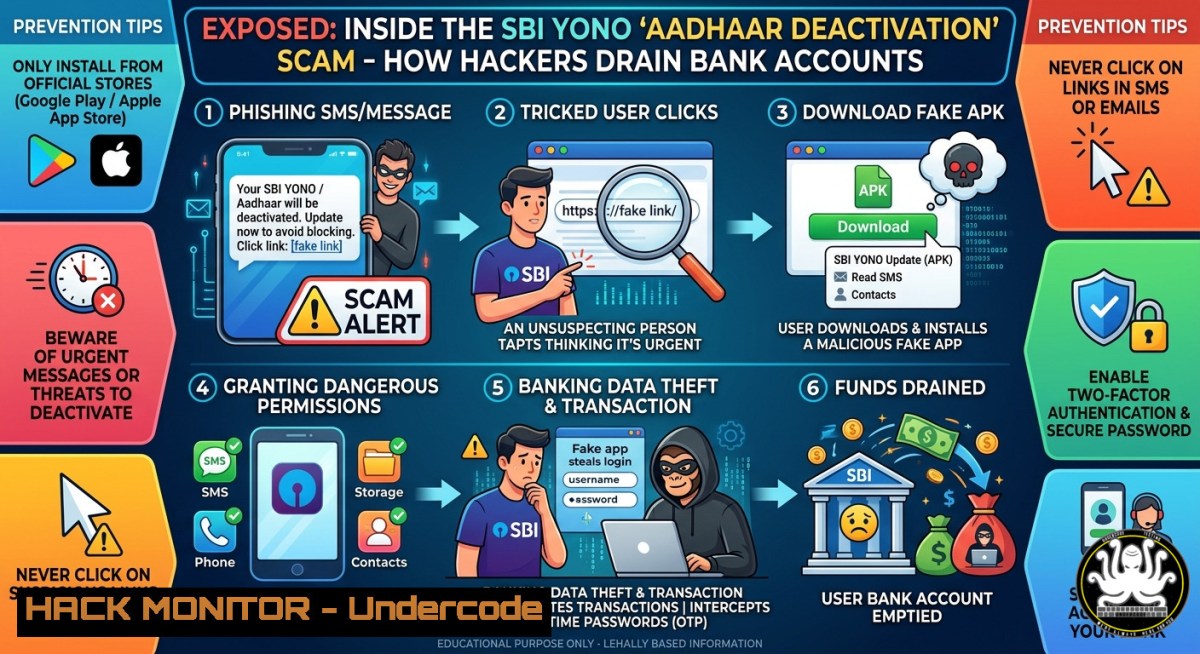
A new wave of sophisticated smishing attacks is weaponizing India’s Aadhaar compliance mandate to target over 45 crore State Bank of India (SBI) customers. Attackers are distributing urgent messages claiming the YONO (You Only Need One) digital banking platform will be permanently deactivated due to incomplete Aadhaar updates, tricking victims into installing malicious APK files that bypass official app store security checks and grant remote access to their devices.
Learning Objectives:
- Analyze the social engineering anatomy of the YONO deactivation scam and identify malicious SMS/WhatsApp message indicators.
- Execute Linux and Windows-based packet capture and malware analysis techniques to inspect suspicious APK behavior.
- Implement host-level hardening and monitoring strategies to detect and block credential-harvesting phishing attacks.
You Should Know:
- Deconstructing the Attack Chain: From Fear to Financial Theft
The attack begins with a fraudulent message crafted to mimic official SBI communications, creating a false sense of urgency. The core of the scam relies on social engineering tactics, exploiting panic to push users into downloading a malicious Android Package Kit (APK) file from an unofficial source. Once installed, this APK bypasses Google Play Protect and can deploy banking trojans or spyware. Below is a full step‑by‑step guide that explains what the attacker does and how you can safely inspect this threat using Linux network analysis.
Step-by-Step Breakdown & Analysis using Linux CLI:
1. Analyze Network Indicators (Linux):
 Extract URLs from a suspicious SMS backup file (replace sms_backup.txt with your file)
grep -Eo '(http|https)://[^"]+' sms_backup.txt | sort -u | tee suspicious_urls.txt

Perform passive DNS analysis using collected pcap (install tcpdump and tshark first)
sudo tcpdump -i eth0 -c 1000 -w capture.pcap  Capture live traffic
tshark -r capture.pcap -T fields -e dns.qry.name | sort -u > dns_queries.txt

Check domain reputation using 'dig' and public blacklists
for domain in $(cat dns_queries.txt); do dig +short $domain; done
2. Simulate the Malicious APK Download (Linux Sandbox):
 Download the APK inside an isolated sandbox (use 'wget' with the suspicious link)
mkdir ~/sandbox && cd ~/sandbox
wget "http://malicious-example.com/fake-sbi-update.apk"

Extract APK contents without installing (requires 'apktool')
sudo apt install apktool -y
apktool d fake-sbi-update.apk -o extracted_apk/

Search for known malicious permission patterns
grep -r "RECEIVE_SMS|READ_SMS|INTERNET|CAMERA" extracted_apk/AndroidManifest.xml
3. Windows-Based Network Monitoring (PowerShell):
 Log all outbound connections from suspicious processes
Get-NetTCPConnection | Where-Object {$_.State -eq "Established"} | Format-Table LocalAddress, LocalPort, RemoteAddress, RemotePort, OwningProcess -AutoSize

Monitor DNS queries in real-time
Get-DnsClientCache | Export-Csv -Path C:\dns_cache_report.csv -NoTypeInformation
The APK typically requests permissions to read SMS messages, intercept OTPs, and draw over other apps (overlay attack), enabling credential harvesting without user awareness. After analyzing the APK, you will find embedded URLs pointing to command-and-control servers. Always block these domains at the firewall level.
- Phishing URL Analysis: How to Spot Fake SBI Domains
Fraudsters register lookalike domains to host phishing pages that perfectly mimic SBI’s official login interface. These pages steal credentials and OTPs in real-time. Use the following step‑by‑step guide to analyze suspicious links and harden your browser against credential leakage.
Step-by-Step Guide – URL Inspection & Browser Hardening:
1. Extract and Analyze URLs from Messages (Linux):
 Using a text file containing scam messages (replace phishing_messages.txt)
grep -oP 'https?://[^\s]+' phishing_messages.txt | while read url; do
echo "Checking $url"
curl -sI "$url" | grep -i "location"
whois $(echo $url | awk -F/ '{print $3}') | grep -E "Creation Date|Registrar|Name Server"
done
2. Manually Verify URL Legitimacy:
- Legitimate SBI YONO domain:
https://www.onlinesbi.com` orhttps://yono.sbi`. - Check for typosquatting: common fake domains include
sbionline.com.co,sb1.co.in,sbi-update-aadhaar.com. - Hover over links (without clicking) to see the actual destination.
3. Windows Command-Line URL Reputation Check (PowerShell):
 Resolve IP and check against threat intelligence feeds
$url = "http://malicious-phish.com"
$ip = [System.Net.Dns]::GetHostEntry([System.Uri]$url.Host).AddressList[bash].IPAddressToString
Write-Host "Resolved IP: $ip"
 Query VirusTotal API (requires API key)
$apiKey = "YOUR_VIRUSTOTAL_API_KEY"
$vtUrl = "https://www.virustotal.com/api/v3/ip_addresses/$ip"
Invoke-RestMethod -Uri $vtUrl -Headers @{"x-apikey"=$apiKey}
4. Browser Hardening:
- Install browser extensions like uBlock Origin to block known malicious domains.
- Enable HTTPS-Only Mode in Firefox/Chrome to prevent downgrade attacks.
- Never enter credentials on any page reached via SMS or WhatsApp links.
The PIB Fact Check unit has officially debunked these claims, confirming that SBI never sends links or APK files over SMS or WhatsApp. If a user falls victim, they should immediately report to [email protected] and call the cybercrime helpline 1930.
3. Host-Level Hardening & EDR Evasion Mitigation
Banking trojans delivered via fake APKs often use overlay attacks and accessibility service abuse. Below are extended commands and configurations to detect and block this malicious behavior on both Linux and Windows systems.
Linux Hardening (For Tech-Savvy Users & SOC Analysts):
 Enable strict firewall rules (using iptables)
sudo iptables -A INPUT -m conntrack --ctstate INVALID -j DROP
sudo iptables -A OUTPUT -d 192.168.0.0/16 -j ACCEPT  Allow internal only
sudo iptables -A OUTPUT -d 0.0.0.0/0 -j REJECT  Block all other outbound

Monitor for unknown processes binding to high ports (potential C2 beaconing)
sudo ss -tulpn | grep -E ':(4444|5555|6666|7777|8080|8443)'

Real-time log monitoring for suspicious SELinux/AppArmor denials
sudo journalctl -f | grep -E "DENIED|COMMAND"
Windows Hardening (PowerShell & Group Policy):
 Block sideloading of APK files via Windows Defender ASR rules
Set-MpPreference -AttackSurfaceReductionRules_Ids D4F940AB-401B-4EFC-AADC-AD5F3C50688A -AttackSurfaceReductionRules_Actions Enabled

Disable installation of apps from external sources (Windows 10/11)
New-Item -Path "HKLM:\SOFTWARE\Policies\Microsoft\Windows Defender\Windows Defender Exploit Guard\ASR" -Force
Set-ItemProperty -Path "HKLM:\SOFTWARE\Policies\Microsoft\Windows Defender\Windows Defender Exploit Guard\ASR" -Name "DisableExternalAppInstall" -Value 1

Enable PowerShell logging to capture malicious scripts
Set-ItemProperty -Path "HKLM:\SOFTWARE\Policies\Microsoft\Windows\PowerShell\ScriptBlockLogging" -Name "EnableScriptBlockLogging" -Value 1

Run a full offline scan to detect existing malware
Start-MpScan -ScanType FullScan -OfflineScan
For Android users, the most effective mitigation is to disable “Install from unknown sources” in security settings and only download apps from the Google Play Store. SBI explicitly clarified that the YONO app should only be downloaded from the Google Play Store or Apple App Store. Additionally, enable Google Play Protect and run regular scans to identify malicious apps already installed.
4. Incident Response: Immediate Steps After a Compromise
If a victim installed the fake APK or entered credentials on a phishing page, follow this incident response checklist:
- Immediately enable airplane mode on the Android device to cut network connectivity to the C2 server.
- Boot into Safe Mode (Android: press and hold power button, then long-press “Power off” > Safe Mode) to disable third-party apps.
- Uninstall the malicious app via Settings > Apps > (find suspicious app) > Uninstall.
- Reset banking credentials and contact SBI customer care to lock the account.
- File a report on the National Cybercrime Reporting Portal at `cybercrime.gov.in` and call 1930 to freeze fraudulent transactions.
- Perform a factory reset if the device remains unstable or if you suspect kernel-level compromise.
What Undercode Say:
- Key Takeaway 1: Smishing attacks leveraging regulatory themes like Aadhaar updates are now the primary vector for credential theft, bypassing traditional email filters. Organizations must deploy SMS gateway filtering and real-time URL rewriting to protect users.
- Key Takeaway 2: The use of APK sideloading bypasses all official app store security checks, making mobile device management (MDM) and application whitelisting critical controls for enterprise mobility. Combining user awareness training with host-based detection (EDR) is the only effective defense against this class of banking trojans.
Analysis: This campaign represents a dangerous evolution in mobile banking fraud. By combining urgency, regulatory fear, and technical complexity (APK installation), attackers achieve high conversion rates. The exploitation of Aadhaar—a mandatory identifier—shows how cybercriminals manipulate legitimate processes. Most victims are likely non-tech-savvy users in semi-urban and rural areas, highlighting an urgent need for localized awareness campaigns in Hindi and regional languages. The speed of transaction drainage (often within minutes) necessitates real-time fraud detection systems that analyze behavioral biometrics and device fingerprints.
Prediction:
By 2027, AI-generated deepfake messages and voice phishing (vishing) will integrate with APK-based malware to create fully automated, end-to-end account takeover (ATO) pipelines. Attackers will use generative AI to craft personalized, grammatically perfect scam messages in real-time, increasing click-through rates by 300% or more. Consequently, Indian regulators like RBI will mandate universal adoption of phishing-resistant multi-factor authentication (MFA)—such as FIDO2 passkeys—for all digital banking transactions, rendering SMS-based OTP obsolete within 18 months. Banks that fail to implement behavioral analytics and device postural verification will face significant financial and reputational losses.
▶️ Related Video (76% Match):
🎯Let’s Practice For Free:
IT/Security Reporter URL:
Reported By: Mayura Kathiresh – Hackers Feeds
Extra Hub: Undercode MoN
Basic Verification: Pass ✅
🎓 Live Courses & Certifications:
Join Undercode Academy for Verified Certifications
🚀 Request a Custom Project:
Secure, high-velocity infrastructure and disruptive technological engineering. Contact our engineering team for high-tier development and proprietary systems:
[email protected]


