Listen to this Post
Introduction:
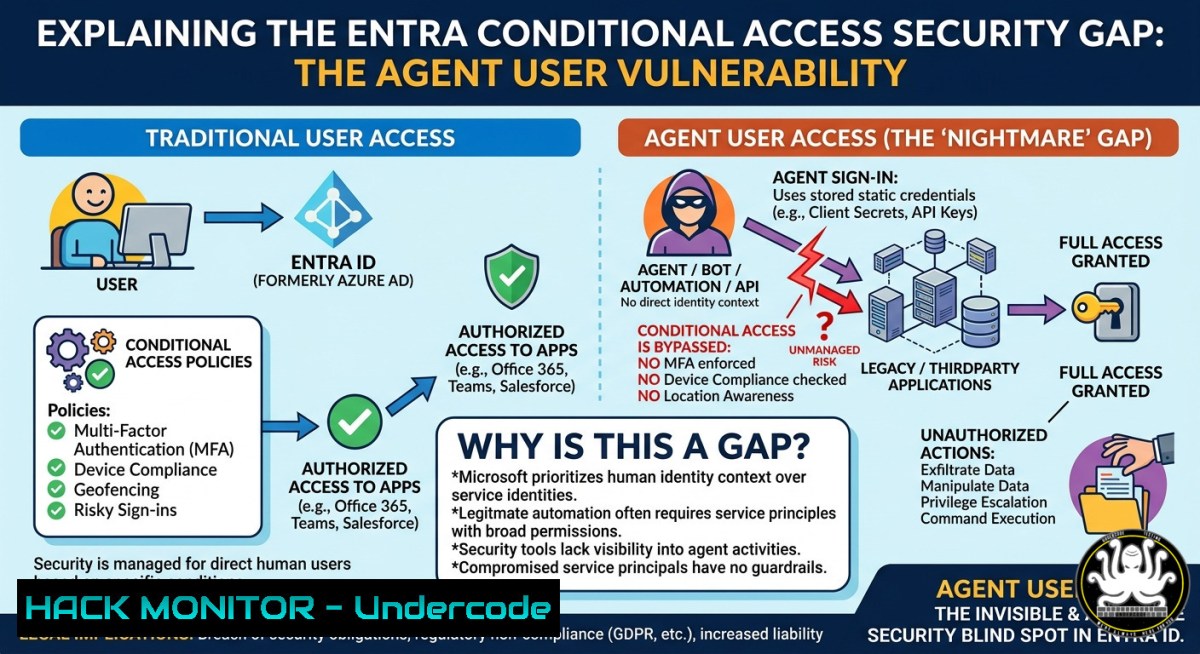
Microsoft Entra Conditional Access Policies (CAP) are the cornerstone of zero-trust identity security, allowing organizations to enforce access controls based on user risk, location, device state, and application sensitivity. However, a critical blind spot has emerged: agent users—service accounts and automated identities—cannot be subjected to risk-based conditional access conditions via the Azure portal or Microsoft Graph API. This limitation, highlighted by security architect Thomas Naunheim and innovator Jan Bakker, forces administrators into an all-or-nothing block for agent identities, creating a dangerous gap where compromised automated accounts may roam undetected.
Learning Objectives:
- Identify the undocumented limitations of risk conditions when applied to agent users in Microsoft Entra CAP.
- Learn to audit existing Conditional Access Policies for agent identity coverage using PowerShell and Graph API.
- Implement compensatory controls, including manual compromise marking and privileged identity management, to mitigate the risk of unmonitored agent accounts.
You Should Know:
- The Hidden Truth: Risk Conditions Exclude Agent Users by Design
The LinkedIn discussion reveals a painful reality: Microsoft’s documentation at https://learn.microsoft.com/en-us/entra/agent-id/manage-agent-identities-admincontrol-agent-access-to-resources suggests controlling agent access to resources, but the risk condition toggle in CAP simply does not apply to “agent users” (a subset of agent identities). Jan Bakker’s testing confirms that “All agent identities” does NOT include agent users. This means any policy relying on “User risk” or “Sign-in risk” will silently ignore agent user accounts.
What this means: An attacker compromising an agent user (e.g., a CI/CD service principal, automation script account, or legacy app credential) can bypass risk-based blocks entirely. The only native options are to block all agent users unconditionally (breaking automation) or allow them without risk evaluation.
Audit existing CAP policies via Microsoft Graph PowerShell:
 Connect to Microsoft Graph with Policy.Read.All scope
Connect-MgGraph -Scopes Policy.Read.All, Policy.ReadWrite.ConditionalAccess

Retrieve all Conditional Access Policies
$policies = Get-MgIdentityConditionalAccessPolicy

Filter policies that include agent identities but miss risk conditions
foreach ($policy in $policies) {
if ($policy.Conditions.Applications.IncludeApplications -contains "All" -or
$policy.Conditions.Users.IncludeUsers -contains "None") {
Write-Host "Policy: $($policy.DisplayName) - May expose agent users" -ForegroundColor Yellow
}
}
Check if a specific service principal is treated as an agent user:
 Azure CLI command to list service principals (agent identities)
az ad sp list --filter "servicePrincipalType eq 'Application'" --query "[].{DisplayName:displayName, AppId:appId}" --output table

Check sign-in logs for risk events on agent users (requires Log Analytics)
az monitor log-analytics query --workspace "YOUR_WORKSPACE" --analytics-query "SigninLogs | where Identity == '[email protected]' | where RiskLevelDuringSignin != 'none'"
Windows/Microsoft 365 workaround via marking compromised:
If you cannot implement risk-based CAP, manually mark suspicious agent users as compromised:
 Mark a user as compromised (requires IdentityRiskEvent.ReadWrite.All)
Update-MgUserRisk -UserId "[email protected]" -RiskLevel "High" -IsCompromised $true
Step‑by‑step guide to verify the limitation in your tenant:
1. Create a test Conditional Access Policy: target “All agent identities” (under Users > Select users > Agent identities).
2. Under “Conditions” > “Sign-in risk,” set to “High risk” and configure grant control to “Block access.”
3. Attempt a sign-in from a known agent user (e.g., a service account with a leaked credential) that would trigger a high risk score.
4. Observe that the policy does NOT evaluate the risk condition—the agent user will be allowed unless you set “Block” unconditionally.
5. Use Graph Explorer with GET /identity/conditionalAccess/policies; note that the `riskLevels` property is ignored for agent identity assignments.
- Compensating for the Agent User Blind Spot: Privileged Identity Management and Continuous Access Evaluation
Since risk conditions are unsupported, organizations must layer alternative controls. Thomas Naunheim suggests marking agent users as compromised as a manual override, but this is reactive. Proactive steps include enforcing Privileged Identity Management (PIM) for agent user roles and enabling Continuous Access Evaluation (CAE) for critical applications.
Configure PIM for agent user service principals:
 Activate PIM for a service principal (requires PrivilegedIdentityAdmin role)
Connect-MgGraph -Scopes PrivilegedAccess.ReadWrite.AzureADGroup
$sp = Get-MgServicePrincipal -Filter "displayName eq 'YourAgentApp'"
$role = Get-MgRoleManagementDirectoryRoleDefinition -Filter "displayName eq 'Application Administrator'"
New-MgRoleManagementDirectoryRoleEligibilitySchedule -PrincipalId $sp.Id -RoleDefinitionId $role.Id -Persistent $false
Enforce CAE for agent-originating requests via custom security attributes:
 Add custom security attribute to require CAE for agent users
$params = @{
AttributeSet = "Engineering"
AttributeName = "RequireCAE"
AttributeValue = "True"
}
Update-MgUser -UserId "[email protected]" -CustomSecurityAttributes $params
Linux-based monitoring of agent user sign-in anomalies (using Microsoft Graph API from bash):
!/bin/bash
 Fetch sign-in logs for agent users using Graph API with jq
TENANT_ID="your-tenant-id"
CLIENT_ID="your-client-id"
CLIENT_SECRET="your-secret"

Obtain access token
ACCESS_TOKEN=$(curl -s -X POST "https://login.microsoftonline.com/$TENANT_ID/oauth2/v2.0/token" \
-d "client_id=$CLIENT_ID" -d "client_secret=$CLIENT_SECRET" \
-d "grant_type=client_credentials" -d "scope=https://graph.microsoft.com/.default" | jq -r '.access_token')

Query sign-ins for the last hour
curl -s -X GET "https://graph.microsoft.com/v1.0/auditLogs/signIns?\$filter=createdDateTime ge $(date -u -d '1 hour ago' +'%Y-%m-%dT%H:%M:%SZ')" \
-H "Authorization: Bearer $ACCESS_TOKEN" | jq '.value[] | select(.userPrincipalName | contains("agent")) | {user: .userPrincipalName, risk: .riskLevel, status: .status}'
Step‑by‑step guide to mark a compromised agent user and enforce conditional access via custom rule:
1. In Entra Admin Center, go to Identity > Monitoring & health > Risky users.
2. Locate the agent user (if visible—note that agent users may not appear here by default).
3. Click “Confirm compromised” – this sets the user’s risk level to High.
4. Create a new CAP that targets “All users” (including agent users implicitly) and set “Sign-in risk” to High → Block.
5. Test: The compromised agent user will now be blocked on next sign-in, despite risk condition being officially unsupported for agent identities.
- Reporting the Gap: How to Push Microsoft for a Fix (and Protect Your Tenant in the Meantime)
Jan Bakker asks about the preferred way to report documentation issues. Thomas Naunheim recommends submitting a PR or issue on the corresponding Markdown page on GitHub. The specific Entra documentation page is part of the MicrosoftDocs/azure-docs repository. Additionally, filing a support ticket through the Microsoft 365 admin center or a UserVoice suggestion for “Conditional Access risk conditions for agent users” can raise visibility.
Create a GitHub issue for the documentation gap:
 Clone the relevant docs repo (Linux/Windows Git)
git clone https://github.com/MicrosoftDocs/azure-docs.git
cd azure-docs/articles/active-directory/conditional-access/

Find the file that discusses agent identities
grep -r "agent-id" .
 Edit the markdown to add a warning about risk conditions not applying to agent users
Windows PowerShell script to create a structured support request:
$supportRequest = @{
= "Conditional Access - Risk conditions ignored for agent users"
Description = @"
Based on testing and community confirmation (Jan Bakker, Thomas Naunheim),
the risk condition in CAP does NOT evaluate for 'agent users' despite documentation
suggesting agent identity control. Steps to reproduce provided. This leaves
automated accounts vulnerable to compromise without any risk-based block.
"@
Severity = "C - Moderate"
Category = "Identity Management"
}
 Submit via Microsoft Graph support API (requires Support.Tickets.ReadWrite)
Connect-MgGraph -Scopes Support.Tickets.ReadWrite
New-MgSupportTicket -Body $supportRequest
Immediate mitigation without waiting for Microsoft:
- Isolate agent users to dedicated administrative units and enforce location-based CAP (e.g., allow only from trusted IP ranges).
- Use workload identities (new Entra feature) where risk conditions are supported – migrate legacy agent users to managed identities for Azure resources.
- Implement custom risk scoring using Azure Sentinel or Microsoft Sentinel: ingest sign-in logs, run anomaly detection for agent account behavior (e.g., impossible travel, unusual volume), and trigger automated response (disable account, force password reset).
Example Sentinel KQL query to detect anomalous agent user sign-ins:
SigninLogs
| where UserType == "Member" and UserPrincipalName contains "agent"
| where RiskLevelDuringSignin != "none" or RiskState == "confirmedCompromised"
| summarize Count = count(), LastSignin = max(TimeGenerated) by UserPrincipalName, IPAddress, AppDisplayName
| where Count > 5 // threshold for automation trigger
What Undercode Say:
- Key Takeaway 1: Microsoft’s Conditional Access risk conditions silently exclude agent users, creating a bypass vector that attackers can exploit for privilege escalation and lateral movement.
- Key Takeaway 2: Manual compromise marking and PIM are temporary band-aids; organizations must either migrate agent users to workload identities (which support risk evaluation) or deploy external behavioral analytics to fill the gap.
The discussion between Jan Bakker, Thomas Naunheim, and Roy Klooster exposes a systemic oversight in Entra’s security model. While Microsoft pushes zero-trust principles, the inability to apply risk-based controls to automated accounts undermines the entire framework. Until the product team addresses this, security architects must treat agent users as untrusted by default—implementing network segmentation, just-in-time access, and continuous credential rotation. The GitHub PR suggested by Thomas Naunheim isn’t just a documentation fix; it’s a call to action for every defender relying on Entra CAP to protect service principals. As more breaches originate from privileged automation accounts (e.g., GitHub Actions tokens, CI/CD pipelines), this blind spot will likely spawn a new class of supply chain attacks.
Prediction:
Within 12–18 months, Microsoft will announce public preview support for risk conditions on agent users, driven by customer backlash and high-severity CVEs involving compromised automation accounts. However, legacy agent users created before 2022 may remain unsupported, forcing organizations to rebuild their identity security model. Expect third-party identity governance tools (e.g., SailPoint, Okta) to capitalize on this gap with agent-specific risk scoring APIs, and regulatory frameworks like FedRAMP will likely mandate explicit risk evaluation for non-human identities by 2027.
▶️ Related Video (76% Match):
🎯Let’s Practice For Free:
IT/Security Reporter URL:
Reported By: Jan Bakker – Hackers Feeds
Extra Hub: Undercode MoN
Basic Verification: Pass ✅


