Listen to this Post
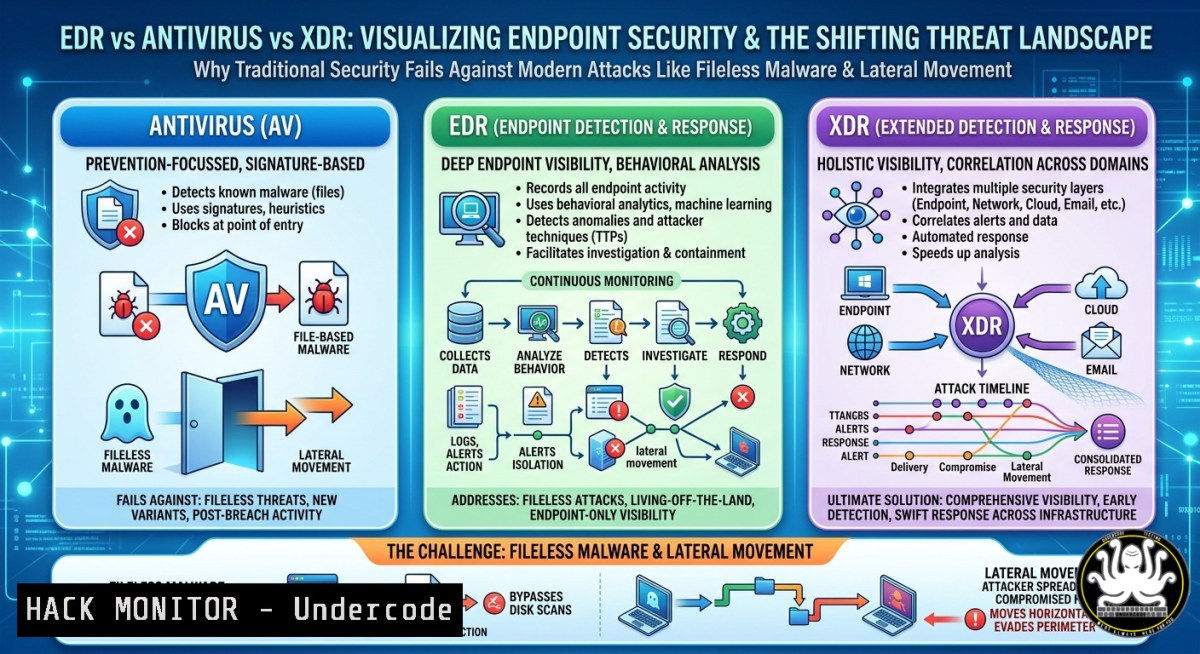
Introduction:
Traditional antivirus (AV) solutions rely on signature-based detection, which fails against zero-day exploits, fileless malware, and living-off-the-land (LotL) attacks. Modern adversaries use credential dumping, PowerShell abuse, and lateral movement to bypass legacy defenses—driving the shift toward Endpoint Detection and Response (EDR) and Extended Detection and Response (XDR) platforms that provide behavioral analysis, telemetry correlation, and automated incident response.
Learning Objectives:
- Differentiate between AV, EDR, and XDR architectures and their detection mechanisms
- Identify suspicious process behaviors, privilege escalations, and credential theft indicators using system commands
- Implement basic EDR-like monitoring via native Windows and Linux tools for threat hunting
You Should Know:
1. Detecting Suspicious PowerShell Activity Without EDR
Many attacks abuse PowerShell to download payloads or execute encoded commands. Even without a full EDR, you can monitor PowerShell logs manually.
Step‑by‑step guide:
- Windows (Enable Script Block Logging):
Open `gpedit.msc` → Computer Configuration → Administrative Templates → Windows Components → Windows PowerShell → Turn on PowerShell Script Block Logging → Enabled. Logs appear in Event Viewer underApplications and Services Logs/Microsoft/Windows/PowerShell/Operational. - Check for encoded commands in real time:
Get-WinEvent -FilterHashtable @{LogName='Microsoft-Windows-PowerShell/Operational'; ID=4104} | Where-Object {$_.Message -match "-EncodedCommand"} | Select-Object TimeCreated, Message - Linux (audit PowerShell Core): If pwsh installed, audit execve syscalls:
sudo auditctl -a always,exit -F exe=/usr/bin/pwsh -S execve -k powershell_exec
sudo ausearch -k powershell_exec --format raw | grep "encodedCommand"
This reveals attackers trying to hide malicious scripts behind Base64 encoding—a common early indicator of compromise (IoC).
2. Credential Dumping Detection: Mimikatz & LSASS Memory
Credential dumping from LSASS (Local Security Authority Subsystem Service) is a hallmark of lateral movement. EDR tools flag this via memory access patterns; you can simulate detection using native tools.
Step‑by‑step guide (Windows):
- Monitor LSASS access attempts: Enable Audit Process Creation and Process Access via Advanced Audit Policy Configuration → System Audit Policies → Detailed Tracking → Audit Process Creation/Process Access.
- Query Event ID 4656 (Handle to LSASS requested):
Get-WinEvent -FilterHashtable @{LogName='Security'; ID=4656} | Where-Object {$<em>.Message -match "lsass.exe" -and $</em>.Message -match "ACCESS_ALLOWED"} | Format-List - Linux equivalent (detect /proc/mem reads):
sudo auditctl -a always,exit -S openat -F path=/proc//mem -F success=1 -k cred_dump
sudo ausearch -k cred_dump | grep -E "pid=|uid="
These commands help forensic analysts identify unauthorized process handle requests before attackers extract password hashes or Kerberos tickets.
3. Ransomware Behavior Simulation & Fileless Execution
Ransomware often performs rapid file renaming or encryption loops. You can simulate benign “ransomware-like” behavior to test your logging coverage.
Step‑by‑step guide:
- Windows (monitor file audit changes): Enable Object Access Auditing → File System → Configure on a test folder. Generate test activity:
for ($i=0;$i -lt 100;$i++) { Rename-Item "C:\Test\doc$i.txt" -NewName "doc$i.encrypted" } - Query Event ID 4663 (File Write/Delete):
Get-WinEvent -FilterHashtable @{LogName='Security'; ID=4663} | Where-Object {$_.Message -match "C:\Test"} | Measure-Object - Linux (monitor rapid file renames using inotify):
inotifywait -m -e move,create,delete /home/test_folder --format '%T %w%f %e' --timefmt '%H:%M:%S' | while read line; do echo "$(date) $line"; done
High-frequency rename events from a single process correlate with ransomware encryption behavior, which EDR uses to kill the process instantly.
4. Lateral Movement: Detecting PsExec & WMI Executions
Attackers move laterally using PsExec, WMI, or WinRM. Proper logging of remote service creation and process launches mimics XDR’s cross‑system correlation.
Step‑by‑step guide (Windows):
- Enable WMI‑Activity logging: `wevtutil set-log “Microsoft-Windows-WMI-Activity/Operational” /enabled:true`
– Detect PsExec service creation (Event ID 7045):Get-WinEvent -FilterHashtable @{LogName='System'; ID=7045} | Where-Object {$_.Message -match "PSEXESVC"} - Linux (detect SSH jumps or
psexec‑like via winexe): Monitor auth logs for rapid consecutive logins:journalctl -u sshd --since "10 minutes ago" | grep "Accepted password" | awk '{print $9}' | sort | uniq -c | awk '$1>3 {print "Possible lateral movement from "$2}'These indicators feed into a basic correlation engine—showing why XDR, which ties endpoint logs with network flow data, is superior.
5. Configuring Sysmon (System Monitor) for EDR‑Like Telemetry
Microsoft Sysmon provides detailed process creation, network connection, and file integrity events—turning a standard Windows host into a lightweight EDR sensor.
Step‑by‑step guide:
- Download Sysmon from Microsoft Sysinternals.
- Install with a recommended configuration (SwiftOnSecurity’s config):
.\Sysmon64.exe -accepteula -i .\sysmonconfig.xml
- Key events to monitor:
- Event ID 1 (Process creation) – detect unusual parent–child chains (e.g., WinWord.exe spawning PowerShell)
- Event ID 3 (Network connection) – detect outbound beaconing
- Event ID 7 (Image loaded) – detect DLL injection
- Query sysmon logs in Event Viewer: `Applications and Services Logs/Microsoft/Windows/Sysmon/Operational`
– Linux alternative: Osquery with pack configurations for MITRE ATT&CK tactics:sudo osqueryi --json "SELECT FROM processes WHERE name IN ('powershell','wget','curl') AND parent NOT IN ('explorer.exe','bash');"
Sysmon data, when aggregated to a central SIEM, replicates part of EDR’s hunting capability.
- Hardening APIs & Cloud Workloads Against Credential Theft
Modern XDR platforms incorporate cloud and API security. Attackers steal API keys from environment variables or metadata services. Here’s a basic mitigation.
Step‑by‑step guide (Linux/Cloud):
- Prevent exposure in process lists: Avoid passing secrets as command arguments. Use files or vaults.
- Detect metadata service abuse (AWS IMDSv1): Disable IMDSv1, enforce IMDSv2 with hop limit:
aws ec2 modify-instance-metadata-options --instance-id i-xxxxx --http-tokens required --http-endpoint enabled --http-put-response-hop-limit 1
- Monitor for unusual `curl http://169.254.169.254/latest/meta-data/` commands:
sudo auditctl -a always,exit -S execve -F path=/usr/bin/curl -k api_key_theft
sudo ausearch -k api_key_theft | grep "169.254.169.254"
- Windows (detect exposed secrets in scripts): Use PowerShell transcription logging:
Set-PSReadLineOption -HistorySaveStyle SaveNothing plus Group Policy: Turn on PowerShell Transcription
Cloud hardening combined with endpoint monitoring prevents attackers from pivoting from a compromised VM to cloud control planes.
What Undercode Say:
- Antivirus is dead for targeted attacks; EDR shifts focus from “known bad” to “suspicious behavior,” but XDR is the only true cross‑domain solution that breaks silos.
- Most small teams can bootstrap basic EDR capabilities using Sysmon + Windows Event Forwarding (WEF) or Osquery on Linux, buying time until they procure a commercial XDR platform.
Analysis: The post correctly highlights that signature‑only AV fails against fileless malware and credential theft. However, it underestimates the operational burden of managing raw telemetry from Sysmon—false positives require tuning. Moreover, XDR’s value hinges on quality correlation logic; simply aggregating logs doesn’t stop attacks. Attackers now abuse legitimate RMM tools and signed drivers, evading even behavioral EDR through “bring your own vulnerable driver” (BYOVD). Therefore, combining EDR with application whitelisting and strict privilege management remains essential. The shift to XDR should be accompanied by SOAR (Security Orchestration, Automation, and Response) playbooks to reduce mean time to respond (MTTR). Ultimately, no tool replaces skilled threat hunters who can differentiate between a developer’s PowerShell script and a ransomware dropper.
Prediction:
-
- Adoption of XDR will accelerate, especially for hybrid and multicloud environments, as organizations demand single‑pane‑of‑glass visibility.
-
- Attackers will increasingly bypass EDR by abusing kernel‑mode vulnerabilities and unmanaged IoT devices that lack any agent.
-
- Open‑source EDR alternatives (e.g., Wazuh, Velociraptor) will mature, democratizing advanced detection for budget‑constrained teams.
-
- The complexity of XDR will lead to “alert fatigue” without AI‑driven prioritization, causing critical incidents to be missed.
-
- Regulatory bodies (PCI DSS v4.0, NIS2) will mandate behavioral detection capabilities, effectively outlawing signature‑only AV for compliance.
▶️ Related Video (74% Match):
🎯Let’s Practice For Free:
IT/Security Reporter URL:
Reported By: Cyber Threats – Hackers Feeds
Extra Hub: Undercode MoN
Basic Verification: Pass ✅
🎓 Live Courses & Certifications:
Join Undercode Academy for Verified Certifications
🚀 Request a Custom Project:
Secure, high-velocity infrastructure and disruptive technological engineering. Contact our engineering team for high-tier development and proprietary systems:
[email protected]


