Listen to this Post
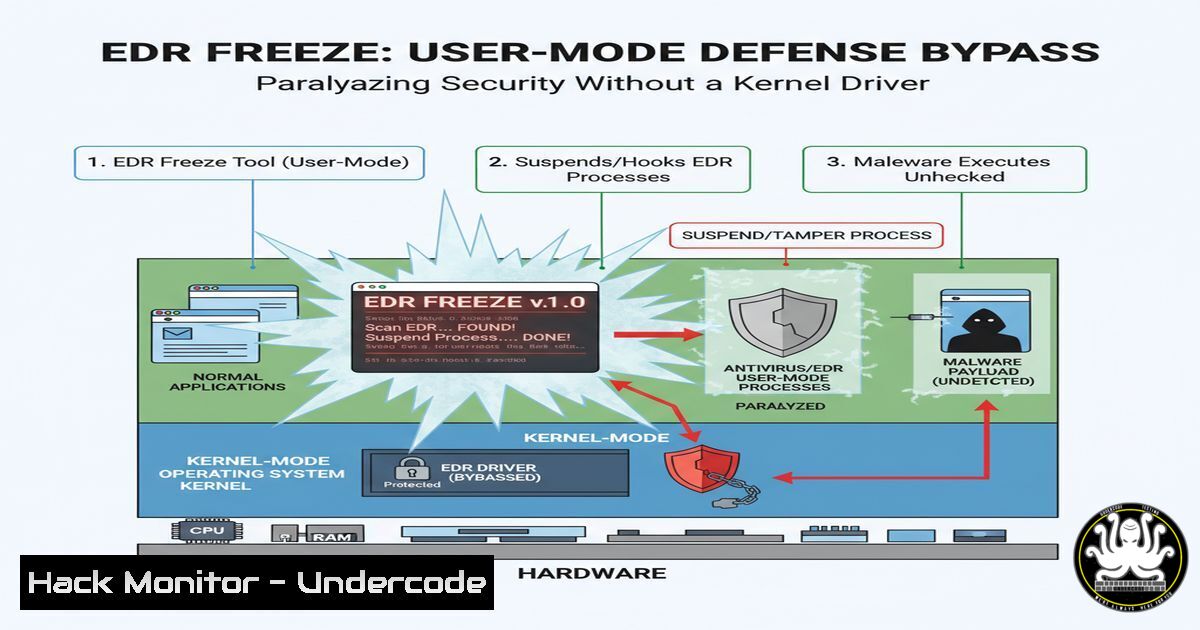
Introduction:
A new tool dubbed “EDR Freeze” is making waves in the cybersecurity community by exploiting a vulnerability within the Windows Error Reporting component, WerFaultSecure, to suspend Endpoint Detection and Response (EDR) and antivirus processes. This technique is significant because it operates entirely in user mode, bypassing the need for the increasingly monitored Bring Your Own Vulnerable Driver (BYOVD) approach, thus lowering the barrier for entry for attackers and posing a new challenge for blue teams.
Learning Objectives:
- Understand the mechanics of the WerFaultSecure vulnerability exploited by EDR Freeze.
- Learn how to identify and mitigate this novel attack vector within your environment.
- Explore command-line and scripting techniques for both offensive testing and defensive monitoring.
You Should Know:
1. The Core Exploit Command
The tool’s usage is deceptively simple, requiring only the Process ID (PID) of the target EDR process and a desired sleep time.
`EDR-Freeze.exe `
Step-by-step guide:
This command instructs the EDR Freeze tool to target a specific running process. The `
2. Identifying EDR Processes for Assessment
Before an attacker can use EDR Freeze, they must identify the correct Process IDs (PIDs). Defenders need to know these same PIDs to monitor them.
`Get-Process -Name “carbon”, “crowd”, “sentinel”, “defend” | Select-Object Id, ProcessName`
Step-by-step guide:
This PowerShell command queries running processes for common EDR/AV product names (e.g., Carbon Black, CrowdStrike, SentinelOne, Windows Defender). It returns the PID (Id) and the full process name. Defenders should run this regularly to baseline normal EDR processes. Red teams use it to find their targets. Monitoring for command-line arguments that include these keywords is a crucial detection step.
3. Monitoring Process State Changes with PowerShell
Detecting when a process enters a suspended state is key to identifying an EDR Freeze attack.
`Get-Process -PID
Step-by-step guide:
When EDR Freeze acts, it suspends the threads of the target process. The `Responding` property will likely show False. More importantly, inspecting the `Threads` collection will reveal that each thread’s `ThreadState` is `Wait` and the `WaitReason` is Suspended. A script that periodically checks critical security processes for this thread state can serve as an early warning system.
4. Sysmon Logging for WerFaultSecure Activity
The exploit leverages WerFaultSecure.exe. Monitoring for unusual activity related to this process is critical.
`
WerFaultSecure.exe
C:\Windows\System32\svchost.exe
`
Step-by-step guide:
This XML snippet for a Sysmon configuration file triggers an event log whenever WerFaultSecure.exe is launched by any process other than its typical parent, svchost.exe. Since EDR Freeze will spawn WerFaultSecure.exe in an abnormal context, this rule will generate a high-fidelity alert. Defenders should deploy this rule and aggregate logs to a SIEM for correlation.
5. Auditing Process Suspension with Windows Security Auditing
Windows can audit specific process-related actions, including thread suspension, if the correct policy is enabled.
`AuditPol /set /category:”Detailed Tracking” /subcategory:”Process Termination” /success:enable /failure:enable`
Step-by-step guide:
While not as granular as third-party EDR telemetry, enabling Detailed Tracking audit policies can provide additional data. The “Process Termination” subcategory logs events like 4689. Correlating the suspension of an EDR process (observed via other means) with a preceding event 4689 showing a parent process of EDR-Freeze.exe can help build an attack timeline. This command must be run from an elevated command prompt.
- Building a Basic Detector with Windows Command Line
A simple batch script can be used to periodically check if critical security processes are running and responding.
`@echo off
for /f “tokens=2” %%i in (‘tasklist /fi “imagename eq CsFalconService.exe” /fo table /nh’) do set “PID=%%i”
if “%PID%”==”No” (
echo CrowdStrike Falcon is not running! ALERT!
) else (
wmic process where processid=%PID% get respondingo | findstr /i “false” >nul && echo PID %PID% is not responding!
)`
Step-by-step guide:
This script first uses `tasklist` to find the PID of a specific EDR service (CsFalconService.exe for CrowdStrike). If found, it then uses Windows Management Instrumentation (wmic) to check the `responding` property of that PID. If the property is false, it prints an alert. This is a basic example that should be integrated into more robust monitoring solutions.
7. Analyzing Loaded Modules for Anomalies
EDR Freeze operates from user mode, but understanding what’s loaded into other processes can reveal injection or hooking.
`powershell “Get-Process -Name SvcHost | Get-ProcessModule | Where-Object {$_.ModuleName -like \”freeze\”}”`
Step-by-step guide:
This PowerShell one-liner checks all `svchost` processes for any loaded modules (DLLs) with “freeze” in the name. While EDR Freeze may not leave a persistent module, this technique is valuable for detecting other user-mode malware that injects DLLs into trusted processes. Defenders can modify the `-like` filter to look for known-bad DLL names or hashes.
What Undercode Say:
- Accessibility is a Double-Edged Sword: The fact that this tool requires no driver makes it extremely accessible to a wider range of threat actors, from sophisticated red teams to less-skilled script kiddies, amplifying the threat landscape.
- Detection Evasion is Evolving: This move away from BYOVD demonstrates a clear evolution in offensive tradecraft, forcing defenders to rely less on driver blocklists and more on behavioral analysis of user-mode applications and Windows components.
The emergence of EDR Freeze signifies a strategic pivot in the cat-and-mouse game of endpoint security. By leveraging a legitimate, signed Windows component (WerFaultSecure) to perform malicious actions, attackers are effectively “living off the land” in a new dimension. This technique forces a re-evaluation of detection strategies. Defenses can no longer focus primarily on kernel-level driver shenanigans; they must deepen their scrutiny of user-mode process behavior, inter-process communication, and the contextual legitimacy of actions performed by trusted system binaries. The core challenge is to distinguish malicious abuse of WerFaultSecure from legitimate crash handling, which requires advanced behavioral analytics and telemetry correlation. This tool is a wake-up call for investing in detection engineering that focuses on how things are done, not just what is being done.
Prediction:
The success of EDR Freeze will catalyze a new wave of research into similar “living-off-the-land” user-mode exploitation techniques targeting security software. We predict a short-term surge in copycat tools that exploit other Windows internal mechanisms, leading to a defensive shift towards more granular user-mode hooking and increased monitoring of process integrity and thread states within critical security applications. In the longer term, this will pressure EDR vendors to harden their user-mode agents against such attacks, potentially by running critical components with higher integrity levels or moving more functionality back into the kernel, albeit with greater care to avoid system instability. This arms race will fundamentally reshape how EDRs are architecturally designed, prioritizing resilience against direct user-mode manipulation.
🎯Let’s Practice For Free:
IT/Security Reporter URL:
Reported By: S0ld13r Edr – Hackers Feeds
Extra Hub: Undercode MoN
Basic Verification: Pass ✅


