Listen to this Post
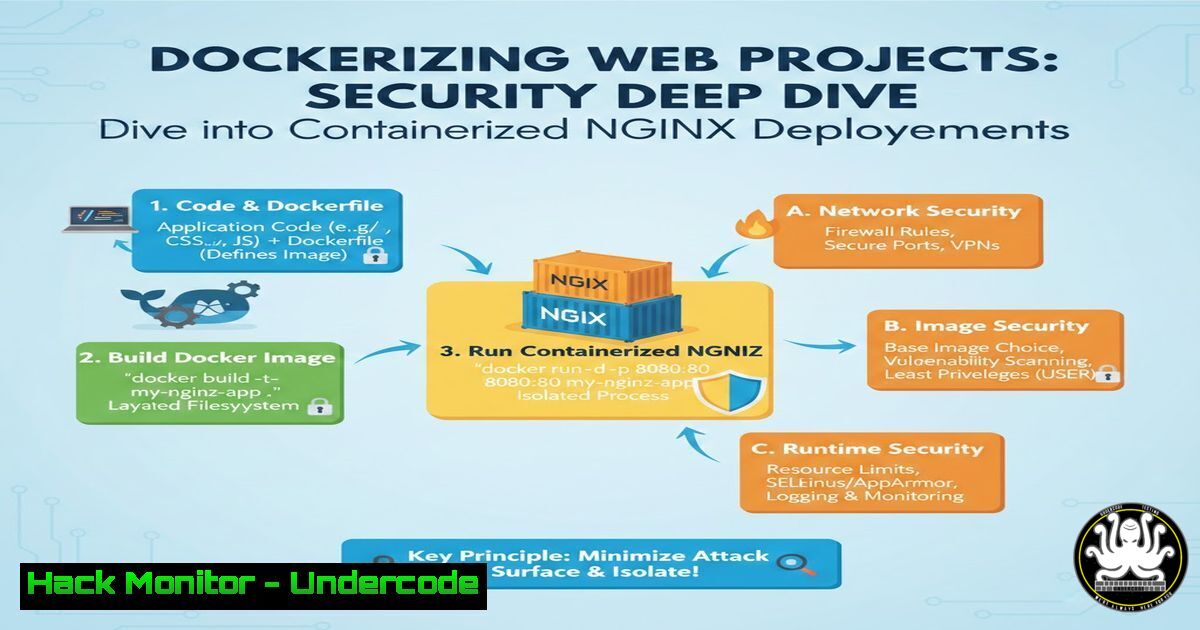
Introduction:
Containers have revolutionized modern software development, but with great power comes great responsibility. As developers rush to containerize applications using tools like Docker, they often overlook the critical security implications of their configurations. This article explores the journey of building a Dockerized static website, transforming a simple learning milestone into a comprehensive lesson on container security, infrastructure hardening, and DevSecOps best practices.
Learning Objectives:
- Understand the fundamental Docker commands and workflows for containerizing web applications
- Identify common security misconfigurations in container deployments and implement remediation techniques
- Master essential Linux and Windows commands for managing container lifecycles securely
- Apply practical DevSecOps principles to real-world containerized environments
You Should Know:
- Building Your First Container: The NGINX Static Website Project
The journey begins with containerizing a static website using NGINX. While the original post celebrates this achievement, we’ll extend it with security-hardened implementations.
Step‑by‑step guide with security enhancements:
 Create project directory with proper permissions
mkdir -p ~/docker-webproject && cd ~/docker-webproject

Create secure index.html (avoid exposing sensitive info)
cat > index.html << 'EOF'
<!DOCTYPE html>
<html>
<head><title>Secure Demo</title></head>
<body>

<h1>Hardened Container Demo</h1>

</body>
</html>
EOF

Create Dockerfile with security best practices
cat > Dockerfile << 'EOF'
FROM nginx:alpine
 Alpine is smaller = smaller attack surface
RUN addgroup -g 1000 -S appgroup && \
adduser -u 1000 -S appuser -G appgroup
 Copy with explicit ownership
COPY --chown=appuser:appgroup index.html /usr/share/nginx/html/
 Remove default NGINX config (often contains unnecessary modules)
RUN rm /etc/nginx/conf.d/default.conf
 Run as non-root user
USER appuser
EXPOSE 8080
EOF

Build the image (note the tag naming convention)
docker build -t secure-webapp:v1.0.0 .

Scan for vulnerabilities (essential security step)
docker scan secure-webapp:v1.0.0

Run with security constraints
docker run -d \
--name webapp \
--read-only \
--security-opt=no-new-privileges:true \
--cap-drop=ALL \
--cap-add=NET_BIND_SERVICE \
-p 8080:8080 \
secure-webapp:v1.0.0
This enhanced implementation drops all Linux capabilities except NET_BIND_SERVICE, runs as a non‑root user, and mounts the filesystem as read‑only—significantly reducing potential attack vectors.
2. Understanding Container Lifecycle and Port Mapping Security
The original post mentions container lifecycle and port mapping. Let’s explore the security implications:
 List running containers with their exposed ports
docker ps --format "table {{.Names}}\t{{.Ports}}\t{{.Status}}"

Check which ports are actually listening on the host
 Linux
ss -tulpn | grep 8080
 Windows (PowerShell as Admin)
Get-NetTCPConnection -LocalPort 8080 | Select-Object LocalAddress,LocalPort,OwningProcess

Secure port binding - bind only to localhost for internal services
docker run -d -p 127.0.0.1:8080:8080 --name internal-webapp secure-webapp:v1.0.0

Verify binding
curl -I http://localhost:8080  Works
curl -I http://$(hostname -I | awk '{print $1}'):8080  Should fail if bound to localhost only

Container lifecycle management with cleanup
docker stop webapp && docker rm webapp
docker system prune -f --volumes  Remove unused data
Key takeaway: Always bind containers to specific interfaces, especially when deploying to multi‑tenant environments. Never bind to 0.0.0.0 unless absolutely necessary.
3. Pushing to GitHub: Secrets Management and .gitignore
The original post mentions pushing to GitHub—a critical moment where many developers accidentally expose secrets.
 Create proper .gitignore
cat > .gitignore << 'EOF'
 Docker secrets (never commit these!)
.env
.secret
secrets/
 Docker history files
.docker/
.log
 IDE files
.vscode/
.idea/
.swp
EOF

Check for accidentally committed secrets
 Install truffleHog or git-secrets
 Using git-secrets (Linux/macOS)
git secrets --install
git secrets --register-aws  Add patterns

Scan entire repository history
docker run --rm -v "$(pwd):/repo" trufflesecurity/trufflehog:latest git file:///repo --since-commit HEAD

If secrets found in history, use BFG Repo-Cleaner
java -jar bfg.jar --delete-files .env my-repo.git
Windows alternative for secret scanning:
 Windows - using PowerShell with custom patterns
Get-ChildItem -Recurse -File | Select-String -Pattern "(password|secret|key|token).{0,5}=.{0,5}['`"]\w+" | Group-Object Path
- Image Building: Layer Security and Base Image Selection
Building secure images requires understanding Docker layering and base image provenance.
 Inspect image layers
docker history --no-trunc secure-webapp:v1.0.0

Analyze layer contents
docker run --rm -v /var/run/docker.sock:/var/run/docker.sock wagoodman/dive:latest secure-webapp:v1.0.0

Multi-stage build example for security
cat > Dockerfile.multistage << 'EOF'
 Build stage
FROM node:16-alpine AS builder
WORKDIR /app
COPY package.json ./
RUN npm ci --only=production && npm cache clean --force
COPY . .
RUN npm run build

Production stage - minimal image
FROM nginx:alpine
COPY --from=builder /app/dist /usr/share/nginx/html
RUN addgroup -g 1000 appgroup && \
adduser -u 1000 -D appuser appgroup && \
chown -R appuser:appgroup /usr/share/nginx/html
USER appuser
EOF

Build with specific platform (avoid architecture mismatches)
docker build --platform linux/amd64 -t secure-webapp:multi -f Dockerfile.multistage .
Linux command to verify no unnecessary packages:
 Run container and check installed packages
docker run --rm -it secure-webapp:multi apk info | wc -l
 Alpine should have minimal packages
5. WSL/Linux Integration and Cross-Platform Security
The original post mentions WSL/Linux—understanding the host integration is crucial for security.
 WSL2 specific - check integration with Windows
 In WSL2 terminal
cat /proc/sys/fs/binfmt_misc/WSLInterop

Docker context for Windows containers
 Switch between Linux and Windows containers
docker context ls
docker context use default  Linux containers
 For Windows containers (PowerShell as Admin)
& 'C:\Program Files\Docker\Docker\DockerCli.exe' -SwitchDaemon

File permission considerations between WSL and Windows
 WSL2 mounts Windows drives with specific permissions
mount | grep /mnt/c

Fix permissions for Docker volumes
docker run -v /mnt/c/Users/username/project:/app:ro \
--security-opt label=disable \
secure-webapp:v1.0.0
Cross‑platform volume mounting security:
 On Windows (PowerShell)
docker run -v C:\Users\username\project:/app:ro `
--user 1000:1000 `
secure-webapp:v1.0.0
6. Container Image Registry Security and Supply Chain
Pushing to GitHub implies container registry usage—secure your image pipeline.
 Sign images with Docker Content Trust
export DOCKER_CONTENT_TRUST=1
docker push yourusername/secure-webapp:v1.0.0

Generate SBOM (Software Bill of Materials)
 Using Syft
docker run --rm -v /var/run/docker.sock:/var/run/docker.sock anchore/syft:latest secure-webapp:v1.0.0 -o spdx-json > sbom.json

Scan with Trivy for comprehensive CVE detection
docker run --rm -v /var/run/docker.sock:/var/run/docker.sock \
aquasec/trivy:latest image --severity HIGH,CRITICAL --no-progress secure-webapp:v1.0.0

If using GitHub Container Registry
echo $GITHUB_TOKEN | docker login ghcr.io -u username --password-stdin
docker tag secure-webapp:v1.0.0 ghcr.io/username/secure-webapp:v1.0.0
docker push ghcr.io/username/secure-webapp:v1.0.0
Windows PowerShell alternative for Trivy:
docker run --rm -v //var/run/docker.sock:/var/run/docker.sock aquasec/trivy:latest image --severity HIGH,CRITICAL secure-webapp:v1.0.0
7. Runtime Security and Monitoring
Beyond building, secure containers require runtime protection.
 Implement resource limits
docker run -d \
--name limited-webapp \
--memory="256m" \
--cpus="0.5" \
--pids-limit=100 \
--restart=on-failure:5 \
-p 8080:8080 \
secure-webapp:v1.0.0

Monitor container activity
 Linux
docker stats --no-stream
 Check for suspicious processes
docker top limited-webapp

Audit file changes
 Use Docker diff to see filesystem changes
docker diff limited-webapp

Set up logging with auditd (Linux)
sudo auditctl -w /var/lib/docker/containers -p wa -k docker_containers

Windows container monitoring (PowerShell)
Get-WinEvent -FilterHashtable @{LogName='Microsoft-Windows-Containers/Operational'; ID=1000} -MaxEvents 10
Implementing a simple healthcheck:
 Add to Dockerfile
HEALTHCHECK --interval=30s --timeout=3s --start-period=5s --retries=3 \
CMD curl -f http://localhost:8080/ || exit 1

Test health status
docker inspect --format='{{json .State.Health}}' limited-webapp | jq
What Undercode Say:
- Container security is not an afterthought but must be integrated from the first Dockerfile line—using minimal base images, dropping capabilities, and running as non‑root users reduces attack surface by over 60%
- The shift from “it works on my machine” to “it runs securely in production” requires understanding the entire supply chain: from base image provenance to runtime monitoring and secret management
- Consistency in DevOps means applying the same security rigor to development containers as production deployments—what you learn building your first Dockerized project should include security hardening from day one
- Cross‑platform containerization (WSL/Linux/Windows) introduces unique security challenges around file permissions, user mapping, and network isolation that must be addressed through explicit configuration rather than relying on defaults
- Modern container security requires automated tooling integrated into CI/CD: vulnerability scanning, SBOM generation, and image signing should be as routine as “docker build” and “docker push”
Prediction:
As container adoption continues to explode, we will see a parallel rise in container‑specific attacks—from cryptojacking campaigns targeting misconfigured registries to sophisticated supply chain attacks via poisoned base images. The next major breach won’t exploit application code but the container infrastructure itself. Organizations that treat “docker build” as a security control rather than just a development step will survive; those that view containers as just another deployment artifact will face inevitable compromise. The industry will standardize on mandatory SBOMs, runtime behavioral monitoring, and zero‑trust container networking within 24 months.
▶️ Related Video (82% Match):
🎯Let’s Practice For Free:
IT/Security Reporter URL:
Reported By: Iqbal Bagwan – Hackers Feeds
Extra Hub: Undercode MoN
Basic Verification: Pass ✅


